cloudpickle pickles a lambda because the worker cannot import your session
Extended pickling support for Python objects
At a glance
- What is it?
- cloudpickle extends the standard pickle module to serialize lambdas and interactively defined functions and classes, and its documented limits are strict: same Python version on both ends, no long-term storage, and only unpickle data from trusted sources.
- Who is it for?
- cloudpickle earns its place in a cluster runtime, a notebook workflow, or a test harness that ships code to workers that cannot import it, and its `register_pickle_by_value` API is the fix when a worker is missing a module you are still editing. Keep it out of anything that persists, since long-term object storage is unsupported, and only load payloads from trusted sources, because unpickling can execute code.
- Can I use it commercially?
- Check first. The repository uses a licence we do not classify automatically, so read its LICENSE file before any commercial use.
- Is it still maintained?
- Yes. The repository last received commits 59 days ago.
- What is it written in?
- Mainly Python, according to GitHub's language statistics.
Answers come from the project's GitHub data, last synced on November 6, 2026, and from our analysis. They are not legal advice.
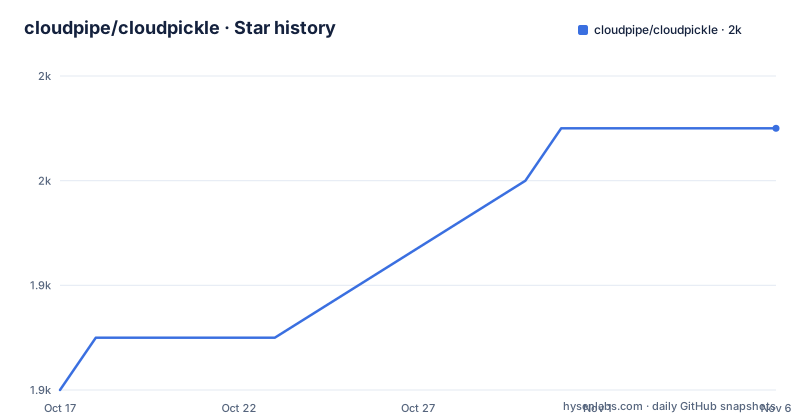
Star history
- cloudpipe/cloudpickle1,951 ★ · +5
| Repository | 2026-10-17 | 2026-11-06 |
|---|---|---|
| cloudpipe/cloudpickle | 1.9k | 2k |
5 Stars in the last 20 days, measured from the daily GitHub snapshot. Compare with other projects
Editorial analysis
By reference fails when the worker cannot import the defining module
The distinction that explains everything else is between serialization by reference and by value. Standard `pickle` only does by reference for functions and classes. It treats them as attributes of modules and pickles them through instructions that trigger an import of that module at load time. By-reference serialization therefore assumes the defining module is available and importable in the environment where the object will be reconstructed.
That assumption holds in a normal application where the same code tree is deployed everywhere. It breaks in two places. The obvious one is an interactive session, where a function defined in `__main__` has no importable home. The less obvious one is distributed development: a module you are working on may not exist on the worker at all, for instance because the worker lives on another machine.
cloudpickle handles the first case automatically. Anything defined interactively, which includes lambdas, is detected and pickled by value, so the code travels inside the payload rather than as an import instruction. The second case it cannot detect on its own, which is where the explicit API comes in.
register_pickle_by_value covers the worker that lacks your module
Since version 2.0.0, a module can be marked for by-value serialization explicitly, which is the answer to the distributed development case:
>>> import cloudpickle
>>> import my_module
>>> cloudpickle.register_pickle_by_value(my_module)
>>> cloudpickle.dumps(my_module.my_function)  # my_function is pickled by value
>>> cloudpickle.unregister_pickle_by_value(my_module)
>>> cloudpickle.dumps(my_module.my_function)  # my_function is pickled by reference
The operational payoff is stated plainly: using this API means there is no need to reinstall the new version of the module on every worker node, and no need to restart the workers. Restarting the client Python process with the new source code is enough.
The documentation marks this feature as still experimental and names two failure cases. The first is an `import` statement inside the body of a function or class pickled by value, where calling the function in the unpickling environment may fail if the imported module is unavailable. The second is subtler: a function pickled by reference that calls a function pickled by value during its execution. Neither is detected at pickling time.
pip install cloudpickle, then dumps and pickle.loads
Installation is a single package install from PyPI, with no compile step described:
pip install cloudpickleThe basic flow uses `cloudpickle.dumps` and the standard library's `pickle.loads`. `cloudpickle.dumps` returns the serialized bytes, and the standard library does the loading, so the receiving side needs no cloudpickle-specific code path:
>>> import cloudpickle
>>> squared = lambda x: x ** 2
>>> pickled_lambda = cloudpickle.dumps(squared)

>>> import pickle
>>> new_squared = pickle.loads(pickled_lambda)
>>> new_squared(2)
4
The second example is the more useful one for understanding the design, because it shows a global dependency travelling with the function. `CONSTANT` is defined in the session and then referenced inside `my_function`, and the reconstructed function still resolves it after being sent through `dumps` and `loads`:
>>> CONSTANT = 42
>>> def my_function(data: int) -> int:
...     return data + CONSTANT
...
>>> pickled_function = cloudpickle.dumps(my_function)
>>> depickled_function = pickle.loads(pickled_function)
>>> depickled_function(43)
85
If the receiving environment could import the defining module, that module-level constant would not need to travel with the payload. By value serialization is what makes it self-contained.
Same Python version on both ends, and nothing long-lived
Two constraints appear near the top of the documentation and both are absolute.
The first is version identity: cloudpickle can only be used to send objects between the exact same version of Python. Not the same minor version within a supported range, the same version. That rules out the common pattern of rolling a heterogeneous worker pool, and it is worth checking before anything else because a mismatch is discovered at unpickling time rather than at submit time.
The second is storage: using cloudpickle for long-term object storage is not supported and is strongly discouraged. A pickled payload is a snapshot of code and data with no schema, no migration path and no compatibility guarantee between library versions. Treat every payload as a live transport artifact with a short life.
The third constraint is security, and the documentation is blunt about it. Pickle data should only be loaded from trusted sources, because `pickle.load` can lead to arbitrary code execution resulting in a critical security vulnerability. This is not a cloudpickle defect; it is inherited from the format, but any pipeline that accepts a task payload from a queue, an upload or a client has to treat that payload as executable code.
A package, not a script: pyproject targets Python 3.8 and up
The build uses flit rather than setuptools. `pyproject.toml` requires `flit_core >=3.2,<5` and uses the `flit_core.buildapi` backend, with the version and description marked dynamic rather than written into the project table.
The declared floor is `requires-python = ">=3.8"`, and the classifiers run from Python 3.8 through 3.14, naming both CPython and PyPy as implementations. Supported operating systems are POSIX, Microsoft Windows and MacOS X. The trove classifier places the project at Development Status 5, Production/Stable, intended audience Developers, with topics covering Python modules, scientific or engineering work and distributed computing.
Formatting is pinned rather than left to defaults. Black is configured at line length 88 with a preview flag, targeting py38 through py313, and ruff is configured with the same line length and a py38 target. `.pre-commit-config.yaml` and `tox.ini` are both present, and CI configuration lives under `ci/`.
The licence is worth stating carefully because two sources describe it differently. The project metadata classifies the licence as a custom one GitHub cannot classify, while `pyproject.toml` declares `license = "BSD-3-Clause"`. Read `LICENSE` at the repository root rather than relying on the badge.
Running the suite across Python versions and PyPy
The project supports two ways to run its tests, and the difference is coverage.
With tox, the suite runs for all supported versions of Python and for PyPy:
pip install tox
tox
Or for a single environment, which is the useful form during development:
tox -e py312With pytest, the suite runs only for the current interpreter. Development requirements come from a file rather than being listed individually, and the package plus tests are put on the path explicitly:
pip install -r dev-requirements.txt
PYTHONPATH='.:tests' pytest
A non-regression test suite is called out in the project's own history as one of the reasons cloudpickle exists as a standalone project: it was developed at picloud.com and shipped inside that company's client SDK, then a copy of `cloudpickle.py` was included as part of PySpark. Apache Spark developers, among them Davies Liu, Josh Rosen and Thom Neale, improved it, most notably for PyPy and Python 3 support. The stated aim was to make that work available outside the Spark ecosystem and easier to improve with a dedicated regression suite.
That history explains the packaging too. The repository is a proper package with a `cloudpickle/` directory rather than a single module file, and `MANIFEST.in`, `CHANGES.md` and `.coveragerc` sit alongside it.
Where cloudpickle is the wrong choice
Three cases stand out.
For anything that outlives a process, cloudpickle is disqualified by its own documentation. Long-term object storage is unsupported, and there is no format version negotiation to make a stored payload survive an upgrade of cloudpickle or of the function it contains. A database column, a message queue topic and an on-disk cache all have that same problem.
For a heterogeneous cluster, the exact-version rule bites. If workers are managed across several Python versions, whether a task arrives by value or by reference, the payload only reconstructs where the version matches. A scheduler that cannot guarantee version uniformity gets a runtime failure instead of a startup failure, which is the worse of the two.
For code where both sides can import the module, cloudpickle is overhead. For an importable module, cloudpickle can serialize the function or class by reference. That is the right trade for an interactive function on a remote worker and the wrong one for a normal library import.
The remaining honest limitation is that the security model does not improve with any of this. Bytecode payloads are untrusted input no matter which module produced them.
Editorial conclusion
cloudpickle earns its place in a cluster runtime, a notebook workflow, or a test harness that ships code to workers that cannot import it, and its `register_pickle_by_value` API is the fix when a worker is missing a module you are still editing. Keep it out of anything that persists, since long-term object storage is unsupported, and only load payloads from trusted sources, because unpickling can execute code. Before rolling it into a pipeline, confirm every worker runs the identical Python version, and if you use the by-value registration, check your functions for `import` statements, since that is the documented failure mode of the experimental path.
Frequently asked questions
What does cloudpickle do that the standard pickle module cannot?
It serializes constructs standard pickle cannot handle, notably lambda functions and functions or classes defined interactively in the `__main__` module, by value rather than by reference. The documentation states it is especially useful for cluster computing, where Python code is shipped over the network to execute on remote hosts.
How do I install cloudpickle and use it?
Install it from PyPI with `pip install cloudpickle`, then call `cloudpickle.dumps(obj)` to serialize and load it with the standard library's `pickle.loads`. The receiving side does not need cloudpickle-specific code.
Can I use cloudpickle to save objects permanently?
No. Using cloudpickle for long-term object storage is not supported and is strongly discouraged, because a payload has no schema or migration path and is tied to the code and version that produced it.
Does cloudpickle work across different Python versions?
No. The documentation states that cloudpickle can only be used to send objects between the exact same version of Python, not merely a compatible one.
What is register_pickle_by_value for?
It forces a module to be serialized by value, which is useful when workers cannot import the module you are developing. Since version 2.0.0 you can call `cloudpickle.register_pickle_by_value(module)` and later `cloudpickle.unregister_pickle_by_value(module)` to switch back. The documentation marks the feature as experimental.
Is loading pickle data safe?
Only from trusted sources. The documentation carries a security notice that `pickle.load` can lead to arbitrary code execution resulting in a critical security vulnerability, so any payload arriving from an untrusted party should not be unpickled.
Official sources
Add this badge to your README
If you maintain this project, the badge below links readers to this analysis and shows its maintenance status from the daily GitHub snapshot. Paste the markdown into your README; add ?metric=license or ?metric=stars to the image URL for a different field.

[](https://hysenlabs.com/projects/cloudpipe-cloudpickle)Star history chart for your README
[](https://hysenlabs.com/projects/cloudpipe-cloudpickle)Was this useful?