Jazzer: coverage-guided fuzzing inside the JVM
Coverage-guided, in-process fuzzing for the JVM
At a glance
- What is it?
- A libFuzzer-based fuzzer for Java, Kotlin and anything else on the JVM, integrated with JUnit 5 so fuzz targets live next to unit tests and can run in CI. The design is deliberately in-process, which is what makes it fast and what makes sanitizer crashes worth reading carefully.
- Who is it for?
- Jazzer suits JVM teams that parse untrusted input, that want a fuzz target to live in the same test class as the unit test, and that want libFuzzer's coverage feedback without leaving the JVM. It does not suit a team that needs a fuzzer to run outside the process under test, since Jazzer is in-process by design, and it does not suit a project where a fuzz target cannot be written as a single method with structured parameters.
- Can I use it commercially?
- Yes. Apache-2.0 is a permissive licence: you can use, modify and sell software built on it, as long as you keep its copyright and licence notices.
- Is it still maintained?
- Yes. The repository last received commits 11 days ago.
- What is it written in?
- Mainly Java, according to GitHub's language statistics.
Answers come from the project's GitHub data, last synced on November 7, 2026, and from our analysis. They are not legal advice.
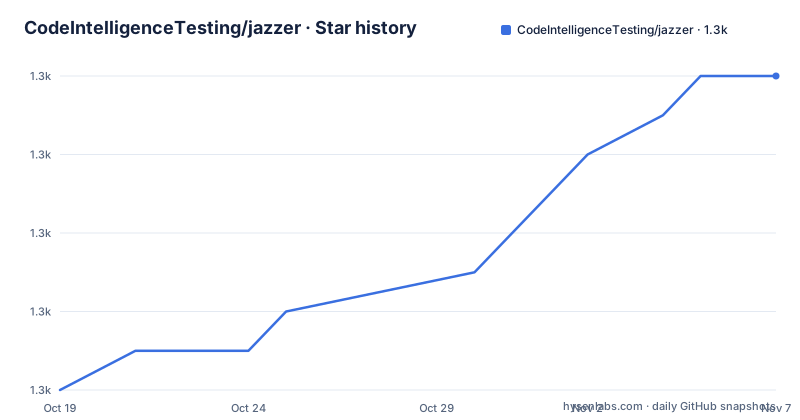
Star history
- CodeIntelligenceTesting/jazzer1,268 ★ · +8
| Repository | 2026-10-19 | 2026-11-07 |
|---|---|---|
| CodeIntelligenceTesting/jazzer | 1.3k | 1.3k |
8 Stars in the last 19 days, measured from the daily GitHub snapshot. Compare with other projects
Editorial analysis
What Jazzer is and what it is built on
Jazzer is a coverage-guided, in-process fuzzer for the JVM platform, developed by Code Intelligence. The README describes it as based on libFuzzer, bringing many of libFuzzer's instrumentation-powered mutation features to the JVM.
That inheritance is the whole design. libFuzzer's method is to instrument the code under test, run an input, measure which code paths the input reached, and mutate the input to reach new ones. Bringing that to the JVM means Jazzer needs coverage instrumentation for JVM bytecode, which is why the repository contains `sanitizers/`, `third_party/`, a `launcher/` directory and a `selffuzz/` directory: the project carries a native component rather than being a pure Java program.
The topics listed for the repository include jni, java, kotlin, jvm, clojure, fuzzer, fuzzing and security, which is a reasonable summary of the surface. Kotlin and Clojure support follow from fuzzing whatever the JVM can load.
Supported platforms are listed as Linux x86_64 and arm64 (aarch64), macOS 12+ on x86_64 and arm64, and Windows x86_64. That is a wide range, and the macOS 12+ floor plus the arm64 entries indicate a project that has been kept current with Apple silicon.
The project is Apache-2.0 licensed, is not archived, and the last push was on 2026-10-14. The release history shows v0.30.0 from 2026-02-24, v0.29.1 from 2025-12-22 and v0.28.0 from 2025-11-28, so the version numbers are still in the zero range despite the cadence.
Two directories carry the whole workflow
The README explains the mode split clearly, and it is the single most important operational detail.
In regression mode, Jazzer runs each fuzz test with the crashing inputs found in its corresponding inputs directory. This mode behaves like a traditional unit test, verifying that previously discovered issues remain fixed and helping you debug the fuzz test with specific inputs. By default, Jazzer operates in regression mode unless fuzzing mode is explicitly enabled.
In fuzzing mode, Jazzer executes a single fuzz test and automatically generates and mutates inputs to maximise code coverage and find bugs. When it discovers an input that produces new coverage, that input is stored in the generated corpus directory of the fuzz test. When it discovers an input that causes the fuzz test to fail, such as an uncaught exception or a triggered sanitizer, it stores the crashing input in the inputs directory.
So the directories are a two-way channel. The generated corpus is the working set the fuzzer grows, and the inputs directory is the regression suite that grows every time the fuzzer finds something new.
There is one more switch worth knowing: setting `JAZZER_COVERAGE=1` makes regression mode also use the inputs from the generated corpus directory, so a normal test run exercises the full set of interesting inputs rather than only the known crashers.
The practical consequence is that your CI needs two jobs. The ordinary test job runs in regression mode and must stay fast and deterministic. A separate job sets `JAZZER_FUZZ=1` and is allowed to run long.
Writing a fuzz target as an annotated JUnit method
The integration point is JUnit, version 5.9.0 or newer, and the recommended way to start is the `jazzer-junit` dependency. A fuzz test is a method in your test class annotated with `@FuzzTest`, and Jazzer generates and mutates the inputs for its parameters.
The example in the README is a small scheme with an encode and decode pair:
class ParserTests {
    @Test
    void unitTest() {
        assertEquals("foobar", SomeScheme.decode(SomeScheme.encode("foobar")));
    }

    @FuzzTest
    void fuzzTest_decode(@NotNull String input) {
        assertEquals(input, SomeScheme.decode(SomeScheme.encode(input)));
    }
}
The unit test and the fuzz test sit in the same class, and the difference between them is the annotation and the parameter list. That is the ergonomics the project is selling: the fuzz target is not a separate harness, it is a method next to the test that already covers the happy path.
Parameter types are constrained. You can use primitives, strings, arrays and many standard library classes, and the README points to the mutation framework documentation for the details of what is supported. Structure is expressed with annotations from `com.code_intelligence.jazzer.mutation.annotation`, namely `@NotNull`, `@InRange` and `@WithUtf8Length`:
@FuzzTest
void fuzzTest_decodeWithN(@NotNull @WithUtf8Length(min=10, max=200) String input, @InRange(min=-10, max=10) int n) {
    assertEquals(input, SomeScheme.decode(SomeScheme.encode(input)));
    assertTrue(n >= -10 && n <= 10);
}
The length bound on the string matters for more than tidiness. Without it, the fuzzer spends its budget mutating arbitrarily long strings, which is where a parser either gets slow or hits a pathological case.
Running fuzzing mode from Maven, Gradle and Bazel
Because the integration is JUnit based, the build system invocation is the ordinary test invocation, with one environment variable changed:
JAZZER_FUZZ=1 mvn -Dtest=ParserTests testFor Maven Surefire, `-Dtest` selects the test class; the upstream README’s extra bare class argument is not a Maven test selector. For Gradle the dependency is added to `build.gradle`:
implementation group: 'com.code-intelligence', name: 'jazzer-junit', version: '<LATEST VERSION>'And for Maven the `pom.xml` gets:
<dependency>
    <groupId>com.code-intelligence</groupId>
    <artifactId>jazzer-junit</artifactId>
    <version>LATEST VERSION</version>
</dependency>
Both snippets are placeholders for the version, and pinning a real version is a better idea than tracking a tag, since a fuzzer upgrade can change how a target is driven.
The `jazzer-junit` package is on Maven Central and signed with a key included in the repository at `deploy/maven.pub`.
Bazel has two routes. Jazzer is supported through `rules_fuzzing`, the official Bazel rules for fuzzing, with setup instructions in that project. It is also possible to use the JUnit5 integration directly in Bazel, and the README points to an example project whose BUILD file shows how to set up corpus directories for fuzzing and regression and how to pass arguments to Jazzer and libFuzzer.
That last point is where the real configuration lives. The libFuzzer arguments are how you set the number of runs, the timeout, the maximum length of an input and the working directory, and the README defers to the Bazel example and to the `docs/` directory for the details.
Standalone mode, the command line and the sanitizers
Jazzer can also run without JUnit, in two ways: by calling the Jazzer main class directly, or by using the `jazzer` binary.
The direct invocation needs the project classpath, the path to `jazzer.jar` and `jazzer-junit.jar`, the main class `com.code_intelligence.jazzer.Jazzer` and the target class containing the fuzz test:
java -cp <classpath>;<path/to/jazzer.jar>;<path/to/jazzer-junit.jar> com.code_intelligence.jazzer.Jazzer --target_class=<fuzz-test-class> [args...]Additional Jazzer arguments are added with a double dash command, and libFuzzer arguments follow. The `launcher/` directory in the repository tree is the `jazzer` binary path, and the `selffuzz/` directory suggests the project fuzzes itself.
The crash detection story is the part that deserves care. The README says a failing fuzz test includes a triggered sanitizer, and the repository has a `sanitizers/` directory at the top level. Because Jazzer runs in-process, a memory-safety failure detected by a sanitizer in the native component can take down the JVM along with it, which is why the crash files and the `examples/json_sanitizer_denylist_crash` fixture exist in the tree. A sanitizer crash is not always a bug in your code: it can equally be a bug in the native code the fuzzer is driving.
The `examples/` directory also contains a `check_for_finding.sh` script and a `labels.bzl` file, which suggests the examples are wired into a test harness that checks the fuzzer actually finds a known issue rather than merely running.
The Bazel-heavy repository layout
The top level entries say a lot about how the project is built. Alongside the `src/`, `tests/`, `docs/`, `examples/` and `third_party/` directories there are `BUILD.bazel`, `MODULE.bazel`, `REPO.bazel`, `WORKSPACE.bazel`, `WORKSPACE.bzlmod`, a `.bazelversion` file, a `.bazelrc`, a `.bazelignore`, `bazel/` and `platform_mappings`.
Having both `MODULE.bazel` and the two `WORKSPACE` files means the project supports both the bzlmod module system and the older workspace mechanism, which is the polite thing to do for a project that other Bazel users depend on. The `platform_mappings` directory is there because the fuzzer needs to know which native binary to use on which platform, and that mapping differs across Linux, macOS and Windows.
Two more files are worth noting. `CITATION.cff` is a citation file, so if you publish a paper using Jazzer you have the metadata to cite it. And `renovate.json5` configures Renovate for dependency updates, which tells you the native dependencies are kept current automatically.
The `format.sh` script and `.clang-format` file show that the native C and C++ parts of the project are formatted with clang-format, which is a reasonable expectation for a project with a substantial native component.
Contributing is documented in `CONTRIBUTING.md`, and the project is a GitHub organisation project, `CodeIntelligenceTesting/jazzer`, with a website at code-intelligence.com and a separate documentation site for the JUnit annotations.
Editorial conclusion
Jazzer suits JVM teams that parse untrusted input, that want a fuzz target to live in the same test class as the unit test, and that want libFuzzer's coverage feedback without leaving the JVM. It does not suit a team that needs a fuzzer to run outside the process under test, since Jazzer is in-process by design, and it does not suit a project where a fuzz target cannot be written as a single method with structured parameters. Before adopting it, confirm your CI runner is one of the supported platforms, Linux x86_64 or arm64, macOS 12+ on either architecture, or Windows x86_64, add the `jazzer-junit` dependency at a pinned version rather than `LATEST VERSION`, and set `JAZZER_FUZZ=1` in a dedicated job so that the normal test run stays in regression mode.
Frequently asked questions
How do I run a Jazzer fuzz test in fuzzing mode?
Set the environment variable `JAZZER_FUZZ` to a truthy value before running the tests, for example `JAZZER_FUZZ=1 mvn test org.example.ParserTests`. Without it, Jazzer runs in regression mode using the crashing inputs it has already found.
What is the difference between regression mode and fuzzing mode in Jazzer?
Regression mode replays the crashing inputs from the inputs directory and behaves like a unit test. Fuzzing mode generates and mutates inputs to maximise coverage, storing new-coverage inputs in the generated corpus directory and crashing inputs in the inputs directory.
Which build tools does Jazzer support?
Maven and Gradle through the `jazzer-junit` dependency, and Bazel either through `rules_fuzzing` or through the JUnit5 integration directly. The README points to a complete Maven example in `examples/junit` and a Bazel JUnit example project.
What platforms does Jazzer run on?
Linux x86_64 and arm64 (aarch64), macOS 12+ on x86_64 and arm64, and Windows x86_64. Jazzer requires JUnit 5.9.0 or newer for the integration.
How do I constrain the inputs Jazzer generates for a fuzz target?
Use the mutation annotations from `com.code_intelligence.jazzer.mutation.annotation`, such as `@NotNull`, `@InRange` and `@WithUtf8Length`. The mutation framework documentation lists the supported types.
Official sources
Add this badge to your README
If you maintain this project, the badge below links readers to this analysis and shows its maintenance status from the daily GitHub snapshot. Paste the markdown into your README; add ?metric=license or ?metric=stars to the image URL for a different field.

[](https://hysenlabs.com/projects/codeintelligencetesting-jazzer)Star history chart for your README
[](https://hysenlabs.com/projects/codeintelligencetesting-jazzer)Was this useful?