NeuralNote: a local audio-to-MIDI plugin built on MuScriptor
Audio Plugin for Audio to MIDI transcription using deep learning.
At a glance
- What is it?
- NeuralNote is a JUCE audio plugin that turns recorded or dropped audio into MIDI using a local MuScriptor model. Version 2 provides installers for macOS and Windows, a Linux source build, and a model download on first use.
- Who is it for?
- NeuralNote suits musicians who want audio-to-MIDI transcription on their own machine. Version 2 provides signed and notarized macOS installers and an unsigned Windows installer; Linux currently requires a source build, and a CLI remains on the roadmap.
- Can I use it commercially?
- Yes. Apache-2.0 is a permissive licence: you can use, modify and sell software built on it, as long as you keep its copyright and licence notices.
- Is it still maintained?
- Yes. The repository last received commits 8 days ago.
- What is it written in?
- Mainly C++, according to GitHub's language statistics.
Answers come from the project's GitHub data, last synced on November 15, 2026, and from our analysis. They are not legal advice.
Star history
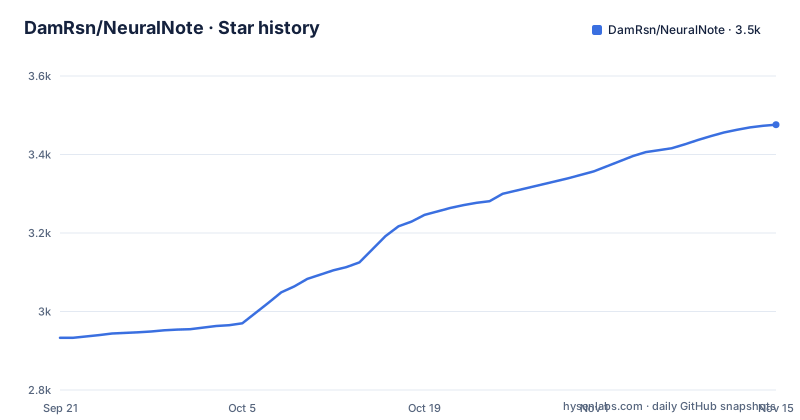
- DamRsn/NeuralNote3,476 ★ · +543
| Repository | 2026-09-21 | 2026-11-15 |
|---|---|---|
| DamRsn/NeuralNote | 2.9k | 3.5k |
543 Stars in the last 55 days, measured from the daily GitHub snapshot. Compare with other projects
Editorial analysis
What NeuralNote solves, and for whom
Turning a performance into editable notes has traditionally meant either hand-transcribing or accepting monophonic pitch detection that collapses under chords. NeuralNote targets the first problem by running a learned transcription model inside the DAW as an AudioFX plugin, so the audio never has to be exported to a separate application. The README describes it as a VST3/AU/Standalone plugin that you apply to the track you want to transcribe, with the result appearing as MIDI in a piano roll inside the plugin window.
The audience is narrow but specific. You can use the standalone app or a DAW that hosts VST3 or AU. Installers are available for macOS and Windows; Linux users can build from source. The v2 line replaces Spotify's Basic Pitch with MuScriptor from Kyutai and Mirelo, a transformer model the README sizes at 103M to 1.4B parameters against fewer than 17K for Basic Pitch. That jump is the reason v2 advertises multi-instrument transcription: the model can be pointed at a full mix rather than one instrument at a time.
How transcription runs inside the plugin
The architecture is split in two. NeuralNote itself is the JUCE plugin and UI. The transcription engine lives in a separate repository, muscriptor.cpp, included as a git submodule at ThirdParty/muscriptor.cpp and linked as a static library. That engine takes 16 kHz mono float32 audio and returns note events, and its public API is documented in its own docs/API.md. If you want to embed transcription in another program, that submodule is the interface to look at, not the plugin.
Weights are not shipped with the source. NeuralNote downloads GGUF files from the DamRsn/muscriptor-gguf repository on Hugging Face, in three sizes called small, medium and large. The Model button in the top bar switches between installed models, starts downloads for the others, and opens the folder where they live. You can also place a file there by hand, but the README is explicit that it must come from the v1/ directory of that HF repo, unchanged and with its original name, for example muscriptor-medium-f16.gguf, and that NeuralNote only picks up files whose name and size match what it downloads. Renaming a quantisation or trimming a file will make it invisible.
Inference is local. The README states that NeuralNote only goes online to download models and to check for updates. GPU acceleration is used when available, through Metal on macOS and Vulkan on Windows and Linux, and the README strongly recommends a GPU for the medium and large models. Decoding is streamed: the MIDI fills into the piano roll as it is produced, with a progress indicator and pause, resume and discard controls, and you can press play before transcription finishes to hear only the part decoded so far. That streaming design is the most interesting choice here, because it makes the tool usable on long takes where a full pass would otherwise be a waiting game.
Installing NeuralNote and making a first transcription
Download the signed and notarized macOS installer for Apple Silicon or Intel, or the unsigned Windows x64 installer, from the project website or releases page. Linux users currently build from source. Models are downloaded separately from within the app.
To build from source, install git, CMake, a C++23 compiler and Python 3; the first configure also downloads ggml and about 55 MB of soundfont sources. The README reports Clang testing on macOS, Windows and Linux. On macOS, follow its Metal toolchain instructions; on Linux it lists dependencies tested on Ubuntu 24.04 with Clang 20 and Vulkan headers and shader compiler.
Clone with submodules so the engine comes along:
git clone --recurse-submodules https://github.com/DamRsn/NeuralNote
cd NeuralNote
If you already cloned without them, the README gives the repair command:
git submodule update --init --recursiveThen configure and build in Release. Ninja is optional but the README notes it makes builds faster:
cmake -B build -DCMAKE_BUILD_TYPE=Release
cmake --build build --config Release
The Standalone app and the plugin artefacts land in build/NeuralNote_artefacts/Release/. On Windows, GPU support requires the Vulkan SDK at build time. Without it the project still builds, but transcribes on the CPU only. With it, configure from a Visual Studio developer prompt or set CC, CXX and RC in the environment, because ggml builds its shader generator as a separate project that does not see CMake's compiler settings.
For a first real use, open the Standalone app or load the plugin on a track. Either click record while the track plays, or drop an audio file on the plugin. The README lists .wav, .aiff, .flac, .mp3 and .ogg (vorbis), plus .m4a on macOS. Pick the instruments in the left panel, or leave it on Automatic to let the model detect them. The README notes that transcriptions tend to be better when the model is given the correct set of instruments, which is a hint to prefer manual selection when you already know what is in the mix. Press Transcribe, wait for the piano roll to fill, then drag the MIDI onto a MIDI track or save it as a file.
Model sizes, hardware, and where the speed goes
The three model sizes trade speed for quality, and the README publishes approximate real-time factors measured on an Apple M1 Pro, where above 1x means faster than real time. The small model reaches roughly 3.5x on Metal and 2x on CPU. Medium sits at about 1.5x on Metal and 0.7x on CPU. Large is about 0.5x on Metal, which is slower than real time, and the README marks the CPU column as not recommended for it.
Read that table as a constraint rather than a spec sheet. Medium on CPU at 0.7x means a three-minute take takes over four minutes to decode, and large on CPU is not a path the project endorses. The README also says testing so far covers only a few machines and GPUs, and asks users to report failures, wrong results or unexpected slowness with their OS, GPU and model size, either in the NeuralNote issue tracker or in muscriptor.cpp's if the problem is in the engine.
Model storage is per-user rather than per-project. On macOS the folder is ~/Library/NeuralNote/models; on Windows it is %APPDATA%\NeuralNote\models; on Linux it is ~/.config/NeuralNote/models. Deleting a file from that folder removes the model, and the Model button can fetch it again. This is convenient for switching sizes and awkward for teams that want a pinned model checked into a build pipeline, because nothing in the README describes a shared or project-local model path.
Where NeuralNote is the wrong tool
Packaging differs by platform. Version 2 provides signed and notarized macOS installers and an unsigned Windows installer. Linux users can build from source; prebuilt Linux binaries remain on the roadmap. The project notes that testing has covered only a few machines and GPUs.
A second limitation is model management. Because NeuralNote only recognises files whose name and size match its downloads, hand-placed weights must be the exact files from the v1/ directory of the HF repo. If you have your own fine-tune, or a quantisation the project does not publish, the plugin will not load it. There is no documented path for custom checkpoints.
A third is the absence of MIDI out. Per the roadmap, MIDI out with per-instrument channel selection is still planned, so the current workflow is drag-and-drop or save-to-file rather than routing notes straight to a synth track. If your session depends on live MIDI routing, this is not the plugin for it yet. Finally, the README's own warning that testing covers only a few machines and GPUs means you should treat unusual hardware as untested rather than supported, and budget time for an issue report if the GPU path misbehaves.
NeuralNote versus cloud transcription services
The obvious alternative is a hosted audio-to-MIDI service, where you upload a file and download MIDI. The difference is not only privacy. A hosted service can run a much larger model on server GPUs and can update it centrally. NeuralNote also offers installers for macOS and Windows, while Linux currently requires a source build. NeuralNote keeps audio on the machine and lets you choose between small, medium and large locally, but the ceiling is your own hardware: large runs at roughly 0.5x on an M1 Pro, so a hosted service will often finish sooner on long material.
The second real difference is integration. A hosted service lives in a browser tab; NeuralNote lives on the track as a VST3 or AU plugin, records from the DAW transport, and streams MIDI into its own piano roll while decoding. If your workflow is already inside a DAW and you dislike round-tripping files, the plugin form is the point. If you want the best possible transcription quality regardless of local hardware, a server-side model is the more sensible choice.
A third comparison is the engine itself. Because muscriptor.cpp is a separate repository with a documented API, you can bypass the plugin entirely and call the engine from your own C++ program with 16 kHz mono float32 input. That is a genuinely different adoption path from using the plugin, and it is the one to take if you are building a tool rather than editing a track.
Licence and what upgrading costs you
NeuralNote's code is published under Apache-2.0, and the repository carries a LICENSE file at the top level. The README states that the separate MuScriptor GGUF weights are distributed under CC BY-NC 4.0 for non-commercial use. If you plan to redistribute the plugin or ship it inside a product, read the licence section of the README in full and check the terms attached to the specific model files you intend to bundle, because the code licence and the weights licence are not the same document. This is not legal advice; it is a pointer to where the two licences diverge.
Version 2 is available from the project website and releases page. Check the selected release and model files before upgrading a studio machine; installers and platform support can change. There is no documented rollback path for models either: you can delete a model from the models folder and re-download it, but the README does not describe pinning a specific revision of a GGUF file. For a studio machine that must keep working, that is the cost to weigh against the newer model.
Editorial conclusion
NeuralNote suits musicians who want audio-to-MIDI transcription on their own machine. Version 2 provides signed and notarized macOS installers and an unsigned Windows installer; Linux currently requires a source build, and a CLI remains on the roadmap. Test the model size and compute device on your hardware: Metal is used on macOS and Vulkan on Windows and Linux when available. The model weights have separate non-commercial terms.
Frequently asked questions
How do I use NeuralNote?
Load it as an AudioFX plugin on the track, or open the Standalone app. Record from the DAW transport or drop an audio file, choose the instruments or leave Automatic, then press Transcribe and watch the MIDI fill into the piano roll. You can drag the MIDI to a MIDI track or save it as a file.
How do I install NeuralNote?
Download a macOS or Windows installer from the project website or releases page. Linux users can build from source with the documented CMake steps. Download a transcription model inside the application on first use.
How do I install NeuralNote on macOS?
Download the signed and notarized installer for Apple Silicon or Intel from the project website or releases page. Download a model through the Model button; models are stored in ~/Library/NeuralNote/models.
How do I install NeuralNote on Windows?
Download the Windows x64 installer from the project website or releases page. It is not code signed, so Windows may display a warning. Download a model through the application; models are stored in %APPDATA%\NeuralNote\models.
Is NeuralNote free?
NeuralNote code is Apache-2.0 licensed. The MuScriptor model weights are distributed separately under CC BY-NC 4.0 for non-commercial use; check all relevant terms before redistribution.
Is NeuralNote safe?
The README states that transcription runs locally and that NeuralNote only goes online to download models and to check for updates, so audio is not uploaded for transcription. You can verify the network behaviour yourself by watching the plugin during a session, since the source is available.
Official sources
Add this badge to your README
If you maintain this project, the badge below links readers to this analysis and shows its maintenance status from the daily GitHub snapshot. Paste the markdown into your README; add ?metric=license or ?metric=stars to the image URL for a different field.

[](https://hysenlabs.com/projects/damrsn-neuralnote)Star history chart for your README
[](https://hysenlabs.com/projects/damrsn-neuralnote)Was this useful?