github-copilot-configs: a curated VS Code settings file for GitHub Copilot
Will 保哥整理的最佳 GitHub Copilot 設定
At a glance
- What is it?
- This repository is not a tool but a settings bundle: a .vscode/settings.json and keybindings.json authored by a GitHub Copilot course instructor, alongside a README that explains every key in Traditional Chinese. It suits a developer who wants a known-good Copilot configuration, and it is the wrong thing to adopt wholesale if your editor setup, locale or model choice differs from the author's.
- Who is it for?
- github-copilot-configs is worth borrowing from selectively if you use GitHub Copilot in VS Code and have no opinion on the many feature flags it controls, since the two JSON files give you a working baseline and the README explains what each toggle does. It is not worth copying whole if your Copilot subscription, editor version or language differs, since some keys assume Agent Mode in Visual Studio Code v1.99 or later and the settings are opinionated rather than neutral.
- Can I use it commercially?
- Not without permission. GitHub finds no licence file in the repository, and without a licence all rights are reserved by default: you may read the code but not reuse it. Check the README, or ask the authors, before using it.
- Is it still maintained?
- Yes. The repository last received commits 160 days ago.
- What is it written in?
- GitHub does not report a main language for this repository.
Answers come from the project's GitHub data, last synced on November 7, 2026, and from our analysis. They are not legal advice.
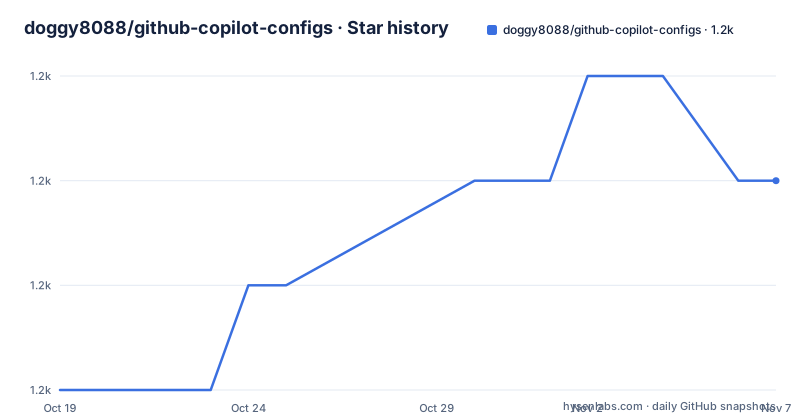
Star history
- doggy8088/github-copilot-configs1,245 ★ · +2
| Repository | 2026-10-19 | 2026-11-07 |
|---|---|---|
| doggy8088/github-copilot-configs | 1.2k | 1.2k |
2 Stars in the last 19 days, measured from the daily GitHub snapshot. Compare with other projects
Editorial analysis
What is in the repository is two JSON files and a long explanation
The repository is small by design. The top level holds a README, a SYNC_README.md, an images directory for the screenshots, a .github directory and, most importantly, a .vscode directory containing settings.json and keybindings.json. There is no code, no build and no release. The README states that the two files can be downloaded and used directly, and that the fastest way to apply them is to open the settings and keybindings JSON files from the editor and merge the contents. The authorship is transparent: the author describes himself as having prepared a large number of GitHub Copilot techniques for three courses and having tested nearly every Copilot option setting, and this repository collects the ones he considers best. The homepage field points to a Facebook page rather than a project site, and the repository carries no declared licence, which matters if you plan to redistribute the files.
The recommended editor version is the first constraint to check
The README makes a version statement before anything else. It says that Copilot Agent Mode has been available in Visual Studio Code since version v1.99, and it recommends installing Visual Studio Code Insiders because some features may only be available there and because Insiders picks up new features as they ship. Several of the settings the author recommends depend on features that are recent or experimental, so the version floor is a real precondition rather than a footnote. The README also notes that Agent Mode is what the third course covers, and that the settings configure GitHub Copilot Chat and VS Code Speech side by side, with the speech settings treated as part of the same tuning exercise.
The extension list is a dependency in disguise
Five extensions are listed as the ones needed to use Copilot properly, and each has a distinct role. GitHub Copilot itself and GitHub Copilot Chat are the two obvious ones. VS Code Speech provides voice input, and a separate Traditional Chinese Taiwan language pack for VS Code Speech makes that voice input work in the author's language. Live Preview is described as letting you preview web pages from files in the editor through a browser at any time. That last one is not strictly a Copilot extension, which tells you something about the scope of the configuration: this is a broader VS Code setup for a specific working style, with Copilot as the centre of it, not a minimal set of Copilot flags.
Most keys turn on features that are off by default
The settings the author recommends fall into a consistent pattern: enabling capabilities that ship disabled. github.copilot.enable activates Copilot in all files but disables it for plain text file types. github.copilot.editor.enableCodeActions set to true makes Copilot commands appear as Code Actions. github.copilot.renameSuggestions.triggerAutomatically set to true fires rename suggestions without being asked. github.copilot.nextEditSuggestions.enabled set to true turns on Next Edit Suggestions, abbreviated NES in the README. The one setting that goes the other way is editor.inlineSuggest.edits.showCollapsed, which the author sets to true so that the inline suggestions stop taking up space in the editor and interrupting the flow. The reasoning given is that after enabling NES the editor frequently asks whether to press Tab, and the collapsed view keeps the content out of the way.
Three settings decide where chat output goes and who answers
A cluster of settings controls the behaviour of the chat interface itself. window.commandCenter must be enabled for chat.commandCenter.enabled to have any effect, and turning the command center on puts a Copilot Chat button in the editor. workbench.commandPalette.experimental.askChatLocation is set to chatView rather than quickChat, so that the result of an Ask GitHub Copilot command from the palette is kept as a record, whereas quickChat discards it. search.searchView.semanticSearchBehavior is set to runOnEmpty, which starts the AI search automatically when a search returns nothing, ahead of the manual default that only shows a link. The author also documents that the completion model can be changed from the palette with GitHub Copilot: Change Completion Model, and notes that the default is now gpt-41-copilot rather than the earlier copilot-codex based on GPT-3.5 Turbo.
The chat settings are where the author is most opinionated
Four chat-related keys carry a clear personal stance. github.copilot.chat.localeOverride set to zh-TW makes Copilot Chat answer in Traditional Chinese. github.copilot.chat.useProjectTemplates set to true lets the /new command offer GitHub project templates directly. github.copilot.chat.scopeSelection set to true prompts the user to select a symbol range when /explain is used with nothing selected in the editor. chat.detectParticipant.enabled is set to false, and the reasoning is specific: with automatic participant detection on, the wrong chat participant is often called, so the author prefers to invoke participants explicitly with @. The last two, chat.promptFiles and chat.promptFilesLocations, are marked experimental in the README and enable shareable, reusable prompt files with extra context, usable from the Chat View, Edit View, Agent Mode and Inline Chat, with the location setting allowing several folders of prompt files to be organised separately.
The README is a teaching document as much as a config source
What makes this repository unusual is the ratio of prose to configuration. The README is written in Traditional Chinese and walks through each key with a description of what it does, which values it accepts and why the author chose the value. For the semantic search behaviour, for example, it lists all three options, auto, manual as the default, and runOnEmpty, so a reader can pick a different one knowingly. The same is true of the language switching instructions, which give a three-step procedure: press F1, type the display language command, choose the Chinese (Traditional) locale and press Restart. Alongside the settings there is a course catalogue, with an entry level course, an advanced course and an agent mode course, plus bundle options for buying them together, and the author suggests buying all three because the content overlaps little. That is a clear statement of what this repository is for, and it is a marketing surface as much as a configuration bundle.
The two files to copy are the ones the README points at.
.vscode/settings.json
.vscode/keybindings.json
The README explains that the same settings are reachable from the gear icon in the lower corner of the editor, under the settings and keyboard shortcuts entries, and that the open settings JSON button in the top right of either panel is the quickest route to merge the values.
Editorial conclusion
github-copilot-configs is worth borrowing from selectively if you use GitHub Copilot in VS Code and have no opinion on the many feature flags it controls, since the two JSON files give you a working baseline and the README explains what each toggle does. It is not worth copying whole if your Copilot subscription, editor version or language differs, since some keys assume Agent Mode in Visual Studio Code v1.99 or later and the settings are opinionated rather than neutral. Verify first which keys exist in your editor version, and treat the repository's own settings.json as the version to read, since the README prose and the file can drift apart.
Frequently asked questions
What files does the github-copilot-configs repository contain?
The useful part is the .vscode directory with settings.json and keybindings.json, which the README says can be downloaded and merged into your own editor configuration. The rest of the repository is the README, a SYNC_README.md, screenshots and the .github directory.
Which Visual Studio Code version do the recommended settings need?
The README states that Copilot Agent Mode is available in Visual Studio Code from v1.99 onwards, and recommends the Insiders build because some features may only exist there.
Which extensions does the configuration expect?
GitHub Copilot, GitHub Copilot Chat, VS Code Speech, the Chinese (Traditional, Taiwan) language support for VS Code Speech, and Live Preview for previewing web pages from the editor.
Why is chat.detectParticipant.enabled set to false?
The README explains that with automatic participant detection enabled the wrong chat participant is often selected, so the author recommends disabling it and invoking participants explicitly with @ instead.
Official sources
Add this badge to your README
If you maintain this project, the badge below links readers to this analysis and shows its maintenance status from the daily GitHub snapshot. Paste the markdown into your README; add ?metric=license or ?metric=stars to the image URL for a different field.

[](https://hysenlabs.com/projects/doggy8088-github-copilot-configs)Star history chart for your README
[](https://hysenlabs.com/projects/doggy8088-github-copilot-configs)Was this useful?