Audio8_TTS Preview: a 0.6B zero-shot cloning TTS model and how to run it
SOTA-Class TTS at Compact Scale
At a glance
- What is it?
- Audio8 TTS offers compact text-to-speech checkpoints with zero-shot voice cloning. The earlier 0.6B Preview has an ONNX CPU deployment; the newer Realistic Air checkpoint expands language coverage, with different deployment availability.
- Who is it for?
- Choose a checkpoint and deployment path based on the languages, hardware and performance you have tested. The README lists 11 languages for 0.6B Preview and 23 for Realistic Air, and says Realistic Air has no ONNX export at present.
- Can I use it commercially?
- Yes. Apache-2.0 is a permissive licence: you can use, modify and sell software built on it, as long as you keep its copyright and licence notices.
- Is it still maintained?
- Yes. The repository last received commits 7 days ago.
- What is it written in?
- Mainly Python, according to GitHub's language statistics.
Answers come from the project's GitHub data, last synced on November 23, 2026, and from our analysis. They are not legal advice.
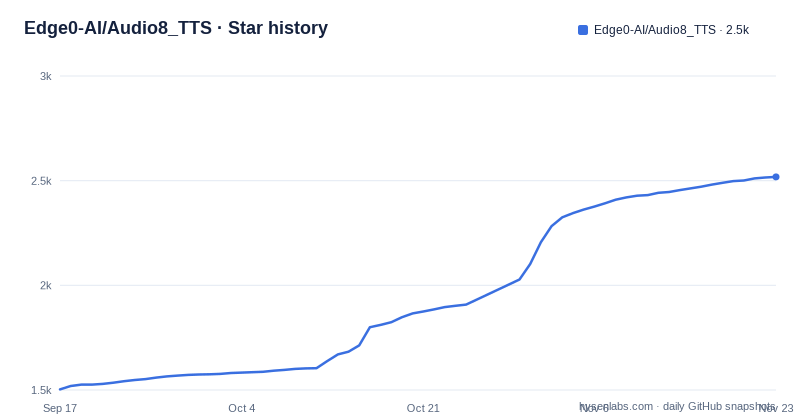
Star history
- Edge0-AI/Audio8_TTS2,518 ★ · +1,015
| Repository | 2026-09-17 | 2026-11-23 |
|---|---|---|
| Edge0-AI/Audio8_TTS | 1.5k | 2.5k |
1,015 Stars in the last 67 days, measured from the daily GitHub snapshot. Compare with other projects
Editorial analysis
What Audio8_TTS solves, and who the 11-language limit excludes
Audio8 TTS is a family of compact text-to-speech models supporting zero-shot voice cloning. The project lists a 0.6B Preview, a newer 0.6B Realistic Air model and a smaller 0.1B family. The current README lists 11 languages for Preview and 23 for Realistic Air; quality varies by language and benchmark coverage is not identical to the supported-language list.
Test the chosen checkpoint with representative text, accents and reference recordings. Use voices only with appropriate permission. Long-form narration may need segmentation and consistency checks; consult the selected model’s current guidance and test on the intended hardware.
DualAR: one semantic token per frame, then ten codebooks
The architecture is a DualAR design, which the README says is inspired by Fish Audio S2 Pro. Two autoregressive transformers run in sequence rather than in parallel.
The slow AR transformer is 24 layers wide, with model width 896, 14 attention heads and 2 KV heads. For each audio frame it predicts a single semantic token. The fast AR transformer is much smaller, 4 layers at the same width and head counts, and its job is to expand that one semantic token into the frame's acoustic content: 10 codebooks with 4,096 entries each. The fast branch is conditioned on the slow hidden state and on the codebooks it has already produced. Both branches use static KV caches during generation.
The codec side sets the timing. It runs at 44.1 kHz with 2,048 samples per model frame, which the README works out to roughly 21.5 frames per second. Context is capped at 2,048 packed text and audio positions. That cap is shared between the prompt text and the reference audio, so a long reference recording eats into the budget available for the text you actually want spoken. It also explains the 150-character advice: the ceiling is positions, not words.
The 0.1B variant changes one piece. `Audio8-TTS-Preview-0.1b` replaces the pure-attention slow backbone with a Falcon-H1 hybrid combining Mamba 2 SSM layers and attention. The SGLang adapter detects this from `config.json`, looking for `slow_backbone: falcon_h1` or a `mamba_d_ssm` field, and switches to an eager hybrid path. That detection is convenient but also means the two checkpoints do not share one inference code path, so a bug fixed for one is not automatically fixed for the other.
Installing Audio8_TTS and cloning a voice on the first run
The README asks for Python 3.10 or newer and recommends a CUDA-capable GPU. `pyproject.toml` sets the Ruff target to py310 and a line length of 100, which is consistent with that floor. Create an isolated environment first, then install the pinned requirements.
python3 -m venv .venv
source .venv/bin/activate
pip install -r requirements.txt
At the inspected revision, `requirements.txt` listed `torch>=2.5.0`, `torchaudio>=2.5.0`, `transformers>=4.57.0,<5`, `numpy>=1.26`, `soundfile>=0.12`, `safetensors>=0.4` and `tqdm>=4.66`. Check the current requirements for the revision you install.
Next, get the weights. The README points to the Hugging Face repository Audio8-TTS-Preview-0.6b and says to place the checkpoint in the repository's `model/` directory, with an expected local path of `model/audio8_tts_0_6B_preview/`. Every command also accepts a Hugging Face model ID through `--model`, so you can skip the manual placement if you would rather let the download happen at run time.
With weights in place, the following illustrates cloning with a reference recording and its matching transcript. Use a recording you have permission to use.
python audio8_tts_infer.py \
  --text "Welcome to audio8_tts." \
  --reference-audio examples/reference.wav \
  --reference-text "Transcript of the reference recording." \
  --output outputs/clone.wav
The same script runs without a reference voice, which is useful for checking that the install works before you hunt for a clean recording.
python audio8_tts_infer.py \
  --text "This utterance does not use a reference voice." \
  --output outputs/no_reference.wav
For more than a handful of lines, batch mode reads a JSONL manifest where each line is an independent object and relative audio paths resolve from the manifest's directory.
{"id":"sample_001","text":"Target text","reference_audio":"audio/ref.wav","reference_text":"Reference transcript"}
{"id":"sample_002","text":"Text without a reference voice"}python audio8_tts_infer.py \
--input-jsonl data/prompts.jsonl \
--output-dir outputs/batch \
--batch-size 2The batch run writes `manifest.jsonl` and `failures.jsonl`. Existing WAV files are skipped unless you pass `--overwrite`, so a rerun after a crash resumes rather than redoes. Run `python audio8_tts_infer.py --help` to see the sampling and code-saving options; the README defers to that help text rather than listing them.
The CPU ONNX path, and why it is a separate deployment
The `onnx_runtime/` directory holds a standalone CPU deployment that does not use PyTorch or Transformers at all. It runs weight-only INT4 Slow and Fast AR models with FP16 activations and KV caches, plus an FP16 codec. The README lists CLI inference, a local web and HTTP service, streaming PCM output, and reference-voice registration.
The memory figures in the README are specific: the online sessions use about 1 GiB of memory in the tested Apple M2 setup. It also describes a sequencing trick worth knowing about, where the online sessions are released before the codec encoder is loaded during voice registration, to keep peak memory down. That is a deliberate design choice, and it tells you the author was working against a real memory ceiling rather than guessing.
Two things to weigh before choosing this path. First, it is a different code path from the PyTorch inference script, so quality and behaviour can diverge; the README does not claim they match. Second, the memory number is tied to one machine. It is a data point, not a specification, and there is no published figure for x86 CPUs or for the 0.1B INT8 variant in `onnx_runtime_0_1b_int8/`. Follow the deployment guide for the exact checkpoint and export. The current project README says the newer Realistic Air model does not yet have an ONNX export; Preview and the 0.1B family have separate ONNX paths.
SGLang Omni serving is the least stable part of the stack
The `sglang_omni/` adapter turns the model into an OpenAI-compatible service with SGLang paged attention, dynamic batching, a fixed KV cache for the fast codebook decoder, reference-audio encoding and waveform decoding. It installs as an independent `audio8_tts` model plugin, which the README says does not overwrite SGLang Omni core files.
The compatibility table is the important part, and it is unusually honest. The adapter uses internal SGLang Omni interfaces, so the README tells you to deploy with the tested revision instead of the latest `main` branch. The tested set is SGLang Omni commit `68a572348837f7b004857b4b07993c20ade4c017` (version `0.1.0`), SGLang `0.5.8`, PyTorch `2.9.1+cu128`, Transformers `4.57.1` and BF16 precision.
Read that as a maintenance warning. Depending on internal interfaces means an upstream refactor can break this adapter without any change on the Audio8 side, and the pinned Transformers `4.57.1` here is stricter than the `>=4.57.0,<5` range in `requirements.txt`. If you need a serving endpoint that survives routine dependency upgrades, this is the wrong layer to build on right now. If you can freeze the whole environment, it is a reasonable way to get batching and an OpenAI-shaped API in front of the model.
Where Audio8_TTS is the wrong choice, and what to use instead
Preview and Realistic Air have different language coverage, and the 0.1B model targets a smaller footprint with Chinese and English as its primary languages. Compare the model cards, listen to representative outputs and measure runtime on your hardware before selecting a checkpoint. For long recordings, test segmentation and transitions rather than assuming uniform quality across a paragraph.
The project also documents SGLang Omni serving and separate ONNX deployments for specific models. Check the current deployment matrix, model compatibility and dependencies instead of assuming that every runtime supports every checkpoint.
Licence, training code and what a fork actually costs
The project currently states that its code and both 0.6B releases use Apache-2.0, while the 0.1B checkpoint has a separate model license. Check the license and notice packaged with each model and export before use or redistribution. Obtain appropriate permission for reference voices and consider how recordings and generated audio are stored.
The repository provides supervised fine-tuning tools and documentation. Training a new voice or improving language coverage requires suitable data, evaluation and compute; it is not guaranteed by the presence of a training script. Pin the repository and model revisions used in a deployment so results can be reproduced and upgrades tested.
Editorial conclusion
Choose a checkpoint and deployment path based on the languages, hardware and performance you have tested. The README lists 11 languages for 0.6B Preview and 23 for Realistic Air, and says Realistic Air has no ONNX export at present. Check the selected model’s license and use a reference voice only with appropriate permission.
Frequently asked questions
What does TTS audio mean?
TTS stands for text-to-speech: software that turns written text into a spoken waveform. Audio8_TTS does this with a 0.6B-parameter model that also accepts a reference recording so the output uses that voice.
Is TTS a form of AI?
Audio8_TTS is a neural model: a slow AR transformer predicts a semantic token per audio frame and a fast AR transformer predicts the frame's codec codebooks. The README also describes a bundled neural codec for encoding references and decoding waveforms.
Is Siri a TTS?
Siri is a voice assistant that includes text-to-speech, but Audio8_TTS is just the speech synthesis part and ships no assistant, wake word or dialogue handling. The README describes only text input, an optional reference voice and a WAV output.
What is the most used TTS voice?
The project does not report a ranking of the most-used TTS voices. Its current README lists 11 languages for the Preview 0.6B checkpoint and 23 for Realistic Air, with quality varying by language.
Official sources
Where developers are discussing it
Posts on Hacker News, dev.to and Lobsters that link to this repository, found by our scan of those communities. 1 in the last 30 days; newest first.
- Audio8 Open Weight TTS 600MHacker News · Oct 30, 2026 · 1 points · 0 comments
Add this badge to your README
If you maintain this project, the badge below links readers to this analysis and shows its maintenance status from the daily GitHub snapshot. Paste the markdown into your README; add ?metric=license or ?metric=stars to the image URL for a different field.

[](https://hysenlabs.com/projects/edge0-ai-audio8-tts)Star history chart for your README
[](https://hysenlabs.com/projects/edge0-ai-audio8-tts)Was this useful?