eko/monday: Local Microservices and Kubernetes Port Forwarding
⚡️ A dev tool for microservice developers to run local applications and/or forward others from/to Kubernetes SSH or TCP
At a glance
- What is it?
- eko/monday is a Go CLI for developers who need to combine locally built services with applications exposed from Kubernetes, SSH, or TCP. Its YAML-driven workflows help, but host-file and network-interface permissions make `sudo` part of the intended operating model.
- Who is it for?
- Adopt eko/monday when a team wants one checked-in local and remote development setup for several services, especially when Kubernetes, SSH, TCP, or hostname-based forwarding are already part of the workflow. Do not adopt it if a plain `kubectl port-forward` command or independent startup scripts meet the need with fewer privileges.
- Can I use it commercially?
- Yes. MIT is a permissive licence: you can use, modify and sell software built on it, as long as you keep its copyright and licence notices.
- Is it still maintained?
- Yes. The repository last received commits 6 days ago.
- What is it written in?
- Mainly Go, according to GitHub's language statistics.
Answers come from the project's GitHub data, last synced on November 7, 2026, and from our analysis. They are not legal advice.
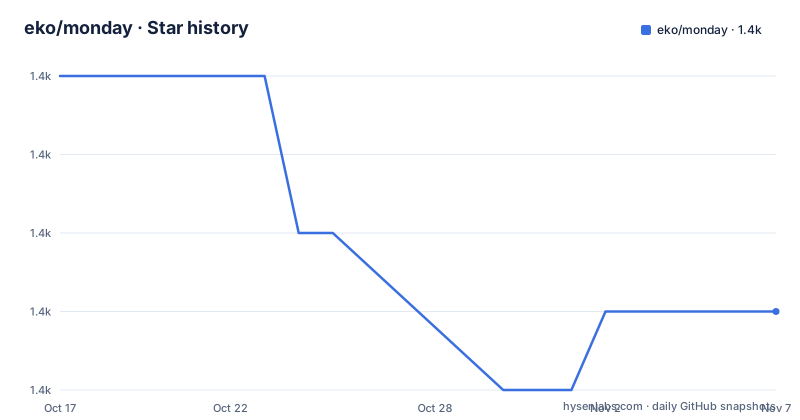
Star history
- eko/monday1,375 ★ · -3
| Repository | 2026-10-17 | 2026-11-07 |
|---|---|---|
| eko/monday | 1.4k | 1.4k |
-3 Stars in the last 21 days, measured from the daily GitHub snapshot. Compare with other projects
Editorial analysis
eko/monday for mixed local and remote microservice environments
eko/monday addresses a specific gap between running a service on a developer machine and consuming services that remain in Kubernetes or another remote environment. A microservice may need a local GraphQL process while its user API, database companion, or another dependency stays remote. Manually coordinating startup commands, environment files, target pods, ports, and hostname mappings is repetitive, especially when the arrangement must be reproducible across developers.
Monday places those operations in YAML. A configuration can describe local applications, setup steps, build commands, environment variables, file generation, copied files, and forwarded dependencies. Projects then combine local and forward entries. The intended users are Go, NodeJS, Rust, and other microservice developers whose work spans local processes and remote infrastructure. The tool also supports monitoring and automatic reconnection after a forwarded connection is lost.
This is a development environment coordinator, not a deployment system. Its scope centers on preparing and connecting services during development. It does not replace Kubernetes manifests, package managers, source builders, or the cluster credentials supplied through your existing Kubernetes configuration.
How eko/monday resolves applications, forwards, and hostnames
Monday reads one YAML file or several files that follow the `~/monday.<something>.yaml` naming pattern. By default, configuration belongs under the home directory. Setting `MONDAY_CONFIG_PATH` changes the configuration directory. The README states that matching files are merged in memory when Monday starts, and that nothing is written back afterward. YAML anchors can therefore share definitions across files without making the split configuration a generated artifact.
Validation is part of startup. Unknown fields, including misspelled keys, are reported with their file and line. The `monday validate` command performs an explicit configuration check. This strict behavior is useful for shared development files because a typo does not quietly become an ignored instruction.
Forward entries identify a service by `name`, `type`, and `values`. For Kubernetes, the documented values include a `kubectl` context, namespace, pod labels, hostname, and port mapping. The description also states that forwarding can use SSH or TCP and can expose traffic from remote applications in either direction. Hostnames make it possible to use the same local port for more than one forwarded service, which is more manageable than colliding on a single loopback port. According to the repository layout, the Go module combines command handling under `cmd/`, internal orchestration, and packages for building, running, proxying, host-file access, and UI concerns.
Installing eko/monday and creating the first configuration
On macOS, Homebrew is the documented shortest installation path. It installs the latest available release, so there is no version flag to add:
$ brew install eko/homebrew-tap/mondayThe release section also provides binaries for Linux i386 and amd64, plus Darwin and Linux amd64 and arm targets. For a source installation, the README presents `go get -u` and a Git clone as alternatives. These commands retrieve the project, but only the first form also obtains the Go package through the Go tool:
$ go get -u github.com/eko/monday
# or
$ git clone https://github.com/eko/monday.git
The Makefile then provides `build` and `build-binary`. The former compiles `./cmd`, moves the resulting binary into `/usr/local/bin`, and therefore needs write permission there. The latter keeps the compiled `monday` binary in the current build directory:
$ make build-binaryFor the first configuration, initialize the home-directory file:
$ monday initMonday may need permission to edit the host file and manipulate network interfaces for IP and port mapping. The README suggests an interactive shell alias rather than requiring every invocation to include `sudo`:
alias monday='sudo -E monday'Run `monday init` through that alias in the current shell, or call `sudo -E monday init` directly if that matches your administration model. The README's usage section ends before it shows the command that starts the configured project. Validate any edited YAML before relying on startup:
$ monday validateA successful check means Monday accepts the configuration structure; it does not confirm that the named Kubernetes context, namespace, labels, ports, source paths, or build tools are usable.
Defining a Kubernetes dependency for a local project
A first useful configuration can pair a local service with one Kubernetes forward. The documented remote dependency uses the staging context, selects pods with `app: user-api`, assigns `user-api.svc.local`, and maps port 8080 locally and remotely:
name: user-api
type: kubernetes
values:
  context: staging
  namespace: backend
  labels:
    app: user-api
  hostname: user-api.svc.local
  ports:
   - 8080:8080
This entry does not identify a single pod by name. It identifies Kubernetes workloads through labels, which is appropriate when the selected workload can move or when several replicas participate. The `context` value must correspond to a `kubectl` configuration context already available on the machine. The `namespace` and labels must identify workloads that actually exist in that cluster.
Local entries can provide setup, optional build commands, and a run command. Environment values can be declared directly under `run.env`, or loaded through `run.env_file`. A `watch` setting enables automatic local change handling. Monday also supports templated file content and file copying, so a developer can prepare project-specific inputs before running the application.
The split is useful because the local process and remote dependency have different lifecycles. Changes can happen in local source without requiring the remote Kubernetes workload to run on the same workstation. However, hostname resolution, port occupancy, cluster credentials, and labels become part of the local failure surface.
Permissions, remote routing, and operational boundaries
Monday's need to alter host-file and network-interface state is its most consequential constraint. The README recommends `sudo -E`, which runs the command as root and preserves relevant environment values. That makes a multi-service development setup easier, but it also means developers need an environment where elevated execution is acceptable. A locked-down workstation may permit individual developer identities while preventing changes to `/etc/hosts` or interface mappings. In that case, Monday's network model is poorly aligned with the host policy.
Remote connections can fail without making the YAML valid. A Kubernetes context may be absent, credentials may have expired, the namespace may contain no matching pods, or a requested local port may already be occupied. SSH targets and TCP routes have their own endpoint and reachability requirements, although the README does not document their complete command-line settings. Monday does state that forwarding reconnects automatically after a lost connection, but that does not remove authentication or routing failures.
The tool also watches local changes and can monitor local or forwarded applications. Those behaviors add moving parts to development. A file watcher may rebuild and restart a process, while a proxy maintains connections to remote endpoints. Developers who need an immutable, one-command environment without filesystem watches or network administration should first confirm that these operations fit their existing controls.
Monday versus separate scripts and kubectl port-forward
The practical alternative is to keep local startup commands in a script and invoke the relevant remote forwarding mechanism directly. For a single Kubernetes service, the platform's existing `kubectl port-forward` workflow is narrower: it exposes a selected Kubernetes workload without trying to unify local build commands, remote SSH and TCP routes, file preparation, hostnames, watching, monitoring, and multi-project orchestration. Monday replaces that assembly with one YAML model and a `monday` command.
That consolidation is an advantage when several developers need the same arrangement or when one project depends on multiple services through different forwarding types. It becomes excess machinery when a team runs one process, forwards one pod, and already has a documented local script. Monday then adds configuration merging, strict validation, elevated network operations, and a Go CLI where a single direct command may be easier to audit.
Separate scripts are also easier to inspect in isolation, although maintaining several scripts can fragment environment setup. Monday can centralize that setup in versioned YAML and support anchors across files. The choice depends on the number of coordinated processes and whether hostname-based access, mixed transports, watching, or automatic reconnection justify the extra permissions and dependencies.
Maintenance, Go requirements, and MIT distribution
The repository is not archived, and its last push was on 2026-10-14. Recent releases include `v2.6.1` and `v2.6.0` on 2026-07-08, after `v2.5.0` on 2024-08-01. Those dates indicate recent repository activity and releases, but the repository does not define a support window for older versions or a compatibility policy for Kubernetes API changes.
The root `go.mod` declares Go 1.26.0 and `toolchain go1.26.4`. The Dockerfile uses `golang:1.27-alpine` for its build stage. This difference matters when building from source: developers should follow the module's declared toolchain requirements rather than assuming that the Docker builder image is the only supported version. The module also includes Kubernetes `client-go` and `k8s.io/api` dependencies, so cluster authentication and Kubernetes client compatibility are part of upgrade review.
The repository vendors dependencies, and the Dockerfile builds with `-mod vendor`. This reduces reliance on fetching modules during that Docker build. Source upgrades can still involve CLI behavior, YAML validation, Kubernetes client changes, or changes to privileged network handling. Teams should review release notes and configuration compatibility for each version they adopt.
Monday is distributed under the MIT License. That identifier permits reuse and modification under the license's stated conditions, but this review does not interpret those conditions. Distribution packaging, notices, and internal policy should be checked against the repository's `LICENSE` file.
Editorial conclusion
Adopt eko/monday when a team wants one checked-in local and remote development setup for several services, especially when Kubernetes, SSH, TCP, or hostname-based forwarding are already part of the workflow. Do not adopt it if a plain `kubectl port-forward` command or independent startup scripts meet the need with fewer privileges. Before approval, verify `monday validate`, test each configured context and namespace, confirm the required hosts and ports, and review the MIT license against your distribution policy.
Frequently asked questions
How do I install eko/monday on macOS?
The README documents installation through the project's Homebrew tap with `brew install eko/homebrew-tap/monday`, which installs the latest available release. Release binaries are also listed for supported Linux, Darwin, amd64, arm, and i386 targets.
Why does eko/monday recommend running commands with sudo?
The README says Monday may need to edit the host file and manipulate network interfaces for IP and port mapping. It suggests the alias `alias monday='sudo -E monday'` for those operations.
Can eko/monday forward applications from Kubernetes, SSH, or TCP?
The project description and README state that applications can be forwarded over Kubernetes, SSH, or TCP. Kubernetes forwards can target pods through labels, while hostnames allow the same local port to be used for multiple forwarded applications.
Official sources
Add this badge to your README
If you maintain this project, the badge below links readers to this analysis and shows its maintenance status from the daily GitHub snapshot. Paste the markdown into your README; add ?metric=license or ?metric=stars to the image URL for a different field.

[](https://hysenlabs.com/projects/eko-monday)Star history chart for your README
[](https://hysenlabs.com/projects/eko-monday)Was this useful?