pymdown-extensions: an extension pack for Python Markdown
Extensions for Python Markdown
At a glance
- What is it?
- pymdown-extensions is Isaac Muse's collection of extra extensions for Python Markdown, distributed on PyPI as pymdown-extensions and imported as pymdownx. The package itself is small, with two runtime dependencies, and most of the engineering effort in the repository goes into the documentation site and the test corpus.
- Who is it for?
- Adopt pymdown-extensions if you build documentation with Python Markdown and want more syntax than the core provides, in particular fenced code handling, and you can live with the extension names it registers in the Markdown namespace.
- Can I use it commercially?
- Check first. The repository uses a licence we do not classify automatically, so read its LICENSE file before any commercial use.
- Is it still maintained?
- Yes. The repository received new commits within the last day.
- What is it written in?
- Mainly Python, according to GitHub's language statistics.
Answers come from the project's GitHub data, last synced on November 7, 2026, and from our analysis. They are not legal advice.
Star history
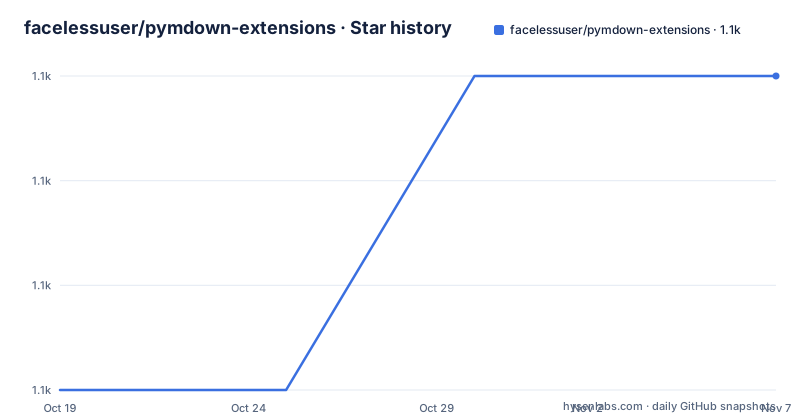
- facelessuser/pymdown-extensions1,134 ★ · +3
| Repository | 2026-10-19 | 2026-11-07 |
|---|---|---|
| facelessuser/pymdown-extensions | 1.1k | 1.1k |
3 Stars in the last 19 days, measured from the daily GitHub snapshot. Compare with other projects
Editorial analysis
Extra syntax for a library that deliberately has little
pymdown-extensions is a collection of extensions for Python Markdown, the pure Python implementation of Markdown that ships as the markdown package on PyPI. The author is Isaac Muse, the licence is MIT, and the project calls itself an extension pack in the package metadata.
The naming has a small trap in it. The distribution on PyPI is pymdown-extensions, and the import package is pymdownx, which is the directory in the repository. So you install pymdown-extensions and you import from pymdownx.
The dependency list is the first thing to look at, because it tells you how much of this is core library and how much is documentation tooling. The project requires Python 3.10 or newer, and its runtime dependencies are Python Markdown 3.6 or newer and PyYAML. There is one optional extra, called extra, that pulls in Pygments 2.19.1 or newer.
That is a small surface, and it is small on purpose. An extension for a Markdown parser has to run inside somebody else's parser and register itself, so every dependency is a compatibility risk. Markdown and PyYAML are the two pieces that the extensions genuinely need, and Pygments is the one that is optional because only the syntax highlighting related extensions care.
The README itself is short by design, and it points to the documentation site at facelessuser.github.io/pymdown-extensions for the extension documentation, with the PayPal donation link, the coverage badge, the PyPI badges and the licence section.
The build is hatchling with a custom metadata hook
The packaging configuration is where the interesting engineering decisions of this repository are visible, and the pyproject.toml is unusually explicit.
[build-system]
requires = [
    "hatchling>=1.26",
]
build-backend = "hatchling.build"

[project]
name = "pymdown-extensions"
license = "MIT"
requires-python = ">=3.10"
dependencies = [
    "Markdown>=3.6",
    "pyyaml"
]
The build backend is hatchling, and the version and the classifiers are both listed as dynamic. The version is not a number in the file, it comes from the source tree, with the hatch version source set to code and the path pointing at pymdownx/__meta__.py. The classifiers are dynamic too, which means they are generated at build time rather than maintained by hand, a common source of stale metadata in older projects.
There is a custom metadata hook, declared as [tool.hatch.metadata.hooks.custom], and the matching hatch_build.py file at the repository root is where that hook lives. Hatch's custom hook mechanism is how a project can compute metadata that the static fields cannot express, and the allow-direct-references setting is what permits a direct URL dependency in the metadata, which is a common way to pin a nightly or a fork.
The sdist and wheel targets are separated carefully. The wheel includes only the /pymdownx directory, so the installed package is the code and nothing else. The sdist includes much more: the documentation sources under docs/src/markdown with their images and the spelling dictionary, the documentation theme, the requirements directory, the package itself, the test suite with its txt, py, html, yml, css and png files, the tools directory with pymdownx_md_render.py, and the configuration files for coverage and spelling.
Typing is strict in one place and waived in another
The type checking configuration is small and reveals a lot about the shape of the code.
[tool.mypy]
files = [
    "pymdownx/blocks/block.py"
]
strict = true
show_error_codes = true

[[tool.mypy.overrides]]
module = [
    "pymdownx.superfences"
]
ignore_errors = true
Mypy runs in strict mode with error codes shown, and it is configured to check exactly one file, pymdownx/blocks/block.py. That is the block parser, the part of the library where the extension code has to talk to the internals of Python Markdown's block processing, and where type checking is worth the effort because the rules there are intricate.
The second override is the more interesting one. pymdownx.superfences has ignore_errors set to true, which is the mypy way of saying that this module is not type clean and is not going to be. Superfences is the extension that handles fenced code blocks, and it is the module that interacts most heavily with the Markdown parser's internals, so the waiver is a deliberate trade: the file is left untyped rather than being covered with ignores one line at a time.
Ruff handles the rest of the linting, with the line length set to 120. The ruff configuration also excludes build,.tox and site directories, which are generated trees.
So the typing story is: one carefully checked file, one explicitly waived module, and a line length rule for everything else. If you are contributing, that is the deal.
The documentation site is a JavaScript project
The largest part of this repository is not Python, and the top-level entries show it. There is a package.json, a gulpfile.babel.mjs, a .babelrc, a .npmrc, an .eslintrc, a .stylelintrc and a .pyspelling.yml, alongside the Python package directory pymdownx/, the tests/ directory, the docs/ directory and the tools/ directory.
The package.json is the documentation toolchain, and its version, 8.1.2, is the version of that toolchain and not of the Python package, which is at 12.3. The build script runs gulp with the babel transpiled gulpfile, with the compress, lint, revision and sourcemaps flags, and there are separate compile, clean_all and lint scripts. The dependency list is a documentation stack: Gulp 5, Babel 8 with the preset-env and register packages, Rollup with the babel and terser plugins, ESLint 10, Prettier, gulp-sass, gulp-postcss, gulp-stylelint and gulp-eslint.
The font dependencies are the tell. The Font Awesome free package, the Material Design Icons SVG set and the Primer octicons are all there, which means the documentation demonstrates icon rendering, and the icon sets have to exist locally for the offline builds and for the icon extension examples to render.
The pipeline also includes PostCSS plugins for inline SVG, pseudo classes, SCSS, sorting media queries and SVGO, so the theme is built and minified rather than hand-written CSS.
Two configuration files are worth a mention for anyone who has seen a documentation site fight back. .pyspelling.yml is the spelling dictionary, and the sdist packaging includes the dictionary directory under docs/src/markdown/dictionary, which means the spell check runs over the documentation text with a project specific word list. And zensical.yml is the configuration for the site generator, with the coverage badge pointing at codecov and the .coveragerc and .codecov.yml files at the root handling the Python side.
The test corpus ships with the source
The tests/ directory is large and, unusually, it is packaged into the sdist, which tells you what kind of testing this is.
The sdist includes tests with .txt files, .py files, .html files, .yml files, .css files and .png files. That mix is a fixture corpus rather than a unit test suite in the narrow sense. The .txt and .yml files are the natural format for Python Markdown, since the project's own test runner compares input text against expected output, and the .html files are the expected output. The .css and .png files are there for the extensions that deal with style and images, and the .html fixtures can be generated as well as stored, which points at a test harness that renders documents rather than only comparing strings.
The runner is run_tests.py at the repository root, and there is a tools/ directory with pymdownx_md_render.py, which is packaged as well. A separate render tool next to the tests is a good sign: it means the same code path that renders a document for a test is the one the project uses to render its own documentation, so the fixtures and the real output cannot drift apart.
The tools directory also contains an __init__.py, so it is a package rather than a loose folder of scripts.
The coverage side is handled by .coveragerc and the codecov badge in the README, and the .github/ directory holds the workflows. SECURITY.md is present at the root, which for a library that renders Markdown from untrusted sources is the file to read, because an extension that parses HTML or evaluates expressions is a security surface.
A fast release line on a permissive licence
The release cadence is steady. Version 12.1 was published on 2026-09-23, 12.2 on 2026-10-10 and 12.3 on 2026-10-14, and the last push was on 2026-10-19. The repository is not archived.
The version numbers follow the project's own scheme, which is a major version that tracks the Python Markdown generation the package targets and a minor version that moves with each release. The 12.x line sits on Python Markdown 3.6, and since Markdown's own releases are what the extensions extend, an upgrade of the Markdown dependency is the event that usually forces a new major version of this package.
The licence is MIT, stated in the README and in the package metadata, with the text in LICENSE.md. Note that the repository's licence classification on GitHub is reported as a custom one that cannot be categorised, so the LICENSE.md file is the reference to rely on rather than the badge.
The documentation site is the project's real user manual. The README is a hub with a documentation link, a coverage badge, the PyPI version and downloads badges, the Python versions badge, a licence badge and a donation link to the author's PayPal. The extension documentation lives at facelessuser.github.io/pymdown-extensions, and the metadata points there too, with the homepage recorded as the GitHub repository.
The project's own homepage field in the package metadata is the GitHub URL, while the hosted documentation is the facelessuser.github.io site, and the distinction is worth keeping straight if you are looking for the extension reference rather than the source.
Editorial conclusion
Adopt pymdown-extensions if you build documentation with Python Markdown and want more syntax than the core provides, in particular fenced code handling, and you can live with the extension names it registers in the Markdown namespace. Do not adopt it if you want the plain CommonMark behaviour, since several of its extensions deliberately change how standard Markdown is parsed, and do not expect a small dependency footprint beyond the Markdown and PyYAML pair, since the extras pull in Pygments. Before you start, read the extension documentation for the options you intend to enable, pin the Markdown version, since the package requires 3.6 or newer, and check the security policy if you render untrusted Markdown.
Frequently asked questions
What is pymdown-extensions and how do I import it?
It is Isaac Muse's extension pack for Python Markdown, distributed on PyPI as pymdown-extensions and imported as pymdownx. It requires Python 3.10 or newer and Python Markdown 3.6 or newer, with PyYAML as the second runtime dependency.
How is pymdown-extensions built and installed?
The build backend is hatchling, with the version read from pymdownx/__meta__.py and the classifiers generated at build time. The wheel contains only the pymdownx directory, while the sdist also carries the documentation sources, the theme, the test fixtures and the tools directory.
Which extensions are type checked in pymdown-extensions?
Mypy runs in strict mode on pymdownx/blocks/block.py, the block parser, and there is an explicit override that sets ignore_errors for pymdownx.superfences, the fenced code handling module. Ruff handles the rest with a line length of 120.
Does pymdown-extensions need Pygments?
Only for the syntax highlighting related extensions. It is declared as an optional extra called extra, requiring Pygments 2.19.1 or newer, and the core package installs without it.
How often is pymdown-extensions released?
The project ships frequently, with 12.1 on 2026-09-23, 12.2 on 2026-10-10 and 12.3 on 2026-10-14, and the last push was on 2026-10-19. The licence is MIT, and the extension documentation is published at facelessuser.github.io/pymdown-extensions.
Official sources
Add this badge to your README
If you maintain this project, the badge below links readers to this analysis and shows its maintenance status from the daily GitHub snapshot. Paste the markdown into your README; add ?metric=license or ?metric=stars to the image URL for a different field.

[](https://hysenlabs.com/projects/facelessuser-pymdown-extensions)Star history chart for your README
[](https://hysenlabs.com/projects/facelessuser-pymdown-extensions)Was this useful?