Fossify Calendar: an ad-free Android calendar that syncs over CalDAV
A simple calendar with events, customizable widgets and no ads.
At a glance
- What is it?
- A Kotlin calendar app from the Fossify family with no advertising and no tracking, distributed through Google Play, F-Droid and IzzyOnDroid, whose release notes are mostly bug fixes against CalDAV sync and home screen widgets, which tells you where the actual fragility sits.
- Who is it for?
- Fossify Calendar is a reasonable default for someone who wants their calendar on Android without handing their schedule to an advertising company, and the CalDAV support means you are not locked into Google even though a Play Store build is listed. The GPL-3.0 licence is the part to think about: it matters if you plan to ship a modified build inside a proprietary product, and it does not matter at all if you install it on your own phone.
- Can I use it commercially?
- Yes, with conditions. GPL-3.0 is a copyleft licence: if you distribute software that includes it, you must release that software's source code under the same licence. Running it internally without distributing it does not trigger that obligation.
- Is it still maintained?
- Yes. The repository last received commits 1 day ago.
- What is it written in?
- Mainly Kotlin, according to GitHub's language statistics.
Answers come from the project's GitHub data, last synced on October 23, 2026, and from our analysis. They are not legal advice.
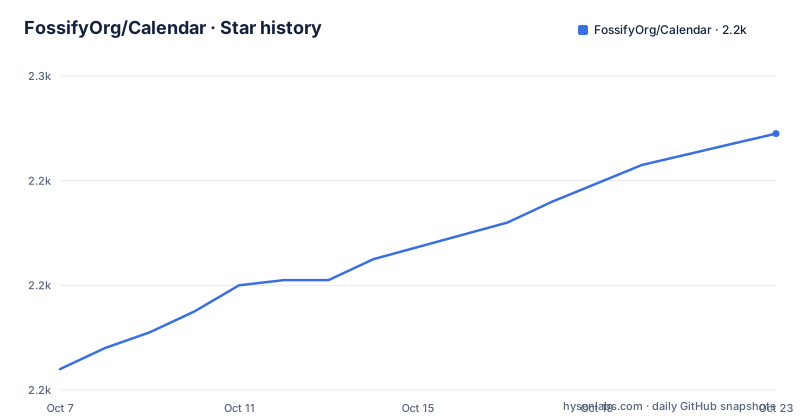
Star history
- FossifyOrg/Calendar2,249 ★ · +45
| Repository | 2026-10-07 | 2026-10-23 |
|---|---|---|
| FossifyOrg/Calendar | 2.2k | 2.2k |
45 Stars in the last 16 days, measured from the daily GitHub snapshot. Compare with other projects
Editorial analysis
What the repository actually contains
This is a standard modern Android project and the tree says so. `app/` is the application module, `build.gradle.kts` and `settings.gradle.kts` are the Kotlin DSL build files, `gradlew` and `gradlew.bat` are the wrapper scripts, and `gradle/` holds the wrapper itself. `graphics/` and `fastlane/` carry the store assets, including the screenshot set the README embeds from `fastlane/metadata/android/en-US/images/`.
Two files in that list are unusual enough to notice. `detekt.yml` configures static analysis for Kotlin at a level stricter than the Android default, and `lint.xml` does the same for the Android lint rules. Both exist because this project treats code quality as part of its identity, which fits an app whose entire pitch is being an ethical alternative to a competitor.
There is also a `.fossify/` directory at the root. That is the shared configuration layer for the family of apps, which is why there are separate sibling repositories for the file manager, the dialer, the image viewer and the notes app. Each one inherits shared settings and differs mainly in what it does.
The primary language is Kotlin and the topics are `android`, `calendar`, `foss`, `kotlin` and `open-source`, which is about as self-describing a topic list as you will find on GitHub.
Three distribution channels and what each one means
The README links three download routes, and the difference between them matters more here than for most apps. Google Play is listed first. F-Droid is second, with a badge pointing at the package page. IzzyOnDroid is third, a German F-Droid repository that carries apps Play does not.
For a privacy-focused app, the Play build is a slightly awkward fit. The code is open and the README promises no ads, no tracking and no intrusive permissions, but a Play-installed build arrives through Google's distribution, which means Google knows the app was installed on your account. Whether that matters is a personal calculation, and it is the reason the F-Droid badge is not merely decorative.
F-Droid builds from source using the `fastlane/` and `scripts/` directories in the tree, which is why those directories are checked in at all. IzzyOnDroid adds another distribution channel for people who want to avoid both Play and the default F-Droid repository.
The project is on Reddit and Telegram as well as GitHub, and the Fossify organisation hosts several related apps. None of that is a technical fact, but it does indicate the project is run as a community rather than as a single maintainer's side project.
Reading 1.11.0 as a map of what breaks
The most recent release, 1.11.0 on 2026-09-23, is more informative than a feature list would be, because almost every entry is a repair. Grouping them by cause tells you what a user actually experiences.
The largest group is home screen widgets: monthly calendar widgets now respect the grid preference, multi-day widget event rendering was fixed in the monthly widget, and the weekly view had an invisible current time indicator plus a stuck zoom level. So if you use a Fossify Calendar widget, expect that the 1.10.x line had real bugs in exactly that surface and that 1.11.0 is where they were addressed.
The second group is sync. CalDAV sync on Android 11 and later was broken and is fixed, and the release before that, 1.10.2, fixed a crash in the event editor specifically when CalDAV sync was disabled. Two consecutive releases touching CalDAV in opposite directions suggests a feature that has been hard to get right across Android versions.
The additions are modest: holidays for New Zealand, updated holiday data, and improved holiday management. The release also fixed event text readability on colored backgrounds and updated translations.
The feature list, minus the marketing
Stripped of the promotional framing, the README describes a fairly conventional calendar. Events have times, durations, reminders and advanced repetition rules. Views switch between daily, weekly, monthly, yearly and an event list. Filters exist for narrowing what you see.
The parts that go beyond a default calendar are three. First, celebration import, which brings in birthdays, anniversaries, public holidays and other special dates, so the app can tell you about a national holiday without you maintaining a separate reminder. Second, the personalisation of event alerts: custom sounds, looping audio streams and vibration patterns per event. Looping audio for a recurring event is a small feature that a certain kind of user cares about a great deal.
Third, the widget and theme support, described as calendar widgets and themes for the home screen, with dynamic theming in the interface.
On sync, the README names Google Calendar, Outlook, Nextcloud and Exchange. Google Calendar and Outlook are reached through their own APIs, while Nextcloud and Exchange speak CalDAV. The presence of Nextcloud in that list is the tell that this app is aimed at people who run their own server, not only at people with a Google account.
GPL-3.0 and what it obliges you to do
The licence is GPL-3.0, and for an end user installing the app from a store it changes nothing about their life. There is no copyleft obligation triggered by running a program, and no source-sharing requirement for someone who just wants a calendar on their phone.
It matters in two situations. If you modify the app and distribute your build to other people, you must offer those people the corresponding source under GPL-3.0. And if you embed parts of this code into a proprietary product that you distribute, the GPL terms reach that product too. For a fork inside a closed-source commercial app, that is a real constraint.
This is worth contrasting with the MIT-licensed approach taken by many small utility libraries. GPL-3.0 is the right choice for an app that wants to guarantee its users can always get the source, and it is the reason the project can promise the absence of tracking as a matter of licence-backed permanence rather than company policy. Someone who does not like the deal can fork it, and the deal obliges them to keep offering it.
For anyone evaluating this as a base to build on, that is the line to read the licence at.
Where the README stops and the code begins
There is no build-from-source walkthrough in this repository, and for an end user that is not a gap so much as a signal. The README is a store page: three badges, a feature list, three community links and a screenshot row. Everything you need to evaluate the app is in it, and nothing about the build process is.
The documentation that does exist is for contributors. `CONTRIBUTING.md` is present in the tree, alongside `CODEOWNERS`, a `CHANGELOG.md`, `detekt.yml` and `lint.xml`. There is a `keystore.properties_sample` file, which tells you release signing is configured through a properties file that is deliberately not committed, and a `Gemfile` and `Gemfile.lock` at the root, which is a fastlane dependency set rather than a Ruby application.
The issue tracker is the honest signal about maturity. There are 315 open issues on a repository of this size, which is a lot for an app of this scope, and it points to a project that receives a steady stream of bug reports and feature requests from a user base larger than the maintainer count. Several of the fixes in 1.11.0 reference issue numbers directly, so the maintainers do work through the queue.
The last push was on 2026-09-28, five days after the 1.11.0 release, on a repository that is not archived. That is the cadence of a project with someone actively working on it.
Editorial conclusion
Fossify Calendar is a reasonable default for someone who wants their calendar on Android without handing their schedule to an advertising company, and the CalDAV support means you are not locked into Google even though a Play Store build is listed. The GPL-3.0 licence is the part to think about: it matters if you plan to ship a modified build inside a proprietary product, and it does not matter at all if you install it on your own phone. Version 1.11.0 came out on 2026-09-23 and the last push was on 2026-09-28, so the project is current. Install from F-Droid rather than Play if avoiding proprietary distribution binaries matters to you, then turn on CalDAV against your own server and check the weekly view zoom before you trust it.
Frequently asked questions
Does Fossify Calendar show ads or track you?
The README states the app is ad-free and private, with no ads, no tracking and no intrusive permissions, and that your events remain yours. The GPL-3.0 licence is the mechanism behind that promise, since a fork must be offered with the corresponding source. Installing from F-Droid or IzzyOnDroid avoids the Play Store distribution channel entirely.
What calendar services can Fossify Calendar sync with?
The README names Google Calendar, Outlook, Nextcloud and Exchange. Google and Outlook are reached through their own APIs, while Nextcloud and Exchange use CalDAV. Version 1.11.0 fixed CalDAV sync on Android 11 and later, and 1.10.2 had fixed a crash in the event editor when CalDAV was disabled.
Does Fossify Calendar have home screen widgets?
Yes, and they are the area the release notes spend the most effort on. Version 1.11.0 made monthly calendar widgets respect the grid preference and fixed multi-day widget event rendering in the monthly widget. It also fixed an invisible current time indicator and a stuck zoom level in the weekly view.
Can Fossify Calendar import holidays and birthdays?
Yes. The README describes importing holidays and special dates so you do not miss a birthday or anniversary, and mentions celebration import as a feature. Version 1.11.0 added holidays for New Zealand, updated the holiday data, and improved holiday management.
What license does Fossify Calendar use?
GPL-3.0, stated in the repository metadata with a `LICENSE` file in the tree. Running the app as an end user carries no obligation. Modifying it and distributing your build requires offering the corresponding source, and embedding it in a proprietary distributed product brings GPL terms to bear on that product.
Where can I download Fossify Calendar?
From Google Play, from F-Droid, or from the IzzyOnDroid repository, all three linked in the README. The F-Droid and IzzyOnDroid builds are built from source using the `fastlane/` and `scripts/` directories in the repository, which is a better fit for the app's privacy pitch than the Play listing.
Official sources
Add this badge to your README
If you maintain this project, the badge below links readers to this analysis and shows its maintenance status from the daily GitHub snapshot. Paste the markdown into your README; add ?metric=license or ?metric=stars to the image URL for a different field.

[](https://hysenlabs.com/projects/fossifyorg-calendar)Star history chart for your README
[](https://hysenlabs.com/projects/fossifyorg-calendar)Was this useful?