homebridge-unifi-protect: Native HomeKit Access to UniFi Protect
:video_camera: Complete HomeKit integration for all UniFi Protect device types with full support for most features including HomeKit Secure Video, and more. https://homebridge.io
At a glance
- What is it?
- homebridge-unifi-protect bridges UniFi Protect cameras, doorbells, sensors, lights, chimes, and viewports into HomeKit through Homebridge. It offers HomeKit Secure Video and realtime events, but requires a compatible controller, FFmpeg, and careful attention to Node.js and camera dependencies.
- Who is it for?
- Adopt homebridge-unifi-protect if your security hardware is managed by UniFi Protect and you want its cameras, doorbells, and sensors represented directly in HomeKit without assembling several accessory plugins. Do not adopt it if your devices are managed outside Protect, your host cannot meet the Node.js requirement, or you need a supported motion stream for an ONVIF camera that has no AI Port.
- Can I use it commercially?
- Check first. The repository uses a licence we do not classify automatically, so read its LICENSE file before any commercial use.
- Is it still maintained?
- Yes. The repository last received commits 1 day ago.
- What is it written in?
- Mainly TypeScript, according to GitHub's language statistics.
Answers come from the project's GitHub data, last synced on November 7, 2026, and from our analysis. They are not legal advice.
Star history
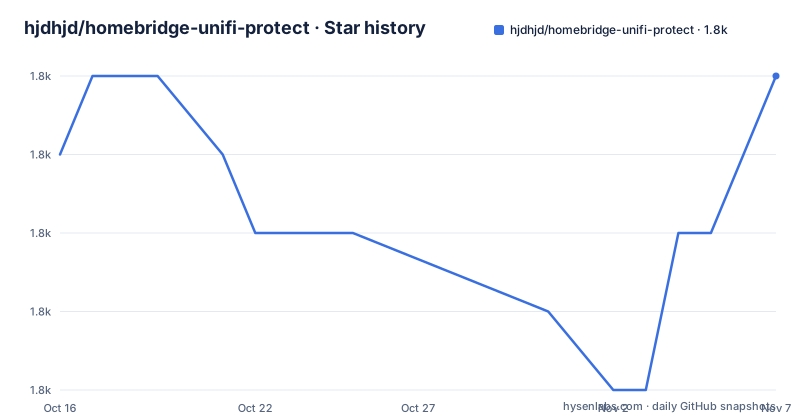
- hjdhjd/homebridge-unifi-protect1,797 ★ · +1
| Repository | 2026-10-16 | 2026-11-07 |
|---|---|---|
| hjdhjd/homebridge-unifi-protect | 1.8k | 1.8k |
1 Stars in the last 22 days, measured from the daily GitHub snapshot. Compare with other projects
Editorial analysis
Why homebridge-unifi-protect Exists for UniFi Protect
UniFi Protect already has a capable management application, but HomeKit users need their Protect equipment represented inside the Home accessory environment. homebridge-unifi-protect fills that gap for cameras, doorbells, chimes, lights, sensors, and Viewports. Its intended audience is a Homebridge operator who controls UniFi Protect hardware through a local controller and wants HomeKit Secure Video, commonly abbreviated HKSV, without installing a separate HKSV bridge.
The project says that discovery is automatic once the controller address and local account credentials are configured. Supported Protect devices are then made available in HomeKit. The README describes support for all generally available Protect device types, with model-dependent capabilities such as tamper detection and ambient-light sensing. Doorbell accessories also cover rings, two-way audio, package cameras, and onboard LCD messages.
This is a broad bridge rather than a small camera accessory. Its scope makes sense for a mixed Protect installation, especially when one HomeKit home should contain not only video feeds but also motion, sensors, lights, and doorbells. Conversely, an installation with only a few cameras but no interest in HKSV or Protect-wide accessory discovery may find the plugin broader than necessary.
Realtime Events, Discovery, and the Video Data Path
The architecture has two distinct paths. One path discovers Protect equipment and exposes supported capabilities as HomeKit accessories. The other handles realtime camera events. According to the README, the project reverse engineered the UniFi OS realtime events API, allowing events such as motion to reach HomeKit as they occur rather than depending on periodic polling.
Video delivery is built around FFmpeg and a standing timeshift buffer for each camera. The README says this buffer supports live viewing, HomeKit Secure Video, and snapshots. The plugin therefore sits between HomeKit and UniFi Protect media rather than merely copying device metadata into HomeKit. That distinction matters for HKSV because HomeKit needs a usable camera stream and event model, not just an accessory definition.
The plugin can also derive motion information from an AI Port for supported third-party cameras. This broadens the device boundary, but it does not make every third-party camera equivalent to a native Protect camera. Camera discovery, stream access, motion detection, and transcoding are separate concerns, and support depends on which capabilities the Protect controller exposes.
The source is TypeScript and is packaged as an ES module. The repository includes a Homebridge web interface under `homebridge-ui`, configuration schema files under `config.schema.json`, documentation under `docs/`, and build configuration in `tsconfig.build.json`. This layout indicates that plugin initialization, schema validation, UI configuration, documentation, and compiled TypeScript are separate concerns.
HomeKit Secure Video Requirements and Device Boundaries
HKSV support for UniFi Protect cameras depends on FFmpeg. The README explicitly states that no additional HKSV plugin or software is needed beyond FFmpeg, but FFmpeg is still a required runtime dependency. The package metadata identifies `node >=22.20` and `homebridge >=2.0.0`, which means an older Homebridge host may need upgrading before this plugin version can be used.
Native Protect cameras are the primary target. The README states that complete HKSV support is available for all Protect cameras and that third-party cameras can receive HKSV when paired with an AI Port. The reason is specific: Protect does not expose a motion sensor for an ordinary ONVIF camera, and HKSV requires the missing motion capability. An AI Port supplies that capability.
That limitation makes AI Port support a hard boundary rather than an optional enhancement. An ONVIF camera can be visible and usable for live viewing without being fully equivalent for HKSV. Buyers should determine whether each third-party camera has an associated AI Port before assuming that ONVIF support alone enables event-driven recording.
The README also reports different live-view start times depending on hardware acceleration. It names Apple Macs with Intel or Apple Silicon, Intel Quick Sync Video CPUs, and Raspberry Pi 4 as supported acceleration platforms. Without acceleration or on slower systems, it gives a longer expected startup range. These are project-authored claims rather than independent measurements, so they should not be treated as guarantees for a particular host.
Installing homebridge-unifi-protect Through Homebridge
The README points users to Homebridge and links the package on npm as `homebridge-unifi-protect`. The normal first setup should therefore follow the installation workflow provided by the Homebridge environment in use.
Before installing, confirm that the Homebridge host meets the package requirement for `node >=22.20` and `homebridge >=2.0.0`. Ensure that FFmpeg is available because the README identifies it as necessary for HomeKit Secure Video. Then install `homebridge-unifi-protect` through the Homebridge plugin installation process, and restart Homebridge if that process requires a restart.
The repository does not provide enough visible documentation here to support an exact `npm install` command, service-management command, or platform-specific FFmpeg installation command. Adding one would risk publishing flags or paths that are not documented by the project. The first configuration step is better performed through Homebridge Config UI, whose web interface the README describes as the place to explore advanced plugin options.
After installation, open Homebridge Config UI, locate the UniFi Protect plugin configuration, and enter the Protect controller hostname or IP address plus the local username and password required by that controller. The README says these are the only required values for its default setup. Saving the configuration should initiate device discovery. The expected result is that supported Protect devices appear as HomeKit accessories, after which they can be assigned to the appropriate HomeKit home.
Configuring Cameras, Sensors, and Multiple Controllers
The minimal configuration is attractive because it avoids requiring a manually maintained camera list. The README says the defaults are intended for most installations, while advanced users can consult `docs/FeatureOptions.md` for additional controls. This arrangement puts a simple path first without removing options for users who need to tailor exposure, filtering, or behavior.
The package description claims support for multiple controllers. That makes the plugin relevant to sites where Protect hardware is split across more than one controller, but the visible README excerpt does not provide a complete multi-controller configuration example. The first setup should therefore confirm that each controller is reachable from the Homebridge process and that its intended devices appear before adding HomeKit automations.
Device support is broader than cameras. The feature list includes chimes, doorbells, lights, sensors, and Viewports, as well as SuperLink accessories such as fobs, glass-break sensors, and relays. Availability remains model-dependent for capabilities such as tamper and ambient-light sensors. Administrators should inspect the accessories generated in Config UI rather than assuming that every current Protect device feature has a direct HomeKit equivalent.
For doorbells, the documented feature set includes ring events, two-way audio, package camera support, and LCD messages. The README warns that two-way audio has caveats and links to `docs/Doorbell.md`, so a deployment that depends on conversations through a specific doorbell should read that document and test the chosen hardware before relying on it in an automation.
Maintenance, Release Cadence, and Licence Review
The repository is not archived, and its last push was on 2026-07-19. Recent releases include v8.1.0 on 2026-07-19, v8.0.1 on 2026-07-15, and v8.0.0 on 2026-07-09. That sequence shows several releases within a short period, which can be useful when resolving compatibility changes but may also require attention to upgrade notes when adopting a major version.
Version 8 may carry migration considerations because two point releases followed the major release within ten days. The README does not document an upgrade procedure or rollback, so an operator should not assume that downgrading one version will restore a previous configuration. This matters for a plugin that publishes accessories and consumes controller events. Preserving the Homebridge configuration and reviewing release notes before an upgrade is more defensible than improvising an undocumented rollback.
Licence metadata requires a direct check. `package.json` declares `ISC`, while GitHub classifies the repository licence as a custom licence that it cannot identify and points to `LICENSE.md`. Because those signals do not match cleanly, review `LICENSE.md` and the package metadata before redistribution, modification, or commercial deployment. This is a licence identification step, not legal advice.
Where homebridge-unifi-protect Is the Wrong Choice
The clearest wrong-tool case is equipment outside the UniFi Protect ecosystem. The plugin discovers devices managed by a Protect controller; it does not present itself as a general driver for arbitrary cameras or smart-home accessories. A mixed estate may still need another bridge for devices that Protect cannot manage.
Third-party ONVIF cameras are the second boundary. They can be added to Protect, but the controller does not expose motion sensing for them, so HKSV is unavailable unless an AI Port supplies the missing capability. An organization that prioritizes HKSV and cannot add the required AI Port should choose a camera integration designed for its motion-event path.
Host requirements can also rule it out. Node.js 22.20 or later is explicit in `package.json`, and FFmpeg is required for HKSV. Systems limited to an older Node.js release, unsupported Homebridge version, or a host where FFmpeg cannot be provisioned should resolve those constraints before installation.
As an alternative, separate Homebridge plugins can be combined so that one handles Protect metadata or events and another handles video streaming. The difference is architectural: homebridge-unifi-protect keeps discovery, Protect realtime events, camera streaming, HKSV, and related accessories in one project, while a multi-plugin setup divides those responsibilities. That division can provide narrower component choices, but it also requires coordinating discovery, event state, buffering, recording behavior, and configuration across projects. homebridge-unifi-protect is preferable when its unified model matches the installed hardware and HomeKit requirements.
Editorial conclusion
Adopt homebridge-unifi-protect if your security hardware is managed by UniFi Protect and you want its cameras, doorbells, and sensors represented directly in HomeKit without assembling several accessory plugins. Do not adopt it if your devices are managed outside Protect, your host cannot meet the Node.js requirement, or you need a supported motion stream for an ONVIF camera that has no AI Port. Verify first that your Protect controller is reachable, that Homebridge runs on Node.js 22.20 or later, that FFmpeg is available, and that each device and event type you need is exposed correctly before migrating automations.
Frequently asked questions
What does homebridge-unifi-protect add to HomeKit?
It exposes supported UniFi Protect cameras, doorbells, chimes, lights, sensors, and Viewports through Homebridge. It also documents HomeKit Secure Video support with FFmpeg as the required external component.
What are the system requirements for homebridge-unifi-protect?
`package.json` requires Node.js 22.20 or later and Homebridge 2.0.0 or later. The README also identifies FFmpeg as necessary for HomeKit Secure Video.
Does homebridge-unifi-protect support third-party ONVIF cameras with HKSV?
Not by ONVIF support alone. Protect does not expose a motion sensor for these cameras, so HKSV is unavailable unless the camera is paired with an AI Port that supplies motion detection.
Official sources
Add this badge to your README
If you maintain this project, the badge below links readers to this analysis and shows its maintenance status from the daily GitHub snapshot. Paste the markdown into your README; add ?metric=license or ?metric=stars to the image URL for a different field.

[](https://hysenlabs.com/projects/hjdhjd-homebridge-unifi-protect)Star history chart for your README
[](https://hysenlabs.com/projects/hjdhjd-homebridge-unifi-protect)Was this useful?