huggingface/dataset-viewer: the backend behind the Hub's dataset table
Backend that powers the dataset viewer on Hugging Face dataset pages through a public API.
At a glance
- What is it?
- This repository is the API service that pre-computes and serves the paginated table, filters, search and statistics shown on Hugging Face dataset pages. The frontend is not here, and neither is the Hub, so adopting it means adopting a component of someone else's platform.
- Who is it for?
- Dataset-viewer provides the backend and API for browsing supported Hugging Face Hub datasets. The hosted API supports some private and gated datasets with authentication and account eligibility; the Hub frontend is not included in this repository.
- Can I use it commercially?
- Yes. Apache-2.0 is a permissive licence: you can use, modify and sell software built on it, as long as you keep its copyright and licence notices.
- Is it still maintained?
- Yes. The repository last received commits 2 days ago.
- What is it written in?
- Mainly Python, according to GitHub's language statistics.
Answers come from the project's GitHub data, last synced on November 15, 2026, and from our analysis. They are not legal advice.
Star history
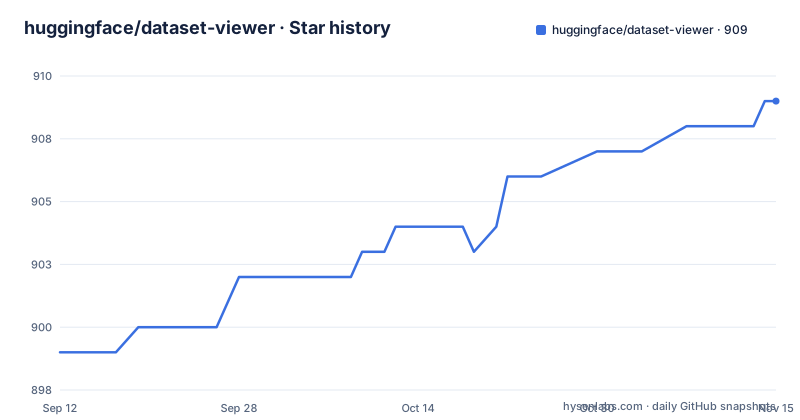
- huggingface/dataset-viewer909 ★ · +10
| Repository | 2026-09-12 | 2026-11-15 |
|---|---|---|
| huggingface/dataset-viewer | 899 | 909 |
10 Stars in the last 64 days, measured from the daily GitHub snapshot. Compare with other projects
Editorial analysis
The gap between a dataset file and a browsable table
A dataset on the Hub is a set of files. Parquet, CSV, JSON, whatever the uploader chose. That is fine for a training script and useless for a person who wants to know what is inside before downloading gigabytes. The dataset viewer closes that gap: the dataset page shows a table of the contents in pages of 100 rows, with navigation buttons, filtering, search and basic statistics. None of that is computed on demand in the browser, because parsing a large Parquet file per page request would be absurd. The README states plainly that this repository is the backend that provides the dataset viewer with pre-computed data through an API, for supported datasets on the Hub. The API provides an `is-valid` endpoint to check availability. So the audience is narrow and specific. It is the team running the Hub, contributors to that backend, and developers who want to read the same pre-computed rows and statistics through the public API rather than downloading the source files. If you are a model trainer looking for a data loading library, this is the wrong repository and you will know within a minute of reading the README.
Pre-computation is the architecture, and the API is the seam
The important design fact is in one clause of the README: the backend serves pre-computed data. The viewer does not ask the backend to parse a dataset and wait. Something has already done the parsing and stored the result, and the API hands back pages of it. That is why the table can paginate at 100 rows and why search and filtering feel immediate. It also explains the failure mode users actually hit. When a dataset page shows an error, the README treats it as a support question rather than a bug: open a discussion on the Hub and tag @lhoestq, because that is the most efficient way to fix it. A failed dataset can result from data, configuration or backend issues; use the project's reporting guidance and investigate the actual error. The second seam is the split between backend and frontend. The README says the frontend viewer component is not part of this repository and is not open source, as the rest of the Hub. What you can read, build and modify is the API side. What renders the table on huggingface.co is closed. A self-hosted deployment would require separate frontend and integration work; assess the backend deployment requirements before deciding whether it fits.
Installing the backend for development
The README does not put install commands in the main file. It points to DEVELOPER_GUIDE.md for installing the backend and starting to contribute to the code, and to CONTRIBUTING.md for the contribution process. That is the honest answer to how you get it running: the instructions live in a separate document in the repository, and this article will not invent commands that are not in the README. What the README does give is the shape of the work. The primary language is Python, the licence is Apache-2.0, and the default branch is main. The API itself is documented at huggingface.co/docs/dataset-viewer, and dataset configuration is documented separately at huggingface.co/docs/hub/datasets-data-files-configuration. That second link matters more than it looks. If the viewer is not showing your dataset correctly, the fix is often in how the data files are configured, not in the backend code. Read the configuration page before filing anything. The README also lists the community channels: a Datasets category on the forum, a Discord channel, and GitHub issues for code and documentation problems.
The release history is the real caveat
The most useful signal is not in the README at all. It is the release list. The most recent tagged release is 0.21.0, dated 2023-02-14. Before that, 0.20.2 in April 2022 and 0.20.1 two days earlier. The repository's last push is 2026-09-07, and it is not archived. Read those two facts together and the picture is clear: the code is active, the version tags are not. This is a service deployed continuously by its operator, not a library with a stable release cadence. If your plan is to depend on a pinned version number, you have nothing recent to pin. If your plan is to call the hosted API, the version tags are irrelevant to you. That distinction decides whether the release gap is a problem or a non-issue, and it is the first thing to settle before writing any integration code. A team that needs semantic versioning guarantees from this repository will not find them in the tag list.
Contributing is the intended use, and the boundaries are explicit
The README spends its length on two things: where to report problems and how to contribute. It invites ideas, answers to questions, bug reports, enhancement proposals, documentation improvements and fixes, with CONTRIBUTING.md as the reference. The bug-reporting split is unusually concrete. A viewer error on a dataset page goes to a Hub discussion with @lhoestq tagged. A larger error that looks like a backend bug, or a feature request, goes to a GitHub issue. That routing tells you what the maintainers consider in scope. Data problems are handled through the platform's discussion system, where the dataset owner is present. Code problems are handled in the repository. The README also notes that starring and watching the GitHub repository is how you follow updates, and points to the forum and Discord for questions. None of this is a support contract. There is no stated SLA, no stated response time, and no stated policy on how quickly an issue is triaged. If your organisation needs a guaranteed fix window for a viewer error, that guarantee is not written down anywhere in this material.
What to use instead, and why the difference matters
If the goal is to browse and query datasets locally, including private ones, the natural comparison is the Hugging Face datasets library plus a local exploration tool, or a notebook that loads the dataset and prints its head. The difference in approach is the whole point. The datasets library reads files on demand in your own process, with your own memory and CPU, and works on any dataset you can point it at, including ones that never touch the Hub. Dataset-viewer does the opposite: it pre-computes results centrally so that a web page can serve pages of 100 rows to many users without re-parsing anything, and its hosted API is designed around Hub datasets, including eligible private and gated datasets with authentication. One is a library you run. The other is a service someone else runs. If you need a viewer for data that is not on the Hub, this repository does not solve your problem, and the closed frontend means you cannot simply lift the whole experience either. You would be rebuilding the frontend against the documented API, which is a legitimate path only if your data is on the Hub and you want a different presentation of it.
Licence and the cost of staying current
The repository is Apache-2.0, which permits use, modification and redistribution under the terms of that licence, including a patent grant and a requirement to preserve notices. This is a summary of the identifier, not legal advice; read the LICENSE file and the Apache-2.0 text for the actual terms, and talk to counsel if you plan to redistribute a modified backend. The licence covers this repository. It does not cover the Hub, the frontend viewer component, or the hosted API, all of which are separate from what is licensed here. On maintenance cost, the repository supports one observation and no more: the repository is not archived and was pushed recently, so the code is being worked on, while the newest tagged release is from February 2023. Anyone building against the API should treat the documentation page as the contract to watch, because that is where the endpoints are described. Anyone building the backend from source should treat DEVELOPER_GUIDE.md as the entry point, because the README delegates installation there and says nothing further about it.
Editorial conclusion
Dataset-viewer provides the backend and API for browsing supported Hugging Face Hub datasets. The hosted API supports some private and gated datasets with authentication and account eligibility; the Hub frontend is not included in this repository. For self-hosting or non-Hub data, inspect the backend's deployment and integration requirements. Check the current API documentation and dataset validity before depending on an endpoint.
Frequently asked questions
Can I run the Hugging Face dataset viewer locally?
This repository is the backend only. The frontend viewer component is explicitly not part of it and is not open source, in the same way the rest of the Hub frontend is not. You can run the rows, search and statistics API yourself; the table you see on a dataset page is served by closed code.
What does dataset-viewer need to run locally?
A .env file and a Docker Compose stack: MongoDB for both the cache and the queue, object storage for assets and cached assets, and nine exported ports, admin 8181, API 8180, rows 8182, search 8183, SSE API 8185, worker 8186, webhook 8187, reverse proxy 8100 and Mongo 27060. The start target rebuilds everything and waits 20 seconds for health.
Which environment values have no defaults?
ASSETS_BASE_URL and CACHED_ASSETS_BASE_URL are both marked as having to be set. The compose file suggests pointing them at the local reverse proxy, using port 8000 in its example, while the Makefile exports the reverse proxy as 8100.
Where does dataset-viewer fetch token keys in development?
The Makefile exports the JWT public key location as https://hub-ci.huggingface.co/api/keys/jwt, with a second variable for additional keys left empty, so a local API trusts keys from the continuous integration host rather than from the production hub.
What should I do when the viewer errors on my dataset page?
Open a discussion on that dataset on the Hub and tag @lhoestq to reach the team, which the document calls the most efficient route. Open a GitHub issue instead when you believe the viewer has a genuine bug or you want to propose a feature.
Official sources
Add this badge to your README
If you maintain this project, the badge below links readers to this analysis and shows its maintenance status from the daily GitHub snapshot. Paste the markdown into your README; add ?metric=license or ?metric=stars to the image URL for a different field.

[](https://hysenlabs.com/projects/huggingface-dataset-viewer)Star history chart for your README
[](https://hysenlabs.com/projects/huggingface-dataset-viewer)Was this useful?