wolvic: an open source browser for standalone VR and AR headsets
A fast and secure browser for standalone virtual-reality and augmented-reality headsets.
At a glance
- What is it?
- Wolvic is a full browser built for headsets, from the Igalia team, running on Mozilla's GeckoView engine. The interesting part of its documentation is the build: the engine has to be compiled locally for WebXR to work at all, and the headset SDKs live in a private repository that outsiders can only partly replicate.
- Who is it for?
- wolvic suits a developer who wants to work on a browser that runs inside a headset, and who is prepared to build GeckoView from source because the prebuilt engine does not support WebXR. It is aimed at people who want to browse on a headset, though getting a WebXR-capable build takes real work.
- Can I use it commercially?
- Yes, with conditions. MPL-2.0 is a weak copyleft licence: you can use it inside commercial and closed-source software, but if you distribute changes to its own files, you must publish those changes under the same licence.
- Is it still maintained?
- Yes. The repository last received commits 2 days ago.
- What is it written in?
- Mainly Java, according to GitHub's language statistics.
Answers come from the project's GitHub data, last synced on November 7, 2026, and from our analysis. They are not legal advice.
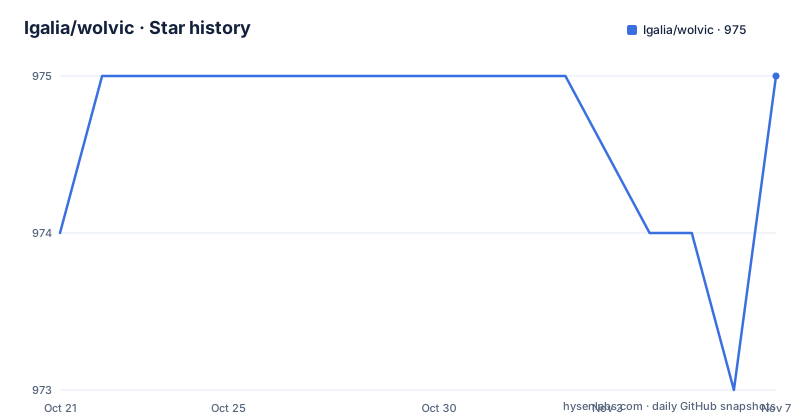
Star history
- Igalia/wolvic975 ★ · +1
| Repository | 2026-10-21 | 2026-11-07 |
|---|---|---|
| Igalia/wolvic | 974 | 975 |
1 Stars in the last 17 days, measured from the daily GitHub snapshot. Compare with other projects
Editorial analysis
A browser whose whole reason to exist is the headset
The project's goal is stated in one line: to create a full-featured browser exclusively for augmented reality and virtual reality headsets.
That exclusivity is the design constraint that shapes everything else. A headset browser is not a desktop browser with a virtual screen attached, because the interaction model is different: there is no pointer, the field of view is the viewport, and the browser chrome competes with the content for a very small amount of screen. The build variants list at the end of the setup instructions, one per device, is the practical statement of that constraint, because a browser for a headset has to be built for that headset's runtime, its controller model and its SDK.
The engine underneath is Mozilla's GeckoView, the same engine that powers Firefox for Android, and that choice is what makes the project interesting to a browser developer. Wolvic is not a WebView shell with a headset skin over it. It is a real browser engine running in an environment that few engines are tested on.
The project is maintained by Igalia, an engineering consultancy, and it has a public site, a Mastodon account, a Twitter account and an email address, plus a FAQ for people who want to learn more. The licence is MPL 2.0, which is the file-level copyleft Mozilla's own code uses, and that is the natural choice for a project that is a downstream of GeckoView.
The release history shows two lines running in parallel: a 1.9 and then a 1.10 release, and a separate 1.4 Chromium build published on the same day as the 1.10. The Chromium line is the one that matters for anyone who wants the browser without the engine build, and the readme points at a separate document for its setup instructions.
Why you have to build GeckoView yourself
The setup instructions open with a problem, and it is the single most important thing to understand before you start.
After a change in the GeckoView protocol, WebXR sessions will not work with the prebuilt Maven GeckoView libraries, so GeckoView has to be built manually by applying patches from a separate patches repository.
There are two ways to do that, and the readme compares them plainly. Using a local Maven repository is described as quite cumbersome, and Gradle dependency substitutions as not at all cumbersome. The substitution route is the one the project supports, and it is configured through flags in a local properties file.
The flags name the paths for a local GeckoView checkout, with a path to the source directory and, optionally, one to the object directory. If you want to build for more than one architecture at the same time, there is a separate flag for the 64-bit object directory alongside the one for the other architecture. The readme points at the relevant Mozilla bug for the background, and notes that this assumes you have already built, packaged and published your local GeckoView, with the substitution script carrying the latest instructions for doing that.
Two practical warnings come with it. You have to run a Gradle sync in Android Studio after changing the local properties file, and only then do the substituted dependencies show up in the modules list so you can edit them from a single window. And a developer workflow wiki page has step by step instructions for building GeckoView.
The result is that the quick start is not the working start. A build made from the prebuilt libraries is fine for the two-dimensional browser and nothing more, which is exactly what the local development section says.
The third-party repository you may not be able to clone
The second obstacle is the headset SDKs, and the readme is upfront about who can get them.
The project itself is cloned with a plain git clone, and the third-party repository is cloned into a directory called third_party. That repository is only available to Igalia members. If you have the relevant SDK but not access to the repository, you can place the files yourself.
The list of what to place is precise. The Oculus SDK goes in a directory with Android and Include folders, the Huawei SDK in a directory with the two ARM architecture folders and an include folder, the Pico OpenXR Mobile SDK in its directory, the Snapdragon Spaces loader, and the Huawei Vision Glass IMU library as an archive file. The readme also notes that the directory contains other things that are not necessary for Wolvic.
That directory is itself a git repository with its own branches, and the readme gives the update procedure using the pushd and popd shell builtins:
pushd third_party && git fetch && git checkout main && git rebase origin/main && popdThe submodules then need initialising, and the readme notes that you may need to set up two-factor authentication for the command line first:
wolvic/third_party$ git submodule update --init --recursiveThe practical reading is that building for Oculus, Huawei, Pico or VIVE requires SDKs that are not in the public repository, so a contributor without Igalia access is limited to the devices whose SDKs they can supply, which is a real constraint on what you can work on.
One build variant per device, and a JDK floor
The build variants are named after the devices, and the list is the clearest summary of the project's scope.
There is a variant for the Oculus Quest, one for Huawei VR Glasses, one for the Pico 4 with the Pico Neo 3 marked as untested, one for the Lynx R1, one for the Lenovo A3 under the Spaces name, one for the Huawei Vision Glass, one for Magic Leap 2 that the readme says should work for any other Android device using OpenXR, and one covering the PFDM YVR1, YVR2 and MR headsets.
And there is a variant for testing on a non-VR device, which runs on standard Android phones without a headset. That one matters more than it looks, because it is how you work on the browser itself without owning a headset.
Building for Huawei requires access to its SDKs, which are not included in the repository, so that variant is out of reach for most contributors.
The tooling requirements are modest and stated. The command line version of the Gradle wrapper requires JDK 11, and the readme has a specific diagnostic for the most common failure: if Gradle does not understand your Java version, check which version you are running, because you are probably on an older JDK that will not work. The build is driven from Android Studio, and the readme says the build may fail and then prompt you to install dependencies, in which case you keep doing what it suggests. The device is chosen through the build variants panel in the tools window.
For local development there is a documented shortcut. By default the project downloads prebuilt GeckoView libraries from Mozilla's Maven repository, where WebXR will not work, and that default is fine for testing the two-dimensional browser or for working on browser features. If you want WebXR, you do the local substitution described earlier.
Three build properties that save real time
The last section of the setup documentation is the most practical, and all three items are properties you add to a user properties file.
The first lets you install a development build and a production build on the same device at the same time, by enabling a development application identifier suffix:
simultaneousDevProduction=trueThe second is about release builds. The readme notes that local release builds can be useful to measure performance or debug problems that only happen in release builds, and that instead of dealing with release keys you can make testing easier with another property:
useDebugSigningOnRelease=trueWith the obvious caveat attached, that release packages generated with a debug keystore cannot be used for production.
The third is a build performance fix rather than a convenience, and the explanation is a good one. By default each build is assigned an auto-generated version code derived from the date the build was created, and that behaviour interferes with Gradle's caching mechanism and unnecessarily re-runs the tasks that depend on the version code, which leads to longer build times. The workaround is to use a static version code that persists between builds.
For a project whose build involves compiling a browser engine, build time is not a small thing, and this is the kind of detail that only appears after somebody has measured it.
Project shape and where the pieces live
The repository layout matches an Android application with an engine attached, and a few entries are worth pointing at.
There is an app directory for the application itself, a libs directory for the libraries, a tools directory, a gradle directory with the wrapper, the gradle properties file and the build script, a settings script, and a l10n configuration file, which is how the localisation of a browser is managed. There is a data review directory for a multi-window policy, an issue template directory, a code of conduct and a contributing guide.
Two files stand out. CHROMIUM.md is the separate setup documentation for the Chromium backend, and the readme points at it instead of the main instructions, which keeps the two build systems from tangling in one document. And the third-party hash file at the root is a small but important detail, because the third-party repository is a separate clone that has to be kept in step, and a hash file lets the build check that it is.
The last push was on 2026-10-13, the default branch is main, and the releases show the two-track pattern, with 1.9 in May 2026, 1.10 and the Chromium build in October, and the Chromium line releasing on the same day as the GeckoView line.
So the two questions for anyone evaluating this are practical. If you want to work on the browser, the Chromium backend is the fast route in. If you want to work on WebXR in a headset, you are signing up for the GeckoView build, and the local substitution is the first thing you will be doing.
Editorial conclusion
wolvic suits a developer who wants to work on a browser that runs inside a headset, and who is prepared to build GeckoView from source because the prebuilt engine does not support WebXR. It is aimed at people who want to browse on a headset, though getting a WebXR-capable build takes real work. Before you start, read the local substitution section rather than the quick start, because the quick start produces a build without WebXR, and check whether your headset SDK is one you can supply yourself, since the third-party repository is restricted to the company.
Frequently asked questions
What is wolvic and what is it built on?
Wolvic is a full-featured browser built exclusively for augmented reality and virtual reality headsets, maintained by Igalia. It runs on Mozilla's GeckoView engine, and the project also ships a separate Chromium-based build with its own setup instructions.
Why does WebXR not work with the prebuilt GeckoView libraries?
Because a change in the GeckoView protocol means the prebuilt Maven libraries no longer support WebXR sessions, so GeckoView has to be built manually with the patches from the project's patches repository. The supported route is Gradle dependency substitution, configured with flags in a local properties file.
Can I build wolvic without access to the headset SDKs?
Partly. The third-party repository holding the Oculus, Huawei, Pico, Spaces and Vision Glass SDK files is only available to Igalia members, so you have to supply the SDKs yourself by placing them in the expected directories. There is also a build variant that runs on standard Android phones without a headset, which is the practical way to test the browser itself.
What are the user.properties settings used for in wolvic?
Three documented ones. simultaneousDevProduction lets a development build and a production build sit on the same device, useDebugSigningOnRelease makes local release builds easier by signing them with a debug keystore, and a static version code avoids the auto-generated date based version code that breaks Gradle caching and lengthens build times.
Official sources
Add this badge to your README
If you maintain this project, the badge below links readers to this analysis and shows its maintenance status from the daily GitHub snapshot. Paste the markdown into your README; add ?metric=license or ?metric=stars to the image URL for a different field.

[](https://hysenlabs.com/projects/igalia-wolvic)Star history chart for your README
[](https://hysenlabs.com/projects/igalia-wolvic)Was this useful?