papermill: turning a Jupyter notebook into something you can run on a schedule
📚 Parameterize, execute, and analyze notebooks
At a glance
- What is it?
- A Python library that injects parameters into a notebook, executes it, and writes out a new one with the results, aimed at data work that has to be repeated rather than run once by hand.
- Who is it for?
- papermill earns its place in a repository that already has notebooks and has stopped wanting to click through them. The value is narrow and concrete: one tagged cell becomes a parameter surface, one command becomes a repeatable run, and one output notebook becomes an artifact with the inputs baked in.
- Can I use it commercially?
- Yes. BSD-3-Clause is a permissive licence: you can use, modify and sell software built on it, as long as you keep its copyright and licence notices.
- Is it still maintained?
- Yes. The repository last received commits 17 days ago.
- What is it written in?
- Mainly Python, according to GitHub's language statistics.
Answers come from the project's GitHub data, last synced on October 20, 2026, and from our analysis. They are not legal advice.
Star history
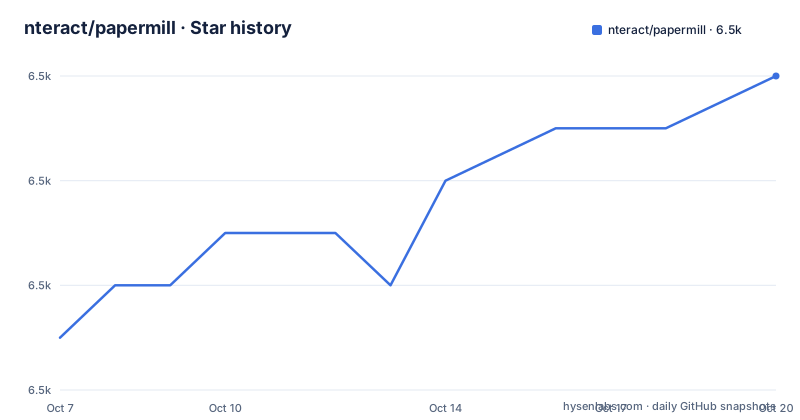
- nteract/papermill6,494 ★ · +5
| Repository | 2026-10-07 | 2026-10-20 |
|---|---|---|
| nteract/papermill | 6.5k | 6.5k |
5 Stars in the last 13 days, measured from the daily GitHub snapshot. Compare with other projects
Editorial analysis
What the library actually does to a notebook
The mechanism is small enough to describe in one paragraph, and that is the project's real strength. You tag one cell in a Jupyter notebook with the tag `parameters`, and papermill treats the values assigned in that cell as defaults. At execution time it inserts a new cell tagged `injected-parameters` immediately after, containing the values passed on the command line, which overwrites the defaults. If no cell carries the `parameters` tag, the injected cell goes in at the top of the notebook instead. On a rerun the tool finds the `injected-parameters` cell from the previous run and replaces it rather than stacking a second one, so the output notebook does not accumulate one injection cell per execution.
The README frames this as an *opinionated* approach, and the word is doing real work. There are other ways to parameterize a notebook, including editing the JSON directly or running a preprocessing script. papermill settles on a cell tag, which means the contract is visible inside the notebook file itself rather than in a separate config. A reader who opens the notebook in Jupyter sees the defaults in one cell and, after a run, the values that were actually used in the cell directly beneath it.
The repository description calls the tool a way to parameterize, execute, and analyze notebooks, while the README's own list of what papermill lets you do names only the first two. Both statements come from the project. The README's version is the one to trust for scope, since it is the longer and more specific document, but the gap is worth knowing about if you were expecting analysis or diffing tooling here.
Installing it, and what the optional bundles drag in
Installation is a single pip line from the command line:
pip install papermillThe base install is deliberately small. The `requirements.txt` in the root lists click, pyyaml, nbformat, nbclient, tqdm, requests, entrypoints and tenacity, and `pyproject.toml` adds a conditional `aiohttp>=3.9` that applies only on Python 3.12. Nothing about running notebooks on a cluster or talking to cloud storage is in that list, which is why a plain install starts quickly and defers every remote-storage decision to later.
The extras exist for the cases the README cares about. For IO dependencies you can name individual bundles such as `s3` or `azure`, or ask for all of them, and adding Black to format the parameter cells is a separate extra:
pip install papermill[all]The `all` extra in `pyproject.toml` is a good place to see what you are agreeing to install. It pulls in boto3 for S3, the azure-datalake-store and azure-storage-blob packages, gcsfs for Google Cloud, pyarrow, pygithub, and Black. Two things stand out. pyarrow is a heavy binary dependency to carry in a data pipeline image for the sake of one IO path, and `black>=19.3b0` is a floor rather than a pin, so what you get depends on the resolver. GitHub reports the project under BSD-3-Clause while `pyproject.toml` records the license simply as BSD, which is the same grant stated less precisely.
Supported Python versions are declared in two places and they agree: `requires-python = ">=3.10"` and classifiers for 3.10 through 3.13. The README adds a policy note rather than a version list, saying the library currently supports 3.10 and up and will drop minor versions as the Python project sunsets them. That is a reasonable maintenance stance for a library whose execution engine is nbclient, which tracks Jupyter's own support window.
Five ways to pass parameters, and why the distinction matters
There are two entry points, the Python API and the command line, and they take the same parameter dictionary. The Python call is the shortest useful thing in the README:
import papermill as pm

pm.execute_notebook(
   'path/to/input.ipynb',
   'path/to/output.ipynb',
   parameters = dict(alpha=0.6, ratio=0.1)
)
The CLI equivalent writes to cloud storage rather than a local path, which is the shape most pipeline usage ends up taking:
$ papermill local/input.ipynb s3://bkt/output.ipynb -p alpha 0.6 -p l1_ratio 0.1The five input flags differ almost entirely in how they interpret types, and this is where the README earns its length. `-p` is documented as interpreting values that look like booleans or numbers as such, so `0.6` arrives as a float and `True` as a bool. `-r`, also spelled `--parameters_raw`, sets the same values one at a time but keeps them as strings even when they look numeric. `-f` reads a YAML file, `-y` takes a YAML string inline, and `-b` takes that same YAML string base64-encoded.
$ papermill local/input.ipynb s3://bkt/output.ipynb -y "
alpha: 0.6
l1_ratio: 0.1"
The YAML forms matter for anything that is not a scalar. Because they parse real YAML, a parameter can be a list or a mapping, which is how you pass an array of values or a small configuration object into a notebook:
$ papermill local/input.ipynb s3://bkt/output.ipynb -y "
x:
    - 0.0
    - 1.0
    - 2.0
    - 3.0
linear_function:
    slope: 3.0
    intercept: 1.0"
If you find yourself reaching for `-b`, you are working around a shell quoting problem rather than choosing a different input style, which is a fair sign to move the values into a file with `-f` instead.
Where the notebooks live: the name handler list
Both arguments to the CLI are paths, and the scheme in front of a path decides which handler reads it. The README enumerates them: `local` for the local filesystem, `http://` and `https://` for the network protocols, `s3://` for Amazon S3, `adl://` and `abs://` for Azure Data Lake Store and Azure Blob Store, and a Google Cloud entry that the document opens but does not finish naming the scheme for.
That incompleteness is the one place in this README where a reader is left hanging, and it is the kind of gap worth resolving before you build a pipeline on it. The AWS S3 path is the best documented, and it comes with a companion note about credentials: if you use more than one AWS account and have your credentials configured properly, set `AWS_PROFILE` to choose between them.
$ AWS_PROFILE=dev_account papermill local/input.ipynb s3://bkt/output.ipynb -p alpha 0.6 -p l1_ratio 0.1The `optional-dependencies` in `pyproject.toml` line up with the handler list rather than with the base requirements: boto3 and gcsfs appear under `all`, while the Azure packages get their own narrower bundle. That is a coherent design, since you only need the client library for a backend you actually address. The one inconsistency is pyarrow, which sits in `all` and is not obviously tied to any single handler in the list.
The practical consequence for a reader is that the base install supports local and HTTP paths out of the box, and everything else needs the matching extra. That is a defensible split, but it means a Dockerfile that installs plain papermill and then writes to `s3://` will fail at run time rather than at build time.
What the repository says about itself, and where it disagrees
The GitHub topics for the project list `julia`, `r` and `scala` alongside `python`, `jupyter` and `notebooks`. The repository is a single Python package: the language field reports Python, the tree holds one `papermill/` directory, and both the source layout and the install instructions are Python-only. The extra language topics read as a trace of the wider ecosystem rather than a claim about this codebase, and there are separate language ports that explain the association. The checkable fact is simpler: what is in this tree is Python.
The other repository-level detail worth knowing is the release history. GitHub reports 196 open issues against 462 forks and 6,485 stars, and the tree contains a `CHANGELOG.md` rather than a `releases/` convention, with version control declared as dynamic in `pyproject.toml`. Version numbers therefore come from the packaging tooling and the changelog, not from GitHub release tags, and if you are pinning papermill you pin the PyPI version rather than a commit.
Two structural files sit alongside the package. `DEVELOPMENT_GUIDE.md` covers working on papermill itself, and `binder/` holds notebook launchers behind mybinder badges, which is how the README demonstrates the tool interactively without asking anyone to install anything. The `docs/` directory is where the reference material lives, and `requirements/` is split into constraint files, a pattern usually used to pin a tested environment for continuous integration rather than to constrain installs.
What papermill is good at, and what it does not try to do
The honest summary is that papermill is a notebook runner with a parameter interface, not a notebook framework. It does not convert notebooks to scripts, it does not schedule them, it does not diff two runs, and it does not manage environments per run. What it does is take a notebook with a tagged cell, execute it with different values, and leave behind an output notebook that records both the inputs and the results.
That is a narrower thing than the project's star count might suggest, and narrower things are easier to trust. The strongest case for it is a report notebook that already exists and already works interactively, which someone now needs to run for each month end or each region. Converting that to a script would mean rewriting working analysis code, and running it by hand means remembering to change four cells in the right order. papermill does neither: it runs the notebook you have.
The part to check before committing is the output. Because the tool writes a new notebook rather than a result file, a schedule that runs one notebook a day produces a growing pile of notebooks, and nothing in the README addresses retention, comparison between runs, or what to do when a run fails halfway. Those are pipeline concerns the library leaves to the surrounding system. If your team already treats notebooks as versioned artifacts and reads the output cell by cell, that fits the design. If you want a number in a database, you will be writing that step yourself, and the injected-parameters cell is the audit trail that tells you which inputs produced it.
Editorial conclusion
papermill earns its place in a repository that already has notebooks and has stopped wanting to click through them. The value is narrow and concrete: one tagged cell becomes a parameter surface, one command becomes a repeatable run, and one output notebook becomes an artifact with the inputs baked in. What the README does not settle is how it behaves when a notebook has no parameters cell, how failures surface, and how the extra IO bundles affect a production install, and those are the pages on papermill.readthedocs.io you will end up reading. Start with the two argument forms, `-p` for typed values and `-y` or `-f` for anything structured, and treat the name handlers as the feature to check first against where your notebooks actually live.
Frequently asked questions
How do I pass a YAML file of parameters to papermill?
Use the `-f` flag, also spelled `--parameters_file`, pointing at the file on disk. The README documents `-f`, `-y` for an inline YAML string, and `-b` for a base64-encoded one as three ways to supply structured values. Because these parse real YAML, a parameter can be a list or a mapping rather than a single scalar.
What is the difference between -p and -r when setting parameters?
`-p` (`--parameters`) interprets values that look like numbers or booleans as those types, while `-r` (`--parameters_raw`) keeps every value as a string even when it could be read as a number or a bool. Use `-r` when a downstream cell needs the literal text rather than a parsed value.
Does papermill work without a cell tagged parameters?
Yes. The README states that if no cell is tagged `parameters`, the injected cell is inserted at the top of the notebook instead of after a defaults cell. Tagging a cell is still the documented way to declare defaults, since without one there are none to overwrite.
Does papermill add a new injected cell every time I rerun it?
No. The README says that on a rerun papermill reuses the `injected-parameters` cell from the prior run, replacing the old cell with the new run's inputs rather than adding a second one. That is what keeps an output notebook readable after several executions.
Official sources
Add this badge to your README
If you maintain this project, the badge below links readers to this analysis and shows its maintenance status from the daily GitHub snapshot. Paste the markdown into your README; add ?metric=license or ?metric=stars to the image URL for a different field.

[](https://hysenlabs.com/projects/nteract-papermill)Star history chart for your README
[](https://hysenlabs.com/projects/nteract-papermill)