Infinigen pins Python 3.11, Blender 4.2, and a Docker X11 ritual
Infinite Photorealistic Worlds using Procedural Generation
At a glance
- What is it?
- Princeton's procedural scene generator ships four separate tracks (nature, indoors, articulated, v2) that each document themselves somewhere different. The install is exact-pinned down to the interpreter minor version, and the Makefile's GPU path runs through a privileged Docker container wired to your X server.
- Who is it for?
- Infinigen fits people who already work inside Blender's Python API and need large volumes of generated geometry for computer vision or simulation. It does not fit someone expecting a one-command download, and it does not fit a machine whose default interpreter is newer than 3.11.
- Can I use it commercially?
- Yes. BSD-3-Clause is a permissive licence: you can use, modify and sell software built on it, as long as you keep its copyright and licence notices.
- Is it still maintained?
- Yes. The repository last received commits 3 days ago.
- What is it written in?
- Mainly Python, according to GitHub's language statistics.
Answers come from the project's GitHub data, last synced on November 14, 2026, and from our analysis. They are not legal advice.
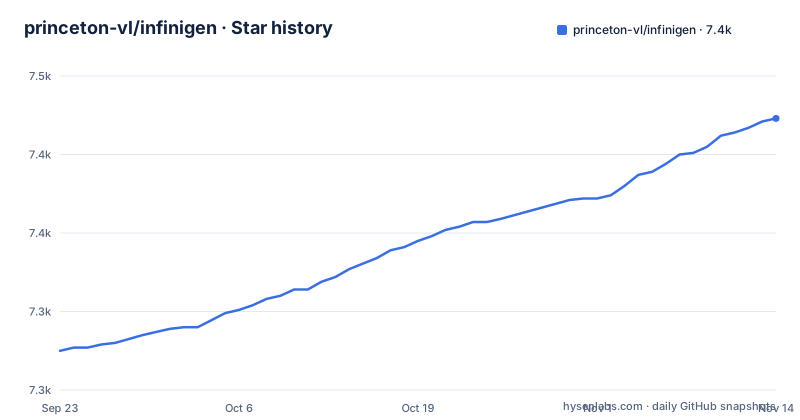
Star history
- princeton-vl/infinigen7,423 ★ · +148
| Repository | 2026-09-23 | 2026-11-14 |
|---|---|---|
| princeton-vl/infinigen | 7.3k | 7.4k |
148 Stars in the last 52 days, measured from the daily GitHub snapshot. Compare with other projects
Editorial analysis
Four tracks, four different places to read the instructions
The README is a routing table, not a manual. Its Getting Started section splits into four tracks, and each one sends you somewhere different. V2 points at hosted documentation on infinigen.cs.princeton.edu. Articulated points at a branch README on articulated-stable, with alternatives on articulated-initial and a latest doc at docs/simulation/ExportingToSimulators.md. Indoors points at indoors-stable, indoors-initial, and docs/HelloRoom.md. Nature points at nature-stable, nature-initial, and docs/HelloWorld.md. The "latest" links (docs/simulation/ExportingToSimulators.md, docs/HelloRoom.md, docs/HelloWorld.md) live on the default branch, main, while the stable and initial links point at other branches. If you follow a link expecting instructions for what you just cloned, you end up reading documentation for a different generation of the codebase.
Python 3.11 is an equality constraint, not a floor
pyproject.toml writes the interpreter requirement as ==3.11.*, admitted through the requires-python field. That is not a lower bound you can grow out of; it covers one minor version of CPython and nothing else. The Dockerfile honors the pin by construction with `conda create --name infinigen python=3.11 -y`, so the environment the project ships with is already correct. If your default interpreter is 3.12 or 3.13, pip refuses rather than negotiates. The same style governs the rest of the list: bpy==4.2.0 is an exact pin with no range at all, while procfunc is held at >=0.37.0,<0.38. A comment above the dependency list explains the policy, saying floors are covered by a compatibility workflow while caps represent known breaks. Read that as a warning about the caps, which are frozen because something broke, not because the maintainers stopped testing upward.
Blender arrives through pip as a Python module, not an application
The dependency list never tells you to install Blender. It pins bpy==4.2.0, which is Blender's own Python module, shipped as a wheel into whatever environment you build. Everything downstream runs inside the conda environment named infinigen rather than inside a desktop Blender you already have. That distinction matters for anyone who has used Blender interactively and expects the same menus, the same UI context, the same add-on ecosystem. A headless module gives you operators and the data API, not an interface, so the environment has to be created correctly from the start rather than assembled around existing tooling. The optional vis extra reinforces this by pulling in einops, numba for ground truth visuals, and pyglet below version 2 for trimesh_scene.show(), which is the one entry point in the list where a display is expected again.
The terrain extra quietly reinstalls the v1 tree
terrain is listed under optional dependencies, and its first line is infinigen[infinigen1], carrying an inline comment that terrain is a v1 feature. Pulling that extra does not add a capability so much as drag a second version of the project into the same environment. The remainder of the extra pins landlab at 2.6.0, allows pyrender below 0.2.0, and holds setuptools under 81 because landlab still needs pkg_resources, which setuptools removed at version 81. That last pin is a maintenance liability with an expiry date attached: it exists to keep an old code path alive for a hydrology library rather than because Infinigen calls that code itself. Anyone assembling a fresh environment has to accept a capped setuptools, which can collide with other tools in that environment expecting the newer release.
Submodules are gone, so the compiled pieces are a manual step
setup.py still defines ensure_submodules, but the function checks whether .gitmodules exists and returns immediately when it does not. Its own comment gives the reason: submodules were removed, and optional components including OcMesher, infinigen_gpl, and the customgt dependencies are now cloned manually if needed. The repository top level still lists a .gitmodules file, so that early return does not apply to a clone that contains it. Four environment variables decide what a build attempts: INFINIGEN_MINIMAL_INSTALL and INFINIGEN_INSTALL_TERRAIN default to True, while INFINIGEN_INSTALL_CUSTOMGT and INFINIGEN_INSTALL_PERF default to False. The matching Makefile targets are separate shells rather than install steps: `make terrain` runs scripts/install/compile_terrain.sh, `make customgt` runs compile_opengl.sh, and `make flip_fluids` runs compile_flip_fluids.sh. Expect to discover missing pieces at render time rather than at pip install time.
Docker is the GPU path, and it hands your X server to containers
The Makefile treats GPU work as a container problem. `make docker-build` tags an image as infinigen_docker_img, and `make docker-build-cuda` passes APP_IMAGE=nvidia/cuda:12.0.0-devel-ubuntu22.04 so the Dockerfile takes its CUDA branch and installs the GL development libraries alongside a fresh Miniconda. `make docker-setup` is the step that catches people out: it installs x11-xserver-utils, touches ~/.Xauthority, runs xauth add and xauth nlist, and finishes with `xhost +local:docker`, which grants local Docker containers access to your X server. `make docker-run` then starts the container with --privileged, --net=host, --ipc=host, and --gpus=all, mounting /tmp/.X11-unix and the host outputs directory at /opt/infinigen/outputs. On a headless machine there is no DISPLAY to forward and the setup target has nothing to attach to.
The newest tag is an alpha, and the tree moves under you
This project names its own generations in the release tags, which makes tag order load-bearing. The newest tag, 2.0.0a3, shipped on 2026-10-08, after v2.0.0a1 on 2026-07-15 as the first alpha of the 2.0 overhaul. Ahead of it, v1.19.0 on 2025-11-14 carried the name Infinigen Articulated update. An alpha tag means the v2 path described in the hosted documentation is not a stable contract, so pinning your expectation to that tutorial means rewriting it when the shape changes. The repository is not archived, and the last push landed on 2026-11-02, so the tree is changing while you read this. The consequence is that version numbers and documentation drift independently: an install that resolved last week can behave differently from one resolved today on the same branch name.
Five things the documentation never answers
None of the four Getting Started sections contains a runnable command, so there is no hello-world snippet to copy from the front page. The Dockerfile names only the CUDA base image it branches on, not a GPU model or driver version. The repository ships examples/clay_orbit/, examples/flying_indoor/ and examples/house_tour/, and the Getting Started sections never say how to invoke them. None of that is a dealbreaker, but each one is an unanswered question you inherit.
Editorial conclusion
Infinigen fits people who already work inside Blender's Python API and need large volumes of generated geometry for computer vision or simulation. It does not fit someone expecting a one-command download, and it does not fit a machine whose default interpreter is newer than 3.11. Before committing, check three things: whether the track you want lives on a stable branch separate from main, whether your GPU path needs the X11 setup the Makefile performs, and whether you can accept a capped setuptools alongside an alpha v2 line. Then read the branch README you were actually sent to, not the main one.
Frequently asked questions
What is Infinigen?
Infinigen is described as Infinite Photorealistic Worlds using Procedural Generation. It is a Python project under BSD-3-Clause with the Blender Python module pinned as a dependency, hosted at infinigen.org.
how to use infinigen
The README routes each track to separate instructions: hosted documentation for V2, and branch READMEs for articulated-stable, indoors-stable, and nature-stable, with docs for HelloRoom and HelloWorld. No runnable first-render command appears on the front page.
What does Infinigen require before it will install?
The requires-python field is set to ==3.11.*, so one Python minor version is admitted, and bpy is pinned at 4.2.0 with no range. You build a new interpreter environment rather than reusing your default one, following the conda create step in the Dockerfile.
How does Infinigen reach a GPU?
Through Docker. `make docker-build-cuda` selects the nvidia/cuda:12.0.0-devel-ubuntu22.04 base image, and `make docker-run` starts the container with --gpus=all and a DISPLAY forwarded from the host after `make docker-setup` configures X authority.
Official sources
Add this badge to your README
If you maintain this project, the badge below links readers to this analysis and shows its maintenance status from the daily GitHub snapshot. Paste the markdown into your README; add ?metric=license or ?metric=stars to the image URL for a different field.

[](https://hysenlabs.com/projects/princeton-vl-infinigen)Star history chart for your README
[](https://hysenlabs.com/projects/princeton-vl-infinigen)Was this useful?