Dash User Contributions: the pull request process and what the README leaves to the wiki
Dash repo of user contributed docsets
At a glance
- What is it?
- Kapeli/Dash-User-Contributions collects community-built docsets for the Dash API documentation browser. Installing a listed docset goes through Dash's own preferences panel, while contributing one requires a specific directory layout, a tar archive, a docset.json file, and a pull request.
- Who is it for?
- This repository is worth using when a Dash user needs documentation for a tool Dash's built-in index does not include. Installing takes only Dash's preferences panel.
- Can I use it commercially?
- Not without permission. GitHub finds no licence file in the repository, and without a licence all rights are reserved by default: you may read the code but not reuse it. Check the README, or ask the authors, before using it.
- Is it still maintained?
- Yes. The repository last received commits 49 days ago.
- What is it written in?
- Mainly Python, according to GitHub's language statistics.
Answers come from the project's GitHub data, last synced on November 7, 2026, and from our analysis. They are not legal advice.
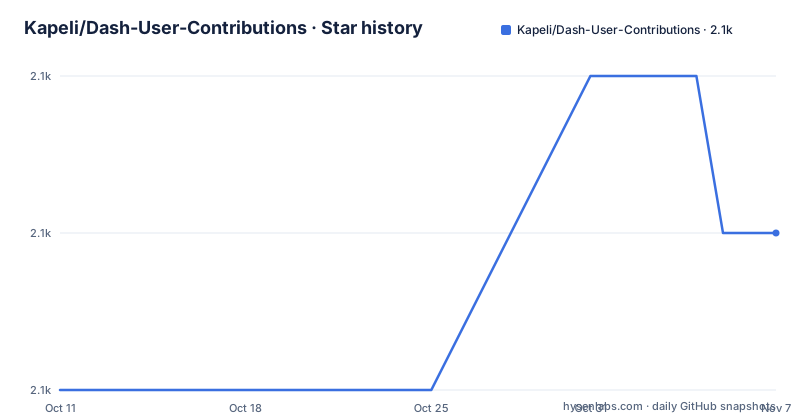
Star history
- Kapeli/Dash-User-Contributions2,057 ★ · +1
| Repository | 2026-10-11 | 2026-11-07 |
|---|---|---|
| Kapeli/Dash-User-Contributions | 2.1k | 2.1k |
1 Stars in the last 27 days, measured from the daily GitHub snapshot. Compare with other projects
Editorial analysis
One directory per docset, served through Dash's built-in download panel
Kapeli/Dash-User-Contributions is a repository that holds community-built documentation sets for Dash, an API documentation browser at kapeli.com/dash. When Dash's built-in index lacks a tool's documentation, users generate a docset and submit it here. Every accepted docset lands inside the docsets/ directory, named after the tool it documents.
6 items sit at the top level: .github/, .gitignore, .travis.yml, README.md, Sample_Docset/, and docsets/. Sample_Docset/ is the contribution template; copy it into docsets/ and rename it rather than starting from a blank directory, because the sample contains the docset.json and icon files that the submission requires. Python is the primary language recorded for the repository, which reflects the generation scripts contributors write to produce a docset from a documentation source.
Its last push was on 2026-09-20, and the repository carries no GitHub releases. The Dash documentation browser at kapeli.com/dash is where users install and manage docsets, including contributed ones.
Installing a contributed docset goes through Dash's preferences, not through git
Anyone who wants a contributed docset installs it entirely inside Dash: open Preferences, select Downloads, then choose the User Contributed tab. Dash handles retrieval from there, with no git clone or direct download from GitHub required.
Distribution changes what the repository contains at any moment. After a docset reaches the project's CDN, the archive file is removed from GitHub automatically, so at any given time the repository holds a mix of archives awaiting that distribution pass and directory entries where the archive is already gone.
Downloading a .tgz directly from the repository is unreliable for this reason, since the file may be absent after the CDN pass has already run. Anyone wanting a specific docset should retrieve it through Dash's preferences rather than through the repository.
Generation starts at kapeli.com/docsets, and feed instructions there are out of scope
Generation happens outside this repository, starting with the instructions at https://kapeli.com/docsets for building a docset from a documentation source. One note in those instructions is easy to miss: the feed configuration sections are irrelevant to a pull request here, since the feed mechanism and the contribution workflow are entirely separate paths. Working through the feed steps wastes time without changing what the submission requires.
After generation, the docset must pass every required criterion on the Docset Contribution Checklist in the project wiki, plus as many optional ones as possible. The 2 wiki documents governing submission, the Docset Contribution Checklist and the Versioning Guidelines, are linked from the README but not reproduced there, and both must be read before submitting.
With those prerequisites done, the workflow is: fork the repository, clone it locally, then follow the 6 directory setup steps to prepare the submission.
Archiving the docset: the tar command, the .DS_Store flag and the _ naming rule
The 6 directory setup steps end with a tar archive, and the README documents this exact command.
tar --exclude='.DS_Store' -cvzf <docset name>.tgz <docset name>.docsetPassing --exclude='.DS_Store' strips macOS metadata files from the archive, since each subdirectory inside the .docset can accumulate a .DS_Store file on macOS and without the flag those files end up packaged with the documentation.
Directory naming follows a fixed rule: replace every space in the docset name with the _ character, and do not append _Docset at the end. ExtJS is the correct form, not ExtJS_Docset. The docset.json file inside the directory must match, with the docset name field using the same _ substitution as both the directory name and the archive filename; any mismatch between those three is a source of rejected submissions.
2 icon sizes are optional, but the 100 MB ceiling closes one submission path
Each docset directory accepts 2 icon files: icon.png at 16x16 pixels and [email protected] at 32x32 pixels. Submissions without icons are valid; if none is available, delete the sample icon files rather than inserting a placeholder, because the README allows that path explicitly.
Archives over GitHub's 100 MB file limit cannot go through a standard pull request. The submission path for an oversized archive is a GitHub issue, where the approach gets worked out case by case. No detail on what that alternative involves is provided, and no guidance on reducing archive size is given.
Whether a given docset stays under 100 MB depends entirely on the source documentation's volume. A large API with many examples and images can push an archive past that limit, and no compression options or size-reduction strategies appear anywhere in the contribution instructions.
What disqualifies a submission from the contributor reward offer
Contributing a docset that required writing a custom generation script from scratch earns a free copy of Dash. To claim it, include an email address in the pull request. Docsets produced with doc2dash, javadocset or similar existing tools do not qualify; only submissions where the generation logic had to be built from scratch, because no existing tool covered the documentation format, are eligible.
How long the free copy lasts, whether it is tied to the submitted docset or transferable, and which version of Dash it covers are not stated anywhere in the contribution instructions.
For anyone whose documentation source already has a working generator, the docset submission remains valid and no free copy of Dash applies. Before writing a generation script from scratch, check whether doc2dash or a similar tool already handles the format at kapeli.com/docsets; if it does, use it and skip the reward claim.
2 CI files coexist at the top level, and the wiki holds criteria the README omits
2 files appear together at the top level, .github/ and .travis.yml, yet no description of automated checks, expected review timelines or how to respond to a failing validation appears in the README. A contributor submitting a pull request cannot tell from the README what automated step, if any, will examine the submission.
Required criteria and versioning rules live in the 2 wiki documents, not in the README. A submission that satisfies everything visible in the README can still be rejected on checklist items only the wiki describes, which makes reading both wiki pages before generating the docset worthwhile.
Bug reports and docset requests go to GitHub issues, with a link to open a new issue at the top of the README alongside a note that help is available through it. If a pull request stalls without feedback, the issue tracker is the documented channel for the project.
Editorial conclusion
This repository is worth using when a Dash user needs documentation for a tool Dash's built-in index does not include. Installing takes only Dash's preferences panel. Contributing is more work: read the wiki checklist before generating anything, verify the archive stays under 100 MB, and do not assume a free copy of Dash applies unless the generation script was written from scratch, since doc2dash and javadocset contributions do not qualify. Before writing a custom generator, check whether an existing tool covers the format at kapeli.com/docsets. The wiki checklist, not the README, defines the required criteria for a successful submission.
Frequently asked questions
How do I install a docset from Dash User Contributions?
Open Dash's Preferences, select Downloads, and choose the User Contributed tab. Dash downloads the docset through its own channel without requiring a GitHub account or any git operations.
How do I contribute a docset to Dash User Contributions?
Generate a docset following the instructions at kapeli.com/docsets, satisfy the Docset Contribution Checklist in the project wiki, archive the .docset directory with the tar command in the README, and submit a pull request with the archive, a docset.json file, and optional icon files.
Do icons have to be included when contributing a Dash docset?
No. If no icon is available, delete the sample icon files rather than providing a placeholder. Icons are optional for a submission.
How do I get a free copy of Dash for contributing a docset?
Include your email address in the pull request. Only contributions that required writing a custom generation script from scratch are eligible; docsets built with doc2dash, javadocset or similar existing tools do not qualify.
What is the file size limit for a contributed docset archive?
GitHub's 100 MB file limit applies. Archives that exceed that size cannot go through a standard pull request; open a GitHub issue to arrange an alternative submission path.
Official sources
Add this badge to your README
If you maintain this project, the badge below links readers to this analysis and shows its maintenance status from the daily GitHub snapshot. Paste the markdown into your README; add ?metric=license or ?metric=stars to the image URL for a different field.

[](https://hysenlabs.com/projects/kapeli-dash-user-contributions)Star history chart for your README
[](https://hysenlabs.com/projects/kapeli-dash-user-contributions)Was this useful?