RisohEditor: A Free Win32 Resource Editor with Broad Format Support
Another free Win32 resource editor
At a glance
- What is it?
- RisohEditor is a free, open-source resource editor for Win32 development, supporting RC, RES, EXE, and DLL files, including UTF-16. It targets Windows XP through 10 and ReactOS, but its licensing is undocumented, which may affect adoption.
- Who is it for?
- Adopt RisohEditor if you need a free, lightweight resource editor for legacy Windows targets (XP to 10) and ReactOS, and if you work with RC, RES, EXE, or DLL files, including UTF-16 resources. Avoid it if you require a clearly defined open-source license, as the repository lists NOASSERTION and the README only points to a LICENSE.txt without stating the terms.
- Can I use it commercially?
- Check first. The repository uses a licence we do not classify automatically, so read its LICENSE file before any commercial use.
- Is it still maintained?
- Yes. The repository last received commits 21 days ago.
- What is it written in?
- Mainly C++, according to GitHub's language statistics.
Answers come from the project's GitHub data, last synced on October 22, 2026, and from our analysis. They are not legal advice.
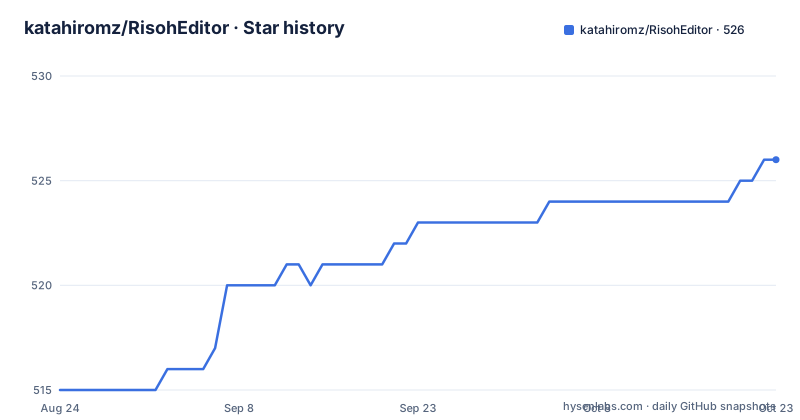
Star history
- katahiromz/RisohEditor526 ★ · +11
| Repository | 2026-08-24 | 2026-10-22 |
|---|---|---|
| katahiromz/RisohEditor | 515 | 526 |
11 Stars in the last 59 days, measured from the daily GitHub snapshot. Compare with other projects
Editorial analysis
What RisohEditor Solves and Who It Is For
RisohEditor addresses a narrow but persistent problem in Win32 development: editing the binary resources embedded in executables and DLLs without a full Visual Studio installation. It is for developers who maintain legacy Windows applications, need to tweak icons, dialogs, strings, or version info in existing binaries, or who build resource files in environments where the proprietary tools are unavailable. The README states it can read and write RC, RES, EXE, and DLL files, and it supports UTF-16 resource files, which is useful for projects that use non-ASCII text. The target audience is clearly Win32 developers, not those working on UWP or .NET, as the tool is specifically for the classic Windows API. Given its support for Windows XP and ReactOS, it also appeals to hobbyists and developers targeting older or alternative Windows-compatible systems.
How It Works: Reading and Writing Resources
The core mechanism is direct manipulation of the resource section in PE files and the corresponding RC and RES formats. The README does not detail the internal architecture, but based on the project's purpose, it parses the resource tree, allows editing of individual resource entries, and writes them back. The support for multiple formats implies a conversion layer: you can load an EXE, edit a dialog template, and save as RC or RES, or vice versa. The inclusion of a custom message compiler, mcdx, suggests it can handle message tables, which are a specific resource type. The README references a separate repository, katahiromz/WonRes, which is described as a Win32 resource data manipulator with encryption and decryption features. This hints that RisohEditor may use WonRes for low-level resource data handling, though the exact integration is not specified. The documentation is thin on data flow, so users must rely on the tool's behavior rather than a detailed spec.
Getting It Running: Installation and Usage
The README offers two distribution modes: a portable version and a version with an installer. The key difference, as stated in the FAQ, is that the portable version uses an INI file instead of the registry. This is a practical distinction for users who want to avoid system changes or run the tool from a USB stick. To get started, you download the appropriate package from the project's web page or GitHub releases. The README does not provide explicit command-line usage or build instructions, but the repository is C++ and likely requires a Windows development environment to compile from source. For most users, the pre-built binary is the straightforward path. The FAQ mentions that rc.exe prior to Visual Studio 2022 garbles UTF-8 files, so if you compile resources with Visual Studio, you need version 2022 or later to avoid character corruption. This is a concrete constraint that affects your workflow when using RisohEditor to generate RC files.
Supported Platforms and Compatibility Constraints
RisohEditor explicitly supports Windows XP, 2003, Vista, 7, 8.1, 10, and ReactOS. This is a broad range, but it also means the tool may not run on Windows 11, which is not listed. The README does not mention Windows 11, so users on that OS may need to run it in compatibility mode or face issues. The support for UTF-16 resource files is a plus, but the FAQ warns about Visual Studio's rc.exe behavior: before VS 2022, UTF-8 files get garbled. This is not a limitation of RisohEditor itself, but it affects how you integrate it with the Microsoft toolchain. The tool's own encoding handling is not detailed, so you must test how it handles UTF-8 without BOM or other variants. The lack of explicit 64-bit support confirmation is resolved in the FAQ: it does support 64-bit, which is good for modern executables. However, the absence of Windows 11 support is a potential gap for forward-looking projects.
Licensing and Maintenance Costs
The repository's license field is NOASSERTION, and the README only says to see LICENSE.txt for details. This is a red flag for organizations that require a clear open-source license. Without a specified license (e.g., MIT, GPL), you cannot legally redistribute or modify the tool without explicit permission, which limits its use in commercial products. The README does not state the license terms, so you must inspect LICENSE.txt in the repository before adoption. The project is actively maintained, with recent releases in August 2026 (6.1.7, 6.1.6, 6.1.5), indicating ongoing bug fixes and feature additions. The release names, like 'Flying Dog', suggest a playful versioning scheme. Maintenance cost is low if you use the pre-built binaries, but if you need to build from source, you must manage the C++ compilation and dependencies. The portable version reduces installation overhead, but you must handle updates manually, as there is no auto-update mechanism mentioned.
Limitations and When It Is the Wrong Tool
The most significant limitation is the unclear licensing, which can make it unsuitable for corporate environments that require legal certainty. Additionally, the tool's focus on classic Win32 resources means it does not handle modern formats like .appx or .msix packages. If you need to edit resources in a Windows 11 app, RisohEditor may not work. The README does not list Windows 11 support, so it is likely untested. Another limitation is the lack of detailed documentation on the internal workings, which makes it hard to predict behavior in edge cases. For example, the mcdx message compiler is not explained in the main README, only referenced. If you rely on message tables, you must read the separate mcdx/MESSAGETABLEDX.md. The tool is also single-platform (Windows only), so it is not for cross-platform development. If you need to edit resources on Linux or macOS, you should look elsewhere. For those who only need to modify a few resources, a hex editor might suffice, but for complex dialogs, a dedicated editor is better.
Alternatives and How They Differ
The primary alternative to RisohEditor is Microsoft's Visual Studio resource editor, which is integrated into the IDE. The key difference is that Visual Studio is proprietary, requires a license (though the Community edition is free for small teams), and is a heavy installation. RisohEditor is free and lightweight, but it lacks the deep integration with the build system that Visual Studio provides. Another alternative is Resource Hacker, a long-standing free tool that also edits resources in EXE/DLL files. Resource Hacker has a simpler interface and is also free, but it does not support RC files as directly as RisohEditor does. According to the README, RisohEditor can read and write RC files, which is a distinct advantage for developers who work with source-level resource scripts. Resource Hacker typically works on compiled binaries, not on RC source. This difference in approach means RisohEditor is better for developers who want to maintain resource source code, while Resource Hacker is more for quick binary tweaks.
Editorial conclusion
Adopt RisohEditor if you need a free, lightweight resource editor for legacy Windows targets (XP to 10) and ReactOS, and if you work with RC, RES, EXE, or DLL files, including UTF-16 resources. Avoid it if you require a clearly defined open-source license, as the repository lists NOASSERTION and the README only points to a LICENSE.txt without stating the terms. Before adopting, verify the license text and test the tool on your specific resource files, especially if you rely on Visual Studio 2022 or later for UTF-8 compilation, as earlier versions may corrupt output. The project is actively maintained with recent releases, so check the latest version for fixes and features.
Frequently asked questions
What file formats can RisohEditor read and write?
Resource data inside source files, compiled resource files, executables and libraries. UTF-16 resource files are also supported.
Which Windows versions does RisohEditor claim to support?
Windows XP, 2003, Vista, 7, 8.1 and 10, plus ReactOS. Windows 11 is not in the stated list even though the project is actively released.
What is the minimum Visual Studio version for RisohEditor?
Visual Studio 2022 or later. The resource compiler handles UTF-16 correctly, but before 2022, loading a UTF-8 file produces garbled output data.
What is the difference between the portable and installer versions of RisohEditor?
The portable version does not use the registry and keeps its settings in an ini file instead, so it can be copied onto a machine and run. The installer build is separate, and there are installer definitions for both 32-bit and 64-bit.
Does RisohEditor support 64-bit?
Yes. The readme answers the 64-bit question directly, and the repository ships separate 32-bit and 64-bit installer definitions.
Which languages is the RisohEditor readme translated into?
Ten translated variants plus two originals: Spanish, Indonesian, Italian, Japanese, Korean, Polish, Brazilian Portuguese, Russian, Turkish and Ukrainian. The changelog has translations for seven of those languages, with Polish, Russian and Turkish missing.
Official sources
Add this badge to your README
If you maintain this project, the badge below links readers to this analysis and shows its maintenance status from the daily GitHub snapshot. Paste the markdown into your README; add ?metric=license or ?metric=stars to the image URL for a different field.

[](https://hysenlabs.com/projects/katahiromz-risoheditor)Star history chart for your README
[](https://hysenlabs.com/projects/katahiromz-risoheditor)