uB-filter-by-kdroidwin: A Community Filter List for Blocking Fraud and SEO Spam in Search Results
A filter list for uBlacklist, uBlock Origin and Brave, mainly aimed at excluding fraudulent or fake sites.
At a glance
- What is it?
- Kdroidwin's uB-filter-by-kdroidwin is a GPL-3.0 filter collection for uBlacklist, uBlock Origin, AdGuard, and Brave Shields. It targets fraudulent sites, fake news, and affiliate spam, but its aggressive scope demands careful subscription choices.
- Who is it for?
- Adopt uB-filter-by-kdroidwin if you are a Japanese-language user frustrated by fraudulent sites, fake reviews, and SEO spam cluttering search results, and you can tolerate occasional false positives. Skip it if you rely on niche sites that might be collateral damage, or if you need a filter with transparent, auditable rules.
- Can I use it commercially?
- Yes, with conditions. GPL-3.0 is a copyleft licence: if you distribute software that includes it, you must release that software's source code under the same licence. Running it internally without distributing it does not trigger that obligation.
- Is it still maintained?
- Yes. The repository received new commits within the last day.
- What is it written in?
- Mainly Adblock Filter List, according to GitHub's language statistics.
Answers come from the project's GitHub data, last synced on October 22, 2026, and from our analysis. They are not legal advice.
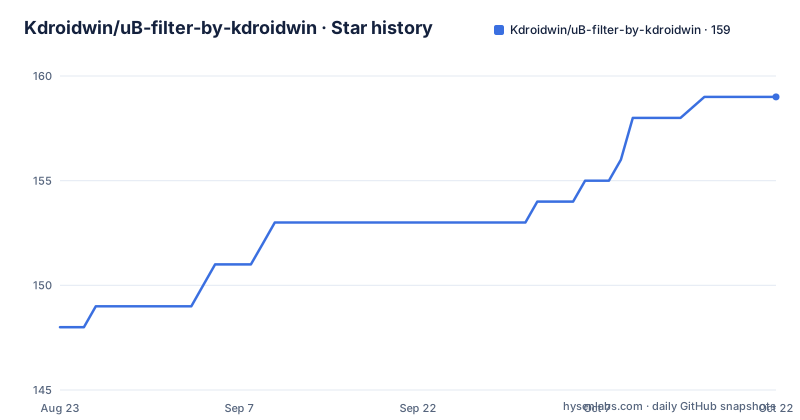
Star history
- Kdroidwin/uB-filter-by-kdroidwin159 ★ · +11
| Repository | 2026-08-23 | 2026-10-22 |
|---|---|---|
| Kdroidwin/uB-filter-by-kdroidwin | 148 | 159 |
11 Stars in the last 60 days, measured from the daily GitHub snapshot. Compare with other projects
Editorial analysis
What This Filter List Actually Targets
The repository is a set of subscription filters for uBlacklist, uBlock Origin, AdGuard, and Brave Shields. Its stated purpose is to exclude fraudulent or fake sites from search results and block access to them. The README lists a broad set of targets: clickbait, misinformation, propaganda, phishing, fake download buttons, and what it calls malicious affiliate sites. It also includes specific categories like press release sites, AI hallucination sites, and services with poor reputations. Notably, the list explicitly does not block pirated content, copyright-infringing material, or CSAM. That boundary is important because it shows the author is making a deliberate editorial choice, not trying to be a comprehensive internet filter. The filter is aimed at Japanese-speaking users, given the Japanese-language documentation and the examples of Japanese sites and services mentioned.
Subscription Structure and the Exclusion List
The project provides three separate uBlacklist subscriptions. The first is the basic filter. The second is marked as experimental and may block sites that should not be blocked. The third is an exclusion list that the README says is mandatory to reduce false positives from the other two. This three-tier structure is a pragmatic approach: it separates aggressive blocking from a corrective layer. The exclusion list is not optional if you use the first two, according to the documentation. For uBlock Origin and AdGuard, there is a single filter that blocks access to sites but still shows them in search results. There is also a separate filter for note.com articles with no content, and a tracking protection list for AdGuard DNS and AdGuard Home users. The tracking list is explicitly described as having many false positives and is not recommended for privacy-averse users. The Brave and Safari filter is a single file that works with those browsers' content blockers.
Installation Commands and URLs
To install the uBlacklist filters, you first install the uBlacklist extension. Then you use the subscription links provided in the README. For Chrome or Chromium browsers, the subscription URL is https://iorate.github.io/ublacklist/subscribe?name=uBlacklist-filter-by-kdroidwin&url=https://raw.githubusercontent.com/Kdroidwin/uBlacklist-filter-by-kdroidwin/main/uBlacklist.txt. For Firefox, the link format is different, using ublacklist.github.io. If those links fail, you can manually add the raw URLs in uBlacklist's options under Subscriptions. For uBlock Origin and AdGuard, the subscription link uses subscribe.adblockplus.org with the raw file URL for uBlockorigin.txt. The Brave and Safari filter is simply a raw URL to Brave_safari.txt. The tracking protection list is a separate raw URL. The README gives no command-line installation method; everything is done through browser extension subscription mechanisms.
The Scope of Blocking: Subjective and Broad
The filter's target list is unusually broad and subjective. It includes categories like 'bad affiliate articles' where the criteria are vague: no criticism of the product, excessive purchase prompts, and copied text. It also targets sites that are 'AI hallucination prone' and 'propaganda from Russia or China'. These are not objective technical categories. The README acknowledges that the second uBlacklist filter is experimental and may block sites that should not be blocked. The uBlock Origin filter is described as powerful but may block unrelated sites. This subjectivity is a genuine limitation. If you subscribe to the aggressive filters, you are trusting the maintainer's judgment on what counts as 'malicious' or 'low quality'. That might be fine for you, but it means the filter is not a neutral tool. It is a personal editorial statement.
Maintenance and Update Cadence
The repository has a recent release history: v1.5.3 on June 12, 2026, v1.5.2 on June 9, 2026, and v1.5.1 on June 7, 2026. That is a release every few days. The README mentions a full changelog on GitHub and a star notification for important changes. This suggests active maintenance. However, the project is not archived, and the last push is the same date as the latest release. The maintenance cost for a user is low: you subscribe once and the extension updates automatically. But the rapid release cadence means the filter content changes frequently, and you may see shifts in what is blocked without warning. The license is GPL-3.0, which means the filter lists are open source, but you should be aware that the project includes parts from Dandelion Sprout's Anti-Malware List under the Dandelicence v1.4, and it is based on FMHYFilterlist. That means the final list is a mix of licenses, though the project itself is GPL-3.0.
A Real Alternative: FMHYFilterlist and Dandelion Sprout
The README credits FMHYFilterlist as the base for this project and Dandelion Sprout's Anti-Malware List as a source. Those are real alternatives. FMHYFilterlist is a community-maintained filter for uBlacklist that focuses on blocking low-quality and spam sites, but it is broader and less focused on Japanese-language content. Dandelion Sprout's Anti-Malware List is a larger, more established filter that targets malware and scam sites specifically. The difference in approach is that FMHYFilterlist and Dandelion Sprout tend to have more conservative, evidence-based criteria, whereas this project explicitly includes subjective categories like 'bad reputation services' and 'propaganda'. If you want a filter with clearer, more technical inclusion rules, those alternatives are worth trying. They also have longer track records and larger communities, though I cannot verify their current maintenance status from this material.
Licensing and Contribution Model
The project is licensed under GPL-3.0, which means you can use, modify, and redistribute it under the same license. The README invites contributions via pull requests or issues, and it says a bot handles sorting, so you do not need to worry about ordering. There is also a Tally form for people without GitHub accounts. The contribution model is open, but the maintainer has final say on what gets included. The license implications are straightforward: if you fork this project, your fork must also be GPL-3.0. The inclusion of Dandelion Sprout's list under Dandelicence v1.4 is a nuance; that license is permissive but has specific terms. You should check the Dandelicence text if you plan to redistribute the combined list.
Editorial conclusion
Adopt uB-filter-by-kdroidwin if you are a Japanese-language user frustrated by fraudulent sites, fake reviews, and SEO spam cluttering search results, and you can tolerate occasional false positives. Skip it if you rely on niche sites that might be collateral damage, or if you need a filter with transparent, auditable rules. Before subscribing, review the raw filter files on GitHub, test the exclusion list with your regular searches, and decide whether the experimental second uBlacklist filter is worth the risk. The project's rapid release cadence and clear separation of exclusion rules make it a practical choice, but its subjective criteria mean you should verify its impact on your own browsing patterns first.
Frequently asked questions
What does uB-filter-by-kdroidwin block?
Its stated purpose is excluding fraudulent or fake sites. The itemised criteria cover fake review sites, SEO spam ranking pages, malicious affiliate articles, press release sites, misinformation, propaganda, support scam redirects, dropcatch pages, malware distribution sites and fake download buttons.
How many lists does uB-filter-by-kdroidwin publish for uBlacklist?
Three, at the top level of the repository: uBlacklist.txt as the basic list, uBlacklist2.txt as an experimental list for readers who accept false blocks, and uBlacklist-Exclusion.txt, which the author describes as a required subscription that reduces the false blocks of the first two.
Can the uBlock Origin lists from uB-filter-by-kdroidwin be used in uBlacklist?
No. The project states plainly that the uBlock Origin filters cannot be used in uBlacklist, so the two blockers are given separate subscriptions, with Chromium using the iorate.github.io subscribe page and Firefox using the ublacklist.github.io rulesets subscribe page.
Which domain suffixes does uB-filter-by-kdroidwin flag?
Nine top level domains are listed as worth watching because registration is easy and abuse is frequent: .best, .click, .top, .cfd, .cyou, .sbs, .cm, .cf and .my. Three domain patterns are also named, za.com, sa.com and ru.com.
Is the AdGuard DNS list from uB-filter-by-kdroidwin safe to subscribe to?
The author advises against it unless privacy is the priority, and states that false blocks are frequent. The file is sites/Kdroidwin_TrackingProtection_REV.txt, intended for AdGuard DNS, AdGuard Home and the AdGuard mobile app, and it succeeds a separate Kdroidwin-Tracking-Protection repository.
Official sources
Add this badge to your README
If you maintain this project, the badge below links readers to this analysis and shows its maintenance status from the daily GitHub snapshot. Paste the markdown into your README; add ?metric=license or ?metric=stars to the image URL for a different field.

[](https://hysenlabs.com/projects/kdroidwin-ub-filter-by-kdroidwin)Star history chart for your README
[](https://hysenlabs.com/projects/kdroidwin-ub-filter-by-kdroidwin)