kubecolor: Colorized kubectl Output for Interactive Terminals
Colorize your kubectl output
At a glance
- What is it?
- kubecolor wraps kubectl, adds color to recognized output, and passes the underlying text through without transforming it. It is designed for interactive Kubernetes and OpenShift users who want themes, colorblind adjustments, and TTY-aware plain output.
- Who is it for?
- Adopt kubecolor for interactive Kubernetes or OpenShift sessions when terminal color, theme selection, and ordinary kubectl behavior are the priorities. Do not adopt it as a Go library because the README explicitly excludes Go source compatibility, and do not use it when raw output transformation or forced color in redirected streams is required.
- Can I use it commercially?
- Yes. MIT is a permissive licence: you can use, modify and sell software built on it, as long as you keep its copyright and licence notices.
- Is it still maintained?
- Yes. The repository last received commits 2 days ago.
- What is it written in?
- Mainly Go, according to GitHub's language statistics.
Answers come from the project's GitHub data, last synced on November 7, 2026, and from our analysis. They are not legal advice.
Star history
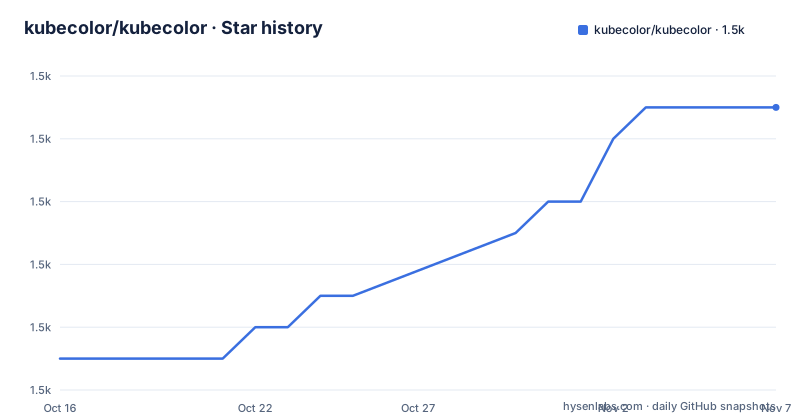
- kubecolor/kubecolor1,481 ★ · +8
| Repository | 2026-10-16 | 2026-11-07 |
|---|---|---|
| kubecolor/kubecolor | 1.5k | 1.5k |
8 Stars in the last 22 days, measured from the daily GitHub snapshot. Compare with other projects
Editorial analysis
What kubecolor Changes in a Kubernetes Workflow
kubecolor addresses a presentation problem rather than a Kubernetes control problem. The README describes it as a wrapper that adds colors to `kubectl` output and does nothing else. That boundary matters. It does not claim to replace kubectl, interpret cluster resources, change API requests, or provide a new command language. Users can keep writing the same kubectl commands while receiving a more readable terminal presentation.
The project is aimed at people who inspect Kubernetes resources interactively. Commands such as listing pods, applying manifests, or describing a pod can produce dense columns and status fields. Kubecolor presents those categories with color, based on the command output and its internal printer and scanner packages. The screenshots in the repository include examples for `kubectl get pods`, `kubectl apply`, and `kubectl describe pod`, although the README does not provide a complete rule-by-rule catalog of every field that receives color.
Kubecolor is also relevant to OpenShift users. The README shows that kubecolor can target the OpenShift CLI through the `KUBECTL_COMMAND` environment variable. This means the wrapper is not limited to one binary name. It still depends on the selected CLI being installed and producing output that the wrapper can recognize. The documentation does not claim support for every kubectl plugin or every custom command format.
Direct kubectl remains the appropriate alternative for CI jobs, machine parsing, scripts that need raw output, or environments where presentation adds no value. Kubecolor is a better fit when a human is reading terminal output and the main cost of the default display is visual scanning. Its narrow scope is a strength for that use case, but it also means users should not expect a resource dashboard, a query language, or a replacement for Kubernetes client libraries.
Wrapper Invocation, Output Flow, and TTY Handling
Kubecolor invokes kubectl internally and then applies color to the output. The project describes this as a wrapper rather than a fork of kubectl. In practical terms, the shell starts kubecolor, kubecolor locates and runs the selected command, and its printer and scanner logic processes the resulting stream. The repository contains dedicated `kubectl/`, `printer/`, and `scanner/` directories, which is consistent with a command delegation and output-processing design.
The most important behavioral boundary is TTY detection. The README states that kubecolor dynamically detects whether output is attached to a terminal and sends plaintext when called programmatically. That behavior keeps colored escape sequences out of non-interactive use. It is appropriate for automation and redirected output, but it means a user cannot assume that color will appear in a file, CI log, or redirected stream. The documentation does not document a `--color=always` override, so a deployment that requires terminal colors in captured output should verify behavior before adopting the wrapper.
The README also says that kubecolor does not tamper with output and only adds colors. That statement describes intent and scope, not a guarantee that every output format will be parsed successfully. Unsupported output from a plugin, a custom printer, or an unusual kubectl version may remain plain or may be displayed without the expected highlighting. The documentation does not describe a fallback policy for malformed output.
For shell integration, the documented kubectl alias is simple:
alias kubectl="kubecolor"This changes the command name resolved by the shell, not the cluster operation performed. The separate OpenShift example sets the target command explicitly:
alias oc="env KUBECTL_COMMAND=oc kubecolor"The alias approach keeps the wrapper optional. Removing it restores direct command use in new shell sessions. The README does not document persistence across shell configuration files beyond the `.bash_profile` example, nor does it describe behavior for aliases loaded by other shells.
Themes and Accessibility-Focused Configuration
Kubecolor includes color themes rather than offering only one fixed palette. The README shows a light-background theme for environments whose terminal background differs from the usual dark presentation. It also lists colorblind-adjusted themes named `protanopia`, `deuteranopia`, and `tritanopia`. These themes are intended for users who need a palette adjusted for different forms of color perception.
The README contains an important implementation note about those themes. As of `v0.3.0`, both `deuteranopia` and `tritanopia` are the same as `protanopia`. The project says they may differ in future versions as the themes are tuned, and it recommends configuring the theme to match the user's color-blindness type so future changes can benefit the user. In other words, selecting a named theme today does not mean each name currently receives a distinct palette.
The repository includes `themes/`, `config/`, and `config-schema.json`, which indicates that theme selection is represented as project configuration rather than being limited to a source-code change. The README links to separate documentation for customizing themes, but the project README does not reproduce command and configuration examples. A reader who wants to customize colors must follow the project's customization documentation rather than assume undocumented keys or file locations.
Themes improve presentation but do not change kubectl semantics. A status field remains a status field after coloring. Users who need machine-readable values should avoid depending on color as data. Users who need accessibility should verify the selected theme in their actual terminal, because terminal palettes, background colors, and rendering behavior can differ between applications. The documentation does not claim that any theme guarantees contrast or accessibility compliance.
Installing kubecolor and Making the First Use
The README does not provide a self-contained installation command. It directs users to the project documentation for setup, specifically the Installation page at `https://kubecolor.github.io/setup/install/`. It also links to Usage and Getting started pages. The README gives no exact download command, package-manager name, platform package, checksum, or install script. Follow that installation page and select the method appropriate for the local operating system and shell.
After kubecolor is installed, the first real use can be tested with the documented alias. Add this to `.bash_profile` as the README shows:
alias kubectl="kubecolor"The reader should then open a shell, confirm that the alias is active, and run an ordinary kubectl command. The expected result is the same kubectl interaction with color added when output is connected to a terminal. The README does not specify a fixed command that every environment can use, because permissions, context, and installed clusters vary.
For OpenShift, use the documented command selection:
alias oc="env KUBECTL_COMMAND=oc kubecolor"This instructs kubecolor to invoke `oc`. The user should verify that `oc` is already installed and authenticated before judging whether the wrapper works. Kubecolor is not documented as replacing or installing the underlying CLI.
A container image is present in the repository. Its Dockerfile builds kubecolor and copies `/bin/kubectl` from `registry.k8s.io/kubectl:v1.33.5` into the final image. The image therefore includes a specific kubectl source version, which should be checked before use. The Dockerfile exposes `kubecolor` as the entrypoint and uses a nonroot distroless image, so it is not a conventional interactive shell container.
Versioning, Maintenance, and Upgrade Boundaries
The repository is not archived, and the recorded last push was on 2026-10-14. Recent release entries are `v0.8.0` on 2026-09-19, `v0.7.1` on 2026-08-25, and `v0.7.0` on 2026-08-25. This indicates recent repository activity and release work. It does not establish compatibility with every kubectl or OpenShift version, nor does it remove the project's stated pre-1.0 warning.
The README says kubecolor tries to follow `SemVer 2.0.0` for the command-line interface, including flags and environment variables. That is the relevant compatibility boundary for an operator using the binary. The same README explicitly says compatibility is not promised for the Go source code. Importing `github.com/kubecolor/kubecolor` as a module may therefore produce unexpected breakage within a minor or patch release. A Go consumer should treat source-level use separately from installing the command.
The README warns that the project has not reached `v1.0.0` and may make breaking changes when considered necessary. An upgrade review should compare the CLI behavior relevant to local aliases, environment variables, and themes. The README does not document a rollback procedure, a configuration migration guide, or a support window. Those gaps make upgrade planning a user responsibility rather than an assumed project feature.
The MIT license covers use and modification under its terms, but this article does not provide legal advice. The operational cost of an upgrade is to replace or obtain the binary, verify the underlying kubectl command, and recheck alias and theme behavior. Container users should also inspect the kubectl version copied into the image. For most shell users, the main upgrade boundary is the CLI contract, not the Go module API.
Editorial conclusion
Adopt kubecolor for interactive Kubernetes or OpenShift sessions when terminal color, theme selection, and ordinary kubectl behavior are the priorities. Do not adopt it as a Go library because the README explicitly excludes Go source compatibility, and do not use it when raw output transformation or forced color in redirected streams is required. Verify the documented installation instructions, the selected `KUBECTL_COMMAND`, theme configuration, and kubectl availability first. For normal interactive use, an alias from kubectl to kubecolor is the clearest integration point.
Frequently asked questions
Does kubecolor replace kubectl?
No. It is a wrapper that internally calls `kubectl` and adds color to its output. The README says it does not change the output beyond adding colors.
How do I use kubecolor with kubectl?
The README shows an alias that maps `kubectl` to `kubecolor`. After installing kubecolor, add `alias kubectl="kubecolor"` to `.bash_profile`.
Can kubecolor be used with the OpenShift CLI?
Yes. The documented alias sets `KUBECTL_COMMAND=oc`, so kubecolor wraps `oc` instead of `kubectl`.
Does kubecolor add color when output is redirected?
The README states that kubecolor uses dynamic TTY detection and sends plaintext when called programmatically. Redirected or non-interactive output should therefore be plain.
Does kubecolor promise Go API compatibility?
No. The project follows `SemVer 2.0.0` for its CLI flags and environment variables, but explicitly does not promise compatibility for consumers importing its Go module.
Official sources
Add this badge to your README
If you maintain this project, the badge below links readers to this analysis and shows its maintenance status from the daily GitHub snapshot. Paste the markdown into your README; add ?metric=license or ?metric=stars to the image URL for a different field.

[](https://hysenlabs.com/projects/kubecolor-kubecolor)Star history chart for your README
[](https://hysenlabs.com/projects/kubecolor-kubecolor)Was this useful?