lede-project/source: OpenWrt build and firmware source
Mirror of https://git.lede-project.org/?p=source.git Please send your PRs against this tree. They will be merged via staging trees and appear in this tree once the staging trees get merged back into source.git
At a glance
- What is it?
- The lede-project/source repository contains the OpenWrt source tree used to configure and build firmware for embedded devices. It suits developers who need package selection and target customization, but it does not by itself guarantee support for a particular router or hardware platform.
- Who is it for?
- Developers should adopt this repository when they need to build an OpenWrt image with a deliberate package and target configuration. Users seeking a ready-made router image, and developers whose devices are absent from the OpenWrt Hardware Database, should use the Firmware Selector or a supported device image instead.
- Can I use it commercially?
- Check first. The repository uses a licence we do not classify automatically, so read its LICENSE file before any commercial use.
- Is it still maintained?
- Yes. The repository received new commits within the last day.
- What is it written in?
- Mainly C, according to GitHub's language statistics.
Answers come from the project's GitHub data, last synced on October 23, 2026, and from our analysis. They are not legal advice.
Star history
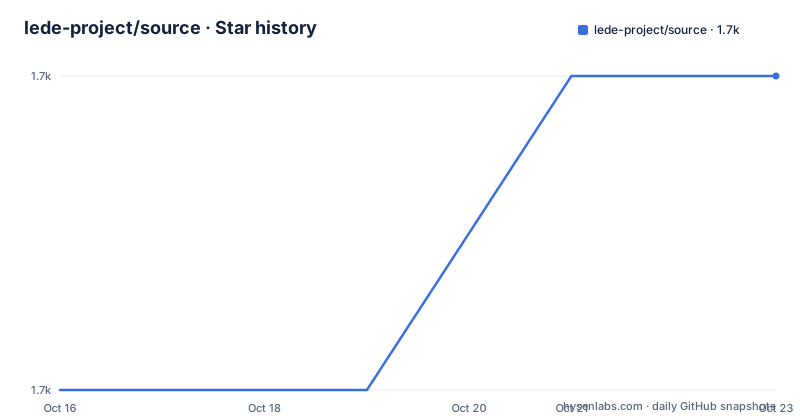
- lede-project/source1,717 ★ · +1
| Repository | 2026-10-16 | 2026-10-23 |
|---|---|---|
| lede-project/source | 1.7k | 1.7k |
1 Stars in the last 7 days, measured from the daily GitHub snapshot. Compare with other projects
Editorial analysis
What lede-project/source Changes for an Embedded Device
OpenWrt addresses the difference between a fixed vendor image and firmware that can be assembled around a device's actual requirements. According to the README, it provides a fully writable filesystem and package management rather than one static firmware for every device. That model is intended for users who need to add or remove packages and configure a device themselves, and for developers who need an application framework without constructing an entire operating-system image around it.
The repository is written primarily in C, but it is a complete build tree rather than a standalone C library. Its top-level directories cover `config/`, `include/`, `package/`, `scripts/`, `target/`, `toolchain/`, and `tools/`. These names match the project roles described by the README: target configuration, toolchain construction, application packaging, and build support. A conventional Make-based interface drives those pieces.
For an ordinary router user, this repository is probably the wrong starting point. The README points those users to built firmware through the OpenWrt Firmware Selector and to device-specific installation information. This source tree becomes relevant when the selected stock package set is insufficient, when firmware must be compiled locally, or when a new package or application is being integrated.
The OpenWrt Build Tree and Package Flow
The documented build begins with feeds, which contain package definitions referenced by `feeds.conf` or `feeds.conf.default`. Updating feeds retrieves their definitions. Installing all feeds creates package links under `package/feeds/`, making those definitions available to the larger build. The README identifies `opkg` as the package manager used by OpenWrt installations, while the source tree itself supplies the machinery for selecting and building packages into firmware.
`make menuconfig` is the configuration stage. It exposes choices for the toolchain, target system, and firmware packages. After configuration, `make` invokes a broader process that downloads sources, builds the cross-compilation toolchain, compiles the GNU/Linux kernel, and builds the selected applications for the configured target. The repository Makefile supports this division through explicit dependencies. In its layout, the toolchain depends on tools, target preparation depends on the toolchain, and packages depend on target output. The included `rules.mk`, `include/`, and subsystem Makefiles connect those stages.
This is source-based composition, not a conventional desktop package installation. The output configuration determines what enters the firmware before a device receives it. The README says packages installed in an OpenWrt system are managed through `opkg`, but it does not describe adding arbitrary host packages after flashing. That distinction matters when evaluating an application workflow.
Preparing GNU/Linux, BSD, or macOS for Local Builds
The README requires a GNU/Linux, BSD, or macOS build host with a case-sensitive filesystem. Cygwin is excluded because its filesystem does not provide the required case sensitivity. Distribution-specific installation instructions are not included in this repository excerpt, so there is no justified package-manager command for installing the prerequisites. The documented tool names are listed below as a requirement reference, not as a portable install command:
binutils bzip2 diff find flex gawk gcc-6+ getopt grep install libc-dev libz-dev
make4.1+ perl python3.8+ rsync subversion unzip which
The versions shown are the README's minimum-style tool names. It says package names vary between distributions and directs users to the external Build System Setup documentation for the complete list. The repository Makefile also rejects a checkout path containing spaces:
ERROR: The path to the OpenWrt directory must not include any spacesThat restriction is enforced directly by the Makefile when the condition is detected. A first build should therefore begin with a path such as a normal directory name under the user's home directory, after confirming that the host filesystem is case-sensitive and the required tools are available.
Fetching Feeds and Producing the First Firmware
A first build starts by synchronizing all feeds configured for this tree. This retrieves the latest package definitions listed by the feed configuration. Run the following from the repository root:
./scripts/feeds update -aAfter that succeeds, install the fetched feed packages. According to the README, this creates symlinks for all obtained packages under `package/feeds/`:
./scripts/feeds install -aNext, open the build configuration interface:
make menuconfigThe reader should select the target system, toolchain settings, and firmware packages there. Saving that configuration prepares the build inputs, but the README does not document a separate validation command for this initial selection. The final documented build command is:
makeA successful invocation downloads the required sources, compiles the cross-compile toolchain, and compiles the kernel and chosen applications. The README does not specify output filenames, completion markers, hardware flashing steps, or a smoke-test procedure in this excerpt. For device deployment, users must first find a supported device in the OpenWrt Hardware Database and follow that device's installation instructions.
Device Support, Images, and the Firmware Selector Boundary
The source tree can describe how firmware is assembled, but it cannot turn an unsupported device into a supported target. The README directs users to the OpenWrt Hardware Database for supported-device information and to the OpenWrt Firmware Selector for a factory image intended to replace vendor firmware. The selector is the relevant path for a quick migration when a suitable image already exists. This repository is more relevant when that image needs additional packages, changed configuration, or local compilation.
There is an important distinction between package availability and device support. A package can be present in feeds without being appropriate for a target's architecture, kernel, libraries, or firmware image. Likewise, selecting a target in `make menuconfig` does not replace the device-specific instructions linked from the hardware database. The README explicitly says to follow the device's `Info` link when it is supported, but it does not provide a universal flashing procedure here.
This boundary also limits claims about deployability. The repository contains build definitions and automation, while hardware boot support, factory partition layout, and installation instructions depend on a particular target image. Anyone using a niche embedded board should verify its entry in the Hardware Database before spending time on a full firmware build.
Package Repositories and the Scope of lede-project/source
OpenWrt divides package work across separate repositories. The README links `openwrt/luci` for a browser-based web interface, `openwrt/packages` for community package ports, `openwrt/routing` for routing and mesh packages, and `openwrt/video` for display servers and clients. This source repository is the firmware build framework that consumes such package definitions, not a single catalog containing every project listed in those repositories.
Developers working on LuCI or porting packages should follow the README toward the relevant related repository. Device users who only need an installed package can use `opkg`, but this repository does not document runtime package commands. The build tutorial instead configures packages before compilation, which is the relevant path for firmware composition.
The repository is also a mirror described as the destination for pull requests against another source tree. Its README says changes are merged through staging trees and then merged back into `source.git`. That development process matters for contributors because the visible mirror may not be the tree against which every proposed change should be submitted. The repository description gives no further workflow details, review policy, or merge schedule.
Maintenance Signals, Releases, and Licence Ambiguity
The repository is not archived, and its last push was on 2026-10-16. That is recent activity, although the README provides no release cadence or long-term support policy. GitHub reports no GitHub releases, so there is no repository release history to use as an upgrade signal. The documented development process refers to staging trees, but it does not define how users should track a stable production branch from this repository description.
Licence information needs care. The README states that OpenWrt is licensed under GPL-2.0, the root `Makefile` carries `SPDX-License-Identifier: GPL-2.0-only`, and the repository includes `COPYING` and `LICENSES/`. However, the repository classification for `lede-project/source` reports a custom licence that GitHub cannot classify and points to the `LICENSE` file. That metadata and the README are not aligned at the level of naming.
This article does not provide legal interpretation. For compliance or redistribution decisions, inspect the exact `LICENSE`, `COPYING`, and applicable `LICENSES/` entries for the files being used. A repository-wide statement in the README does not by itself document every possible file-level licence exception.
Editorial conclusion
Developers should adopt this repository when they need to build an OpenWrt image with a deliberate package and target configuration. Users seeking a ready-made router image, and developers whose devices are absent from the OpenWrt Hardware Database, should use the Firmware Selector or a supported device image instead. Verify device support first, then confirm the exact licence files because the repository metadata calls the licence custom while the README states GPL-2.0.
Frequently asked questions
How do I build the first OpenWrt firmware from lede-project/source?
From the repository root, update and install feeds, run `make menuconfig` to select the target and packages, then run `make`. The build downloads sources and compiles the toolchain, kernel, and selected applications.
Does lede-project/source provide a ready-made firmware image for every device?
No. Built images are obtained through the OpenWrt Firmware Selector, and device support must be checked in the OpenWrt Hardware Database. The source repository provides the build system rather than a universal factory image.
What host systems are supported for compiling lede-project/source?
The README supports GNU/Linux, BSD, and macOS builds on case-sensitive filesystems. Cygwin is unsupported because it lacks the required case-sensitive filesystem.
Official sources
Add this badge to your README
If you maintain this project, the badge below links readers to this analysis and shows its maintenance status from the daily GitHub snapshot. Paste the markdown into your README; add ?metric=license or ?metric=stars to the image URL for a different field.

[](https://hysenlabs.com/projects/lede-project-source)Star history chart for your README
[](https://hysenlabs.com/projects/lede-project-source)Was this useful?