limehawk/rmm-scripts: hardcoded PowerShell and Bash for RMM platforms
Production-ready PowerShell and Bash scripts for RMM platforms (Level.io, SuperOps, Datto, NinjaRMM)
At a glance
- What is it?
- A GPL-3.0 collection of PowerShell and Bash scripts for SuperOps, Datto, and NinjaRMM, built around the Limehawk Script Framework's hardcoded-input and structured-output conventions. The trade-off is simplicity and auditability versus flexibility.
- Who is it for?
- Adopt limehawk/rmm-scripts if you manage SuperOps, Datto, or NinjaRMM environments and prefer scripts that are easy to audit, with no hidden parameters and clear console output. Do not adopt it if you need parameterized, reusable scripts across many clients, because the hardcoded-input model forces per-client copies.
- Can I use it commercially?
- Yes, with conditions. GPL-3.0 is a copyleft licence: if you distribute software that includes it, you must release that software's source code under the same licence. Running it internally without distributing it does not trigger that obligation.
- Is it still maintained?
- Yes. The repository last received commits 29 days ago.
- What is it written in?
- Mainly PowerShell, according to GitHub's language statistics.
Answers come from the project's GitHub data, last synced on October 4, 2026, and from our analysis. They are not legal advice.
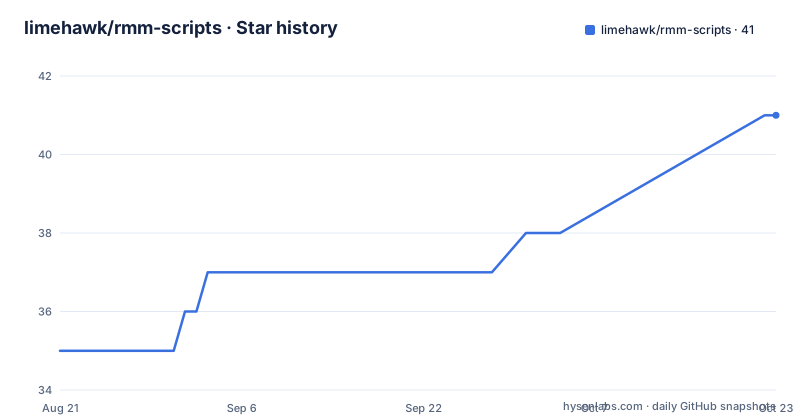
Star history
- limehawk/rmm-scripts38 ★ · +3
| Repository | 2026-08-21 | 2026-10-04 |
|---|---|---|
| limehawk/rmm-scripts | 35 | 38 |
3 Stars in the last 44 days, measured from the daily GitHub snapshot. Compare with other projects
Editorial analysis
What this repository actually gives an RMM engineer
The repository is a collection of PowerShell and Bash scripts aimed at Remote Monitoring and Management platforms: SuperOps, Datto, and NinjaRMM. The README lists categories like disk analysis, BitLocker management, MSI deployment, winget installation, device renaming, reboot scheduling, speed testing, and agent installation or removal. The target user is an MSP technician or internal IT admin who needs to push a specific action to many endpoints through an RMM tool. The value is not in any single script but in the consistent structure across all of them. Every script is supposed to follow the Limehawk Script Framework, which standardizes documentation, console output, error handling, and exit codes. That consistency matters because RMM platforms often parse console output or rely on exit codes to decide whether a job succeeded.
The Limehawk Script Framework: hardcoded inputs as a design choice
The framework's most distinctive rule is that scripts must not use param blocks or command-line arguments. All configuration lives inside the script as hardcoded variables. The README shows an example: after Set-StrictMode, you edit $apiKey, $targetPath, and $timeout. This is the opposite of a typical reusable PowerShell script. For an RMM context, it makes sense in one way: an RMM job often runs a single script on a single machine, and the technician configures that job once. Hardcoding removes the chance of a malformed parameter call or an injection through a parameter value. The cost is that you cannot reuse one script for different clients without editing the file each time. The framework also demands a detailed README block at the top of each script, with purpose, behavior, prerequisites, and examples. That block is what you read before deploying, because the script itself may not have help text.
Structured console output and error handling
The framework specifies clear, parseable console output with labeled sections and key-value formatting. The README mentions that you should check for [ ERROR OCCURRED ] sections when troubleshooting. Exit code 0 means success, exit code 1 means failure. This is a simple contract, but it is exactly what an RMM platform needs to report job status. The error handling uses $ErrorActionPreference = 'Stop' and contextual error messages. That means the script stops on the first error and prints where it failed. For a remote execution tool, failing fast is better than continuing with a partial state. The README also states that no secrets should appear in logs, and that scripts must validate inputs. These are good practices, but the repository's own wiki is the only place to confirm each script's actual behavior. The README does not list which specific scripts exist beyond examples like speedtest_to_superops.ps1 and chrome_installer.ps1.
Getting started: local testing and RMM deployment
To run a script locally, the README says to execute .\scripts\script_name.ps1 in PowerShell with appropriate permissions. There is no install step, no package manager, no dependencies to fetch. You edit the hardcoded variables, then upload the script to your RMM platform. The README gives a four-step flow: review the script's README block, configure the hardcoded inputs, deploy to the RMM, then execute and monitor. For creating new scripts, the framework prescribes a four-phase approach: Understand, Architect, Structure, Generate. There is also a quality checklist that includes using snake_case filenames, ensuring the README block has the required sections, and validating inputs. The checklist mentions '80 = rulers, 62 - dividers', which appears to refer to line-length formatting rules in the README block, but the exact meaning is not explained in the README. You would need to read the guidelines document in docs/ to know precisely.
What the repository does not tell you
The README is light on specifics. It does not name the individual scripts beyond a few examples, nor does it list the exact categories with counts. It points to a wiki for the complete script index, but the wiki is external. The README also does not mention any release tags or version numbers, and the repository has no recent releases retrieved. That means you cannot track changes through release notes. The license is GPL-3.0, which is fine for internal use, but if you plan to embed these scripts in a commercial product, you need to understand the copyleft obligations. The README says the repository is provided as-is and that you should review and test all scripts before production deployment. That is a warning, not a guarantee.
Maintenance and upgrade cost
Because there are no releases, you cannot subscribe to a versioned update stream. You would have to clone or fork the repository and pull from main periodically. The hardcoded-input model makes upgrades awkward: if a script changes its variable names or output format, you must merge those changes into every copy you have already customized for different clients. The README's contribution guidelines require descriptive commit messages and compliance with the framework, which suggests the maintainer expects a steady flow of changes. But without a changelog or release tags, you cannot know what changed between pulls. The wiki might have per-script changelogs, but the README does not confirm that. For an MSP, this means you should treat each script as a static asset and test it after any upstream change.
A real alternative: parameterized scripts in a private repository
The main alternative is to write your own PowerShell scripts that use param blocks and accept arguments from the RMM platform's job configuration. Many RMMs, including NinjaRMM and Datto, allow you to pass arguments to a script at runtime. That approach lets you use one script for many clients, with the RMM storing the parameters per site or device. The trade-off is that you must design the parameter validation yourself, and you lose the framework's built-in documentation block unless you replicate it. Another alternative is to use a public repository like the RMM-actions or community script collections, but those often have inconsistent style. The limehawk approach is the opposite: strict consistency, no parameters. Which one fits depends on whether you value auditing simplicity over deployment flexibility.
Editorial conclusion
Adopt limehawk/rmm-scripts if you manage SuperOps, Datto, or NinjaRMM environments and prefer scripts that are easy to audit, with no hidden parameters and clear console output. Do not adopt it if you need parameterized, reusable scripts across many clients, because the hardcoded-input model forces per-client copies. Before deploying any script, verify the target platform's execution policy and review the specific script's README block for prerequisites and exit-code behavior. Start with one script, run it on a test machine, and confirm the output format matches what your RMM expects.
Frequently asked questions
What does RMM stand for in rmm-scripts?
Remote Monitoring and Management. The scripts are written for RMM platforms, with SuperOps, Datto and NinjaRMM named in the documentation and Level.io in the repository description.
What is RMM software in the context of rmm-scripts?
It is the remote monitoring and management environment the scripts run in. A script is edited locally, uploaded to the platform, and executed there, with exit code 0 for success and 1 for failure.
Why do rmm-scripts scripts have no parameters?
The Limehawk Script Framework requires hardcoded inputs: no param blocks and no command line arguments, with all configuration defined inside the script, in a variables section placed after Set-StrictMode.
How do I tell whether an rmm-scripts run failed?
Check the exit code: 0 is success and 1 is failure. The console output is structured into labeled sections and carries [ ERROR OCCURRED ] blocks to read when the code is not 0.
Official sources
Add this badge to your README
If you maintain this project, the badge below links readers to this analysis and shows its maintenance status from the daily GitHub snapshot. Paste the markdown into your README; add ?metric=license or ?metric=stars to the image URL for a different field.

[](https://hysenlabs.com/projects/limehawk-rmm-scripts)Star history chart for your README
[](https://hysenlabs.com/projects/limehawk-rmm-scripts)