IMGo: local batch image compression rebuilt on Tauri and Rust
🖼️ Image optimization app for macOS, Windows and Linux.
At a glance
- What is it?
- IMGo compresses and converts images entirely on the machine, offering a Tauri desktop app for macOS, Windows and Linux plus a browser build. It is a rewrite of meowtec/Imagine with its own costs: unsigned installers, a browser build that drops JPEG XL, and a build bootstrap that patches four dependencies (libheif-sys, libde265, libheif and jpegxl-rs).
- Who is it for?
- Adopt IMGo if you compress images in batches on your own machine and cannot send them to a web service, and accept that the Windows installer is unsigned and the macOS app is not notarized. Do not adopt it if you need a signed installer, a documented headless mode for unattended jobs, or a JPEG XL path in the browser build, since only the desktop app reaches JXL.
- Can I use it commercially?
- Not without permission. GitHub finds no licence file in the repository, and without a licence all rights are reserved by default: you may read the code but not reuse it. Check the README, or ask the authors, before using it.
- Is it still maintained?
- Yes. The repository last received commits 31 days ago.
- What is it written in?
- Mainly TypeScript, according to GitHub's language statistics.
Answers come from the project's GitHub data, last synced on November 15, 2026, and from our analysis. They are not legal advice.
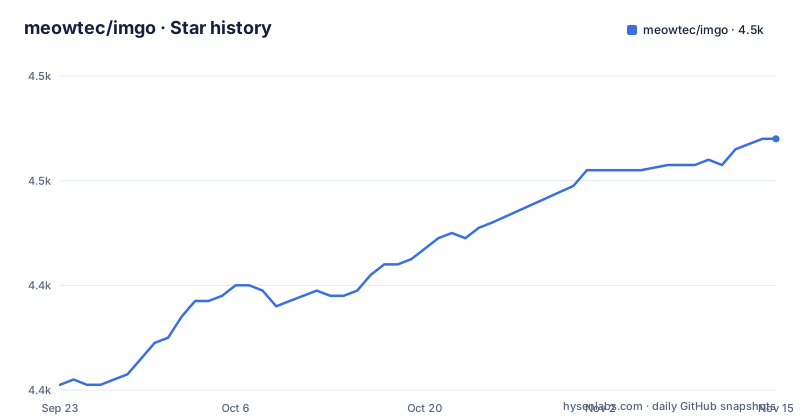
Star history
- meowtec/imgo4,468 ★ · +47
| Repository | 2026-09-23 | 2026-11-15 |
|---|---|---|
| meowtec/imgo | 4.4k | 4.5k |
47 Stars in the last 53 days, measured from the daily GitHub snapshot. Compare with other projects
Editorial analysis
Compression runs on your machine, not on a server
The central claim in IMGo is that your images never leave the device. Batch operations, quality and lossless controls, resizing, metadata controls and format conversion all execute locally, which is the reason to prefer it over the many browser compression sites that work by uploading. The audience is narrow: someone with a folder of screenshots, product shots or scanned pages who wants them smaller without handing a copy to a third party.
A Rust workspace sits behind that promise. At the repository root, a Cargo.toml lists members including `crates/minifier`, `crates/minifier-utils`, `crates/minifier-cli`, `crates/shared` and two wasm bridges, `crates/minifier-js` and `crates/shared-js`. Codec sources live under `deps/`, and both libheif-sys and jpegxl-src are redirected there through a `[patch.crates-io]` block.
Why the Electron shell was thrown away
IMGo replaces the original meowtec/Imagine, and the swap is structural rather than cosmetic. The desktop shell moved from Electron to Tauri, and the project adds a full web version that runs in the browser at imgo.app. Anyone migrating from Imagine inherits a different interaction model and a different platform footprint.
TypeScript is the primary language on GitHub, which fits that split: interface in TypeScript, heavy lifting in Rust. `app/` holds the Tauri application (`app/src-tauri` is a workspace member) and `crates/` the Rust crates, alongside `packaging/` and `benchmark/` directories. One-line description in package.json still reads "PNG/JPEG optimization app", a leftover that understates a project which also writes GIF, WebP, AVIF, HEIC and JPEG XL.
JPEG XL exists on the desktop and nowhere else
Output formats differ by build, and that gap decides whether IMGo fits your workflow. The web app writes JPEG, PNG, GIF, WebP, AVIF and HEIC. Its desktop counterpart writes all of those and adds JPEG XL. Animated PNG, GIF, WebP and AVIF output works in both.
A pipeline built on the browser build cannot produce JPEG XL even when the receiver supports it, and a team that standardises on the hosted page ends up silently one format short. The desktop app is the only route to JXL here, which turns the platform choice into an output choice. Note too that no documented command line entry point exists for these conversions: `crates/minifier-cli` appears among workspace members, but usage for it is never written down, so scripted batches have nothing to call.
The macOS app is unsigned and the Windows installer is not notarized
Each platform gets its own package: a DMG for Apple Silicon or Intel, an installer for Windows on ARM64 or x64, and a Linux AppImage on ARM64 or x64. The README states plainly that the Windows installer is unsigned and the macOS app is not notarized, so Gatekeeper or SmartScreen will warn on first launch. That is a real cost on a managed laptop, where policy can block an unsigned binary outright rather than let you dismiss the warning.
The macOS escape hatch has an order a quick skim misses. You must first move `IMGo.app` into the Applications folder, then strip the quarantine attribute, then reopen the app. Running the command before the move does nothing useful, because the path you run it against is the one you copy to.
Building from source needs four patched C libraries and wasm-pack
No published npm package exists to install. At the root, package.json is marked `"private": true` and asks for Node `^24.18.0` with pnpm `^12`, pinning pnpm 12.0.0 as the package manager. Getting a working tree takes one long bootstrap command:
pnpm run initThat script runs `git submodule update --init --recursive -f`, then `init:src`, which resets and patches libheif-sys, libde265, libheif and jpegxl-rs from files kept in `deps/`. After that it builds the wasm bridge and runs `pnpm install`.
Here is the catch worth knowing before you start. `init:src` touches four directories, yet the `[patch.crates-io]` block only redirects `libheif-sys` and `jpegxl-src`. libde265 and libheif are patched in place and do not appear in that block. Compile the wasm layer separately with:
pnpm run rstsTests split the same way, with `test:js` walking the pnpm workspace and `test:rust` running `cargo test` against the `imgo-shared` and `minifier` libraries. Optimised builds strip symbols, set `opt-level = 3`, enable fat LTO and force `codegen-units = 1`, while the two wasm crates drop to `opt-level = "s"` for size.
Imagine-plus keeps the old UI, browser tools skip codecs entirely
For anyone who liked Imagine's interaction model, the README points at xianfei/Imagine-plus, which preserves the original interface and adds format support. The difference in approach is what matters: IMGo replaced Electron with Tauri, so the choice is between a familiar interaction style and a smaller native footprint carrying a rewritten interface.
Browser-based converters form the other alternative, and IMGo's own web build is the honest comparison point since it runs the same Rust core locally in your tab. The genuine gap is codec reach and platform integration. JPEG XL needs the desktop app, and neither build exposes a documented headless mode for scheduling unattended batches.
A benchmark directory with no procedure attached
Automation is the weak spot here. With no distributed package and no documented CLI usage, the only reliable path for a server-side job is a downloaded binary driven by hand, which is exactly what the project was not designed for.
A `benchmark/` directory sits at the repository root, and no benchmark procedure, input corpus or reporting format is written down anywhere. Treat any compression ratio you encounter elsewhere for this tool as unverified.
Editorial conclusion
Adopt IMGo if you compress images in batches on your own machine and cannot send them to a web service, and accept that the Windows installer is unsigned and the macOS app is not notarized. Do not adopt it if you need a signed installer, a documented headless mode for unattended jobs, or a JPEG XL path in the browser build, since only the desktop app reaches JXL. Before anything else, take one downloaded binary for your platform and confirm its processor matches the ARM64 or x64 asset, because the project ships both.
Frequently asked questions
Does IMGo upload my images to a server?
No. Both builds process files locally, and the web app at imgo.app runs in your browser without uploading your images. The README states this for the desktop apps and for the browser version alike.
Can IMGo output JPEG XL, and where?
Only the desktop app writes JPEG XL. The web app is limited to JPEG, PNG, GIF, WebP, AVIF and HEIC, so a browser-only workflow cannot reach the JXL encoder.
Why does macOS block IMGo on first launch, and how do I fix it?
The macOS app is not notarized, so Gatekeeper warns on first open. Move `IMGo.app` to the Applications folder and run `xattr -cr "/Applications/IMGo.app"` in Terminal, then open it again.
Official sources
Add this badge to your README
If you maintain this project, the badge below links readers to this analysis and shows its maintenance status from the daily GitHub snapshot. Paste the markdown into your README; add ?metric=license or ?metric=stars to the image URL for a different field.

[](https://hysenlabs.com/projects/meowtec-imgo)Star history chart for your README
[](https://hysenlabs.com/projects/meowtec-imgo)Was this useful?