mingw-w64.github.io, a documentation site deployed from a second branch
mingw-w64.net web page contents (The new web page)
At a glance
- What is it?
- The web presence of the mingw-w64 project is a static site whose content is Markdown in one branch and whose built output is a second branch, deployed automatically to GitHub Pages and served under two domain names. The interesting details are the two ways a page can be changed without a local toolchain, and the warning that the Markdown dialect the generator understands is not quite the one GitHub renders in its preview.
- Who is it for?
- This repository fits a maintainer who wants the project's documentation to be editable by anyone, since a single click on any page opens the online editor for that file, and it fits a contributor who wants to see the site before opening a pull request, thanks to the local preview server.
- Can I use it commercially?
- Check first. The repository uses a licence we do not classify automatically, so read its LICENSE file before any commercial use.
- Is it still maintained?
- Yes. The repository last received commits 22 days ago.
- What is it written in?
- Mainly CSS, according to GitHub's language statistics.
Answers come from the project's GitHub data, last synced on November 7, 2026, and from our analysis. They are not legal advice.
Star history
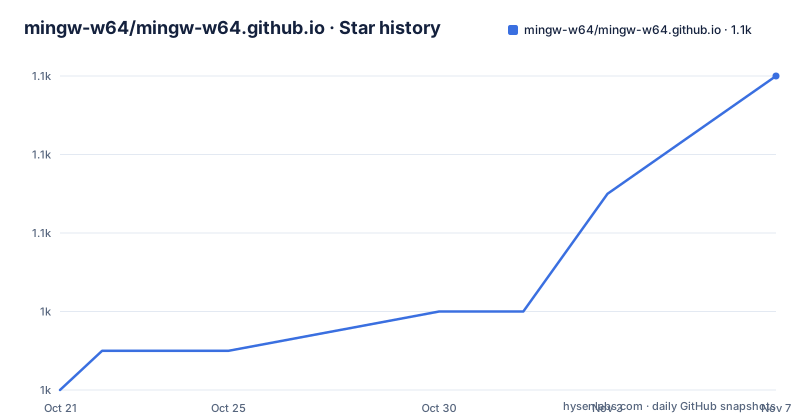
- mingw-w64/mingw-w64.github.io1,054 ★ · +8
| Repository | 2026-10-21 | 2026-11-07 |
|---|---|---|
| mingw-w64/mingw-w64.github.io | 1k | 1.1k |
8 Stars in the last 17 days, measured from the daily GitHub snapshot. Compare with other projects
Editorial analysis
Two branches, one of which is the website
The repository is described as the mingw-w64.net web page contents, the new web page, and the README explains the branch arrangement in one paragraph.
The website is written in Markdown and built to a static site with zensical. The main branch of the repository is the source branch, and any new commits to it automatically deploy a new build to the main branch using a GitHub action. The main branch is connected to GitHub Pages and is reachable under both mingw-w64.github.io and www.mingw-w64.org. Changes to the source branch usually take a minute or two until they are live.
That is a design with a clear rationale. A documentation site that is served from a branch of build output has two advantages over the more common arrangement of building in CI and deploying the artefacts. The published site is reproducible from the source branch, because the output is committed rather than only uploaded, and the site is a plain Git repository that anybody can clone and build.
The two domain names are the other half of the arrangement. GitHub Pages serves the project URL, and the custom domain points at the same content, which means the project controls the name that people type while the hosting remains the free tier. The two-branch split has a cost as well, since a reader browsing the repository sees a main branch full of generated files rather than the Markdown, and a contributor has to know which branch to work in.
The deployment action is not a GitHub Pages default. The README links the action from the peaceiris organisation, which is the well known third-party Pages deployment action, and the reason to use one rather than the built-in workflow is that the built output has to be committed to another branch rather than published from the source branch directly.
The Python side of a project that ships no Python
The build configuration is in a pyproject.toml, and it is worth reading because it says how the toolchain is pinned.
The project is named mingw-w64.org with version 1.0, it requires Python 3.11 or newer and less than 4, and it has a single dependency, zensical at 0.0.23 or later. It is authored by Christoph Reiter.
Then come the tool sections, and there are more of them than a site usually needs. There is a poetry section with package-mode set to false, and a uv section with package set to false as well, and an exclude-newer setting of four days. The build system is hatchling, even though the project is not distributed as a package.
Two things are worth drawing out of that. The first is that exclude-newer of four days is a dependency freshness policy rather than an accident of configuration: it means releases newer than four days are held back, which is a way of avoiding the situation where a fresh dependency release breaks the site build. The second is that there are three build tool configurations for a project that publishes no Python package at all, which is a sign of a configuration that grew rather than was designed.
The repository also carries a uv.lock, so the exact versions used by the build are recorded, and a.codespellrc for the spell checker, which for a documentation site is a more valuable file than it would be in a code project.
Changing a page without a local toolchain
The development section splits into two paths, and the first one is unusual for a website project.
For small changes, the instructions are to use the online editor on GitHub and the Markdown preview to inspect the changes, and to open a pull request with the changes in case you do not have commit rights. The README then adds a note that the Markdown dialect and extensions understood by zensical and by GitHub are slightly different, so you should double check that the deployed website matches what you expected.
That note is the most useful sentence in the README. The generator understands a superset or a variation of GitHub's flavour, which means the preview you are reading in the browser while editing is rendered by GitHub, not by the thing that will actually produce the site. A page can look correct in the preview and differ in the deployed build, and a documentation site is exactly the place where that is embarrassing.
The second note is the reason the workflow works for outsiders at all. Every page on the website has a small edit icon in the top right corner which leads straight to the online editor for that page. So a reader who spots a typo in a header file description does not have to clone anything, find the right file in the right branch, install a Python toolchain, or learn the site's build. They click the icon and edit the file.
That is a deliberate design choice about who maintains documentation, and it is the difference between a project whose docs get fixed and one whose docs get frozen at the moment the last developer left.
The local preview loop, one command
For larger changes, the workflow is one command:
uv run zensical serveThat serves the site at http://127.0.0.1:8000, and any changes to the sources should be immediately visible in the browser. The workflow then says to open a pull request with the changes, or just push them if you have commit rights.
The choice of uv is deliberate and recent. Running the tool through uv means the developer does not need a virtual environment of their own, does not need to install the dependencies, and gets the exact versions from uv.lock rather than whatever is on the machine. With a single dependency that is not much of a win, but it is the pattern that will survive the site gaining more tooling.
Serving on the loopback address rather than a public interface is a small detail with a purpose, since a local preview of the documentation site should not be reachable from the network while it is being edited.
The repository layout supports the two workflows. There is a web/ directory holding the content, an overrides/ directory for the theme overrides, a fonts/ directory, and a mkdocs.yml at the root, which is the configuration file of a different static site generator and the most interesting leftover in the tree.
The mkdocs.yml that outlived its generator
The root of the repository contains mkdocs.yml, the configuration file for MkDocs, while the README states plainly that the site is built with zensical. Both cannot be the current build system.
There is a plausible reading, and it is worth spelling out because it is the kind of detail that confuses a first-time contributor. A documentation site usually accumulates configuration from its previous generator, and the file is often left in place after a migration because removing it touches a workflow that somebody depends on, or because a tool still reads it. The repository also keeps an overrides/ directory, a fonts/ directory and a.codespellrc.
So the tree carries two generations of site configuration, and the README documents only the newer one. Nothing in the README says that the MkDocs configuration is still used, and a reader who spends an afternoon trying to make a change work by editing mkdocs.yml would be wasting their afternoon. A one-line note in the README saying that the file is a leftover would cost a sentence and save that afternoon.
The same observation applies to the Python configuration, which carries a poetry section for a project with a single dependency and a hatchling build backend for a project that is not a package. None of it is harmful, and all of it is noise for the person who just wants to fix a page, which is the person the edit icon was designed for.
Where this repository is the wrong place to look
The first limit is obvious but worth stating, because the repository name invites confusion. This is the website. It is not the compiler, not the headers, not the import libraries and not the runtime. A developer looking for the mingw-w64 source or for the list of supported Windows versions is looking in the wrong repository, and the README never says where those live.
The second is that the site content is not versioned against the software it documents. The branches are source and main, the built site and the sources, and there is no release tag and no published release at all. A reader who wants to see what the documentation said in a particular year, or a maintainer who wants to check out the site as it was when a particular release shipped, has no way to do that from this repository. The history exists, but it is the history of the build, and there is no marker in it that says which version of the software the text described.
The third is the deployment model. Because the output is committed to a branch and served by GitHub Pages, there is no per-pull-request preview of the built site, only the editor's own Markdown preview, which the README explicitly warns is not identical. For a project whose documentation is the main artefact, that mismatch is a permanent source of small surprises.
The fourth is the two-domain arrangement. The site is reachable under both the GitHub Pages URL and the custom domain, which is good for reachability and for keeping the pages URL alive, but it does mean two addresses for one thing, and the repository does not say which is canonical. For a documentation site that people link to from issue trackers, that is a small ambiguity with a long tail.
The fifth is scope. There is no versioning, no changelog for the site, no issue tracker referenced in the README for corrections, and no automated link checking described. For a project that has existed for a long time, the documentation is where the rot accumulates, and this repository has mechanisms for making small edits easy but none for noticing that something has decayed.
Editorial conclusion
This repository fits a maintainer who wants the project's documentation to be editable by anyone, since a single click on any page opens the online editor for that file, and it fits a contributor who wants to see the site before opening a pull request, thanks to the local preview server. It does not fit a user looking for the headers, the import libraries or the compiler, since none of that lives here, and it does not fit a release process that needs the documentation versioned alongside a release. Before changing anything, remember that the Markdown dialect understood by the site generator differs slightly from GitHub's own preview, so a page that looks right in the preview has to be checked on the deployed site. The last push was on 2026-10-10, the repository publishes no releases, and the branch naming is the thing to get right: source holds the content and main holds the build.
Frequently asked questions
How do I build the mingw-w64 website locally?
Run `uv run zensical serve` and open http://127.0.0.1:8000, where any change to the sources should be immediately visible. The project pins its single dependency through uv.lock, so uv installs the right versions for you.
Which branch holds the live mingw-w64 website?
The main branch holds the built site and is connected to GitHub Pages, reachable under mingw-w64.github.io and www.mingw-w64.org. The source branch holds the Markdown, and commits to it automatically deploy a new build to main, usually taking a minute or two to go live.
Can I fix a typo on the mingw-w64 site without cloning anything?
Yes. Every page carries a small edit icon in the top right corner that opens the online editor for that page, and the README suggests using the Markdown preview to check the change and opening a pull request if you do not have commit rights. It also warns that the Markdown dialect understood by the generator differs slightly from GitHub's, so the deployed site should be checked.
What builds the mingw-w64 site, and what is mkdocs.yml doing there?
The site is built with zensical, a static site generator, and the project depends on it in pyproject.toml. The root also contains a mkdocs.yml, which belongs to a different generator, and the README does not say whether that file is still used, so it is best treated as a leftover.
Official sources
Add this badge to your README
If you maintain this project, the badge below links readers to this analysis and shows its maintenance status from the daily GitHub snapshot. Paste the markdown into your README; add ?metric=license or ?metric=stars to the image URL for a different field.

[](https://hysenlabs.com/projects/mingw-w64-mingw-w64-github-io)Star history chart for your README
[](https://hysenlabs.com/projects/mingw-w64-mingw-w64-github-io)Was this useful?