laya-coreml: typed decisions on the Apple Neural Engine, with no generated tokens
Local Laya typed decisions on Apple Core ML and Neural Engine. Validated ports, ~5 ms short decisions on M3 Max, reproducible speed and energy benchmarks.
At a glance
- What is it?
- laya-coreml is an Apache-2.0 Python package that runs Laya decision models on Core ML and the Apple Neural Engine, returning typed probabilities instead of generated text. The judgement is that the typed-decision contract and the calibration clamp are the substance, and that the headline latency figure is a single short question rather than a full application workload.
- Who is it for?
- laya-coreml fits an Apple Silicon developer who needs a classifier-style decision with calibrated probabilities, running locally with no PyTorch, Transformers or MLX in the inference path, and who is willing to work inside a 96-token budget on the Neural Engine bundles. It does not fit a team that needs generative output, since the model returns typed answers and no generated tokens, and it does not fit a non-Apple platform, since the classifiers list only MacOS.
- Can I use it commercially?
- Yes. Apache-2.0 is a permissive licence: you can use, modify and sell software built on it, as long as you keep its copyright and licence notices.
- Is it still maintained?
- Yes. The repository last received commits 10 days ago.
- What is it written in?
- Mainly Python, according to GitHub's language statistics.
Answers come from the project's GitHub data, last synced on November 6, 2026, and from our analysis. They are not legal advice.
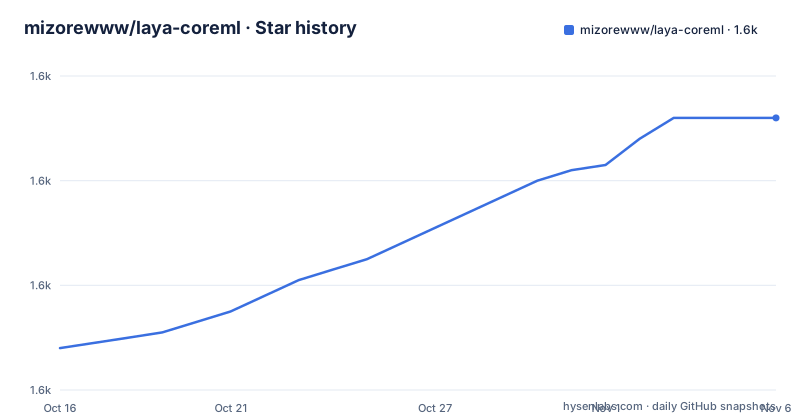
Star history
- mizorewww/laya-coreml1,632 ★ · +44
| Repository | 2026-10-16 | 2026-11-06 |
|---|---|---|
| mizorewww/laya-coreml | 1.6k | 1.6k |
44 Stars in the last 21 days, measured from the daily GitHub snapshot. Compare with other projects
Editorial analysis
Typed questions instead of generated JSON
laya-coreml runs Laya models locally on Apple Silicon through Core ML and the Neural Engine, and the headline is that it produces zero generated tokens.
The API shows what that means. You load a model and ask a question with a typed schema:
import laya_coreml as laya

agent = laya.load("aac6fef/laya-multilingual-coreml-ane")
result = agent.predict(
    "The customer requests a refund of a duplicate payment.",
    {
        "refund": {
            "type": "noul",
            "instructions": "Does the customer request a refund?",
        }
    },
)
print(result["answers"]["refund"])
Laya returns probabilities for three kinds of question. `choice` for a set of options, ordinal `score` for a graded value, and boolean `noul` for a yes or no decision. The `type` key in the question dictionary selects which of the three applies, and `instructions` describes the question in words.
The claim in the README is that there is no autoregressive decoding and no generated JSON to parse. That is a design choice with consequences. A classification model that returns a probability over a fixed set of options cannot hallucinate a field name, cannot produce malformed output, and does not need a grammar-constrained decoder to be safe to use in a pipeline. The cost is that the set of possible answers is fixed at request time, and a question whose answer is not in the option list cannot be expressed at all.
There is also a hub and local distinction. Hub models download before initialization, and subsequent predictions stay local. You can pass `local_files_only=True` to require an existing cache, or load a local directory instead of a hub identifier. The demo section says the same thing from the other direction: download once, then play offline.
The calibration clamp is the detail to read twice
Version 0.4.0 aligns the host inference contract directly with official Laya v0.4.1, and the migration guide covers changed defaults, validation evidence and the remaining Core ML boundaries. One of those changed defaults deserves attention.
Following upstream v0.3.5, fitted calibration temperatures are clamped to the range [0.5, 5.0] before use. The reason is given: the shipped `choice:11+` bucket is 0.1006, which would sharpen the logits by roughly a factor of ten and report a coin flip as near-certainty.
That is a genuine correctness fix, and it is also a change in behaviour that anyone comparing outputs across versions needs to know about. A model whose scores were previously overconfident will now report more moderate probabilities.
The escape hatch is that the checkpoint's raw values remain available as `agent.temperature_raw` and `agent.temperature_by_options_raw`, and a `RuntimeWarning` names every clamped bucket at load time. So a user can see, at startup, exactly which buckets were modified, and can reach the unmodified values if they need to reproduce an older result.
The API also supports batch and long-text prediction, hooks, structured decisions, calibration, HTTP and MCP exposure, evaluation and Router behaviour, and the migration guide says all of these now share the official host semantics rather than the earlier selective port. The `pyproject.toml` shows the optional dependency groups that carry those features: `serve` with fastapi, uvicorn and httpx, `mcp` with the mcp package, `structured` with pydantic, `calibration` and `convert` with torch, `langchain` and `llama-index-core` adapters, and `crewai`.
The ANE bundle has 96 tokens, and that budget is real
The capacity constraints are stated plainly and they will decide whether the model fits your use case.
The ANE bundle has a 96-token total limit, including the question, the options and the state. State truncation and long-text scanning use that actual budget, and oversized question heads or option sets still fail. For general-purpose work there is a separate checkpoint, `aac6fef/laya-multilingual-coreml`, with a 1024-token model.
So the choice is between a small, fast, Neural Engine bundle and a larger CPU and GPU one. The checkpoint table makes the trade-off explicit, with a default engine and a capacity column for each.
| Bundle | Default engine | Capacity | |---|---|---:| | Laya 421M | CPU + GPU | 512 tokens | | Multilingual 322M | CPU + GPU | 1024 tokens | | Typed Decisions 421M | CPU + GPU | 1024 tokens | | Snake GPU | CPU + GPU | B3 / L64 | | Multilingual ANE | CPU + ANE | B1 / L96 | | Multilingual ANE W8 | CPU + ANE | B1 / L96 |
The Snake GPU entry is described as batching the three compact game questions, and the ANE entries are for short decisions in FP16, with the W8 variant offering optional approximate palette compression. The bundles also have a stated purpose each, from the original English model to the general multilingual decisions, the original specialised checkpoint, and the short-decision ANE bundles.
Every bundle includes the tokenizer and configuration, a model card, provenance, checksums and packaging-time validation. The ANE bundles additionally include the exact original host embedding and action tensors they need, so no original training checkout is required to run them.
The README's port fidelity section covers the remaining Core ML boundaries for the port.
The measured numbers, and what they do not cover
The benchmark section is unusually careful about scope, and that care is the most useful thing in it.
The environment is specified: a 40-core GPU, 128 GiB, macOS 27.2, on an M3 Max. The workload is one 91-token question padded to 96, including prompt preparation, tokenization, arrays, synchronous inference, calibration and formatting, with loading and warmup excluded. The comparison implementation is compiled MLX FP16, which enables compile, prefix caching and shape buckets. Six alternating 20-second blocks per implementation produced 65,598 stable calls.
The table that comes out of it:
| Metric | Compiled MLX FP16 | Core ML ANE FP16 | Core ML ANE W8 | |---|---:|---:|---:| | P50 / P95 | 6.94 / 7.39 ms | 4.98 / 5.31 ms | 4.88 / 5.23 ms | | Mean system power estimate | 61.39 W | 30.75 W | 27.39 W | | System energy / decision | 0.4288 J | 0.1540 J | 0.1344 J | | Speed gain | 1x | 1.39x | 1.42x | | System energy gain | 1x | 2.78x | 3.19x |
The caveats are stated in the same breath as the numbers, and they matter. Energy uses direct SMC PSTR sensor readings, with raw samples and explicit anomaly rejection, and it is an estimate with sensor and background-load uncertainty. The arithmetic is spelled out too: speed gain times average power ratio equals energy gain, and multiplying energy by speed again would double-count the time. The W8 variant compresses weights while retaining FP16 compute, it is approximate, and its package-size reduction is not a speed ratio.
The README is also explicit about what the headline latency does not represent. The 4.98 ms P50 and 5.31 ms P95 figure is a single-question result, not a full Snake frame time, and the requested 10x improvement was not achieved.
For the game loop specifically, the numbers are separate. The complete active Snake loop sustained 49.1 to 50.0 decisions per second across three uncapped 600-step episodes, with zero deaths and two safety interventions. The game-loop timings include rendering serialization, and terminal painting is excluded. The project also states that version 0.4.0 validates fidelity and makes no new throughput or energy claim.
The raw measurements are published in the repository under `benchmarks/results`.
The Snake demo is the fastest way to see the contract work
The demo is a terminal Snake game driven by a real Laya model, and the GIF at the top of the README is a recorded Core ML run at 1x speed.
The install path is short:
pip install 'laya-coreml[demo]'
hf download aac6fef/laya-multilingual-coreml-ane --local-dir models/snake
laya-coreml-snake --model ./models/snake
The requirements are stated as Apple Silicon, macOS 15 or later, and Python 3.11 to 3.13, which matches the `requires-python = ">=3.11,<3.14"` in the project metadata. The terminal needs 104 columns by 35 rows. Space pauses, the up and down arrows change speed, R resets and Q quits. First-time Core ML initialisation can take tens of seconds.
The demo is the point rather than a toy. The README says the game uses explicit planner features and a visible cycle safety layer, and the game shows visible probabilities, score, length, latency and safety interventions. So the demo is exercising the parts of the contract that are hard to test otherwise, including the case where a model produces a decision that would trap the agent in a cycle, and the intervention that stops it.
That safety layer is worth pausing on. A model that outputs a typed action is still a model that can be wrong, and the demo makes the intervention visible rather than hiding it, which is the right approach for something you might want to reason about.
The documentation is split across several files. There is a Snake demo document covering controls, recording and video export, a separate benchmarks document with the measured stable decision rates, a launch document about shareable video and recording provenance, and a usage document with the full API, model selection and offline usage.
A small dependency footprint, and a large set of optional integrations
The packaging separates the inference path from everything else you might want to bolt on, and the base dependency list is short.
The required dependencies are `coremltools>=9,<10`, `numpy>=1.26,<2.2`, `tokenizers>=0.21,<1`, `huggingface-hub>=0.34,<2` and `safetensors>=0.6`. The demo says no PyTorch, Transformers or MLX is needed for inference, which is the point of the Core ML route: the heavyweight Python ML stack is not in the path, and `torch` only appears in the `calibration` and `convert` extras.
The optional groups cover the surrounding work. `serve` gives an HTTP surface with fastapi, uvicorn and httpx. `mcp` exposes the model over the Model Context Protocol. `structured` adds pydantic for typed outputs. `langchain`, `llama-index-core` and `crewai` are agent framework adapters. `reference` pulls in transformers, `publish` has twine, and `dev` has pytest, ruff, build and psutil. There is also a `compare` extra pinned to `laya-mlx==0.2.0` and a `research` extra with kmeans1d.
Six console scripts are registered. `laya-coreml` is the main CLI, `laya-coreml-snake` runs the demo, `laya-coreml-router` is the Router, `laya-coreml-serve` the server, `laya-coreml-evals` the evaluation CLI, and `laya-coreml-mcp-server` the MCP server.
The repository layout is organised around evidence. There is a `benchmarks/` directory with a `results/` subdirectory holding the raw measurements, a `docs/` directory, `examples/` with `quickstart.py`, `questions.json` and `state.json`, an `experiments/` directory, `tests/`, `scripts/`, and `laya_coreml/` for the package itself. There is a `BENCHMARKS.md` at the root and a `NOTICE` file, alongside the `LICENSE` and both a Chinese and an English README.
The licence is Apache-2.0, and the project is classified as `Development Status:: 4 - Beta` with `Operating System:: MacOS`. The last push was on 2026-10-10, the same day as the v0.4.0 release, so the code and the published version are in step.
Editorial conclusion
laya-coreml fits an Apple Silicon developer who needs a classifier-style decision with calibrated probabilities, running locally with no PyTorch, Transformers or MLX in the inference path, and who is willing to work inside a 96-token budget on the Neural Engine bundles. It does not fit a team that needs generative output, since the model returns typed answers and no generated tokens, and it does not fit a non-Apple platform, since the classifiers list only MacOS. Verify first that the checkpoint you choose matches the capacity your questions need, because the ANE bundle has a 96-token total limit and the general-purpose bundle offers 1024, that you read `agent.temperature_raw` if you need the unclamped calibration values, since fitted temperatures are clamped to the range [0.5, 5.0] before use, and that the model you load is the one you validated, since version 0.4.0 aligns the host contract with upstream Laya v0.4.1 and ships a migration guide.
Frequently asked questions
What does laya-coreml do differently from a text generation model?
Laya returns probabilities for three typed question kinds, `choice` over a set of options, ordinal `score`, and boolean `noul`. There is no autoregressive decoding and no generated JSON to parse, so a field name cannot be hallucinated and a malformed output is not possible.
How do I run the laya-coreml Snake demo?
Run `pip install 'laya-coreml[demo]'`, then `hf download aac6fef/laya-multilingual-coreml-ane --local-dir models/snake`, then `laya-coreml-snake --model ./models/snake`. It needs Apple Silicon, macOS 15 or later, Python 3.11 to 3.13 and a terminal of 104 columns by 35 rows.
What is the token limit of the laya-coreml ANE bundle?
96 tokens in total, including the question, the options and the state. State truncation and long-text scanning work within that budget, but oversized question heads or option sets still fail. For longer work there is a 1024-token model at `aac6fef/laya-multilingual-coreml`.
Why are calibration temperatures clamped in laya-coreml?
Fitted temperatures are clamped to the range [0.5, 5.0] before use, because the shipped `choice:11+` bucket is 0.1006 and would sharpen the logits by roughly ten times, reporting a coin flip as near-certainty. The raw values remain available as `agent.temperature_raw` and `agent.temperature_by_options_raw`, and a RuntimeWarning names each clamped bucket at load.
What did the laya-coreml benchmarks actually measure?
One 91-token question padded to 96 on an M3 Max with 40 cores and 128 GiB running macOS 27.2, including prompt preparation, tokenization, arrays, synchronous inference, calibration and formatting, with loading and warmup excluded. The reported 4.98 ms P50 is a single-question result and not a full Snake frame time, and the project states the requested 10x improvement was not achieved.
Official sources
Add this badge to your README
If you maintain this project, the badge below links readers to this analysis and shows its maintenance status from the daily GitHub snapshot. Paste the markdown into your README; add ?metric=license or ?metric=stars to the image URL for a different field.

[](https://hysenlabs.com/projects/mizorewww-laya-coreml)Star history chart for your README
[](https://hysenlabs.com/projects/mizorewww-laya-coreml)Was this useful?