CodeCarbon: Tracking emissions from local Python compute
Track emissions from Compute and recommend ways to reduce their impact on the environment.
At a glance
- What is it?
- CodeCarbon is a Python library and CLI that estimates emissions from local CPU, GPU, and RAM use. It fits experiments that can be instrumented in Python or wrapped as commands, but it does not measure remote GenAI API calls or several smaller hardware loads.
- Who is it for?
- Developers and researchers running local CPU, GPU, or RAM workloads should consider CodeCarbon when they need repeatable Python integration, a CLI wrapper, or emissions data for later analysis. Teams measuring remote GenAI services should select EcoLogits instead.
- Can I use it commercially?
- Yes. MIT is a permissive licence: you can use, modify and sell software built on it, as long as you keep its copyright and licence notices.
- Is it still maintained?
- Yes. The repository last received commits 2 days ago.
- What is it written in?
- Mainly Python, according to GitHub's language statistics.
Answers come from the project's GitHub data, last synced on November 7, 2026, and from our analysis. They are not legal advice.
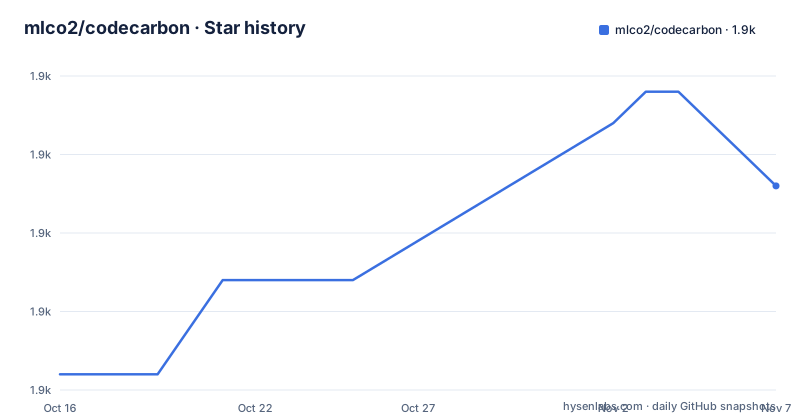
Star history
- mlco2/codecarbon1,939 ★ · +6
| Repository | 2026-10-16 | 2026-11-07 |
|---|---|---|
| mlco2/codecarbon | 1.9k | 1.9k |
6 Stars in the last 22 days, measured from the daily GitHub snapshot. Compare with other projects
Editorial analysis
CodeCarbon's local-compute measurement scope
CodeCarbon addresses a specific measurement gap: developers often know how long an experiment ran without knowing the estimated carbon emissions associated with its local hardware. The project targets Python developers, machine-learning practitioners, researchers, and system administrators who need an emissions figure associated with code executed on a computer. Its output is an estimate based on hardware electricity consumption and the carbon intensity associated with the computation region.
The supported scope is narrower than the phrase "computing emissions" might imply. CodeCarbon concentrates on CPU, GPU, and RAM. It does not separately model disk I/O, network transfers, displays, cooling, or other peripherals. That decision avoids spreading a low-level instrument across sources that the README says are usually smaller during local code-level experiments. It also means that a CodeCarbon result should not be interpreted as a complete facility-level carbon inventory.
The README also draws a hard boundary around remote AI services. CodeCarbon measures hardware on the local machine, so calls to services such as OpenAI, Anthropic, or Mistral fall outside its stated model. This distinction matters when an apparent workload is mostly remote API traffic.
How CodeCarbon estimates CPU, GPU, and RAM emissions
The documented calculation has two stages. First, CodeCarbon estimates power consumption for the local compute components it can measure or estimate directly: GPU, CPU, and RAM. Second, it applies the carbon intensity of the region where the computing occurs. The returned emissions value is consequently an estimate tied to both energy use and an emissions factor, not a direct reading from a CO₂ sensor.
The Python interface reflects that lifecycle. Creating `EmissionsTracker` prepares the tracker, `start()` begins measurement, and `stop()` ends the active interval and returns an emissions value. Code can call the tracker directly, which makes the library suitable for experiment scripts, model comparisons, and application code that already has a clear measurement boundary.
Results can be put into context through the CodeCarbon dashboard or examined locally with carbonboard. The repository also contains dashboards, a `carbonserver`, a web application, and a Docker Compose setup. Those components indicate a broader reporting path than the core Python library, although the README does not document every privacy or deployment decision. Configuration can come from `~/.codecarbon.config`, `./.codecarbon.config`, `CODECARBON_*` environment variables, or arguments passed to `EmissionsTracker(...)`, so a project can control behavior without embedding every setting in source code.
Installing CodeCarbon and running a first Python measurement
The README gives `pip` as the standard installation route. CodeCarbon requires Python 3.10 or later according to `pyproject.toml`. Install it in the environment used for the experiment so that `codecarbon` and its dependencies are available to the same interpreter.
Use this command in a shell or Python environment:
pip install codecarbonIf the project uses Conda, the README first activates an existing environment and then installs the package into it:
conda activate your_env
pip install codecarbon
A first measurement can remain inside an existing script. The placeholder comment marks the work being measured; it is not a command to run.
from codecarbon import EmissionsTracker

tracker = EmissionsTracker()
tracker.start()

# Your code here

emissions = tracker.stop()
print(f"Emissions: {emissions} kg CO₂")
The output line should print the estimated emissions returned by `stop()`. The README example labels that value in `kg CO₂`. Users who need more control should consult the configuration guide rather than infer parameters not shown in the quickstart.
Monitoring an existing command with the CodeCarbon CLI
The CLI offers a practical path when modifying an application is undesirable. It places a command between `codecarbon monitor` and the normal program invocation. In the documented example, `--no-api` selects operation without the API before Python runs `train.py`.
Use this form for a command-line training script:
codecarbon monitor --no-api -- python train.pyThis arrangement is useful for comparing runs driven by shell scripts or comparing models through repeated training commands. However, the README does not state the exact result files, measurement boundaries, or exit behavior for the CLI. Those details belong in the linked CLI tutorial and should be checked before the output becomes part of an automated benchmark pipeline.
For machine discovery, the README provides a separate command:
codecarbon detectIt is the documented starting point when users need to inspect what local hardware CodeCarbon recognizes. The README does not claim that detection resolves all platform-specific measurement limitations, so hardware recognition and measurement quality are separate questions.
Configuration and reporting choices in CodeCarbon
CodeCarbon exposes configuration at four levels: a global `~/.codecarbon.config`, a project-local `./.codecarbon.config`, `CODECARBON_*` environment variables, and Python arguments supplied to `EmissionsTracker(...)`. The existence of these layers is useful for separating machine settings from experiment settings, but the README does not publish the full precedence table. The configuration guide is the authoritative project reference for that behavior.
The repository also provides a hosted dashboard for visualizing experiment emissions. Carbonboard is the documented local visualization option. This creates a meaningful adoption decision beyond package installation: a team must determine whether it will use local records, send measurements to the dashboard, or operate relevant server components itself.
The `docker-compose.yml` shows a self-hosted service topology. It defines PostgreSQL, `carbonserver`, and `ui`; maps PostgreSQL port `5432`, carbonserver port `8008` to container port `8000`, and the UI port `3000`; and configures `DATABASE_URL`, `CORS_ORIGINS`, and frontend variables. The file also contains development credentials and a fixed encryption-key example, so it should not be treated as a documented production security configuration. The repository includes `privacy_policy_en.md`.
Why CodeCarbon differs from EcoLogits and full system inventories
EcoLogits is the clearest alternative named by the project because it addresses a different execution boundary. CodeCarbon estimates emissions from local hardware used by Python code, while EcoLogits is directed at remote GenAI API calls such as OpenAI, Anthropic, and Mistral. If a workload sends prompts to a hosted model and performs little local computation, CodeCarbon's primary scope does not represent the remote service's energy use. The README calls the two tools complementary, so choosing one does not imply that it measures the other.
A second alternative is a full facility or system inventory. Such an approach can account for categories that CodeCarbon explicitly excludes, including cooling, displays, network transfers, storage activity, and other peripherals. The README does not name a particular inventory package, so no comparative feature list would be supportable. The architectural difference is still clear: CodeCarbon concentrates on a local code-level estimate for CPU, GPU, and RAM rather than attempting to describe every energy-consuming part of an installation.
CodeCarbon is therefore the better fit when measurement must be attached directly to a Python execution interval or command. It is the wrong abstraction when the main emissions source is remote, or when reporting requires a complete organizational boundary.
CodeCarbon releases, maintenance, and the MIT license
The repository is not archived, and its last push was on 2026-10-13. Recent releases include v3.3.1 on 2026-09-09, 3.3.0 on 2026-08-04, and 3.2.9 on 2026-07-19. Those dates show recent project activity and a sequence of published package versions. They do not, by themselves, establish compatibility for every supported platform or Python release.
`pyproject.toml` classifies the project as `Development Status :: 5 - Production/Stable`, requires Python 3.10 or later, and lists Linux, macOS, and Windows through its classifiers. Version numbers are dynamic in `pyproject.toml`, so users should confirm the installed package version when reproducing research results.
The repository identifies `codecarbon` under the MIT license and includes a `LICENSE` file. MIT is a permissive license, but users who redistribute the package or incorporate it into a product should inspect that file for the actual permissions and notice obligations. The license does not turn CodeCarbon's estimate into a regulatory measurement or remove the need to document region, hardware scope, and methodology when reporting results.
Editorial conclusion
Developers and researchers running local CPU, GPU, or RAM workloads should consider CodeCarbon when they need repeatable Python integration, a CLI wrapper, or emissions data for later analysis. Teams measuring remote GenAI services should select EcoLogits instead. Before adoption, verify that CPU, GPU, and RAM represent the intended workload, decide whether dashboard submission is acceptable, and review the MIT license and the methodology documented at https://docs.codecarbon.io/ for the required reporting context.
Frequently asked questions
How do I install CodeCarbon in Python?
Install it with `pip install codecarbon`. The repository's `pyproject.toml` requires Python 3.10 or later, and the README also provides a Conda workflow.
Can CodeCarbon track emissions from OpenAI or Anthropic API calls?
No. The README says CodeCarbon measures local computing hardware. For remote GenAI API calls such as OpenAI, Anthropic, and Mistral, it directs users to EcoLogits.
Which hardware components does CodeCarbon measure or estimate?
CodeCarbon focuses on CPU, GPU, and RAM. It does not separately model disk I/O, network transfers, displays, cooling, or other peripherals.
Official sources
Add this badge to your README
If you maintain this project, the badge below links readers to this analysis and shows its maintenance status from the daily GitHub snapshot. Paste the markdown into your README; add ?metric=license or ?metric=stars to the image URL for a different field.

[](https://hysenlabs.com/projects/mlco2-codecarbon)Star history chart for your README
[](https://hysenlabs.com/projects/mlco2-codecarbon)Was this useful?