AudioSignalProcessingForML: A Notebook-Based Path to Audio Features
Code and slides of my YouTube series called "Audio Signal Proessing for Machine Learning"
At a glance
- What is it?
- AudioSignalProcessingForML is a course repository for learning how audio signals become numerical features for machine learning. It pairs Jupyter Notebook exercises with slides and videos, progressing from waveforms to MFCCs, spectral features, and implementation examples.
- Who is it for?
- Adopt this repository as a learning resource for Python developers who want a guided introduction to audio features before building an ML pipeline. Do not treat it as a production preprocessing library or a substitute for task-specific audio modeling.
- Can I use it commercially?
- Yes. MIT is a permissive licence: you can use, modify and sell software built on it, as long as you keep its copyright and licence notices.
- Is it still maintained?
- Yes. The repository last received commits 111 days ago.
- What is it written in?
- Mainly Jupyter Notebook, according to GitHub's language statistics.
Answers come from the project's GitHub data, last synced on November 7, 2026, and from our analysis. They are not legal advice.
Star history
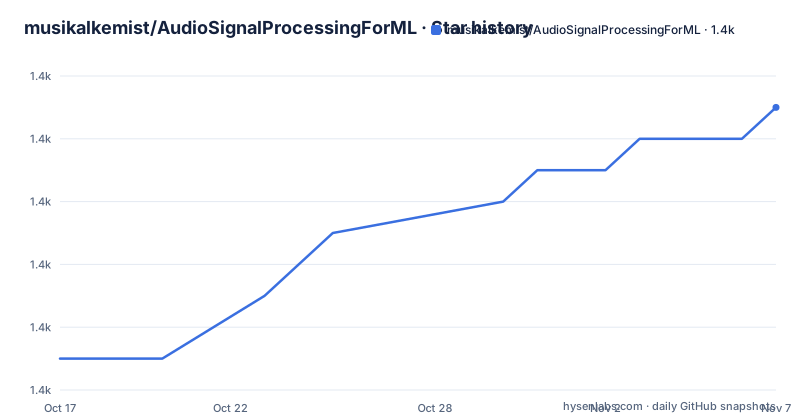
- musikalkemist/AudioSignalProcessingForML1,427 ★ · +8
| Repository | 2026-10-17 | 2026-11-07 |
|---|---|---|
| musikalkemist/AudioSignalProcessingForML | 1.4k | 1.4k |
8 Stars in the last 21 days, measured from the daily GitHub snapshot. Compare with other projects
Editorial analysis
What AudioSignalProcessingForML Teaches
AudioSignalProcessingForML addresses the gap between raw sound and the numerical representations expected by machine learning systems. A recording starts as a sequence of audio samples, but a model needs a defined representation. This repository organizes that transition as a course: sound and waveforms first, then feature types, time-domain measurements, Fourier analysis, spectrograms, Mel spectrograms, MFCCs, band energy ratios, and spectral centroid and bandwidth.
The intended audience is best described as Python learners, data practitioners, and developers beginning an audio-focused ML project. The course assumes enough programming familiarity to open and execute notebooks, but the repository is structured to explain the signal-processing ideas alongside Python implementations. The README does not claim that it provides a trained model, an application service, or an end-to-end classifier. Its scope is feature extraction and the reasoning needed to understand those features.
The repository includes slides and videos for many lessons, while selected chapters also include Jupyter Notebook files. That combination matters. Slides explain concepts such as the DFT, STFT, and MFCCs, while notebooks expose the corresponding Python workflow. A learner can compare a mathematical description with code that loads or analyzes audio and produces visualizations or feature arrays. The result is a study resource, not an installable audio processing service.
A Course Path Across the Audio Signal Pipeline
The repository layout follows the processing sequence closely. Directories numbered from 01 through 07 establish the conceptual foundation. Later directories move from the time domain to the frequency domain, then into Python extraction examples. This is a deliberate curriculum rather than a single packaged API.
The early chapters cover intensity, loudness, and timbre, followed by an explanation of audio signals and time-domain features. The implementation sequence then includes an amplitude envelope notebook and a notebook for RMS energy and zero-crossing rate. Those examples connect measurable signal properties to machine learning inputs before introducing spectral transformations.
The frequency-domain section begins with Fourier Transform intuition and complex numbers, then defines the transform and introduces the Discrete Fourier Transform. A later notebook is titled “Visualising the Power Spectrum,” which indicates that the repository does not treat extraction as a black box. It shows how the resulting frequency information can be inspected.
The pipeline continues with spectrograms, Mel spectrograms, and MFCCs. Separate concept slides and extraction notebooks make the distinction between theory and implementation explicit. Chapters for band energy ratio, spectral centroid, and spectral bandwidth extend the coverage beyond a single familiar feature set. The `audio_resources/` directory contains `.wav` files used by the examples, so the repository includes input resources rather than relying entirely on hypothetical arrays.
The numbered layout also gives learners a practical route through the course. Someone who already understands the fundamentals can open a specific implementation chapter, while a beginner can follow the sequence from waveform terminology toward representation choices. That flexibility is useful, although the README does not document a shorter track for users who already know DSP.
Time-Domain and Frequency-Domain Representations
The notebooks in this repository address two distinct ways of representing audio. Time-domain features work directly with the signal sequence. The amplitude envelope notebook targets changing signal magnitude over time, while the RMS energy and zero-crossing rate notebook examines energy and the frequency of amplitude crossings. These concepts can be useful when the shape of a waveform carries information relevant to a classification task.
The frequency-domain chapters change the representation from sample amplitude to components indexed by frequency. The repository explicitly lists the DFT and its power spectrum, then adds short-time analysis. A full transform describes a signal across frequency, while a spectrogram shows how spectral content changes over time. That time-frequency representation matters for audio because a recording can contain different sounds at different moments.
Mel spectrograms and MFCCs appear as separate stages in the course. The repository provides explanation slides and Python notebooks for both, rather than treating a Mel spectrogram and an MFCC as interchangeable outputs. It also covers handcrafted spectral descriptors such as band energy ratio, spectral centroid, and spectral bandwidth. This gives learners several representations to compare conceptually, although the README does not frame them as alternatives for every classification problem.
The README does not document production settings such as window size, hop length, sample rate, coefficient count, channel handling, or normalization. Those omissions make the repository less useful as a deployment specification. They do not prevent it from teaching the feature-extraction path, but they mean that notebook parameters should not be assumed to represent universal defaults.
This structure also clarifies what the repository is not. It is not a general audio editing package, a model-serving system, or a configurable data pipeline. It is a set of lessons demonstrating how common audio representations are derived and interpreted.
Dependencies, Local Setup, and First Notebook Use
The README does not provide a dedicated installation section. It does provide a `requirements.txt` file, plus a badge indicating Python 3.11. The requirements file pins the numerical, plotting, audio, notebook, and kernel dependencies used by the examples, including `librosa==0.11.0`, `numpy==2.2.6`, `scipy==1.16.1`, `matplotlib==3.10.6`, `scikit-learn==1.7.1`, and `soundfile==0.13.1`.
A practical first step is to obtain the repository and use its `requirements.txt` as the dependency manifest. The README also provides a `legacy` branch for following the original video course exactly. The default `master` branch represents the updated v2 code, which may differ from the code shown in the videos.
For a first real use, prepare a Python 3.11 environment from the repository root, install the packages declared in `requirements.txt`, and start Jupyter Notebook. The README does not document the command used to launch that server, so no launch command can be confirmed from it.
A reader should expect the notebook interface to open with a directory listing that mirrors the repository’s numbered lesson folders. Selecting `08 - Implementing the amplitude envelope/Implementing the amplitude envelope.ipynb` is a concrete first exercise because that chapter is an implementation lesson rather than a conceptual-only PDF. After the notebook opens, follow its cells in order and use the included WAV resources when its code references them.
The successful result is an executed notebook that demonstrates the chapter’s feature calculation and any plots or printed output defined by that notebook. The README does not promise a particular plot, console message, or resulting array shape. Readers should therefore use the notebook’s own assertions and displayed outputs, if present, rather than expect a result shown in the README.
The requirements file also includes `ipykernel`, `jupyter_core`, `debugpy`, and related notebook components. That confirms a Python notebook workflow, but the repository does not prescribe a particular IDE or notebook interface.
Learning Value and Operational Limits
The strongest part of the repository is the sequence of explanations and examples. A learner can start with what a waveform is, then move toward representations commonly encountered in audio machine learning. The inclusion of slides, videos, notebooks, and sample WAV files lets the same concept be approached through theory, presentation, and executable code.
Its limitations follow from the format. The repository does not document a public Python API, a command-line entry point, automated tests, or a service interface. The README also does not state how the notebooks handle sample-rate conversion, resampling, mono or stereo channels, clipping, silence, or long recordings. Those are real preprocessing decisions in audio systems, so readers need to understand them before transferring notebook logic into an application.
There is no GitHub release history. The repository notes that v2 is updated and that the original course version is deprecated, with the legacy branch retained. The last push was on 2026-07-19, so the repository has recent recorded activity. Even so, recent commits are not the same as a stable library release with published migration notes.
Notebook environments can also be sensitive to Python, NumPy, librosa, and compiled dependency versions. The exact pins in `requirements.txt` improve reproducibility for the declared environment, but they can increase the work involved when adopting a newer package. A reader should not replace the pins without checking every notebook’s numerical output.
For production use, the biggest gap is architectural. There is no documented service, queue, cache, batching strategy, or validation layer. This is appropriate for lessons, but adopting the repository as a library would require extracting and maintaining the relevant code separately.
How It Differs from a Signal-Processing Library
A standard Python signal-processing library serves a different role. `librosa` is listed as a dependency, but the repository organizes concepts, explanations, and examples across a curriculum. The library role belongs to packages that expose processing functions and callable APIs. AudioSignalProcessingForML instead gives learners context for selecting and understanding transformations such as the DFT, STFT, spectrogram, Mel spectrogram, and MFCC.
A notebook-based course is also different from production-oriented audio feature tooling. Course notebooks often expose intermediate concepts and visualization steps in educational order. A production component usually centers on a stable function signature, predictable output dimensions, explicit input validation, and integration with training or inference pipelines. AudioSignalProcessingForML does not document that contract.
Another alternative is to build a preprocessing module directly around a project’s training data. That approach can be preferable when the model needs fixed sample rates, deterministic batching, channel handling, caching, normalization, and tests. The notebook repository leaves those production decisions outside its documented scope, so a direct integration would require additional engineering.
This difference affects upgrade cost. A library can expose versioned functions and dependency constraints, while a notebook collection may require a user to preserve Python package versions and execution order. The repository pins exact versions in `requirements.txt`, which helps reproduce its declared environment, but upgrades still require deliberate compatibility checks.
The repository is therefore best treated as a guided study companion. It can shorten the path from unfamiliar audio concepts to a first feature-extraction implementation, but it does not remove the engineering work required to turn that implementation into a dependable preprocessing component.
MIT Licensing and Maintenance Context
The repository identifies the MIT license. Its source includes an explicit permissive license, subject to the terms recorded in the `LICENSE` file. License obligations should still be read alongside that file for redistribution and attribution requirements. This review does not provide legal advice or interpret how an organization’s internal policy applies.
Maintenance information is limited but concrete. The repository is not archived, and the last push was on 2026-07-19. The README states that the v2 code was updated for current environments and improved dependency management, while the original course version remains available in the `legacy` branch. There are no GitHub releases, so there is no release-based upgrade path to rely on.
The practical maintenance cost is notebook and dependency management. Exact versions are recorded in `requirements.txt`, which supports reproduction of the declared environment. However, notebook code can still depend on file paths, local audio resources, and assumptions about how outputs are interpreted. The repository layout and branch names are part of that maintenance surface. A user adopting the material should preserve the directory structure and inspect the exact notebook version rather than assuming every example matches the video.
The branch distinction also affects maintenance decisions. The `master` branch may contain code that differs from what appears on screen in the course videos. The `legacy` branch exists for readers who need the original version. Anyone integrating this code should record which branch the notebooks came from, because the repository does not publish GitHub releases that encode these compatibility distinctions.
Editorial conclusion
Adopt this repository as a learning resource for Python developers who want a guided introduction to audio features before building an ML pipeline. Do not treat it as a production preprocessing library or a substitute for task-specific audio modeling. Verify first that its pinned dependencies work on your platform, that notebook paths resolve after download, and that the examples match the feature representation required by your model.
Frequently asked questions
How do I install AudioSignalProcessingForML?
The README does not provide a dedicated installation command. It identifies Python 3.11 and includes `requirements.txt`, which pins dependencies including `librosa`, `NumPy`, `SciPy`, `Matplotlib`, `scikit-learn`, and notebook components.
What does AudioSignalProcessingForML teach?
It teaches audio signal processing for machine learning, progressing from sound and waveforms to time-domain features, Fourier analysis, spectrograms, Mel spectrograms, MFCCs, band energy ratio, spectral centroid, and spectral bandwidth.
Does AudioSignalProcessingForML contain production audio preprocessing APIs?
No production audio preprocessing API is documented. The repository is primarily a collection of Jupyter Notebook lessons, slides, videos, explanations, and example WAV resources.
Can I follow the original AudioSignalProcessingForML course?
Yes. The README says the original course version is available in the `legacy` branch for following the video content exactly, while the default branch contains the updated v2 files.
Official sources
Add this badge to your README
If you maintain this project, the badge below links readers to this analysis and shows its maintenance status from the daily GitHub snapshot. Paste the markdown into your README; add ?metric=license or ?metric=stars to the image URL for a different field.

[](https://hysenlabs.com/projects/musikalkemist-audiosignalprocessingforml)Star history chart for your README
[](https://hysenlabs.com/projects/musikalkemist-audiosignalprocessingforml)Was this useful?