Potpie indexes your repo and hands the context back through potpie resolve
Context Graph for AI Native SDLC. Potpie turns your codebase and software development lifecycle into a living context graph for AI agents.
At a glance
- What is it?
- A CLI-first context graph for AI coding agents, installed from PyPI and provisioned by a setup wizard. Ingest is agent-driven rather than a command you run, the supported harness list is four entries long, and the graph engine dependency is pinned to one exact version.
- Who is it for?
- Potpie fits a team whose agent already runs in Claude Code, Cursor, Codex or OpenCode and whose useful context lives in GitHub, Linear, Jira and Confluence rather than in one machine. Skip it if you need the harness list to grow on your schedule, or if your environment is stuck on Python 3.11, since pyproject.toml requires >=3.12,<3.15.
- Can I use it commercially?
- Yes. Apache-2.0 is a permissive licence: you can use, modify and sell software built on it, as long as you keep its copyright and licence notices.
- Is it still maintained?
- Yes. The repository last received commits 15 days ago.
- What is it written in?
- Mainly Python, according to GitHub's language statistics.
Answers come from the project's GitHub data, last synced on November 13, 2026, and from our analysis. They are not legal advice.
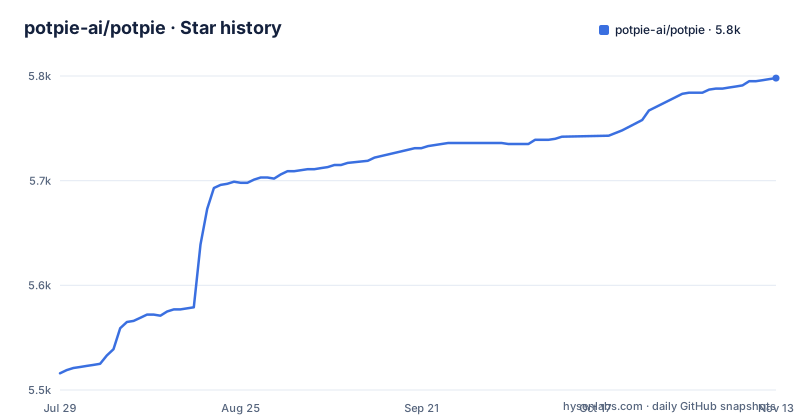
Star history
- potpie-ai/potpie5,798 ★ · +282
| Repository | 2026-07-29 | 2026-11-13 |
|---|---|---|
| potpie-ai/potpie | 5.5k | 5.8k |
282 Stars in the last 107 days, measured from the daily GitHub snapshot. Compare with other projects
Editorial analysis
potpie setup provisions a daemon, a pot, and agent skills
Installation is three steps, and two of them are commands. The CLI comes from PyPI, and the project recommends uv because globally mutating Python packages is not recommended:
uv tool install potpieThe documented alternative, for an environment without uv, installs into the user site:
python3 -m pip install --user potpieThen the wizard does the actual provisioning:
potpie setupKnowing what that wizard creates matters before you run it: local config, storage, the daemon, a default pot, and agent skills, with prompts for which integrations to connect and which coding harness to configure. A pot is the workspace the CLI resolves against. The daemon has its own command: the Makefile installs both potpie and potpie-daemon on your PATH, and potpie ui opens a graph explorer in the browser served by that daemon.
There is no manual ingest command, and that changes the expectation
The setup path stops short of indexing anything, and a note in the installation steps says why: you do not need a separate manual ingest command, because the CLI registers sources and the configured agent ingests or updates project context when the task requires it. So the graph fills during work rather than before it. Reading it back is explicit, through two commands with different shapes. potpie resolve "<task>" pulls the context an agent should read before doing a task, which takes a question rather than a keyword:
potpie resolve "what should I know before working in this repository?"
potpie search "authentication flow"
potpie search "<query>" is the narrower lookup, aimed at one file, workflow, bug, decision or convention. Writing goes the other way, through potpie record --type <type> --summary "<summary>", which the command table describes as writing a durable project learning. The practical consequence for a new user: a fresh install holds an empty graph, and nothing in that command list forces a full index on demand.
status, doctor, and auth status --verify answer three different questions
Three diagnostics overlap enough to confuse people, and the command table draws the lines. potpie status reports context readiness for the active pot, covering the daemon, the graph and skill checks. potpie doctor runs local diagnostics over daemon state, backend capabilities and skill drift. potpie auth status shows configured integration auth status, and appending --verify turns it into a live check that verifies integration credentials with lightweight API calls. So doctor answers whether the local install is sane, auth status answers whether your GitHub or Linear connection is configured, and status answers whether there is any context to work with. Account features take a different door, potpie login, while potpie github login and potpie linear login connect the sources themselves. The three diagnostics are short enough to keep as a script:
potpie auth status
potpie status
potpie doctor
Python 3.12 is the floor and the context engine is pinned to 0.2.0
pyproject.toml sets requires-python to >=3.12,<3.15, so anything older than 3.12 is excluded, and the classifiers list 3.12, 3.13 and 3.14. The wheel is built by hatchling, pinned to hatchling==1.32.0, with a custom build hook at scripts/distribution_defaults_hook.py that has to run at package time. The weight sits in one dependency: the graph engine is a separate distribution, potpie-context-engine[http,local]==0.2.0, pinned to one exact version with its http and local extras (the optional all extra adds potpie-context-engine[all]). Around it sits a web and CLI stack of fastapi, starlette, uvicorn[standard], typer, click, httpx, aiohttp and rich, while keyring, pydantic-ai-slim, pyjwt, pillow and sentry-sdk (held below 3.0.0) come only through optional extras such as auth, ingest, ui and telemetry. An exact pin on the engine means a newer one cannot enter your environment without reinstalling potpie, and a fix published in that package waits for potpie to move first.
make cli-install installs editable and loads your .env
The root Makefile targets developing the CLI rather than using the product, and its header says the targets build and install the local potpie CLI and daemon globally. Three details decide what you get. The install runs in editable mode, so the global potpie and potpie-daemon on your PATH execute straight from the repository source and code changes take effect on the next invocation with no reinstall. The CLI also auto-loads this repository's .env, which the Makefile comments identify as holding Neo4j and Postgres credentials, no matter which directory you run from, so a global potpie reaches local backends out of the box. And the UI is a Node build: the Makefile declares ui-build and ui-build-ci targets for the frontend in potpie/daemon/http/ui/frontend, and cli-install builds the graph-explorer UI before installing.
make cli-install
make cli-status
One mismatch is worth knowing before you file a bug about it. The Makefile defaults CLI_PYTHON to >=3.12,<3.14 while the package metadata allows <3.15, so development installs target a narrower range than the published classifiers advertise.
Four sources and four harnesses, with skill drift as the failure mode
The supported surface is a closed list and the escape hatch is a ticket. Sources are GitHub for repositories, pull requests, issues, reviews and source history; Linear for teams, issues, projects and documents; Jira for projects, issues, status and changelog context; Confluence for spaces, pages, runbooks and decisions. Harnesses are Claude Code, OpenAI Codex and Cursor, which receive Potpie instructions and skills, and OpenCode, which receives Potpie skills. A team that needs a different integration or harness is asked to raise a ticket, which makes the cost of an unsupported tool a wait rather than a workaround. The failure mode that follows from a fixed harness list is drift. Skills are installed or refreshed per agent with potpie skills install --agent <agent>, and potpie doctor is the command that reports skill drift next to daemon and backend checks. A harness that rewrites its own instructions can leave Potpie guidance behind, and nothing in the command list schedules that refresh.
CLI-first, with the line between local and managed left open
The architecture section is two sentences: Potpie's current architecture is CLI-first, the CLI is designed to be used by both humans and agents, and the deeper notes sit in docs/context-graph/architecture.md inside the repository. Read that next to the command table and a boundary appears. Setup provisions local config, storage, a daemon, a default pot and skills on your own machine, while potpie login exists for account-backed and managed features. Which features land on which side is not stated in the README, and it matters before you commit, because a fully local install and an account-backed one are different operating models with different failure modes. The version line is young and moving: 2.0.1 was published on 2026-08-31 after betas on 2026-06-18 and 2026-06-24, the package carries the Development Status :: 3 - Alpha classifier, the licence is Apache 2.0, and the last push was on 2026-10-30. The repository root stays conventional around all of this, with docs/, spec/, tests/, scripts/, a pre-commit config and a uv.lock sitting next to the README and pyproject.toml.
Editorial conclusion
Potpie fits a team whose agent already runs in Claude Code, Cursor, Codex or OpenCode and whose useful context lives in GitHub, Linear, Jira and Confluence rather than in one machine. Skip it if you need the harness list to grow on your schedule, or if your environment is stuck on Python 3.11, since pyproject.toml requires >=3.12,<3.15. Before adopting it, run potpie auth status --verify and potpie doctor on a scratch repo, and read docs/context-graph/architecture.md, because the README does not say which features need potpie login and which stay local after the setup wizard.
Frequently asked questions
What is Potpie AI?
Potpie turns your codebase and the software development lifecycle around it into a living context graph for AI agents. It indexes code, structure, decisions, source history, team knowledge and engineering workflows so an agent can answer questions, plan changes and debug failures with project specific context.
How do I install the Potpie CLI?
From PyPI, either with uv tool install potpie, which the project recommends because global mutation of Python packages is not recommended, or with python3 -m pip install --user potpie. Then run potpie setup to provision local config, storage, the daemon, a default pot and agent skills.
Does Potpie need a separate ingest command?
No. The CLI registers sources with potpie source add repo ., and the configured agent ingests or updates project context when the task requires it. You read the result back with potpie resolve for a task and potpie search for a specific file, workflow, bug, decision or convention.
Official sources
Add this badge to your README
If you maintain this project, the badge below links readers to this analysis and shows its maintenance status from the daily GitHub snapshot. Paste the markdown into your README; add ?metric=license or ?metric=stars to the image URL for a different field.

[](https://hysenlabs.com/projects/potpie-ai-potpie)Star history chart for your README
[](https://hysenlabs.com/projects/potpie-ai-potpie)Was this useful?