Codex agent skills as folders: a look at a two-skill repository
My profile & the agent skills I created
At a glance
- What is it?
- This repository holds two prompt-level skills for Codex, packaged as portable folders with a SKILL.md entrypoint and an agents/openai.yaml, installed by copying or symlinking into ~/.codex/skills. There is no code and no licence file, which makes it useful to read and awkward to depend on.
- Who is it for?
- Read this repository if you are writing your own agent skills, because it demonstrates the whole shape of one at its smallest: a folder, an entrypoint file, an optional metadata file, and a trigger description written to be specific enough that the agent loads it only when it applies. Copy the structure, not the content.
- Can I use it commercially?
- Not without permission. GitHub finds no licence file in the repository, and without a licence all rights are reserved by default: you may read the code but not reuse it. Check the README, or ask the authors, before using it.
- Is it still maintained?
- Yes. The repository last received commits 82 days ago.
- What is it written in?
- GitHub does not report a main language for this repository.
Answers come from the project's GitHub data, last synced on November 7, 2026, and from our analysis. They are not legal advice.
Star history
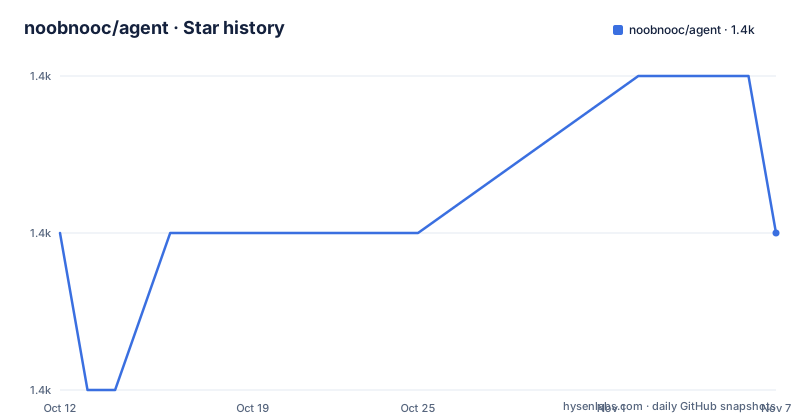
- noobnooc/agent1,387 ★ · +0
| Repository | 2026-10-12 | 2026-11-07 |
|---|---|---|
| noobnooc/agent | 1.4k | 1.4k |
0 Stars in the last 26 days, measured from the daily GitHub snapshot. Compare with other projects
Editorial analysis
What this repository is, exactly
The top level holds a README and a skills directory. That is the entire repository, and the README is candid about what it is: personal Codex agent skills maintained by one person.
The organisation principle is stated plainly and is the most transferable idea here. Each skill is kept as a portable folder, and a skill folder contains a SKILL.md entrypoint plus, when it is useful, agent-specific metadata under an agents/ subdirectory. Nothing is compiled, nothing is installed as a package, and there is no runtime dependency to satisfy.
The catalogue has two entries. wtf covers pre-launch and pre-commit audits for fast-moving projects, with a scope list that includes repository hygiene, secrets, environment variables, database readiness, deployment risks, dead code and common mistakes in AI-built applications. better-codex is described as a reliability overlay for Codex coding work, listing safer scope control, stale-edit prevention, dependency judgment, root-cause debugging, quality-first implementation, focused tests and concise user updates.
Both descriptions enumerate the situations the skill covers. That is deliberate, and the maintenance guidance later in the README says so.
A repository with two folders and no code still shows the convention, because it makes the packaging convention visible in a way that a large collection would hide.
Anatomy of one skill folder
The structure block in the README shows the layout in full:
skills/
  better-codex/
    SKILL.md
    agents/openai.yaml
  wtf/
    SKILL.md
    agents/openai.yaml
Three observations follow from that listing. First, the entrypoint name is fixed by convention rather than by configuration, which means a skill is identifiable to the agent by its folder and its SKILL.md without any manifest listing it. Second, the metadata file is optional and named after the agent, so the same skill folder could carry metadata for a different agent later without restructuring. Third, the two skills share a shape exactly, which is what makes copy and symlink workflows work.
The maintenance section adds the rule that governs the SKILL.md file: keep the trigger description specific enough that agents load it only when useful. That rule carries the repository. A skill is loaded because its description matched, so a vague description turns every request into a skill invocation, and an overly narrow one makes the skill dead weight.
For agents/openai.yaml the guidance is shorter: keep it short and focused on display metadata and the default prompt. In other words, judgement goes in the entrypoint, presentation goes in the metadata, and mixing the two is the failure mode the author is steering contributors away from.
Installing by copy, or by symlink while you work on them
Installation is a clone and a file operation, with two variants, one for consuming the skills and one for editing them.
To consume them:
git clone https://github.com/noobnooc/agent.git
cd agent

mkdir -p ~/.codex/skills
cp -R skills/wtf skills/better-codex ~/.codex/skills/
To work on them, link the folders instead of copying, so an edit in the repository is visible to the agent immediately:
mkdir -p ~/.codex/skills
ln -s "$(pwd)/skills/wtf" ~/.codex/skills/wtf
ln -s "$(pwd)/skills/better-codex" ~/.codex/skills/better-codex
That distinction is a general one about agent tooling rather than a quirk of this project. Copied skills are versioned by when you copied them, which means an update in the repository never reaches you. Symlinked skills track the working tree, which means an experiment in progress changes your agent's behaviour immediately, including when you have not finished the experiment.
The README also handles the case where the agent does not read skills from that directory, saying only that you should copy or symlink the same folders there. That is the whole portability story: there is no installer that discovers locations, so knowing where your agent looks is your problem.
The paths assume a POSIX home directory. There is no Windows equivalent in the documentation, which is consistent with a personal setup rather than a packaged distribution.
Invoking a skill by name in a prompt
Usage is a prompt, and the syntax is a dollar sign followed by the skill name:
Use $wtf to audit this project before I commit or deploy it.
Use $better-codex to complete this coding task safely and concisely.
Two behaviours follow from that syntax. The skill is selected explicitly by the person writing the prompt, which means the trigger description is not the only route to activation. And the rest of the sentence is free text, so the skill is a prompt fragment rather than a command with arguments, which is why the two examples include a task description rather than a flag.
That combination, a name that guarantees loading plus a natural-language instruction that sets the goal, is the practical interface. It also means the quality of a skill depends on the text inside SKILL.md in a way that is hard to evaluate before loading it, since the description is all the agent sees when deciding, and the body is all you see when it has already decided.
The two skills occupy different moments. $wtf runs before a commit or a deploy, and $better-codex runs during a coding task. That sequencing is the closest thing to a workflow in this repository, which says the author treats audit and execution as separate activities with separate failure modes.
What the two skills actually ask an agent to do
Reading the catalogue entries as scope statements rather than as feature lists gives a clearer picture of the design.
The wtf skill enumerates audit targets: repository hygiene, secrets, environment variables, database readiness, deployment risks, dead code, and the mistakes that recur in applications written by AI assistants. That last category is the distinguishing one. A generic pre-commit checklist would stop at hygiene and secrets; including the recurring AI-built failure modes means the audit is written for a specific situation, which is the audience the trigger description has to match.
The better-codex skill is narrower and aimed at the agent's own behaviour. Safer scope control and stale-edit prevention address a specific class of coding-agent failure, where work drifts or edits are made against code that has changed underneath. Dependency judgment and root-cause debugging address how the agent decides what to change and why. Quality-first implementation and focused tests say something about what counts as done. Concise user updates address the reporting layer.
Neither entry is a specification. There is no scoring, no severity model and no output format described in the README, which means you cannot diff two audit results mechanically. If you need a gate rather than a review, you would have to write that part yourself.
They are also mutually independent, which is the point of the folder layout: you can install one and skip the other.
What the repository itself gives you to rely on
Three facts about the repository itself shape how you should treat it.
The first is licensing. Nothing in the top level declares terms, so assume you may read the text and not copy it. That is not a technicality for anyone considering copying a checklist into a company prompt library, and it is the single most important thing to resolve before doing so.
The second is that there is nothing to test. No CI configuration, no test directory, no scripts. For a repository of prose that is arguably correct, since there is no behaviour to assert, but it means you have no signal about whether a skill still matches your agent's behaviour after an agent upgrade.
The third is the maintenance guidance, which is short and prescriptive: keep the trigger description specific, keep the openai.yaml short, and update skills/README.md when the catalogue changes. That last instruction matters more than it looks, because skills/README.md is described as the catalogue, so a skill that is not listed there is a skill nobody will find.
The repository was last pushed to on 2026-08-18, and the README presents the project as personal rather than as a maintained distribution. Read it as a worked example with a permissive invitation to copy the pattern.
Where this approach is the wrong fit
Prompt-level skills are the right tool for a narrow set of problems, and this repository shows both the fit and the limit.
They fit repeatable procedural work that depends on a checklist rather than on computation. An audit before a deploy, a review pass on a diff, a documentation convention: these change what the agent attends to, and a written list is a legitimate way to express them. The $wtf skill is a good example because the value is in the enumeration, which is knowledge the author encoded once.
They do not fit anything requiring determinism. A skill cannot guarantee an outcome, cannot be unit tested, and produces text a human must still judge. If your requirement is that a check passes before a merge, a CI job is the mechanism and a skill is not a substitute.
They do not fit multi-agent orchestration either. Nothing here coordinates several agents, shares state or reports results to a system. A skill is a prompt loaded into one session.
Finally, they do not travel well between agents. The folder convention is portable, and the README says so, but the metadata is named agents/openai.yaml and the usage examples are Codex prompts. Expect to rewrite the invocation and re-check the metadata for another tool, and expect the trigger wording to need tuning, since how an agent decides to load a skill is tool-specific.
For anyone building their own, the lesson is that convention plus a good catalogue beats infrastructure, and be honest that you are borrowing a pattern from a personal project with nothing attached to it.
Editorial conclusion
Read this repository if you are writing your own agent skills, because it demonstrates the whole shape of one at its smallest: a folder, an entrypoint file, an optional metadata file, and a trigger description written to be specific enough that the agent loads it only when it applies. Copy the structure, not the content. The two skills themselves, a pre-launch audit checklist and a reliability overlay for coding work, are opinionated prompts written by one person for one agent, and read them as examples rather than adopting them as policy. Verify three things before you depend on it. Terms are the first question: nothing is declared, so treat the text as readable and not reusable, and if you want to reuse wording you need permission from the author. Scope is the second, since the repository contains no tests, no CI and no code, which means nothing about it can break silently and equally nothing about it is verified. Portability is the third: the install path is a copy into ~/.codex/skills, and the README notes that a different agent reading from another directory needs the same folders placed there, so confirm your agent's skills directory before copying. Start by symlinking both folders and invoking $wtf on a repository you already know well.
Frequently asked questions
What is the format of a Codex agent skill folder?
A folder containing a SKILL.md entrypoint, plus an optional agents subdirectory holding agent-specific metadata such as agents/openai.yaml. Nothing is compiled and there are no runtime dependencies.
How do I install these agent skills?
Clone the repository and copy the folders you want into the skills directory your agent reads, such as ~/.codex/skills. For local development, symlink the folders instead so edits in the repository take effect immediately.
How do I invoke a skill in a prompt?
Reference it by name with a dollar sign inside a normal instruction, for example Use $wtf to audit this project before I commit or deploy it. The rest of the sentence is free text that sets the goal.
Which skills does this repository provide?
Two. wtf covers pre-launch and pre-commit audits of repository hygiene, secrets, environment variables, database readiness, deployment risks, dead code and AI-built app mistakes, while better-codex is a reliability overlay for coding work.
Can I use these skills with an agent other than Codex?
The folder convention is portable and the README says to copy or symlink the same folders wherever your agent reads skills from. The metadata file is named agents/openai.yaml and the usage examples are Codex prompts, so expect to adjust both for another tool.
Official sources
Add this badge to your README
If you maintain this project, the badge below links readers to this analysis and shows its maintenance status from the daily GitHub snapshot. Paste the markdown into your README; add ?metric=license or ?metric=stars to the image URL for a different field.

[](https://hysenlabs.com/projects/noobnooc-agent)Star history chart for your README
[](https://hysenlabs.com/projects/noobnooc-agent)Was this useful?