PyCuTe is the whole CuTe algebra in plain Python, with an empty dependency list
Reference implementation and examples of the CuTe Layout representation and algebra.
At a glance
- What is it?
- A reference implementation of the layout and tensor algebra behind CUTLASS 3.x, written so it imports from any script and needs no GPU. Eleven operations over hierarchical shapes and strides, a thin accessor layer, and a documentation set numbered in dependency order.
- Who is it for?
- PyCuTe fits someone who needs to reason about layouts before writing any CUDA, or who wants test vectors to check a C++ or DSL implementation against. It does not fit production code on a GPU path, since nothing here calls the hardware.
- Can I use it commercially?
- Yes. Apache-2.0 is a permissive licence: you can use, modify and sell software built on it, as long as you keep its copyright and licence notices.
- Is it still maintained?
- Yes. The repository last received commits 11 days ago.
- What is it written in?
- Mainly Python, according to GitHub's language statistics.
Answers come from the project's GitHub data, last synced on November 14, 2026, and from our analysis. They are not legal advice.
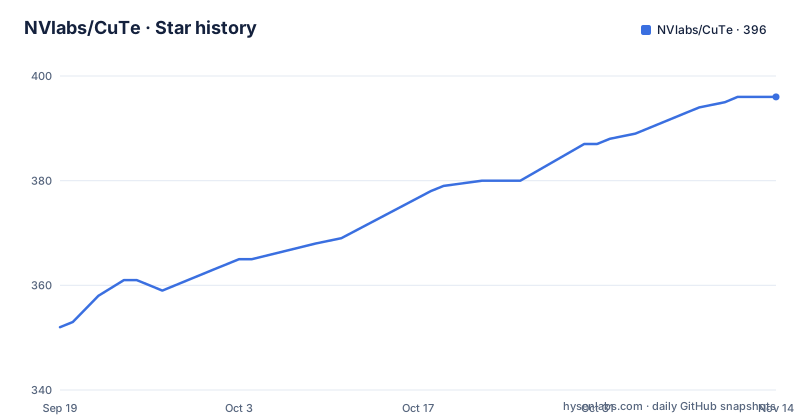
Star history
- NVlabs/CuTe396 ★ · +44
| Repository | 2026-09-19 | 2026-11-14 |
|---|---|---|
| NVlabs/CuTe | 352 | 396 |
44 Stars in the last 56 days, measured from the daily GitHub snapshot. Compare with other projects
Editorial analysis
A Layout is a coordinate-to-offset function, and that is the idea
The entire system fits one sentence: a Layout is a function from coordinates to offsets, defined by a Shape giving the coordinate domain and a Stride giving how those coordinates become offsets, both of the same hierarchical profile.
That framing is why the code is short. Constructing a layout and calling it on a coordinate is all that is happening:
>>> from pycute import *

>>> A = Layout((3, 4), (4, 1))   # 3x4 row-major matrix
>>> A(2, 3)                      # call the layout on a coordinate
11
>>> size(A), rank(A)
(12, 2)
A one-dimensional coordinate works on the same object, which is the practical consequence of treating the layout as a function rather than as a matrix.
Where C++ CuTe is a header-only template library coupled to CUDA, this is plain Python that can be imported from any script. The three stated uses are learning the algebra, prototyping new transformations, and generating test vectors for the C++ and DSL implementations.
The stride is what makes one shape row-major, column-major or nested
The shape fixes the domain, and the stride decides the map. Three examples from the documentation show the range.
A shape of 4 by 8 with a stride of 8, 1 is row-major. The same shape with a stride of 1, 4 is column-major. And a nested shape paired with a nested stride produces a hierarchical layout with nested modes.
>>> coalesce(Layout((2, (1, 6)), (1, (6, 2))))
Layout(12, 1)
>>> composition(Layout(12), Layout((4, 3)))
Layout((4, 3), (1, 4))
>>> logical_divide(Layout(24), Layout(4, 2))
Layout((4, (2, 3)), (2, (1, 8)))
Hierarchical profiles matter because tiling, partitioning, vectorisation and layout analysis all fall out of combining layouts rather than out of any special code. A stride may also be an integer or a coordinate built on ArithTuple and basis values, and there is limited support for F2 strides, which are the XOR swizzles.
Eleven operations, each a pure function
Every operation takes layouts and returns another layout, with no mutation and no hidden state, which is what makes them testable in isolation and usable as test vectors.
coalesce simplifies a layout to the fewest modes with the same map. composition is functional composition, indexing one layout through another. complement returns the missing modes that fill out a layout's codomain.
logical_divide factors a layout into tiles of a given shape, which is tiling. logical_product replicates a layout's pattern across another, which is repetition. right_inverse, left_inverse and nullspace invert and analyse maps.
The full set named in the repository is those eight plus recast, layout_add and greatest_common_domain.
Above them sits a thin Tensor and Accessor layer as a reference data model. A Tensor is a Layout paired with an Accessor such as a pointer, and evaluating the tensor at a coordinate evaluates the layout to an offset and dereferences the accessor there:
>>> T = make_tensor(Layout((4, 4), (4, 1)))   # 4x4 row-major
>>> T[1, 2] = 42.0
>>> T[1, 2]
42.0
Because the accessor is a reference model rather than a memory view, the tensor layer demonstrates the contract without touching storage.
Zero dependencies, and PEP 668 is the only install wrinkle
The manifest declares an empty runtime dependency list, with the comment that the core layout algebra has no third-party dependencies. Python 3.10 or newer is the only hard requirement, and the classifiers run from 3.10 through 3.13. The project is marked at beta development status.
The install problem is not the dependencies but the environment. Many systems mark the system Python as externally managed under PEP 668, so the documented path is a virtual environment:
python3 -m venv .venv
source .venv/bin/activate

pip install -e .              # core layout algebra only (no third-party deps)
pip install -e ".[viz]"       # + visualization helpers (svgwrite, tabulate)
pip install -e ".[test]"      # + everything needed to run the test suite
Three extras exist. viz adds svgwrite and tabulate. symbolic adds sympy for symbolic shapes and strides. test adds pytest plus those. The LaTeX helpers need no Python packages at all, only a LaTeX install such as TeX Live's pdflatex for the optional PDF step.
There is also no requirement to install anything: putting the repository on PYTHONPATH is enough for import pycute to work from a bare checkout.
The documentation is numbered in the order the concepts depend on each other
The documentation path is not thematic, it is a dependency order, starting from docs/index.md and moving through hierarchical tuples to layouts to the full algebra.
The first file is a quickstart covering installation and a first tour. Then come hierarchical tuples and the toolbox over them, then Shape and Stride with the integer-modules strides, then Layout for construction, evaluation, coordinates and slicing, then the layout algebra itself.
After that come Tensor and Accessor, then Swizzle and F2-stride layouts, then the visualisation helpers, and finally an API reference that indexes every function, class and unit test.
Two details make this unusually usable. The examples in the documentation are drawn from the unit tests, so anything shown can be run. And the API index is a test index as well, which means the documented surface and the tested surface are the same list rather than two that drift apart.
The repository root is correspondingly small: the pycute package, docs, examples, scripts, a test directory, and the usual project files.
Every figure in the write-up is generated from a layout object
Visualisation comes in three forms. Layouts render as ASCII tables through print_tensor and print_table, as coloured SVG through draw_svg and draw_svg_tv, and as TikZ or PDF through draw_latex and draw_latex_tv, the last being the analogue of the C++ print_latex.
The printed form is the cheapest way to check a layout by eye:
>>> from pycute.util import print_tensor, draw_svg
>>> print_tensor(Layout((4, 8), (1, 4)))
(4, 8):(1, 4)
0     4     8     12    16    20    24    28
1     5     9     13    17    21    25    29
The figures in the write-up are not drawn by hand. Each is a plain PyCuTe Layout rendered through pycute.util, and the whole set is regenerated by one command:
python -m examples.readme_figures # writes docs/images/*.svg (needs the viz extra)That matters for correctness as much as for convenience. The illustrative case is one 8 by 8 shape shown three ways, row-major, column-major and blocked, where each cell is labelled with its offset and coloured by offset mod 8, so the difference between the three is visible as a pattern rather than asserted in prose.
The Whitepaper is the authority, and this defers to it
The authority for the mathematics is named and cited: CuTe Layout Representation and Algebra by Cris Cecka, arXiv:2603.02298. The text states that the Whitepaper is the authoritative source for every definition and post-condition, and that this implementation defers to it throughout.
That is a deliberate positioning rather than modesty. PyCuTe is a reference implementation whose job is to be readable and to agree, so that a transformation prototyped here can be moved into the C++ library or the DSL with a known meaning. Where the two disagree, the documented rule is that the Whitepaper wins.
The examples directory follows the same principle. Alongside the figure generator sit einsum, einfold and im2col, each with a matching test file, plus an algorithms directory and its own README. Those three are the standard reductions, which is the right test for a layout algebra because an incorrect layout shows up as a wrong shape somewhere in an einsum.
The last commit on the main branch is dated 2026-09-30, and the package version in the manifest is 0.1.0.
Editorial conclusion
PyCuTe fits someone who needs to reason about layouts before writing any CUDA, or who wants test vectors to check a C++ or DSL implementation against. It does not fit production code on a GPU path, since nothing here calls the hardware. Two things to know before starting: the Whitepaper is the authority for every definition and post-condition, so treat this as a companion rather than a replacement, and the F2 XOR-swizzle stride support is described as limited. If you only want the algebra, skip the extras entirely, because the core has no dependencies and imports from a checkout.
Frequently asked questions
Does PyCuTe need a GPU to run?
No. It is a pure-Python reference implementation and is stated to need no GPU, unlike the C++ CuTe library which is tightly coupled to CUDA. The core algebra has no third-party runtime dependencies.
Which Python version does PyCuTe require?
Python 3.10 or newer is the only hard requirement, with classifiers published for 3.10, 3.11, 3.12 and 3.13. A virtual environment is recommended because many systems mark the system Python as externally managed.
What is a Layout in PyCuTe?
A function from coordinates to offsets, defined by a Shape giving the coordinate domain and a Stride giving how coordinates become offsets, both of the same hierarchical profile.
Which layout operations does PyCuTe implement?
coalesce, composition, complement, logical_divide, logical_product, right_inverse, left_inverse, nullspace, recast, layout_add and greatest_common_domain, over integer and coordinate strides with limited support for F2 XOR-swizzle strides.
What optional extras does PyCuTe ship?
viz adds svgwrite and tabulate for the drawing helpers, symbolic adds sympy for symbolic shapes and strides, and test adds pytest along with those. The LaTeX helpers need only a system LaTeX install for the PDF step.
Where does PyCuTe defer for authoritative definitions?
To the CuTe Whitepaper, CuTe Layout Representation and Algebra by Cris Cecka, arXiv:2603.02298, which is stated to be the authoritative source for every definition and post-condition.
Official sources
Add this badge to your README
If you maintain this project, the badge below links readers to this analysis and shows its maintenance status from the daily GitHub snapshot. Paste the markdown into your README; add ?metric=license or ?metric=stars to the image URL for a different field.

[](https://hysenlabs.com/projects/nvlabs-cute)Star history chart for your README
[](https://hysenlabs.com/projects/nvlabs-cute)Was this useful?