Sionna depends on sionna-rt, and its own build excludes the sionna.rt packages
Sionna: An Open-Source Library for Research on Communication Systems
At a glance
- What is it?
- A read of NVlabs/sionna: three pip distributions, a ray tracing package that lives in a submodule and a second repository, a root Makefile that rewrites license headers instead of building anything, and documentation dependencies pinned tighter than the runtime ones.
- Who is it for?
- Sionna is built for research work where a differentiable simulation has to connect to a trained model, and the three package split reflects a real difference in what you need on your machine. If you only want link-level or system-level simulation, install the variant without the ray tracer and you avoid the Mitsuba and LLVM requirements entirely, which is the single decision that most affects how hard this is to set up.
- Can I use it commercially?
- Check first. The repository uses a licence we do not classify automatically, so read its LICENSE file before any commercial use.
- Is it still maintained?
- Yes. The repository last received commits 25 days ago.
- What is it written in?
- Mainly Jupyter Notebook, according to GitHub's language statistics.
Answers come from the project's GitHub data, last synced on November 14, 2026, and from our analysis. They are not legal advice.
Star history
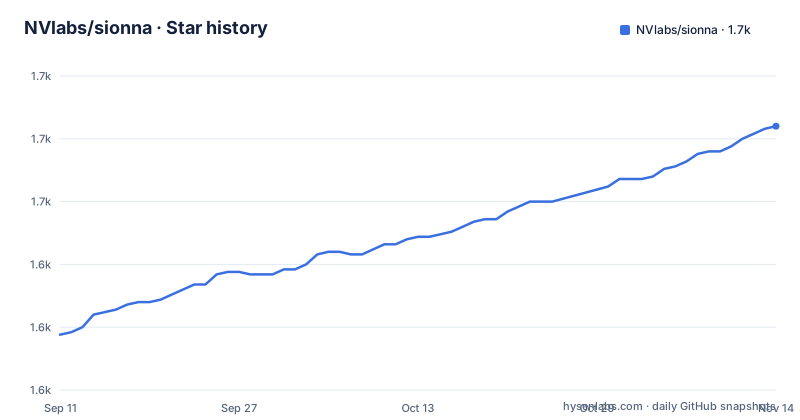
- NVlabs/sionna1,680 ★ · +83
| Repository | 2026-09-11 | 2026-11-14 |
|---|---|---|
| NVlabs/sionna | 1.6k | 1.7k |
83 Stars in the last 64 days, measured from the daily GitHub snapshot. Compare with other projects
Editorial analysis
sionna-rt is a hard dependency that this build deliberately leaves out
The manifest lists `sionna-rt` in the runtime dependencies with no version bound, next to `torch>=2.9.1` and `numpy>=2.2.6`. In the same file, the package discovery is told to leave the ray tracing namespace alone:
[tool.setuptools.packages.find]
where = ["src"]
include = ["sionna*"]
exclude = ["sionna.rt*"]

[tool.setuptools.exclude-package-data]
"sionna.rt" = ["*"]
So a `sionna` wheel does not carry `sionna.rt` at all, including any data files under it, and the code you get for that namespace comes from a separately published package. That is coherent, but it means the import name and the distribution name are different things, and the two do not live in the same repository. The source of that code is `NVlabs/sionna-rt`, named in the installation section as a separate repository, and it is wired into this tree as a submodule under `ext/`, with a `.gitmodules` file at the top level.
That submodule is why the source install is two commands rather than one. From the repository root:
pip install ext/sionna-rt/ .
pip install .
The RT package has to be installed first, from the submodule directory, before the main package will resolve. And a clone that forgot `--recursive` is repaired with `git submodule update --init --recursive --remote`, which is the step people skip until an import fails.
Three distributions are published and only one of them is in the manifest
Installation is documented as three separate pip commands, each with a different consequence:
pip install sionnafor the full library, `pip install sionna-rt` if you only want the ray tracer, and `pip install sionna-no-rt` for the library without it.
Only the first is described in the manifest you can read. The project table names the package `sionna`, version 2.2.0, and lists `sionna-rt` as an unconditional runtime dependency. Nothing visible explains how `sionna-no-rt` is produced, because a distribution that drops a dependency would need a different build configuration, and the one file that would show it is the only one shown.
The reason the variant exists is spelled out in the requirements. Sionna PHY and Sionna SYS need Python 3.11 or newer and PyTorch 2.9 or newer, with Ubuntu 24.04 recommended. Sionna RT has the same requirements as Mitsuba 3, and to run it on CPU, LLVM is required, because that is what Dr.Jit needs. So the RT half drags in a different toolchain than the PHY and SYS half, which is a good reason to make it optional rather than mandatory.
One more detail in that requirements paragraph. It says earlier PyTorch versions may still work but are not recommended, while the dependency line says `torch>=2.9.1`. The floor is enforced at install time and the leniency is a statement about running anyway.
The root Makefile rewrites license headers and nothing else
The Makefile at the top of the repository has a single phony target, and it does not build, test or install anything. It regenerates SPDX headers:
.PHONY: update-headers

update-headers:
	@head -2 LICENSE > /tmp/spdx.txt
	@echo "" >> /tmp/spdx.txt
	@licenseheaders --tmpl /tmp/spdx.txt --dir . \
		-x "*/.*" ".venv/*" ".git/*" ".gitlab/*" ".github/*" ".vscode/*" \
		   "doc/build/*" "ext/*" "src/sionna/rt/*" "tutorials/rt/*" \
		   "doc/source/rt/*" "doc/source/rk/*" \
		   "doc/source/phy/tutorials/notebooks/*" "doc/source/sys/tutorials/notebooks/*"
	@rm /tmp/spdx.txt
	@echo "Removing extra blank comment lines..."
	@find . -name "*.py" -type f ! -path "./.venv/*" ! -path "./ext/*" \
		-exec sed -i ':a;N;$$!ba;s/Apache-2.0\n#\n#/Apache-2.0\n#/g' {} \;
The header template is taken from the first two lines of the LICENSE file, written to a temporary path, applied with an external tool called `licenseheaders`, and then deleted. The exclusion list is the informative part. It skips dotfiles and the usual metadata directories, the built documentation, `ext/*`, `src/sionna/rt/*` and `tutorials/rt/*`, which is the same boundary the manifest draws when it excludes `sionna.rt*` from the package, and it also skips the RT and RK sections of the docs plus the tutorial notebooks under the PHY and SYS documentation trees. In other words, one repository with two provenances, and the header tool knows which is which.
The trailing `sed` pass is a cosmetic repair. It collapses a blank comment line that appears after the Apache-2.0 SPDX line, which happens when the header is applied to a file that already had one. The documentation commands live somewhere else entirely: `make html` and `make serve` are run from within the `doc` folder, not from here.
Documentation dependencies are pinned exactly, runtime dependencies are not
The runtime list uses floors everywhere, `h5py>=3.15.1`, `importlib-resources>=6.5.2`, `matplotlib>=3.10.8`, `numpy>=2.2.6`, `scipy>=1.15.3`, `torch>=2.9.1` and the unpinned `sionna-rt`. The documentation extra is the opposite:
doc = [
"ipython",
"nbsphinx==0.9.8",
"pydata-sphinx-theme==0.19.0",
"sphinx==9.1.0",
"sphinx-copybutton==0.5.2",
"sphinxcontrib-bibtex>=2.6,<3"
]
Four exact pins and one range with a ceiling. That is the right way round for a repository whose documentation embeds tutorial notebooks through nbsphinx and whose output is a hosted site, and it also means a documentation build that fails after an unrelated upgrade is a Sphinx pin problem rather than a library problem. Only `ipython` is loose.
The build itself is installed with `pip install '.[doc]'` from the root, and pandoc may need to be installed by hand, which the text notes rather than automating. Then the commands run from inside the `doc` folder: `make html` to build, `make serve` to serve it locally at `http://localhost:8000/sionna/`, and `make serve PORT=9000` to move the port. For local development without the path prefix that matches the production site, both commands take an empty `BASE_PATH`, as in `BASE_PATH= make html`. That one detail is what makes a local build clickable, since every link inside the documentation assumes the `/sionna/` prefix.
The suggested citation names version 2.2.0 and the year 2022
The citation instruction ends with a BibTeX entry you are asked to paste as is. It is an `@software` entry titled Sionna, with a `note` field holding the documentation address, a `year` of 2022, and a `version` field reading 2.2.0. The author field lists eight names: Hoydis, Cammerer, Ait Aoudia, Nimier-David, Maggi, Marcus, Vem and Keller.
Two things in that entry are worth pausing on. It hardcodes the release number, so the citation the project hands you goes stale the next time a version is cut, while the year stays 2022 and becomes increasingly unrelated to the artifact you actually used. And it asks for eight named authors while the package metadata describes itself collectively, as The Sionna contributors with the address [email protected]. Whichever form you cite, one of the two is describing a different thing than the other.
The version numbers themselves are consistent, for what it is worth. The manifest declares 2.2.0, the README heading says Sionna 2.2, and the newest tag is v2.2.0, released on 2026-09-29, the same day as the last push. Before it sit v2.1.0 on 2026-09-09 and v2.0.1 on 2026-04-01. So the 2.x line has had three releases in six months, and the citation block is regenerated with the rest of the documentation rather than left to rot.
Apache-2.0 is declared in three places and reported as unknown in one
The licensing information is not in doubt inside the project, but it is worth laying out because the fields disagree in an unusual direction.
The README states that Sionna is Apache-2.0 licensed and points at the LICENSE file for the text. The manifest carries `license = {text = "Apache-2.0"}`. The first thing in the README file is an SPDX header comment, `SPDX-License-Identifier: Apache-2.0`, with the copyright line `Copyright (c) 2021-2026 NVIDIA CORPORATION & AFFILIATES. All rights reserved.` And the LICENSE file is present at the top of the tree, which is also where the root Makefile reads its header template from.
What is empty is the license field in the repository's own metadata, which reports no assertion rather than Apache-2.0. Every explicit statement inside the project points one way, so there is no real ambiguity about intent, but if a tool you are automating reads only that field, it will see nothing. Worth knowing before a compliance check runs.
The same manifest declares its audience and platform in a way that also deserves a second look. The classifiers name Science/Research and Telecommunications Industry as the intended audiences and mark the project as operating system independent, while the installation section recommends Ubuntu 24.04 and defers GPU support and driver setup to the PyTorch getting started guide. Independent in the packaging sense, particular in the recommendation.
The wheel carries csv, npy, npz and json data next to the code
The package data declaration is four globs and one exclusion:
[tool.setuptools.package-data]
"sionna" = ["**/*.csv", "**/*.npy", "**/*.npz", "**/*.json"]
That is the shape a research library takes when its algorithms need lookup tables, channel model data and configuration files at run time rather than as Python literals. The cost is that the wheel is not just code: numpy arrays in `.npy` and `.npz` form and tabular `.csv` files travel with it, and the exclusion that follows immediately removes all of it from `sionna.rt`, so the ray tracing half ships none of its data inside the main distribution.
The repository layout around it explains the rest. Source lives under `src/`, the RT submodule under `ext/`, tests under `test/`, documentation under `doc/`, and tutorial notebooks under `tutorials/`, with more notebooks inside the documentation tree for the PHY and SYS tutorials. Tests are installed with their own extra, `pip install '.[test]'`, and then run by invoking pytest from within the `test` folder. Governance files sit at the top level alongside the Makefile and the README: `SECURITY.md`, `CONTRIBUTING.md`, `CODE_OF_CONDUCT.md`.
One dependency deserves a note because it is unusual for a numerical library: `importlib-resources`, listed with a floor. It is there so the packaged data files above can be located through the package resource API rather than by path arithmetic, which is the piece that keeps those globs working once the wheel is installed somewhere other than a source checkout.
Editorial conclusion
Sionna is built for research work where a differentiable simulation has to connect to a trained model, and the three package split reflects a real difference in what you need on your machine. If you only want link-level or system-level simulation, install the variant without the ray tracer and you avoid the Mitsuba and LLVM requirements entirely, which is the single decision that most affects how hard this is to set up. If you do want the ray tracer, budget for the recursive clone and the two-step source install, because the RT code is not in the main wheel. Two smaller checks are worth doing. The version your citation names is the version you have to cite, so read it rather than copying, and the suggested BibTeX entry hardcodes the current release number with a 2022 year. And if you plan to build the documentation, the doc extras are pinned to exact versions while the runtime dependencies are open floors, so a documentation build that breaks after an unrelated upgrade is a pinned Sphinx problem, not a code problem.
Frequently asked questions
What is NVIDIA Sionna used for?
It is a Python library for research on communication systems, split into three packages: Sionna RT, a stand-alone ray tracer for radio propagation modeling, Sionna PHY, a link-level simulator for wireless and optical systems, and Sionna SYS, a system-level simulator built on physical-layer abstraction.
What does installing Sionna require?
Python 3.11 or newer and PyTorch 2.9 or newer, with Ubuntu 24.04 recommended. Sionna RT has the same requirements as Mitsuba 3, and running it on CPU additionally requires LLVM, which Dr.Jit depends on.
How do I install sionna-rt separately or skip it?
There are three commands: `pip install sionna` for the full library, `pip install sionna-rt` for the ray tracer alone, and `pip install sionna-no-rt` for the library without the RT package. From source you need a recursive clone, because the RT code is a submodule under `ext/`, and then install it before the main package.
How do I build the Sionna documentation locally?
Install the doc extra with `pip install '.[doc]'` from the repository root, install pandoc if you need to, then run `make html` or `make serve` from inside the `doc` folder. Serving uses port 8000 unless you pass `PORT=9000`, and `BASE_PATH=` before either command removes the `/sionna/` URL prefix for local development.
How do I run the Sionna unit tests?
Install the test requirements with `pip install '.[test]'` from the repository root, then execute pytest from within the `test` folder. The visible test extra begins with pytest itself and a second pytest-prefixed package whose name is not shown.
What license is sionna released under?
Apache-2.0. The README states it and links the LICENSE file, the manifest declares it, and every source file carries an SPDX header identifying Apache-2.0 with an NVIDIA copyright line covering 2021 to 2026.
Official sources
Add this badge to your README
If you maintain this project, the badge below links readers to this analysis and shows its maintenance status from the daily GitHub snapshot. Paste the markdown into your README; add ?metric=license or ?metric=stars to the image URL for a different field.

[](https://hysenlabs.com/projects/nvlabs-sionna)Star history chart for your README
[](https://hysenlabs.com/projects/nvlabs-sionna)Was this useful?