NyaTerm: A Desktop Workspace for SSH, Files, and Remote Sessions
A modern remote terminal workspace
At a glance
- What is it?
- NyaTerm is a Tauri, React, and Rust desktop client for SSH-centric work, local shells, Telnet, Serial, RDP, VNC, and SFTP. Its shared workspace is the main benefit, while its broad feature set requires protocol-specific verification.
- Who is it for?
- NyaTerm is a reasonable fit for developers and sysadmins who want SSH sessions, SFTP, remote desktops, and workspace management in one desktop client. It is less suitable for users who need a small SSH utility with a minimal dependency surface or a fully documented installation path.
- Can I use it commercially?
- Yes. Apache-2.0 is a permissive licence: you can use, modify and sell software built on it, as long as you keep its copyright and licence notices.
- Is it still maintained?
- Yes. The repository received new commits within the last day.
- What is it written in?
- Mainly TypeScript, according to GitHub's language statistics.
Answers come from the project's GitHub data, last synced on November 7, 2026, and from our analysis. They are not legal advice.
Star history
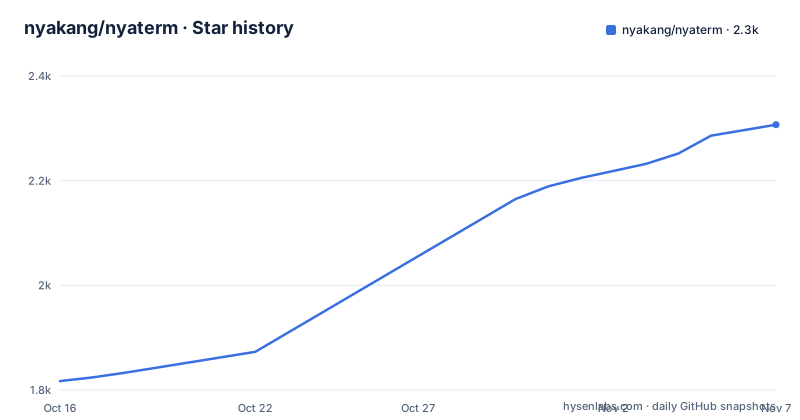
- nyakang/nyaterm2,307 ★ · +490
| Repository | 2026-10-16 | 2026-11-07 |
|---|---|---|
| nyakang/nyaterm | 1.8k | 2.3k |
490 Stars in the last 22 days, measured from the daily GitHub snapshot. Compare with other projects
Editorial analysis
NyaTerm's SSH Workspace and Session Scope
NyaTerm addresses a specific operational problem: managing remote hosts alongside local commands, device connections, file transfers, and remote desktop sessions. The README identifies developers, sysadmins, and DevOps engineers as its primary audience. Its central model is a workspace rather than a single connection window. Related terminals can remain in tabs, horizontal splits, or vertical splits, while saved connections can be organized into folders and given icons and metadata.
The supported session types are unusually broad for a project described as an SSH client. The README lists SSH, Local Terminal, Telnet, Serial, RDP, and VNC. It also describes an SFTP browser with a transfer queue and a local-edit-then-upload-back workflow. NyaTerm is therefore not limited to issuing commands over SSH. It is intended for workflows where a user may inspect a remote filesystem, edit a file locally, upload the change, and return to the terminal session.
The project also includes temporary SSH links for one-off connections created from a pasted `ssh://` URL or an `ssh` command. That is useful for quick access, but it also creates a clear boundary: NyaTerm is a client for connecting to existing systems, not a replacement for a shell, server, or network device. The README does not document how every protocol behaves under unstable networks or how all session types are configured on each desktop platform.
Tauri, React, and Rust Session Architecture
Based on the repository layout and `package.json`, NyaTerm separates the desktop application into a frontend and a native backend. The frontend is a React and Vite application, while the `src-tauri/` directory contains the Rust side used by Tauri. The `package.json` defines `pnpm dev` for starting the Vite development server and `pnpm build` for building the MCP sidecar, compiling TypeScript, and producing the Vite build. The release command is `pnpm release`, which synchronizes the version and runs `tauri build`.
The session workspace is a desktop composition rather than a browser-only interface. The README describes tabs, split panes, child windows, side panels, session quick switching, and layout restoration. It also lists activity areas for files, network activity, authentication, synchronization, AI assistance, notes, resource monitoring, process management, and Docker management. The repository includes `plugins/` and plugin creation scripts, which indicates that the workspace supports extensions beyond its built-in panels.
AI assistance is integrated into the active terminal context. The README describes an Ask mode for command generation, output explanation, and error analysis. Agent mode uses an observe-decide-run loop against the active session. The documentation says that approved command execution tools and a separate final-answer step are used for Agent workflows. Session mentions can add other terminal sessions to the AI context with `@`, and recent-output actions can send the latest terminal output without manual copying.
This design does not make the assistant independent of the terminal. It is explicitly connected to terminal state and includes risk levels, approval gates, execution controls, and safer alternatives for high-impact commands. Users who require strict command isolation should inspect those controls before allowing Agent workflows.
Credentials, File Transfer, and Encrypted Sync
NyaTerm groups credential management with the sessions that use it. The README names credentials, keys, known hosts, OTP, a lock screen, and master-password protected storage. This is relevant because NyaTerm is designed to hold saved connections and related workspace state, not merely open an ephemeral SSH window. The repository topics also include `otp`, `ssh`, `sftp`, `serialport`, and `telnet`, matching the session and authentication areas described in the README.
The SFTP feature is more than a file listing. NyaTerm provides a transfer queue and a workflow that allows a remote file to be edited locally and uploaded back. The README does not document conflict handling, permissions preservation, file watching, retry behavior, or whether edits are synchronized automatically. Those omissions matter for production configuration management, where a failed upload or an unexpected overwrite can affect a deployment.
Configuration portability is documented through import flows, encrypted `.nya` backups, and encrypted sync through WebDAV or S3-compatible storage. The repository includes `docs/` and `docs-site/` directories, and the README links to `https://nyaterm.app/docs/`. Those locations are the places to check for backup format details, credential migration, and supported sync providers before relying on them operationally. The repository's `LICENSE` identifies the project as MIT licensed. That permits use and modification under the license's terms, but it does not establish how a deployment should treat imported keys or backup files.
Remote Desktop, Serial, and Monitoring Boundaries
Beyond terminal sessions, NyaTerm includes RDP and VNC panes, remote host monitoring, GPU and NPU overviews, process management, and Docker management. The README gives specific VNC behavior: direct TCP, None or classic VNC Auth, RA2_256 in Auto mode, server-key TOFU verification, Raw, ZRLE, Tight, and Tight JPEG updates, window scaling, bounded reconnects, and text clipboard exchange for Latin-1 text. Those details suggest that VNC support extends beyond a basic screen-sharing connection.
The same breadth creates operational boundaries. The README does not document clipboard formats beyond the stated Latin-1 VNC text exchange, nor does it explain compatibility with particular RDP servers, serial adapters, GPU models, or container runtimes. The monitoring panels depend on the remote environment exposing the relevant process, accelerator, or Docker information. A panel can be present in the interface without guaranteeing that every host supports it.
NyaTerm's support for Telnet and Serial also means that adoption should be tied to actual endpoint requirements. Telnet lacks the transport security of SSH. Serial sessions depend on devices and drivers, but the README does not specify port permissions, baud-rate configuration, or supported adapters. Telnet should be selected only when the endpoint and network path make that tradeoff acceptable, while Serial should be verified against the hardware and operating system used by the team.
Installation Evidence and First Use
The README does not give a complete installation tutorial for end users. It links to the project website, documentation site, GitHub releases, and community destinations, and its platform badge states Windows, macOS, and Linux. It does not provide a verified package-manager command, a direct download filename, or a documented first-run configuration example.
For a developer who has the repository checked out, `package.json` exposes the local development and build scripts. The following command starts the Vite development process:
pnpm devThe script is defined in `package.json`. A developer should expect this to start the frontend development server, but the README does not explain whether a separate Rust or Tauri process must also be started separately for a usable desktop session.
The repository's build command is:
pnpm buildAccording to `package.json`, this builds the MCP sidecar, runs TypeScript compilation, and builds the frontend with Vite. The release command is `pnpm release`, which synchronizes the version and invokes `tauri build`. These are repository scripts, not a substitute for platform prerequisites or packaged installer instructions. A first real use should begin with a saved SSH connection and an SFTP view, after checking the documentation for authentication and storage behavior.
Maintenance, Release Scope, and Upgrade Cost
The repository is not archived. Its last push was on 2026-10-16, so it does not have an archival status that would require treating it as discontinued. The release history includes `v1.3.0` on 2026-10-07 and preview releases `v2.0.0-preview.6` on 2026-10-13 and `v2.0.0-preview.5` on 2026-10-05. The existence of both a stable release and preview releases is relevant for upgrade planning, because the README does not state whether preview builds change storage formats, plugin compatibility, or session behavior.
The TypeScript package uses `pnpm`, and the repository includes `pnpm-lock.yaml`, a pnpm workspace file, Vite, Vitest, Biome, and Rust formatting scripts. An upgrade can therefore involve both frontend dependencies and the Tauri Rust backend. The presence of `CHANGELOG.md` provides a repository location for release tracking, but the README does not document a rollback procedure or compatibility matrix for saved connections, encrypted backups, plugins, or AI provider settings.
MIT licensing lowers the licensing barrier for adoption and modification, subject to the license text. It does not remove operational upgrade costs. Users should compare release notes for changes to credential storage, sync, session protocols, and plugin APIs before replacing an existing installation.
Adoption Trade-offs and Standalone SSH Alternatives
A conventional SSH client may be a better fit when the user needs one narrow workflow, a small interface, or a well-understood command-line configuration model. NyaTerm trades that simplicity for a broad workspace: SSH is combined with local shells, Telnet, Serial, RDP, VNC, SFTP, tunnels, OTP, monitoring, notes, Docker management, AI assistance, and encrypted synchronization. That consolidation is useful for a workstation used across several systems, but it increases the number of configuration surfaces that must be understood.
The closest alternative is a standalone SSH client paired with a separate SFTP tool and a separate remote desktop application. That approach keeps protocol and storage responsibilities in separate programs, but it also requires more window and credential management. NyaTerm's differentiator is not a single protocol feature. It is the shared workspace, with sessions, files, monitoring, and assistant actions connected to the same interface.
The trade-off is especially visible in preview software and broad protocol support. A team that requires one audited SSH client, a specific serial workflow, or a particular RDP environment should verify those paths in the project documentation and release notes before adopting NyaTerm as a standard administrative interface.
Editorial conclusion
NyaTerm is a reasonable fit for developers and sysadmins who want SSH sessions, SFTP, remote desktops, and workspace management in one desktop client. It is less suitable for users who need a small SSH utility with a minimal dependency surface or a fully documented installation path. Before adoption, verify the desktop platform, required session protocols, authentication methods, and the availability of a packaged release for your environment.
Frequently asked questions
What protocols does NyaTerm support?
The README lists SSH, Local Terminal, Telnet, Serial, RDP, VNC, and SFTP-related file workflows. It also documents tunnels and OTP as workspace features.
Does NyaTerm include an AI assistant?
Yes. NyaTerm includes Ask mode for one-off help and Agent mode for multi-step workflows that use an observe-decide-run loop. The README documents execution controls, risk levels, approval gates, and configurable terminal output capture.
How can NyaTerm configuration be backed up or synchronized?
The README documents encrypted `.nya` backups and encrypted sync through WebDAV or S3-compatible storage. It does not specify backup scheduling or conflict-resolution behavior.
Official sources
Add this badge to your README
If you maintain this project, the badge below links readers to this analysis and shows its maintenance status from the daily GitHub snapshot. Paste the markdown into your README; add ?metric=license or ?metric=stars to the image URL for a different field.

[](https://hysenlabs.com/projects/nyakang-nyaterm)Star history chart for your README
[](https://hysenlabs.com/projects/nyakang-nyaterm)Was this useful?