Oil UI: an agent skill that researches peers, compares directions with a two-axis overlap rule, and checks real screenshots
UI design skill for Claude Code, Codex and other AI agents: explore distinct directions, compare them side by side, refine against real screenshots. 给 AI Agent 用的 UI 设计 Skill。
At a glance
- What is it?
- oil-oil/oil-ui is a Python-hosted design skill for Claude Code, Codex and other AI agents. This review covers its eight-step design process, the install commands, where intermediate files go, and the line between the open-source skill and Oil UI Pro.
- Who is it for?
- Use Oil UI if you ask an AI agent to build websites, dashboards or components and want it to study peers, offer genuinely different directions and verify against desktop and mobile screenshots. Skip it if you already run Oil UI Pro, since installing both makes them compete for the same requests.
- Can I use it commercially?
- Yes. MIT is a permissive licence: you can use, modify and sell software built on it, as long as you keep its copyright and licence notices.
- Is it still maintained?
- Yes. The repository received new commits within the last day.
- What is it written in?
- Mainly Python, according to GitHub's language statistics.
Answers come from the project's GitHub data, last synced on November 7, 2026, and from our analysis. They are not legal advice.
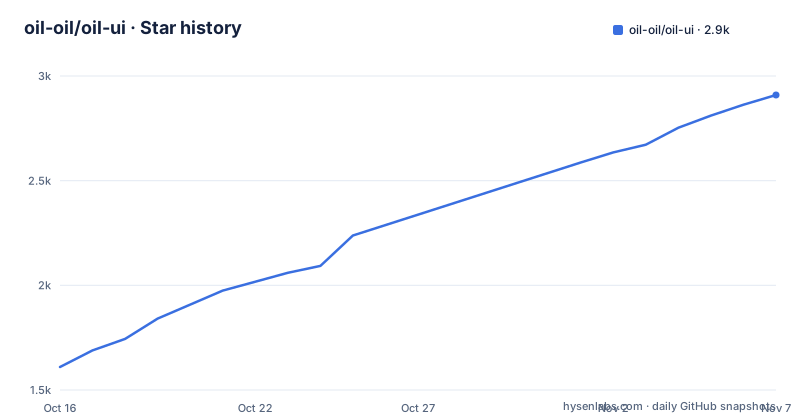
Star history
- oil-oil/oil-ui2,909 ★ · +1,299
| Repository | 2026-10-16 | 2026-11-07 |
|---|---|---|
| oil-oil/oil-ui | 1.6k | 2.9k |
1,299 Stars in the last 22 days, measured from the daily GitHub snapshot. Compare with other projects
Editorial analysis
It studies two or three distinctive peers before it draws anything
Oil UI is an interface design skill for AI agents. It recommends one direction and refines it against real screenshots, or explores several side by side when you ask to compare. It targets websites, apps, dashboards and components.
The first step is research. Before drawing, it names the product category, finds two or three peers with the most distinctive styles, and looks at what they do and why. Then it decides what to keep and what to change. For a user, that means the agent's first output starts from a view of the product's neighbors, not from a generic template. The skill is listed for Claude Code, Codex and other agents, and the homepage is ui.oiloil.org.
Words like premium and clean get converted into typefaces, white space and color share
The second step addresses a familiar failure: everyone says premium or clean, and the words do not tell you what to put on the screen. Oil UI sets a tone from the subject, audience and brand voice, such as lively or calm, polished or raw, dense or airy. It then turns that tone into visible choices: which typefaces, how much white space, and how much of the page uses color.
Third, each direction starts from something concrete. That can be a material in its setting, a scene, a character or the visual language of another field. Ideas come from the product itself, not from adjectives like minimal or bold. The practical effect is that two directions for one product should differ in origin as well as in styling.
Two directions may share at most one of layout, typography, color and key imagery
When you ask for several directions, any two of them can share at most one of four attributes: layout, typography, color and key imagery. Once the previews exist, Oil UI puts them side by side and squints at the light and dark shapes of each first screen. If two look alike, it changes the layout instead of just swapping colors.
This is a concrete rule, and it shows where the skill is strict. A request for three options with only different palettes would violate it, so the agent has to vary composition too. The previews go onto one comparison page. You pick one and say what you like and dislike, and the design is tightened around that feedback before it goes further. Without a compare request, it recommends one direction for your confirmation by default.
Installing is one npx command, and installing Pro as well makes them compete
Installation is a single line, either sent to an agent that can install skills or run in a terminal:
Install this skill for me: run npx skills add oil-oil/oil-uinpx skills add oil-oil/oil-uiNothing needs to be configured after installation. When a new version is out, your agent mentions it at the end of a reply, and you can ask it to update whenever you like. If you already have Oil UI Pro, you do not need the open-source version, because installing both makes them compete for the same requests. DeepSeek Harness users install the native plugin dsh-oil-ui, with this command:
dsh plugin --profile web add github:oil-oil/dsh-oil-uiThat plugin includes the free edition and automatically detects a local Oil UI Pro installation.
Intermediate candidates live in .oil-ui, and your project conventions win
Intermediate candidates, screenshots and media caches go into the project's .oil-ui workspace. Final code and production assets are written back to the project itself. Existing project conventions take precedence, so a polish request that says to use the project's existing design guidelines is a supported flow.
The usage examples cover five jobs: explore directions for a course booking product, create three designs on a comparison page, polish a page, review a homepage without touching the files, and recreate a page from a screenshot with a mobile layout added. You can share brand assets, screenshots or an existing project. It can start with no references and only asks questions when the deliverable is unclear. Add .oil-ui to your ignore rules if you do not want caches in version control, since the workspace sits inside the project.
The first screen is content for browsing pages, and designed only for persuasion pages
Step four decides who the first screen is for. On pages where people browse, shop or get work done, the first screen should be the content itself. Only pages meant to persuade need a designed opening layout, settled before the copy is written. A dashboard therefore does not get a hero banner from this skill.
Step six leaves one moment people remember. Instead of pushing every part of the page, it makes one or two details exceptional, such as the response to a tap, a successful payment, AI at work or a 404 page, and everything else stays quiet. The last step, trusting the real screen, opens the finished page at desktop and mobile sizes and checks screenshots. A reviewer who has not seen the work in progress can be brought in, followed by a round of subtraction: one focal point per page, and no copy, lines or boxes that do not help you understand it.
The free skill points to Oil UI Pro, and releases are arriving every day or two
The open-source skill points to Oil UI Pro for more usable interfaces, existing project redesigns and effects such as light trails and dot patterns. The differences are listed in an Open source and Pro section lower in the README. If you need to redesign an existing project, check that section first.
The README also links guides, including one comparing 15 blind runs across Oil UI, frontend-design, UI UX Pro Max, Impeccable and a no-Skill control. Those results are published by the project's own site, so judge them against your own brief. Release cadence is fast: v0.26.0 on 2026-10-26, v0.27.0 on 2026-10-28 and v0.27.1 on 2026-10-29. The repository is not archived, the last push was on 2026-10-24, and the license is MIT. With versions still at 0.x, expect behavior to change between updates.
Editorial conclusion
Use Oil UI if you ask an AI agent to build websites, dashboards or components and want it to study peers, offer genuinely different directions and verify against desktop and mobile screenshots. Skip it if you already run Oil UI Pro, since installing both makes them compete for the same requests. Before relying on it, run the compare prompt on one real page and check what lands in the .oil-ui workspace versus your project.
Frequently asked questions
How do I install Oil UI?
Run npx skills add oil-oil/oil-ui in your terminal, or send an agent that can install skills the line Install this skill for me: run npx skills add oil-oil/oil-ui. Nothing needs to be configured afterward.
Can I install Oil UI and Oil UI Pro together?
It is not advised. If you already have Oil UI Pro, you do not need the open-source version, and installing both makes them compete for the same requests.
Where does Oil UI save its working files?
Intermediate candidates, screenshots and media caches live in the project's .oil-ui workspace. Final code and production assets are written back to the project, and existing project conventions take precedence.
Official sources
Add this badge to your README
If you maintain this project, the badge below links readers to this analysis and shows its maintenance status from the daily GitHub snapshot. Paste the markdown into your README; add ?metric=license or ?metric=stars to the image URL for a different field.

[](https://hysenlabs.com/projects/oil-oil-oil-ui)Star history chart for your README
[](https://hysenlabs.com/projects/oil-oil-oil-ui)Was this useful?