openai/evals: the registry is Git LFS data, the framework is a pip install
Evals is a framework for evaluating LLMs and LLM systems, and an open-source registry of benchmarks.
At a glance
- What is it?
- Evals is a Python framework for testing LLM systems and an open source registry of benchmarks. Running one costs API calls, the data arrives through Git LFS rather than the clone, and the project is not accepting evals with custom code right now.
- Who is it for?
- Use openai/evals when you want a shared registry of benchmark evals and the option of running your own against the same machinery, and accept that every run spends API budget while the registry data is a separate Git LFS download. Do not plan to contribute a custom-code eval upstream, since the project says it is not accepting them, and keep customer data out of a public registry eval when the private-eval path exists.
- Can I use it commercially?
- Check first. The repository uses a licence we do not classify automatically, so read its LICENSE file before any commercial use.
- Is it still maintained?
- Activity is slowing. The repository last received commits 7 months ago.
- What is it written in?
- Mainly Python, according to GitHub's language statistics.
Answers come from the project's GitHub data, last synced on November 13, 2026, and from our analysis. They are not legal advice.
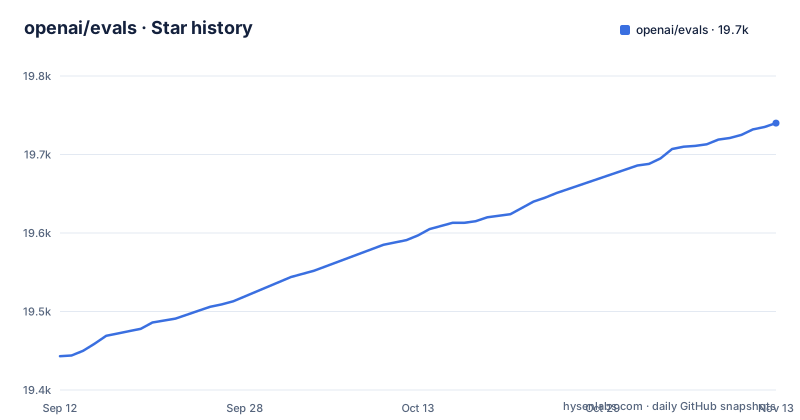
Star history
- openai/evals19,740 ★ · +297
| Repository | 2026-09-12 | 2026-11-13 |
|---|---|---|
| openai/evals | 19.4k | 19.7k |
297 Stars in the last 62 days, measured from the daily GitHub snapshot. Compare with other projects
Editorial analysis
The registry data is in Git LFS, so a clone starts as pointers
A fresh clone of openai/evals gives you the framework and a set of pointer files, not the benchmark data. The registry is stored with Git-LFS, and the data sits under evals/registry/data. From inside your local copy of the evals repo, you fetch and pull it:
cd evals
git lfs fetch --all
git lfs pull
That populates the pointer files under evals/registry/data. If you only want one eval, the same two commands take a path filter, where ${your eval} stands for the directory you care about:
git lfs fetch --include=evals/registry/data/${your eval}
git lfs pull
Two consequences follow. Someone who skips the LFS step gets a repository that looks complete and then fails when an eval tries to read its data file. And anyone intending to run the whole registry has to budget for that download before anything else, since the framework has nothing to score without it. Notice also that the first command expects to run from a directory named evals.
pip install evals, then an API key and an eye on the bill
If you only want to run the existing evals, the package installs from pip:
pip install evalsThe minimum is Python 3.9, which matches the requires-python floor in pyproject.toml, where the version reads 3.0.1.post1. The install exposes two console entry points, oaieval and oaievalset, mapped to evals.cli.oaieval and evals.cli.oaievalset. Before anything runs you need an OpenAI API key in the OPENAI_API_KEY environment variable, and the setup notes tell you to be aware of the costs of using the API while running evals. Every run is paid model traffic, so a sweep across the registry multiplies that quickly. Two hosted alternatives also exist: evals can be configured and run directly in the OpenAI Dashboard, and Weights & Biases is offered as another place to run and create them.
An editable clone plus pre-commit is the contributor path
Writing evals is a different installation. The suggestion is to clone the repository and install its requirements in editable mode:
pip install -e .The -e is the point: changes to your eval show up immediately without a reinstall, which is what makes an edit-and-rerun loop bearable. Formatters are an extra:
pip install -e .[formatters]That extra pulls in black, isort, autoflake and ruff, and the repository carries a .pre-commit-config.yaml and a mypy.ini, with the Makefile holding a single mypy target that runs the type checker with --no-site-packages. Hooks go into your git setup with `pre-commit install`, and from then on they run on every commit. To run them over the whole repository by hand, use `pre-commit run --all-files`; for one hook, `pre-commit run <hook_id>`. The style configuration is permissive by default, with ruff's line-length set to 767 characters and a note that this is currently the longest line and should be brought down.
Evals with custom code are not being accepted upstream
The contribution rules are narrower than the framework. The project states that it is currently not accepting evals with custom code, while still accepting model-graded evals with custom model-graded YAML files. If your scoring function needs real Python, you can build and run it in your editable clone, but you cannot put it in the registry. The no-code route is the template route: follow one of the existing eval templates, supply your data in JSON, and set the eval parameters in YAML, with docs/build-eval.md walking through the steps. The examples folder holds notebooks to work from, including examples/mmlu.ipynb, examples/lambada.ipynb, examples/retrieval-completionfn.ipynb and examples/lafand-mt.ipynb. One file in the registry is worth knowing about: evals/registry/evals/coqa.yaml implements small subsets of the CoQA dataset across several eval templates, to help illustrate the differences between them.
The run prints its report and then hangs
The FAQ admits a rough edge: when you run an eval it sometimes hangs at the very end, after the final report, and the documented response is to interrupt it safely, after which the eval finishes immediately. Read that as a process lifecycle problem rather than a scoring one. A CI job that waits for a clean exit will sit there after the numbers are already printed, and the remedy sits in your runner, since an interrupt on the post-report phase is the only way out the documentation describes. Results can also be logged to a Snowflake database, which needs four more environment variables: SNOWFLAKE_ACCOUNT, SNOWFLAKE_DATABASE, SNOWFLAKE_USERNAME and SNOWFLAKE_PASSWORD. Turning that on moves evaluation records off the machine that produced them, which is the point, and also the thing to think about before the records include anything sensitive.
More than forty dependencies for a single eval run
The dependency list in pyproject.toml shows the real scope of the framework. It runs past forty packages, and among them anthropic, google-generativeai, langchain, datasets, evaluate, tiktoken, spacy-universal-sentence-encoder, nltk, jiwer, sacrebleu, pandas, matplotlib, seaborn, statsmodels, networkx, numexpr, playwright, docker, flask, chess, gymnasium and snowflake-connector-python, next to openai>=1.0.0. Some of that breadth follows from shipping benchmark evals across many domains, and some of it is convenience. Either way the effect lands on install time and on your environment, because `pip install evals` brings in plotting, browser automation and a container client whether or not the eval you want touches them. Trimming the list is a fork decision, and forking drifts you away from the registry that was the reason to use the package.
MIT for contributions, with data rights attached to them
The disclaimer is the part to read before contributing anything. By contributing to evals you agree to place your evaluation logic and data under the same MIT license as the repository, which ships LICENSE.md at the root even though the repository's licence metadata reads NOASSERTION. You must have adequate rights to upload any data an eval uses, OpenAI reserves the right to use that data in future service improvements to the product, and contributions fall under the OpenAI usage policies. The private-eval path is the alternative: you can build evals from your own data that represent the patterns in your workflow without exposing that data publicly. On maintenance, the last push to main was on 2026-04-14, the repository has no GitHub releases, and the package version is 3.0.1.post1, so you install a moving package with no tag to pin.
Editorial conclusion
Use openai/evals when you want a shared registry of benchmark evals and the option of running your own against the same machinery, and accept that every run spends API budget while the registry data is a separate Git LFS download. Do not plan to contribute a custom-code eval upstream, since the project says it is not accepting them, and keep customer data out of a public registry eval when the private-eval path exists. Before the first run, verify that Python is 3.9 or newer, that OPENAI_API_KEY is set, and that `git lfs pull` actually populated evals/registry/data.
Frequently asked questions
What are evals in LLM?
In openai/evals they are a framework for evaluating large language models or systems built on them, plus an open source registry of benchmarks to test different dimensions of OpenAI models. You can also build private evals from your own data without exposing that data publicly.
How to use evals?
Install the package with `pip install evals` on Python 3.9 or newer, set OPENAI_API_KEY, and fetch the registry data from inside the repo with `git lfs fetch --all` followed by `git lfs pull`. The full run instructions live in docs/run-evals.md, and be aware that API calls made while running evals are billed.
how to setup evals
Clone the repository and use `pip install -e .` for an editable install, or `pip install -e .[formatters]` to add black, isort, autoflake and ruff, then `pre-commit install` to wire the hooks into git. The registry data itself still has to come from Git LFS.
how to setup evals for agents
For prompt chains and tool-using agents, the project points at its Completion Function Protocol in docs/completion-fns.md and at the examples folder, which includes examples/retrieval-completionfn.ipynb. Writing your own completion functions is fine locally, though evals with custom code are not being accepted upstream at the moment.
Official sources
Add this badge to your README
If you maintain this project, the badge below links readers to this analysis and shows its maintenance status from the daily GitHub snapshot. Paste the markdown into your README; add ?metric=license or ?metric=stars to the image URL for a different field.

[](https://hysenlabs.com/projects/openai-evals)Star history chart for your README
[](https://hysenlabs.com/projects/openai-evals)Was this useful?