PySyft v2 runs your script on someone else's machine, with Google Drive as the transport
Perform data science on data that remains in someone else's server
At a glance
- What is it?
- PySyft 0.10 splits into a sync engine and a Remote Data Science client that move a Python file over Google Drive instead of moving data. It suits a data owner willing to sit through manual approvals, and nobody else.
- Who is it for?
- Adopt PySyft when you have one data owner who already runs on Google Drive, will answer approval prompts, and wants to inspect your script before it touches their files. Do not adopt it for automated pipelines, for datasets you need to iterate on interactively, or as a differential privacy layer, because the quick start shows no noise being added to a result.
- Can I use it commercially?
- Yes. Apache-2.0 is a permissive licence: you can use, modify and sell software built on it, as long as you keep its copyright and licence notices.
- Is it still maintained?
- Yes. The repository last received commits 2 days ago.
- What is it written in?
- Mainly Python, according to GitHub's language statistics.
Answers come from the project's GitHub data, last synced on November 15, 2026, and from our analysis. They are not legal advice.
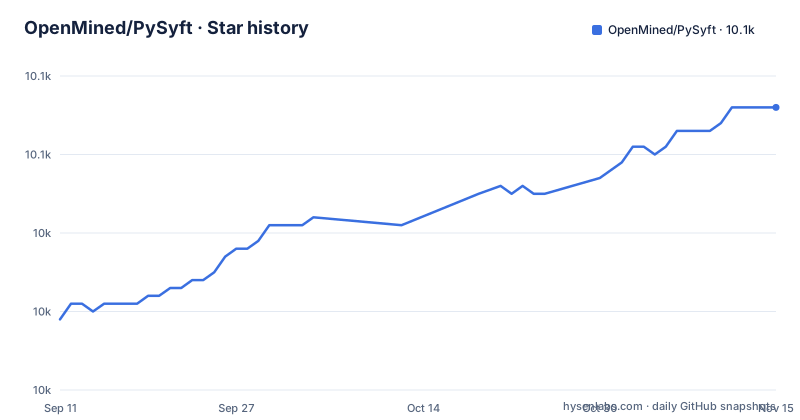
Star history
- OpenMined/PySyft10,056 ★ · +27
| Repository | 2026-09-11 | 2026-11-15 |
|---|---|---|
| OpenMined/PySyft | 10k | 10.1k |
27 Stars in the last 65 days, measured from the daily GitHub snapshot. Compare with other projects
Editorial analysis
Google Drive is the transport, and that is the whole architecture
PySyft's answer to moving data to a data scientist is not to move the data. It moves a small Python file to the data owner and asks them to run it. The transport underneath is Google Drive, reached through `google-api-python-client` and `google-auth-oauthlib` in the package dependencies. The `Connections` document is titled around the Google Drive transport layer, and the features list calls PySyft transport-agnostic while saying it works over Google Drive today and is extensible to any file-based transport.
That single dependency shapes the rest of the design. Both sides call `sync()` and the state advances by whatever the other side has already committed to the shared folder. The features list calls this offline-first: two parties can be disconnected for a while and the workflow still completes, because nothing depends on a live socket when a job is approved. In exchange, every state transition costs one side remembering to call `sync()`, and the shared folder is the only place both parties can see.
The README's introduction also mentions Microsoft 365 and serverless peer-to-peer channels such as WebRTC, but the quick start and the features list document only Google Drive.
A dataset is two files, one public and one not
`create_dataset` takes a mock path and a private path, and the split is the core privacy mechanism. The data scientist opens the mock file, writes analysis code against it, and only the job touches the private file.
do.create_dataset(
    name="census",
    mock_path="mock.txt", # create this and add some text
    private_path="private.txt", # create this and add some text
    users=["[email protected]"],
)
do.sync(); ds
The redirection happens inside a job. `sy.resolve_dataset_file_path("census")` returns the private file rather than the mock one, and `resolve_dataset_file_path` is a helper on the sync engine package, not on `syft-rds`. A script that works against mock data and behaves differently on the private file is a data-quality problem, not a permission error.
The consequence for a reader: the mock file is your only chance to catch a bad assumption. Once the job is approved and `process_approved_jobs` runs, the code has already read the real file.
Every job needs a human to press approve
Jobs do not start on submission. The submitter writes a file and hands over a path.
ds.submit_python_job(
    user="[email protected]",
    code_path="analysis.py",
    job_name="analysis",
)
ds.sync(); do.sync()

# Data owner Approves & runs job
do.jobs["[email protected]"]["analysis"].approve()
do.process_approved_jobs(share_outputs_with_submitter=True)
do.sync(); ds.sync()
result = open(ds.jobs["[email protected]"]["analysis"].output_paths[0]).read()
`approve` is a per-job decision, and the peer approval earlier in the flow is separate from it. `add_peer` plus `approve_peer_request` gets a collaborator into your list; it does not let their jobs run. Automatic execution is not in this path at all. The closest thing is `syft-bg`, which the docs list under background services together with email notifications, running api calls, and a TUI dashboard. That is a separate package the data owner installs, so a data scientist cannot switch it on for themselves.
If your work is a nightly job, a CI step, or anything that runs while a person is asleep, this step is a blocker rather than a detail. Every run costs one prompt and one person.
Installation splits into two different package sets
The data scientist and the data owner do not install the same thing. `syft` and `syft-rds` come first, and the data owner adds the background services on top.
# Data scientist
uv pip install "syft>=0.10.0" "syft-rds>=0.6.0"
# Data owner (adds the background services)
uv pip install "syft>=0.10.0" "syft-rds>=0.6.0" "syft-bg>=0.3.12"
The imports split the same way. `syft` is the sync engine plus helpers such as `resolve_dataset_file_path` and `bug_report`. `syft_rds` is the Remote Data Science client and the source of `login_do` and `login_ds`.
import syft as sy                          # sync engine + helpers (resolve_dataset_file_path, bug_report, ...)
from syft_rds import login_do, login_ds    # datasets + jobs (the Remote Data Science client)
Logging in is per person and per role, and the same call takes an argument for environments without a Colab flow.
# Login (colab auth, for non-colab pass token_path)
do = login_do(email="[email protected]") # use your own email
ds = login_ds(email="[email protected]") # use another email here

# Peer request & approve
ds.add_peer("[email protected]")
do.approve_peer_request("[email protected]")
`login_do` and `login_ds` are both surfaced by the same import, so the two identities in the quick start are two calls from one module. Authentication runs through Google Cloud OAuth, which the `Authentication & Setup` document covers for local and Jupyter use.
The only thing crossing back is whatever analysis.py wrote
Results travel as files, and the data owner decides the share flag at run time. The example job writes a single JSON file and the data scientist reads it through `output_paths`.
# analysis.py
import json
import syft as sy

data_path = sy.resolve_dataset_file_path("census")
with open(data_path, "r") as f:
    data = f.read()

with open("outputs/result.json", "w") as f:
    json.dump({"length": len(data)}, f)
This is a genuine improvement over emailing a spreadsheet, and it is also the entire privacy story. The example job returns its result as a plain JSON file with no noise or budget tracking. The features list phrases the guarantee as private data never leaves the data owner's machine and only approved results are shared. Read strictly, that means a result which contains a row, a name, or an identifier is still a disclosure. `share_outputs_with_submitter=True` is passed at the moment the job is processed, so the data owner sees the flag and the file.
For anyone whose risk model is about aggregates, that is fine. For anyone whose risk model is about re-identification, it is a workflow agreement, not a guarantee.
Dependency pins and a dev branch that the PyPI tags do not describe
The root `pyproject.toml` pins four sibling packages to exact versions: `syft-permissions==0.1.15`, `syft-perms==0.1.15`, `syft-migration==0.1.1`, and `syft-dataset==0.1.21`, alongside `syft-crypto-python>=0.1.2b2`. Everything else in the dependency list is a floor rather than a pin. Mixed policy is a maintenance cost: the permission model and the dataset object can change their serialization on their own release schedule, and your install will refuse or silently drift depending on which of them moves first.
The version story in the README is a second problem. It says `syft` 0.10+ is the successor of `syft-client` and that code written against the PySyft 0.9 API should pin `syft<0.10`. The three most recent releases are v0.9.6b6 from 2025-04-13, v0.9.6b5 from 2025-03-30, and v0.9.6b4 from 2025-03-23, all on the 0.9 line. The default branch is `dev`, and the last push was on 2026-11-02. So the tags describe the old API and the branch describes the new one, and the package table plus `[tool.uv.sources]` workspace entries show the new layout lives under `packages/` with a top level `syft/` directory still present. Plan an install against `syft>=0.10.0` or plan to pin `syft<0.10`, not both.
Licensing is simple. Apache-2.0 in both the `pyproject.toml` metadata and the repository `LICENSE` file.
Where a whole file exchange beats PySyft, and where it does not
The honest alternative for a single analysis is to skip the framework. Encrypt the script with the data owner's public key, drop it in the same Drive folder PySyft already uses, and let the owner decrypt and run it. For one file with one output, that is the same privacy boundary with none of `submit_python_job`, `approve`, and `process_approved_jobs` in the way. PySyft earns its overhead when the exchange repeats, when several collaborators need to be admitted one at a time, and when the mock and private files need to stay in one addressable namespace.
Federated learning is a different category entirely. People search for PySyft as a federated learning library, and the repository's own keywords include `federated-learning`. What the workflow actually implements is one data owner running one data scientist's script and returning its output file. There is no model aggregation, no client selection, and no training round in this path. If the problem is training a model across data holders, this is the wrong tool.
One last asymmetry: the README says peer communication can be signed and encrypted, and `syft-crypto-python` appears in the dependency list, but the quick start documents no encryption step you configure.
Editorial conclusion
Adopt PySyft when you have one data owner who already runs on Google Drive, will answer approval prompts, and wants to inspect your script before it touches their files. Do not adopt it for automated pipelines, for datasets you need to iterate on interactively, or as a differential privacy layer, because the quick start shows no noise being added to a result. Verify first that the sandboxed Python virtual environment in which `do.process_approved_jobs` runs your job has every Python package your `analysis.py` imports.
Frequently asked questions
How can I create a dataset in PySyft?
The data owner calls `do.create_dataset` with a name, a `mock_path`, a `private_path`, and a list of `users`, then calls `do.sync()`.
What packages do I install to use PySyft?
The data scientist installs `syft>=0.10.0` and `syft-rds>=0.6.0`, and the data owner adds `syft-bg>=0.3.12` for background services. The README also says to pin `syft<0.10` if you depend on the legacy PySyft 0.9 API.
Can I use PySyft without Google Drive?
Not in the documented flow. The features list says PySyft works over Google Drive today and is extensible to any file-based transport, and the setup documentation covers Google Cloud OAuth, although the README's introduction also mentions Microsoft 365 and WebRTC peer-to-peer channels.
Does PySyft need a running server?
No. The features list calls PySyft offline-first with full functionality when peers are offline, and both parties only exchange state through `sync()` calls over the shared storage their organizations already use.
Is PySyft a differential privacy library?
The quick start shows a job that reads the private file and writes a plain JSON result with no noise or budget tracking. The guarantee the README states is that private data never leaves the data owner's machine and only approved results are shared.
How long does a PySyft job take to run?
The Quick Start gives no job runtimes. The README does say jobs run in sandboxed Python virtual environments, and the approval is a manual step performed by the data owner before `process_approved_jobs` runs.
Official sources
Add this badge to your README
If you maintain this project, the badge below links readers to this analysis and shows its maintenance status from the daily GitHub snapshot. Paste the markdown into your README; add ?metric=license or ?metric=stars to the image URL for a different field.

[](https://hysenlabs.com/projects/openmined-pysyft)Star history chart for your README
[](https://hysenlabs.com/projects/openmined-pysyft)Was this useful?