Open Source Point of Sale: what CodeIgniter 4 and MySQL actually give a small shop
Open Source Point of Sale is a web based point of sale application written in PHP using CodeIgniter framework. It uses MySQL as the data back end and has a Bootstrap 3 based user interface. If you like this project, please give it a star! Doing so helps maintain Popular OSS status for the project.
At a glance
- What is it?
- opensourcepos/opensourcepos is a self-hosted PHP point of sale on CodeIgniter 4 with MySQL, aimed at a single store that wants its own till server rather than a hosted terminal lease. The register logic holds up, but the Docker path and the web server setup are left on the operator.
- Who is it for?
- Adopt opensourcepos if you run one register room, want the till data on your own hardware, and can spare an afternoon on the web server and MySQL rather than paying a per register terminal lease. Skip it if you need a general ledger at month end, or a vendor who will answer a phone at nine in the evening, because none of that is what this codebase does.
- Can I use it commercially?
- Check first. The repository uses a licence we do not classify automatically, so read its LICENSE file before any commercial use.
- Is it still maintained?
- Yes. The repository received new commits within the last day.
- What is it written in?
- Mainly PHP, according to GitHub's language statistics.
Answers come from the project's GitHub data, last synced on November 15, 2026, and from our analysis. They are not legal advice.
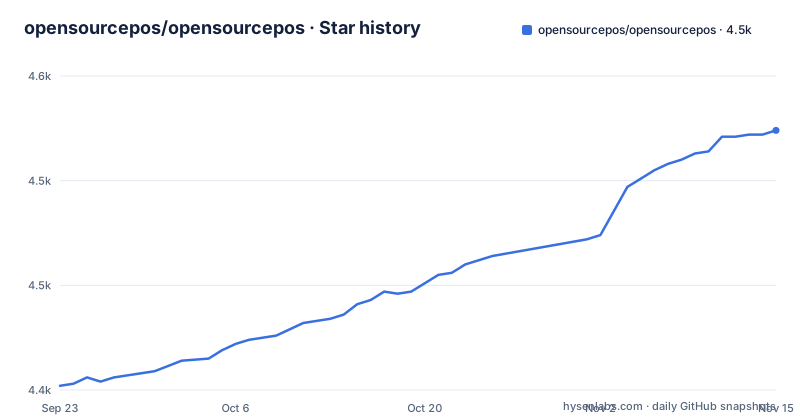
Star history
- opensourcepos/opensourcepos4,524 ★ · +122
| Repository | 2026-09-23 | 2026-11-15 |
|---|---|---|
| opensourcepos/opensourcepos | 4.4k | 4.5k |
122 Stars in the last 53 days, measured from the daily GitHub snapshot. Compare with other projects
Editorial analysis
A till server on CodeIgniter 4, with the tax and stock model in the database
Open Source Point of Sale puts the register on a web server instead of tying it to one PC. The application is PHP on CodeIgniter 4, MySQL or MariaDB holds the data, and the interface is Bootstrap 3. For a shop that sells physical goods, the parts that decide whether it works are the stock model and the tax model: items and kits carry an extensible list of attributes, and VAT, GST and customer taxation run in tiers. Transactions are logged in a sale register, so a drawer can be reconciled after the fact rather than trusted.
What sits around that core is the register-adjacent paperwork. Quotations and invoices, receipts by print or email, receivings against suppliers, expenses, cash up, gift cards, rewards and restaurant tables. Customer and supplier records, barcode generation, reporting on sales, orders, expenses and inventory status, multiuser accounts with permission control, and SMS messaging. Optional integrations are MailChimp, optional Google reCAPTCHA on the login page for brute force attempts, and multilingual strings through Weblate. Anyone shortlisting it should note the target: a shop with a handful of staff, not a chain with per-store stock transfer.
The compose file provisions secrets at boot, so the first start is not just docker compose up
The Docker path is the one worth reading before you commit. The compose file publishes port 80 on the host, sets CI_ENVIRONMENT=production, and waits for the mysql service. Its command line is where the real work happens, because the app generates its own runtime secrets before the web server starts:
command: ["sh", "-c", "php spark env:provision && exec apache2-foreground"]The environment block is where a fresh install will bite you. The hostname allowlist defaults to a single entry, and the .env.example comments mark it required in production, with the application failing to start when it is unset:
- ALLOWED_HOSTNAMES=localhost
- FORCE_HTTPS=false
- PHP_TIMEZONE=UTC
- MYSQL_USERNAME=admin
- MYSQL_PASSWORD=pointofsale
- MYSQL_DB_NAME=ospos
- MYSQL_HOST_NAME=mysql
Those are demo-grade credentials and a single-host allowlist. Change both before this reaches a network.
A bind mount on .env that deliberately refuses to create its host file
The compose file mounts .env from the host directory with create_host_path: false, and the inline comment explains why in unusual detail: a named volume would be a directory, forcing .env to become a directory and breaking the atomic write rename that env:provision performs. In practice the failure mode is blunt. If the host .env file does not exist, the container fails to start rather than auto-creating it as a directory. You get that by copying .env.example first, which ships the database block, the driver set to MySQLi and the table prefix ospos_. Two named volumes carry state out of the container, uploads and logs:
uploads:/app/public/uploads
logs:/app/writable/logs
The image is jekkos/opensourcepos:master, and the Dockerfile behind it builds on php:8.2.35-apache, installs the mysqli, bcmath, intl and gd extensions, enables the rewrite module, and symlinks everything outside public away from the web root. The image tag tracks master, so a compose pull can move you a version without you asking.
The FAQ is where the real support answers live, and it names four errors you will hit
The installation section asks you not to open installation issues before reading the FAQ and points at INSTALL.md, so the practical guidance sits in the FAQ instead. Four entries cover errors people actually see. A `system folder missing` message means you cloned with git and never ran a build; download the published zip archive instead. `The installation is not correct, check your php.ini file.` at login means something in PHP is wrong, and the answer is to read error_log in the public folder. Missing avatar pictures on items point at ownership and a specific mode:
750Set writable and its subdirectories to that permission under the correct owner, or item save will fail on the picture step. Web server configuration is dismissed as a sysadmin matter, with the advice to serve a Hello world page before pointing at the public directory.
Behind a reverse proxy, the session drop and the http URL are the two settings you will change
Two FAQ entries exist purely for proxy deployments. If the proxy does ssl offloading, the generated URLs come out as http unless you set an environment variable, and the entry names it as FORCE_HTTPS = 1. The compose file ships it as false, so you must flip it yourself in your own copy. If the application constantly drops your session behind a proxy, the FAQ suggests whitelisting the proxy IP address through a `public array` setting.
Installing under a web server subdirectory is a third edit: public/.htaccess has commented sections labelled if in web root and if in subdir, and you uncomment one and replace the <OSPOS path> placeholder. The login page has optional reCAPTCHA, which is off until configured, so an internet-facing install should not assume brute force protection exists.
The manifest pulls in Bootstrap 5 while the interface is described as Bootstrap 3
package.json depends on bootstrap ^3.4.1 and on bootstrap5 ^5.3.8 and bootswatch5 ^5.3.8 at the same time, which is hard to square with a description that calls the interface Bootstrap 3. Read that as the two being staged side by side during a version rewrite, not as a description error, but it does mean a theme or a custom view you write against 3 may not survive. The same file declares "license": "MIT" while the repository carries no recognised licence identifier and ships a LICENSE file at the root, so open that file before you redistribute anything. The build side is small: package.json requires node >=22, exposes a build script wired to gulp default, and ships a gulpfile.js at the root.
Where OSPOS sits against a hosted terminal and a general ledger suite
The difference against a hosted terminal is ownership of the data and the fee. A hosted terminal keeps the sales data on someone else's server and bills per register; OSPOS puts the MySQL database on a machine you control and costs the hardware and the hours to run it. Against a general accounting suite such as a full ERP, OSPOS does less. There is no general ledger, no double entry bookkeeping and no accrual accounting here. What it does have is the register: transactions logged, cash up, expenses, receivings and stock that moves when an item sells. PHP on CodeIgniter with a Bootstrap interface also means your own developers can read and change it, which is the argument for it over a closed terminal and against a shop that wants month end handled by an accountant's package.
Reading the numbers before you install
Check three things in a fixed order. Start with the compose path on a throwaway host, because a missing host .env file stops the container before the web server ever starts, and port 80 on the host is a conflict waiting to happen if anything else is listening there. Then open the System Info tab in the configuration section, since that tab's information is what the maintainers ask you to include in bug reports. Then decide on the web server separately. The project treats that configuration as your problem, and the subdirectory case alone needs a hand edit to public/.htaccess. If the shop needs reCAPTCHA on login, per-host hostname allowlisting and https URLs behind a proxy switched on day one, budget for that configuration rather than expecting the defaults to hold.
Editorial conclusion
Adopt opensourcepos if you run one register room, want the till data on your own hardware, and can spare an afternoon on the web server and MySQL rather than paying a per register terminal lease. Skip it if you need a general ledger at month end, or a vendor who will answer a phone at nine in the evening, because none of that is what this codebase does. Then verify in this order before going live: run the Docker compose file on a throwaway host, confirm the hostname allowlist is set to the domain you will actually serve, confirm FORCE_HTTPS is switched on if a proxy terminates TLS, and open the System Info tab in the configuration section, since its information is what a bug report has to carry.
Frequently asked questions
how to install opensourcepos
The project points you at INSTALL.md and supports only the setup methods described there. For Docker, the compose file publishes port 80, waits on mysql and runs php spark env:provision before Apache starts, and a host .env file must exist or the container fails to start.
What is opensourcepos and who is it for?
opensourcepos is a web based point of sale application written in PHP using the CodeIgniter framework, with MySQL as the data back end and a Bootstrap 3 interface. It covers stock, sales register, invoices, expenses and multiuser permission control for a small shop running its own server.
What licence does opensourcepos use?
The package.json file declares "license": "MIT", and a LICENSE file sits at the repository root. Read that file directly before redistributing, since the repository metadata carries no recognised licence identifier.
Does opensourcepos work behind a reverse proxy?
Two settings exist for that case. Set FORCE_HTTPS = 1 when the proxy handles ssl offloading so generated URLs come out as https, and if sessions keep dropping, the FAQ suggests whitelisting the proxy IP address through a `public array` setting.
Official sources
Add this badge to your README
If you maintain this project, the badge below links readers to this analysis and shows its maintenance status from the daily GitHub snapshot. Paste the markdown into your README; add ?metric=license or ?metric=stars to the image URL for a different field.

[](https://hysenlabs.com/projects/opensourcepos-opensourcepos)Star history chart for your README
[](https://hysenlabs.com/projects/opensourcepos-opensourcepos)Was this useful?