OWASP Java HTML Sanitizer: policy-based HTML filtering for embedded content
Takes third-party HTML and produces HTML that is safe to embed in your web application. Fast and easy to configure.
At a glance
- What is it?
- The OWASP Java HTML Sanitizer takes HTML written by third parties and returns HTML that is safe to embed in a web application, driven by an explicit allow-list policy. It ships with no runtime dependencies and an Apache 2.0 licence, and it is a filter, not a rewriting engine.
- Who is it for?
- Take this library when your application must render HTML that came from outside your trust boundary and you want the allowed elements, attributes and URL protocols written down in code rather than guessed at. Do not take it when the content is plain text that should simply be escaped, or when you need to preserve arbitrary markup, since anything not in the policy is dropped.
- Can I use it commercially?
- Yes. Apache-2.0 is a permissive licence: you can use, modify and sell software built on it, as long as you keep its copyright and licence notices.
- Is it still maintained?
- Yes. The repository last received commits 4 days ago.
- What is it written in?
- Mainly Java, according to GitHub's language statistics.
Answers come from the project's GitHub data, last synced on November 7, 2026, and from our analysis. They are not legal advice.
Star history
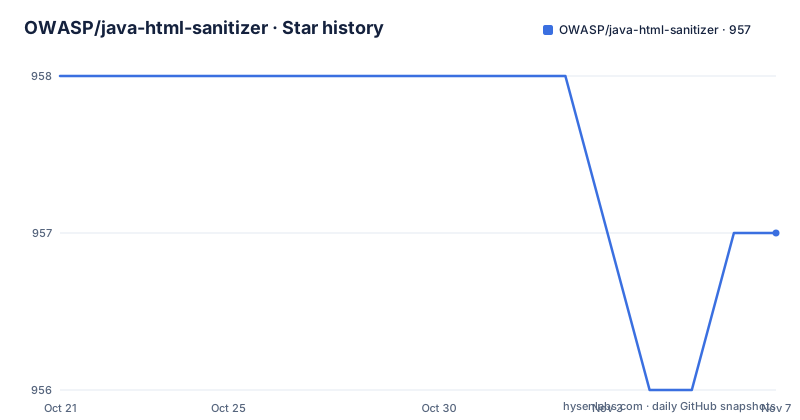
- OWASP/java-html-sanitizer957 ★ · -1
| Repository | 2026-10-21 | 2026-11-07 |
|---|---|---|
| OWASP/java-html-sanitizer | 958 | 957 |
-1 Stars in the last 17 days, measured from the daily GitHub snapshot. Compare with other projects
Editorial analysis
The problem: embedding HTML you did not write
The library exists for one situation. Somebody else authored HTML, and your application wants to show it. The obvious defensive answer is to escape everything, which turns formatting into visible angle brackets and is usually not what the business wants. The other answer is to strip tags, which throws away legitimate structure along with the dangerous parts.
OWASP Java HTML Sanitizer takes the third path. It takes third-party HTML and produces HTML that is safe to embed in your web application, and it does so by running the input through a policy that you define. The README describes it as written with security best practices in mind, with an extensive test suite, and as having undergone an adversarial security review whose ground rules are in docs/attack_review_ground_rules.md.
For the Java developer, the appeal is that the policy is a Java object rather than a configuration file. There is no XML allow-list to keep in sync with your templates, no regex to maintain, and the compiler sees your policy code. The API surface is deliberately small: you build a PolicyFactory and call sanitize on it.
That last point is where the real risk lives. The library will do exactly what the policy says, and a policy that allows an element without restricting its attributes can still let something through that you did not intend. The documentation pushes you toward writing that policy yourself rather than starting from a broad default.
Allow-list policies are built with HtmlPolicyBuilder
The core of the library is the builder. Each call states what is permitted, and anything not stated is not permitted. A minimal policy that allows anchor elements with only the https protocol and only the href attribute looks like this:
PolicyFactory policy = new HtmlPolicyBuilder()
    .allowElements("a")
    .allowUrlProtocols("https")
    .allowAttributes("href").onElements("a")
    .requireRelNofollowOnLinks()
    .toFactory();
String safeHTML = policy.sanitize(untrustedHTML);
Each line has a specific job. allowElements names a tag that survives. allowUrlProtocols limits the URL schemes a URL-bearing attribute may use, which is how a javascript: URL is kept out. allowAttributes on a specific element ties an attribute to that element rather than to the whole document. requireRelNofollowOnLinks asks for the rel attribute on links that leave your site, and toFactory produces the immutable PolicyFactory you then call.
The method names are worth reading as a specification of the security model. Because protocols are allowed per policy and attributes per element, an attribute that is harmless on one tag can be excluded on another. The README links the builder's own tests as the place where the configuration examples live, which is the honest reference for behaviour that the top-level README does not spell out.
Prepackaged policies versus policies you write
For quick work there is a set of prepackaged policies, listed in the Sanitizers class of the Javadoc. The smallest example combines two of them:
PolicyFactory policy = Sanitizers.FORMATTING.and(Sanitizers.LINKS);
String safeHTML = policy.sanitize(untrustedHTML);
The and method composes policies, so FORMATTING gives you the elements that carry formatting and LINKS gives you link handling, and combining them yields a factory that applies both sets of rules.
This is the tempting path and it carries a real trade-off. A prepackaged policy is broad by design, because it has to work for applications it knows nothing about. It is right for a quick experiment or a low-risk internal tool. It is a poor fit when the input comes from an untrusted party and the markup can influence layout, phishing or click-through behaviour on your page.
The project makes the two routes coexist in the repository layout. The examples directory holds sample policies to read and copy, and it is tested but not published, so those samples are a source of patterns rather than a shipped artifact. The published library module is owasp-java-html-sanitizer, which contains the library, its tests and its Java module descriptor, and the shim modules java8-shim and java10-shim hold compatibility code that is bundled into the library JAR.
Custom policies can rename elements and filter attributes
The element policy is a function, not just a name. It receives the element name and the attribute list and returns the name to keep or null to drop, which means a policy can rewrite the document structure as it filters it. The README gives an example that turns heading elements into divs carrying a class:
PolicyFactory policy = new HtmlPolicyBuilder()
    .allowElements("p")
    .allowElements(
        (String elementName, List<String> attrs) -> {
          // Add a class attribute.
          attrs.add("class");
          attrs.add("header-" + elementName);
          // Return elementName to include, null to drop.
          return "div";
        }, "h1", "h2", "h3", "h4", "h5", "h6")
    .toFactory();
String safeHTML = policy.sanitize(untrustedHTML);
Attribute policies work the same way, one value at a time. The README makes an important guarantee about them: adding an attribute policy does not water down any default policy like style or URL attribute checks. That is the difference between a filter you extend and one you accidentally disable.
One sharp edge appears in both examples. The elements a, font, img, input and span need to be whitelisted explicitly with allowWithoutAttributes if you want them to pass through the filter when they carry no attributes. That behaviour catches people out, because an element that is permitted with attributes can still be dropped when it is bare.
One more caveat belongs here rather than in a footnote: rewriting an h1 into a div changes the meaning of the document for anyone reading it, including screen readers and crawlers. A policy that alters structure is a content decision, not only a security decision.
Preprocessors can rewrite the stream before filtering
Preprocessors run ahead of the policy and receive an HtmlStreamEventReceiver, which lets them insert text and make large structural changes. The README example annotates every link with its origin so a reader sees where a click will lead before making it, using an HtmlStreamEventReceiverWrapper that overrides openTag, reads the href attribute and appends a text fragment:
PolicyFactory myPolicy = new HtmlPolicyBuilder()
    .withPreprocessor(
        (HtmlStreamEventReceiver r) -> {
          // Provide user with info about links before they click.
          // Before:                       <a href="https://example.com/...">
          // After:  (https://example.com) <a href="https://example.com/...">
          return new HtmlStreamEventReceiverWrapper(r) {
            @Override public void openTag(String elementName, List<String> attrs) {
              if ("a".equals(elementName)) {
The stream shape is what makes this possible. Tags arrive one at a time with their attributes as a flat list, so a preprocessor can look at a single element and react to it without re-parsing the whole document.
The same example closes with allowElements("a"), allowAttributes("href").onElements("a") and allowStandardUrlProtocols, which shows the ordering rule that matters: the preprocessor adds information, the policy decides what survives. If the preprocessor is trying to achieve something the policy then strips, the work is wasted.
Getting the library onto your classpath
The published artifact is on Maven Central under the group and artifact name com.googlecode.owasp-java-html-sanitizer.owasp-java-html-sanitizer, which is an unusual coordinate for a project hosted under the OWASP organisation, and it is worth checking that coordinate carefully in your dependency management before you import it.
The dependency story is one of the library's selling points. The README states that the sanitizer JAR has no runtime dependencies, that its only compile-time dependency is spotbugs-annotations in provided scope for annotations only, and that the other jars are needed only by the test suite. For a security component, an empty runtime dependency graph means one fewer thing to audit and one fewer path for a transitive vulnerability to arrive through.
Building from source needs JDK 11 or newer. The project uses a Maven wrapper that pins the required Maven version, and the whole build plus the test suite runs from the repository root:
./mvnw clean verifyIf you select a single module with -pl, the README asks you to add -am so that the modules it depends on are built as well. There is also a getting started document covering use with or without Maven, for teams that assemble their classpath by hand rather than through a build tool.
Maintenance, licence, and the limits of a filter
The repository is not archived and the last push was on 2026-10-11, with a release of the same date named release-20261011.1 and two more releases in late September 2026. The release naming, a date plus a counter, means you can tell at a glance how recent a build is, and that scheme also implies frequent patch level releases rather than a small number of major versions. The presence of a change_log.md at the root supports the same reading.
The licence is Apache 2.0, with COPYING and LICENSE files in the repository root, and the README states that the project is released under version 2.0 of the Apache License. OWASP projects are also the kind of dependency that enterprise policies sometimes treat differently from a vendor library, so if your organisation has a policy on OWASP code specifically, that is a question for your security team rather than for this text.
Now the limits. A sanitizer is a filter, and a filter is only as good as its policy. The library cannot tell you which elements your users need; that decision belongs to whoever writes the policy. The library also does not validate that the sanitized output is what you wanted, only that it satisfies the rules you set. If your content genuinely needs script, forms or embedded frames, no policy in this library will give you that safely, and reaching for a different approach is the right move rather than loosening the allow-list.
One structural cost is worth noting too. The build is a multi-module Maven project with shims for Java 8 and Java 10 compatibility, and the examples module is tested but not published, so a consumer of the library does not get the sample policies as a runtime dependency and has to copy them by hand.
Editorial conclusion
Take this library when your application must render HTML that came from outside your trust boundary and you want the allowed elements, attributes and URL protocols written down in code rather than guessed at. Do not take it when the content is plain text that should simply be escaped, or when you need to preserve arbitrary markup, since anything not in the policy is dropped. Verify first that the elements and attributes your own rich text editor produces are covered by the policy you write, including the a, font, img, input and span elements that need an explicit allowWithoutAttributes entry when they carry no attributes, and check the Telemetry and attack review documentation before you rely on a configuration you did not write yourself.
Frequently asked questions
How do I sanitize HTML with the OWASP Java HTML Sanitizer?
Build a PolicyFactory with HtmlPolicyBuilder, listing the elements, attributes and URL protocols you allow, then call sanitize on it with the untrusted HTML. The result is HTML safe to embed in your application.
Does the OWASP Java HTML Sanitizer have any runtime dependencies?
No. The README states that the sanitizer JAR has no runtime dependencies, and that its only compile-time dependency is spotbugs-annotations in provided scope for annotations only. Other jars are needed only by the test suite.
Why is my allowed element being stripped when it has no attributes?
The elements a, font, img, input and span must be whitelisted explicitly with the allowWithoutAttributes method if you want them to pass through the filter when they carry no attributes.
Can I change heading tags into divs with the OWASP Java HTML Sanitizer?
Yes. The element policy is a function that receives the element name and attributes and returns the name to keep or null to drop, so you can return a different element name and add attributes such as a class.
What licence is the OWASP Java HTML Sanitizer released under?
The README states that it is released under version 2.0 of the Apache License, and the repository root carries LICENSE and COPYING files.
Official sources
Add this badge to your README
If you maintain this project, the badge below links readers to this analysis and shows its maintenance status from the daily GitHub snapshot. Paste the markdown into your README; add ?metric=license or ?metric=stars to the image URL for a different field.

[](https://hysenlabs.com/projects/owasp-java-html-sanitizer)Star history chart for your README
[](https://hysenlabs.com/projects/owasp-java-html-sanitizer)Was this useful?