Pezzo ships an Nx monorepo whose release tags stopped at v0.9.2
🕹️ Open-source, developer-first LLMOps platform designed to streamline prompt design, version management, instant delivery, collaboration, troubleshooting, observability and more.
At a glance
- What is it?
- An open-source LLMOps platform for prompt management, observability and caching, built as an Nx monorepo on NestJS, Prisma and ClickHouse. The documentation and the package manifest disagree about the license, and the newest release tag is from May 2024.
- Who is it for?
- Pezzo fits a team that wants self-hosted prompt versioning, tracing and response caching with Node, Python or LangChain clients. It does not fit anyone who needs the 90 percent cost claim to be measurable, or who wants an unambiguous license.
- Can I use it commercially?
- Yes. Apache-2.0 is a permissive licence: you can use, modify and sell software built on it, as long as you keep its copyright and licence notices.
- Is it still maintained?
- Yes. The repository last received commits 15 days ago.
- What is it written in?
- Mainly TypeScript, according to GitHub's language statistics.
Answers come from the project's GitHub data, last synced on November 23, 2026, and from our analysis. They are not legal advice.
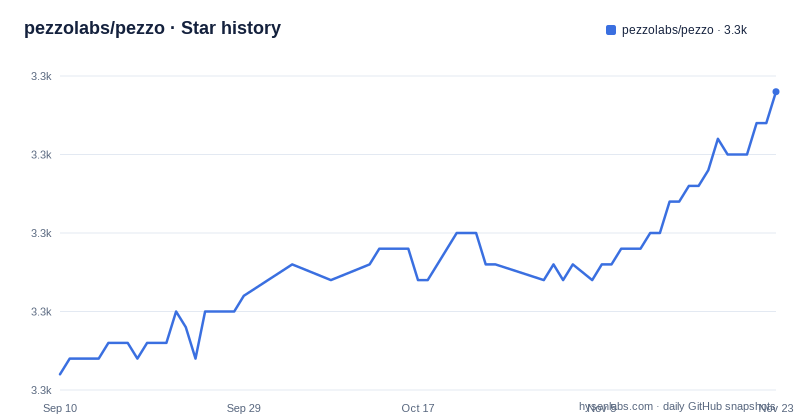
Star history
- pezzolabs/pezzo3,289 ★ · +18
| Repository | 2026-09-10 | 2026-11-23 |
|---|---|---|
| pezzolabs/pezzo | 3.3k | 3.3k |
18 Stars in the last 74 days, measured from the daily GitHub snapshot. Compare with other projects
Editorial analysis
package.json declares MIT, the README declares Apache 2.0
The repository carries two different license statements and does not reconcile them. The README closes with a line saying the source code is available under the Apache 2.0 License, and a LICENSE file sits at the root of the tree. The repository metadata also records Apache-2.0. Then there is `package.json`, which declares `"license": "MIT"` on a package marked `"private": true`. Because that package is private it is never published, so the MIT field does not travel with a tarball, but it is still the field any tool reading the manifest will report. This article does not pick a winner between the two. Read the LICENSE file and decide which terms you are actually accepting, and if you contribute, settle the question in the pull request rather than after a release. The same file also carries a version that disagrees with the release history, which the last section of this piece takes up.
The Features heading in the README is three empty paragraphs
The README opens with a paragraph promising to observe AI operations, troubleshoot issues, save up to 90 percent on costs and latency, collaborate on prompts and deliver changes instantly. Then it reaches a Features heading followed by three centred HTML paragraphs containing nothing at all. The feature list is not short or summarised; it is absent from the file. What survives is one client support table with three rows, Prompt Management, Observability and Caching, each carrying a check mark in all three client columns, so the table shows which clients exist without distinguishing any of them. The 90 percent figure has no baseline, no workload and no measurement attached to it anywhere in the repository, and no benchmark is linked. Treat it as a marketing number rather than a sizing input, and size your own spend by measuring the caching hit rate on your traffic instead.
Six backing services are configured, four are named in prose
The README describes the platform as relying solely on open-source technologies and names four of them: PostgreSQL, ClickHouse, Redis and Supertokens. The configuration tells a longer story. `.env.example` sets a database URL pointing at a `postgres:5432` host, `SUPERTOKENS_CONNECTION_URI` on port 3567, `REDIS_URL` at `redis://redis-stack-server:6379`, and also `KAFKA_BROKERS="kafka:9092"` and `OPENSEARCH_URL="http://opensearch:9200"`. Two services that carry no prose description anywhere. The compose file treats all of them as hard dependencies: the server service waits on `service_healthy` for postgres, supertokens, clickhouse and redis-stack-server, and additionally on two jobs finishing successfully, `pezzo-prisma-migrate` and `pezzo-clickhouse-migrate`. The Prisma half of that is documented in the quickstart. The ClickHouse migration job is not, so a first run has an ordering requirement the prose never mentions.
Compose reads five env files where the README tells you to write two
The setup instructions say Pezzo uses a `.env` file for environment variables, that you should also create a `.env.docker` file when using Docker, and that `.env.example` is the reference. The compose file lists five. The `pezzo-server` service pulls in `./.env`, `./.env.local`, `./.env.docker`, `./apps/server/.env` and `./apps/server/.env.local`, in that order, which means the later files win on conflict. The `pezzo-console` and `pezzo-proxy` services read two files each, both of them app-scoped. The Prisma command in the quickstart makes the same distinction from the other direction, pointing dotenv-cli at the server's own file:
npx dotenv-cli -e apps/server/.env -- npx prisma migrate deploy --schema apps/server/prisma/schema.prismaSo the app-local `apps/server/.env` is not optional decoration; it is the file the migration step reads. A deployment that creates only `.env` and `.env.docker` will start the server without the variables the migration already consumed.
npm install ends with a postinstall patch against rollup
The root package defines a `postinstall` script that runs `node tools/scripts/patch-rollup` after every install, including in CI and in Docker builds. A script that rewrites a dependency's own files at install time is the kind of thing worth knowing before you adopt a repository, because it changes what is on disk after `npm install` and it is invisible in the resolved dependency tree. The same manifest also carries `docs:dev`, which runs `cd docs && mintlify dev --port 3200`, which tells you the documentation site in the `docs/` directory is a Mintlify project, and two GraphQL codegen scripts that delegate to Nx. The rest of the manifest is a NestJS server on `@nestjs/*` version 9, a Prisma client, a ClickHouse client, `@dqbd/tiktoken` for tokenisation, `@aws-sdk/client-kms`, a Radix UI set for the console, a Spline runtime, Sendgrid and two analytics SDKs. The list runs on past `@splinetool/react-spline`.
The client table links to PyPI's front page and to issue 180
Two of the three client columns in the support table point somewhere other than a package. The Node.js column links to the npm page for `@pezzo/client`, which is a real package page. The Python column links to `https://pypi.org/`, the PyPI home page, with no package name in it, so the reader is sent to a search box rather than to a distribution. The LangChain column links to issue 180 in the repository's issue tracker, which is a request for the integration rather than a place to install one. The table also flattens its own distinctions: all three rows are identical across all three columns, so a reader cannot tell from it whether caching behaves the same in Python as in Node. One thing the surrounding page does state is that the project wants to hear about unlisted clients, and it points at a new issue form for that.
Three containers in compose, two in the instructions, all three pinned to latest
The compose file defines three application services. `pezzo-server` maps host port 3000 to container port 3000, and `pezzo-console` maps host 4200 to container port 8080, which is worth noting because the development instructions serve the console on 4200 directly from Nx rather than through that mapping. The third service, `pezzo-proxy`, maps 3001 to 3000 and receives `PEZZO_SERVER_URL=http://pezzo-server:3000`. The quickstart never mentions the proxy; it starts a server and a console and leaves it there. All three services carry `restart: always` and a `build:` context alongside their `image:` reference, and every image is tagged `:latest` against `ghcr.io/pezzolabs/pezzo`. That combination is the quiet risk in this file: running compose can pull prebuilt images that do not match the checkout you are reading, while the documented development path builds from source. Pin explicit versions if you need the two to agree. The server also declares a healthcheck that curls its own `/api/healthz` every 10 seconds with 5 retries, and the console refuses to start until that check passes.
The root package says 0.8.0 while the newest tag is v0.9.2
Version tracking in this repository has three separate answers. The release list holds `v0.9.2` dated 2024-05-15, `v0.9.1` dated 2024-05-14 and `v0.9.0` dated 2024-04-28, with v0.9.0 and v0.9.1 one day apart. The root `package.json` says `"version": "0.8.0"`, a version that predates all three. The last push to the repository was on 2026-08-21, so the code has moved well past the newest tag. The practical reading is that the release tags are not a usable upgrade signal here, and the manifest is not a usable one either; the commit history is the only ordering you can trust. Two more files in the root make the same point in a quieter way: a `migrations.json` sitting next to `nx.json` and `project.json`, and a `.nvmrc` that pins the Node version for the whole workspace, which lines up with the Node.js 18 or newer stated as a prerequisite. The documentation site lives in the `docs/` directory as a Mintlify project, driven by the `docs:dev` script on port 3200.
Editorial conclusion
Pezzo fits a team that wants self-hosted prompt versioning, tracing and response caching with Node, Python or LangChain clients. It does not fit anyone who needs the 90 percent cost claim to be measurable, or who wants an unambiguous license. Before adopting, read the LICENSE file sitting next to the MIT field in package.json, check that your setup creates the five env files the server service reads rather than the two the README names, and confirm the ClickHouse migration job has finished, since pezzo-server will not start until it has.
Frequently asked questions
What does Pezzo do?
It is an open-source LLMOps platform covering prompt design and version management, observability, troubleshooting and delivery of AI changes. Prompt management, observability and caching are the three capabilities its client support table names, and the architecture and provider recipes are documented at docs.pezzo.ai.
How do I run Pezzo in development mode?
You need Node.js 18 or newer and Docker. Run `npm install`, create `.env` and `.env.docker` from `.env.example`, start dependencies with `docker-compose -f docker-compose.infra.yaml up`, deploy the Prisma migrations, then serve the server and the console with `npx nx serve server` and `npx nx serve console`. The server answers on http://localhost:3000/api/healthz and the console on http://localhost:4200.
Which databases and services does Pezzo need?
PostgreSQL, ClickHouse, Redis and Supertokens are named in the README. The .env.example file also sets KAFKA_BROKERS and OPENSEARCH_URL, so two further services appear in the configuration even though the prose does not mention them.
What license is Pezzo released under?
The repository gives two answers. The README says the source is available under the Apache 2.0 License and a LICENSE file sits at the root, while package.json declares an MIT license field on a package marked private. The project does not explain the discrepancy.
Which client libraries does Pezzo support?
Node.js, Python and LangChain, each marked as supporting prompt management, observability and caching with identical check marks across all three columns. The Node.js client is published to npm as @pezzo/client, while the Python column links to the PyPI home page and the LangChain column links to issue 180.
Official sources
Add this badge to your README
If you maintain this project, the badge below links readers to this analysis and shows its maintenance status from the daily GitHub snapshot. Paste the markdown into your README; add ?metric=license or ?metric=stars to the image URL for a different field.

[](https://hysenlabs.com/projects/pezzolabs-pezzo)Star history chart for your README
[](https://hysenlabs.com/projects/pezzolabs-pezzo)Was this useful?