The ZFS figures are the only capacity numbers, and the badges point at another repository name
DBLab enables 🖖 database branching and ⚡️ thin cloning for any Postgres database and empowers DB testing in CI/CD. This optimizes database-related costs while improving time-to-market and software quality. Follow to stay updated.
At a glance
- What is it?
- DBLab Engine branches PostgreSQL through copy-on-write thin clones and sells two editions, one free and one from the Postgres.ai console. What the repository shows is narrower than the pitch: capacity claims annotated for one filesystem, a feature list that stops mid-word, and build badges wired to a differently named GitLab project.
- Who is it for?
- DBLab Engine earns its place in a CI pipeline that needs a full-size clone per test run, provided your PostgreSQL data directory sits on a filesystem with copy-on-write snapshots and you have somewhere to put the engine. Before committing, confirm which of the two CoW backends you will actually run, since every stated ceiling in the file is annotated for ZFS and none for LVM, and check whether the managed instance you target forces the separate-VM arrangement.
- Can I use it commercially?
- Yes. Apache-2.0 is a permissive licence: you can use, modify and sell software built on it, as long as you keep its copyright and licence notices.
- Is it still maintained?
- Yes. The repository last received commits 12 days ago.
- What is it written in?
- Mainly Go, according to GitHub's language statistics.
Answers come from the project's GitHub data, last synced on November 23, 2026, and from our analysis. They are not legal advice.
Star history
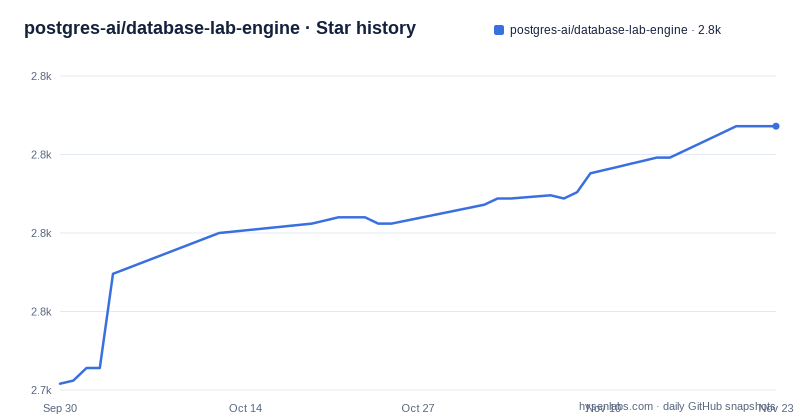
- postgres-ai/database-lab-engine2,809 ★ · +82
| Repository | 2026-09-30 | 2026-11-23 |
|---|---|---|
| postgres-ai/database-lab-engine | 2.7k | 2.8k |
82 Stars in the last 54 days, measured from the daily GitHub snapshot. Compare with other projects
Editorial analysis
The build badges name a different project than the repository does
The badge row at the top of the README links a pipeline view at gitlab.com/postgres-ai/database-lab/-/pipelines and a score card at goreportcard.com/report/gitlab.com/postgres-ai/database-lab. Both point at a project called database-lab, while this repository is called database-lab-engine and lives on GitHub. The tree supports both stories at once: there is a .github/ directory and a .gitlab/ directory with its own .gitlab-ci.yml, plus a second pipeline file, .gitlab-ci-security.yml, dedicated to security scanning. The same split shows up in the tree for the SQL optimization bot the file recommends, which is a separate project at gitlab.com/postgres-ai/joe. Two automation systems and three externally named projects sit behind one README.
Every capacity number in the file is annotated for ZFS
Thin cloning is built on Copy-on-Write, and two technologies are offered for it: ZFS as the default and LVM as the alternative. The two headline capacity figures both carry the same parenthetical, ZFS default. The theoretical maximum for snapshots and clones is 2^64, and the maximum size of a PostgreSQL data directory is 256 quadrillion zebibytes, which is 2^128 bytes. Neither figure is restated for the LVM path, so a deployment on LVM has no stated ceiling to check against. The ZFS behavior is spelled out further: snapshots of the data directory are taken routinely, a collection of them is managed, old or unused ones are removed, and a clone request can select a preferred snapshot.
A one terabyte clone in ten seconds is stated once, with no machine behind it
The performance claim sits in the Why section: cloning a 1 TiB PostgreSQL database takes just about 10 seconds, and on a single machine you can run dozens of independent clones at once with no added hardware cost. It is given once, as prose, with no processor, no disk layout, no snapshot count and no comparison point. Around it sit two products. The free path is the DBLab Community Edition, installed by following a tutorial. The paid path is DBLab Standard Edition, provisioned through the Postgres.ai Console to any cloud or on-premises environment, with pricing starting at $62 per month. A demo instance runs at demo.dblab.dev. The self-managed and the console-provisioned engines are the same engine reached by different routes.
Managed cloud databases move the engine to a second machine in the same region
The feature list claims location flexibility across self-managed PostgreSQL, AWS RDS, GCP Cloud SQL and Azure with no source adjustments needed. The footnote at the top of the file explains the cost of that claim. For managed services such as AWS RDS or Heroku, direct physical connection and PGDATA access are not possible, so DBLab should run on a separate VM within the same region. From there it routinely auto-refreshes its data, effectively behaving as a database-as-a-service, and that arrangement is what offers thin branching for development and testing. Source databases are also free of ZFS and Docker requirements. The upshot is that the supported list is wide, but the supported configuration is a local engine plus a synced copy of a remote instance.
Nine major PostgreSQL releases share one set of container images
Supported PostgreSQL versions run from 10 through 18, and every component is packaged in Docker containers. The images ship popular extensions including contrib modules, pgvector and HypoPG, there is a customization path for adding more, and the Docker container settings along with PostgreSQL configuration parameters are held in the DBLab config. A version range that wide spans major releases that change on-disk layout and default settings, and the file gives no per-version matrix saying which image serves which server. Control comes through a UI for manual tasks plus an API and a CLI for automation, so the same engine has to be driven three ways.
The data provisioning section starts one word in and stops
The feature list is grouped into named areas, and the last one is Data provisioning and retrieval. Exactly one line follows that heading, beginning Simple-m, and the file ends there. Nothing in the readable text says how data enters a clone, how it is reset, or how results are retrieved, which is the part of the workflow a CI integration depends on most. The two topics that do get written paragraphs elsewhere are how cloning works and why the project exists. Everything else in the feature list is one short clause per entry.
Two headline promises rest on claims the repository does not back
The header promises coverage of 100% of DB migrations with CI tests and, in the same breath, says you can verify ChatGPT ideas to get rid of hallucinations. The Why list repeats both, adding that you can rapidly validate LLM concepts and check for hallucinations, and points SQL optimization work at a separate chatbot rather than at anything in this tree. Support material is thin in the same way: one case study, GitLab, alongside documentation, a blog tag and a Slack link. The project does carry the governance files you would expect, CODE_OF_CONDUCT.md, SECURITY.md, ROADMAP.md and CONTRIBUTING.md, a Gitpod configuration, a WhiteSource config, a Prometheus page, five translated READMEs under translations/ and a CLAUDE.md with its own .claude/ directory.
Editorial conclusion
DBLab Engine earns its place in a CI pipeline that needs a full-size clone per test run, provided your PostgreSQL data directory sits on a filesystem with copy-on-write snapshots and you have somewhere to put the engine. Before committing, confirm which of the two CoW backends you will actually run, since every stated ceiling in the file is annotated for ZFS and none for LVM, and check whether the managed instance you target forces the separate-VM arrangement. Verify the data provisioning surface elsewhere, because the feature list that should cover it ends mid-word.
Frequently asked questions
How does DBLab Engine clone a PostgreSQL database without copying all the data?
Thin cloning is based on Copy-on-Write and uses ZFS, which is the default, or LVM. With ZFS the engine takes new snapshots of the data directory routinely, keeps a collection of them and removes old or unused ones, and a clone request can select a preferred snapshot.
Can DBLab Engine branch a managed cloud PostgreSQL instance directly?
Not directly. For managed services such as AWS RDS or Heroku, direct physical connection and PGDATA access are not possible, so DBLab should run on a separate VM within the same region and routinely auto-refresh its data from there.
Which PostgreSQL versions and filesystems does DBLab Engine support?
PostgreSQL 10 through 18, with thin cloning over ZFS as the default and LVM as the alternative. The stated ceilings, 2^64 snapshots or clones and a 2^128 byte data directory, are both annotated as ZFS defaults.
Is DBLab Engine free to run?
There are two editions. DBLab Community Edition is installed by following a tutorial, and DBLab Standard Edition is provisioned through the Postgres.ai Console with pricing starting at $62 per month. A demo instance is available at demo.dblab.dev.
What does DBLab Engine say about testing database migrations?
It presents automatic testing of database changes in CI/CD pipelines as a way to reduce the risk of production incidents, and the feature list claims coverage of all database migrations with CI tests.
Official sources
Add this badge to your README
If you maintain this project, the badge below links readers to this analysis and shows its maintenance status from the daily GitHub snapshot. Paste the markdown into your README; add ?metric=license or ?metric=stars to the image URL for a different field.

[](https://hysenlabs.com/projects/postgres-ai-database-lab-engine)Star history chart for your README
[](https://hysenlabs.com/projects/postgres-ai-database-lab-engine)Was this useful?