Python Packaging User Guide: Documentation and Local Editing
Python Packaging User Guide
At a glance
- What is it?
- The Python Packaging User Guide is a community-maintained reference for packaging and installing Python distributions. It is a Sphinx documentation project, not a package installer or a replacement for build tools such as setuptools and wheel tooling.
- Who is it for?
- Python developers should use the guide when they need a maintained account of Python packaging terminology and practices, while contributors should use it when they can improve the documentation. Organizations that require reproducible internal documentation builds should first confirm the command sequence in the contribution guide, because the README and `requirements.txt` do not provide an exact local build command.
- Can I use it commercially?
- Not without permission. GitHub finds no licence file in the repository, and without a licence all rights are reserved by default: you may read the code but not reuse it. Check the README, or ask the authors, before using it.
- Is it still maintained?
- Yes. The repository last received commits 2 days ago.
- What is it written in?
- Mainly Python, according to GitHub's language statistics.
Answers come from the project's GitHub data, last synced on November 6, 2026, and from our analysis. They are not legal advice.
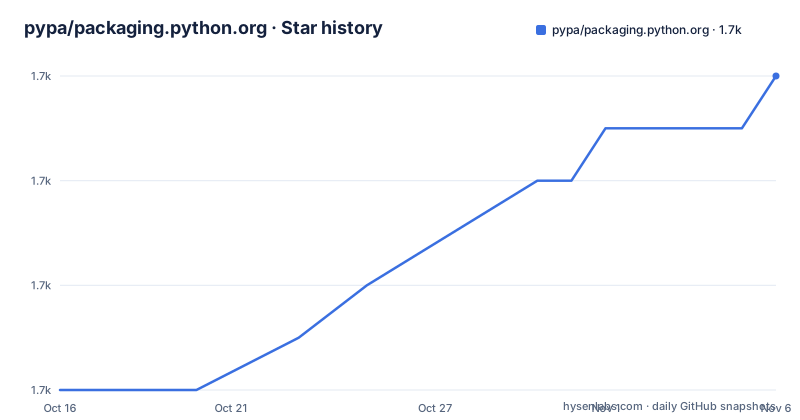
Star history
- pypa/packaging.python.org1,684 ★ · +6
| Repository | 2026-10-16 | 2026-11-06 |
|---|---|---|
| pypa/packaging.python.org | 1.7k | 1.7k |
6 Stars in the last 21 days, measured from the daily GitHub snapshot. Compare with other projects
Editorial analysis
What the Python Packaging User Guide Covers
The repository addresses a documentation problem rather than a runtime problem. Its stated purpose is to explain how to package and install Python distributions using current tools. That makes it relevant to Python developers deciding how a distribution should be structured, authors preparing package metadata, and contributors who need shared terminology rather than an informal collection of examples. The guide describes itself as an authoritative resource, but that description is a project objective rather than evidence that every page is current or applicable to every packaging workflow.
The repository is not itself a Python package that users install from PyPI. It is the source for a published guide hosted at packaging.python.org. The top-level files support the publication process: `source/` is the documentation tree, `extra/` contains additional project resources, `pug_sphinx_extensions/` contains project-specific Sphinx extensions, and `scripts/` contains supporting automation. Repository and automation directories add contribution and delivery infrastructure.
The guide is also distinct from the Python Packaging Authority site linked by the README. That site is presented as a place to follow Python packaging development. The repository’s narrower role is to hold the user guide itself. A team looking for live news about packaging governance would need the linked authority site, while a team looking for instructional documentation belongs here.
The README does not list the individual guide pages or identify particular commands, metadata fields, backends, or installation scenarios. Its defensible scope comes from its stated mission and published location. Any adoption decision should therefore account for the guide’s editorial nature: it can explain recommended practice, but it does not turn into an automated dependency or enforce packaging behavior inside a build.
Sphinx Sources and Published Guide Architecture
The repository layout identifies a Sphinx documentation system. `requirements.txt` pins `furo==2024.8.6`, `sphinx==7.2.6`, `sphinx-autobuild==2021.3.14`, `sphinx-inline-tabs==2023.4.21`, `sphinx-copybutton==0.5.2`, `sphinx-toolbox==3.5.0`, and `sphinx-jsonschema==1.19.1`. These dependencies show that the guide is assembled from documentation sources using Sphinx and several extensions. The individual package descriptions should not be extrapolated into features beyond what the README or dependency file records.
The `source/` directory is the apparent documentation tree consumed by the build. The separate `pug_sphinx_extensions/` directory places project-specific behavior outside the general content area. The presence of `sphinx-autobuild` is consistent with a local preview workflow, but the README does not provide the command or configuration needed to confirm how it is invoked.
Published output is associated with Read the Docs through `.readthedocs.yaml`, while the root `noxfile.py`, `.pre-commit-config.yaml`, and `scripts/` indicate separate automation surfaces. Their filenames alone do not establish which checks run in continuous integration or whether a contributor must invoke them locally. The README directs contributors to the public contribution guide for writing rules and instructions for building the guide locally.
This architecture has a practical consequence. Downstream teams normally consume the rendered website rather than installing the repository. Editors and documentation maintainers work with the source, dependency pins, configuration, and contribution process. The distinction matters because the pinned Sphinx stack is part of building the guide, while the resulting guide describes workflows used by other Python projects. Confusing those roles would make the repository look like a runtime packaging dependency when it is documentation infrastructure.
Installing the Sources for a First Local Edit
The README sends contributors to https://packaging.python.org/contribute for the writing style guide and local build instructions. That page is the project’s stated source for setup steps. The README does not give commands for cloning the repository, creating an environment, installing dependencies, starting a preview server, or building HTML. An exact tutorial would require inventing at least one of those commands, so this article does not present an unverified command sequence.
The first concrete setup artifact is the pinned Python requirements list. It records the documentation stack but does not name a supported Python version. Selecting `python` or `python3`, choosing a virtual environment implementation, or deciding whether to use `pip` would add assumptions that the README does not document.
For a first contribution, the repository gives a verifiable sequence rather than executable commands: locate the relevant source under `source/`, follow the contribution guide’s writing style rules, build the guide locally as that guide instructs, and inspect the rendered result. The missing piece is the exact local command. Contributors must consult the project’s contribution page for that instruction rather than relying on a generic Sphinx command reconstructed from memory.
This gap does not make the repository unusable, but it prevents the README from functioning as a complete setup tutorial by itself. Compatibility should therefore be verified at the contribution layer. The pinned Sphinx packages do not establish the supported Python version, and the presence of `noxfile.py` does not prove that a particular `nox` session name exists. Those details should be read from their respective configuration files before automating the documentation build.
Community Contributions and Documentation Constraints
The README states that the guide is community-maintained and that contributions are welcome. It also defines participation expectations for people interacting with the project’s codebases, issue trackers, chat rooms, and mailing lists through the `PSF Code of Conduct`. This makes the project suitable for subject-matter contributions as well as corrections to wording, examples, and site navigation.
Contribution quality still depends on knowing where the build rules live. The README delegates writing-style guidance and local build instructions to the contribution guide. It does not state how a proposed change is reviewed, whether every change requires a specific label, or how quickly maintainers respond. Those workflow details cannot be inferred from the repository directory names. A contributor who needs approval guarantees or review timing will need the contribution documentation or the project’s stated communication channels.
The fixed requirements list creates a controlled documentation environment, but it can also make upgrades deliberate. Every listed package is version-pinned, so changing documentation behavior may require coordinated version updates. The repository has no GitHub releases, which means there is no release entry identifying a migration from one pinned documentation stack to another. Upgrade planning therefore has to follow repository changes rather than GitHub release notes.
The guide’s educational value also depends on the accuracy of upstream packaging terminology and tooling references. The repository contains packaging documentation, not the implementations of every packaging tool described by that documentation. A correction to an example may involve current tool behavior that cannot be confirmed from the README or top-level file list. Contributors should distinguish an editorial defect, such as broken navigation or unclear wording, from a technical claim that needs verification against the relevant Python packaging project.
Why the Guide Differs from a Build Toolchain
The main alternative approach is to use each packaging tool’s own documentation and configuration schema as the execution source for a project. The Python Packaging User Guide offers a cross-tool account of packaging and installation practices. A tool’s documentation instead defines that tool’s own commands, options, templates, and compatibility rules. Neither source replaces the other when a reader needs exact executable behavior.
The dependencies provide a concrete example of the boundary. Sphinx and `furo` are pinned because this repository builds documentation. They are not presented as components used to package an application. A Python project looking for a packaging backend should inspect its own packaging configuration and the selected backend’s documentation. The guide may help explain that choice, but its repository cannot serve as the backend itself.
The README does not show examples of supported packaging metadata, build commands, index operations, or version constraints. It would be unsafe to promise that this guide is sufficient for selecting a backend, reproducing a wheel, resolving a dependency conflict, or diagnosing a failed upload. Those tasks require documentation and files tied to the actual toolchain in use.
This project is the wrong tool for automated policy enforcement. The repository layout does not indicate that it validates a project’s configuration during installation, rejects malformed metadata, or replaces continuous integration checks. It is the right kind of resource when someone first needs to understand shared vocabulary and the recommended path, then proceeds to implementation-specific documentation for exact commands.
License, Maintenance, and Documentation Upgrades
The README identifies the Python Packaging User Guide as licensed under Creative Commons Attribution-ShareAlike 3.0. It supplies the license URL at http://creativecommons.org/licenses/by-sa/3.0 and names the license as `CC BY-SA 3.0`. This statement appears in the guide project’s README. The repository metadata identifies the license as unknown, so users who need permissions for a particular file should inspect that file and any current license files rather than treating one README statement as blanket legal advice.
The repository is not archived. Its last push was on 2026-10-13. That date confirms recent repository activity, but it does not establish the release state of the published site or the availability of support for individual pages. The repository also has no GitHub releases, so version discovery for the guide cannot rely on GitHub release artifacts.
Upgrade work has two layers. Documentation authors may need to update content when Python packaging practice changes. Maintainers may also need to update pinned packages in `requirements.txt`, review `noxfile.py`, and confirm that `pug_sphinx_extensions/` still works with the selected Sphinx versions. The repository files identify those surfaces, but the README does not document their complete upgrade procedure.
For organizations planning to mirror or adapt content, the immediate verification targets are the exact license statement for the files they intend to reuse, the contribution guide’s local build instructions, and the compatibility of the pinned documentation dependencies. The guide is openly licensed according to the README, but attribution and share-alike obligations should be checked for the intended reuse.
Editorial conclusion
Python developers should use the guide when they need a maintained account of Python packaging terminology and practices, while contributors should use it when they can improve the documentation. Organizations that require reproducible internal documentation builds should first confirm the command sequence in the contribution guide, because the README and `requirements.txt` do not provide an exact local build command. A useful adoption check is whether the page answers the team’s packaging question accurately and can be traced to current packaging guidance.
Frequently asked questions
What is the Python Packaging User Guide used for?
It is a community-maintained reference for packaging and installing Python distributions with current tools. The README identifies packaging.python.org as its published home.
Can I use packaging.python.org as a Python package installer?
No. The repository builds a documentation guide rather than providing an installation command or runtime packaging engine. Exact package-building behavior must come from the tools used by the project being packaged.
How do I build the Python Packaging User Guide locally?
The README directs contributors to https://packaging.python.org/contribute for local build instructions. It does not provide the command sequence, while `requirements.txt` lists the pinned Sphinx documentation dependencies.
What license covers the Python Packaging User Guide?
The README states that the guide is licensed under Creative Commons Attribution-ShareAlike 3.0, or `CC BY-SA 3.0`. The repository metadata does not separately identify licensing for every individual file.
Does packaging.python.org publish GitHub releases?
The repository has no GitHub releases. Repository updates should therefore be assessed through commits and the published site rather than GitHub release entries.
Official sources
Add this badge to your README
If you maintain this project, the badge below links readers to this analysis and shows its maintenance status from the daily GitHub snapshot. Paste the markdown into your README; add ?metric=license or ?metric=stars to the image URL for a different field.

[](https://hysenlabs.com/projects/pypa-packaging-python-org)Star history chart for your README
[](https://hysenlabs.com/projects/pypa-packaging-python-org)Was this useful?