mcp-server-qdrant: two tools, a pinned framework, and a container that installs the release instead of your checkout
An official Qdrant Model Context Protocol (MCP) server implementation
At a glance
- What is it?
- The official Qdrant MCP server exposes exactly one store tool and one find tool, decides whether the collection field exists in its own schema from an environment variable, takes its tool descriptions from configuration, pins its framework to one exact version, and ships a Docker image that pulls the published package twice.
- Who is it for?
- This is the server to reach for when a Qdrant collection is meant to act as an agent's semantic memory rather than as an application index. The surface is two tools, the framework's environment variables are documented rather than hidden, and there is a read-only switch that removes the write tool entirely, which is the right way to expose a memory store to an agent you do not fully trust.
- Can I use it commercially?
- Yes. Apache-2.0 is a permissive licence: you can use, modify and sell software built on it, as long as you keep its copyright and licence notices.
- Is it still maintained?
- Yes. The repository last received commits 4 days ago.
- What is it written in?
- Mainly Python, according to GitHub's language statistics.
Answers come from the project's GitHub data, last synced on November 14, 2026, and from our analysis. They are not legal advice.
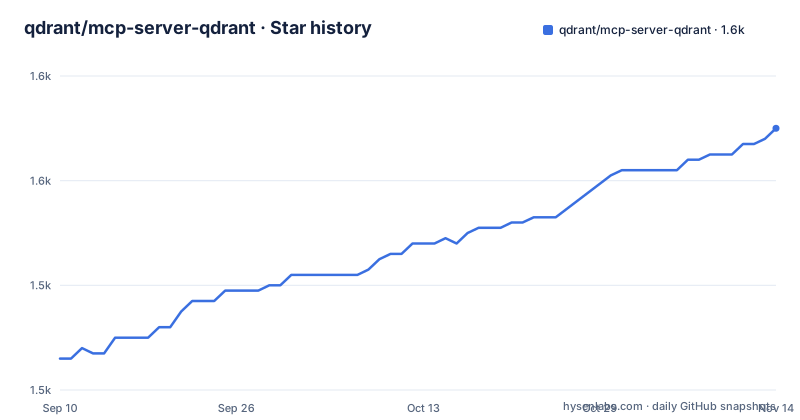
Star history
- qdrant/mcp-server-qdrant1,570 ★ · +44
| Repository | 2026-09-10 | 2026-11-14 |
|---|---|---|
| qdrant/mcp-server-qdrant | 1.5k | 1.6k |
44 Stars in the last 65 days, measured from the daily GitHub snapshot. Compare with other projects
Editorial analysis
Two tools, and the write one returns nothing you can use later
The tool surface is two calls. One stores a string of information with optional metadata, and returns a confirmation message. The other takes a query string and returns what was stored as separate messages.
That asymmetry is the design fact worth noticing. A store call that returns only a confirmation gives you no identifier, so there is no way to delete, update or deduplicate an item through this interface, and no way to check whether a near-duplicate is already in the collection. If your workflow needs idempotent writes or a forget path, this surface does not have one.
Embedding is not a choice you make per request. The provider variable accepts exactly one value, with the documentation noting that only one embedding library is currently supported, and the default model is a small six-layer sentence-transformer MiniLM model. That is a sensible default for a memory store and a poor one if your corpus is domain-specific, since you would be changing the embedding of an existing collection out from under it.
The collection field appears or vanishes from the schema, and the two defaults disagree
Both tools take a collection name field, and the documentation specifies its presence conditionally: it is required when no default collection name is configured, and it is not enabled at all when one is. That means the tool schema itself is a function of the environment. A server started with a default collection exposes two-parameter tools, and one started without it exposes three-parameter tools, and a model that learned the interface yesterday may be looking at a different schema today.
The two documented places that describe the default do not agree. The environment table lists the default collection variable as having no default value, while the container image sets it to a literal default-collection name. So the same configuration produces different behaviour depending on whether you ran the package or the image, and neither place says which is intended.
The rest of the table is more disciplined: a server URL, an API key, an alternative local database path that is explicitly mutually exclusive with the URL, a result limit defaulting to ten, and a read-only flag defaulting to false.
What the model is told the tools do is a configuration value
Two of the environment variables exist purely to rewrite the server's own tool descriptions: one for the store tool and one for the find tool, each defaulting to whatever the settings module holds. The model does not read that module. It reads the description attached to the tool, which is the string you supplied.
That makes the tool description a prompt surface rather than documentation. It is the right place to state a constraint the model should respect, and the wrong place to assume the model already knows, because a default written for one deployment carries over silently into the next.
The read-only flag belongs in the same discussion. It disables the store tool outright rather than returning an error from it, so a read-only deployment does not merely discourage writes, it removes the write path from the tool list. For a shared memory store that is the setting that makes the server safe to hand to an agent, and it is documented in one line in a ten-row table.
The framework is pinned to one exact version and the data model is capped
Four runtime dependencies are declared. Two float, one is capped, and one is frozen:
dependencies = [
    "fastembed>=0.6.0",
    "qdrant-client>=1.12.0",
    "pydantic>=2.10.6,<2.12.0",
    "fastmcp==2.7.0",
]
The protocol framework is held at a single version with an exact match, and the validation library has an upper bound as well as a floor. The other two have floors only. So the server's behaviour on the wire depends on which framework release your resolver picks, and it cannot pick a newer one at all, and it will refuse a newer data model than the author tested.
That is defensible for a server whose output other agents parse, and it has a cost: the repository carries a lock file so its own development is reproducible, but the published package resolves fresh on every install, and the exact framework pin means a security or bug fix in that library arrives only when a new release of this server does.
The container installs the published package, then downloads it again at startup
The image is short and does not build from source:
FROM python:3.11-slim

WORKDIR /app

# Install uv for package management
RUN pip install --no-cache-dir uv

# Install the mcp-server-qdrant package
RUN uv pip install --system --no-cache-dir mcp-server-qdrant

# Expose the default port for SSE transport
EXPOSE 8000

# Set environment variables with defaults that can be overridden at runtime
ENV QDRANT_URL=""
ENV QDRANT_API_KEY=""
ENV COLLECTION_NAME="default-collection"
ENV EMBEDDING_MODEL="sentence-transformers/all-MiniLM-L6-v2"

# Run the server with SSE transport
CMD uvx mcp-server-qdrant --transport sse
Three observations. The install step names the package rather than the local directory, so an image built from a clone contains the published release and none of the commits in your working tree. The command at the end runs the package through the one-shot runner rather than the binary that was just installed, so the runtime fetches it a second time on every container start. And the image switches the transport to the network-facing one and exposes the port, where the default everywhere else is the standard input and output transport meant for a local client.
The two credential variables are declared empty, which is the right default, and the collection name is declared as a literal, which is the contradiction described earlier.
The newest tag is about nine months older than the last commit
The release history is sparse. The three most recent tags are 0.8.1 in December 2025, 0.8.0 in June 2025 and 0.7.1 in March 2025, so a minor version arrived roughly every six to nine months. The last push on the default branch is dated 4 September 2026.
That gap is the fact to plan around. The branch carries close to nine months of commits that no published version contains, and the version in the project manifest still reads the number of the newest tag, so the manifest version tells you which release you would get from a registry, not which code is in the repository.
The branch is also called master rather than the current default name, and it is not archived. For a server that other people's agents depend on, the practical consequence is that pinning to the newest tag and tracking the branch are two different decisions with two different amounts of work in them.
It is called an example in one place and official in another
Two framings sit side by side. The repository description calls it an official server implementation, and the overview calls it an official server for keeping and retrieving memories in the vector database. The introduction to the documentation calls the same repository an example of how to create such a server for Qdrant. Both are true in a narrow sense, since it is the vendor's own implementation and it is also small enough to read as a template.
The rest of the repository supports the template reading. There is a source directory with a settings module the documentation points at for default values, a tests directory configured with automatic async mode, a pre-commit configuration, and a lock file. Development uses two type checkers side by side plus a linter and a formatter hook, which is more tooling than a two-tool server strictly needs and about what you would expect from a project that also wants to serve as a reference.
One directory at the root is named for a different editor and is never mentioned in the text on view. Its presence, alongside the machine-readable orientation files the description implies, suggests the project is also being packaged for other agent environments.
Editorial conclusion
This is the server to reach for when a Qdrant collection is meant to act as an agent's semantic memory rather than as an application index. The surface is two tools, the framework's environment variables are documented rather than hidden, and there is a read-only switch that removes the write tool entirely, which is the right way to expose a memory store to an agent you do not fully trust.
Four things to check on your own deployment. Decide the collection question first, because the presence of the collection field in both tool schemas is decided by one environment variable, so the same server presents a different interface to the model depending on how it is configured. Read the two tool description variables before you deploy, because the model's understanding of what the tools do is configuration rather than code. Pin the framework yourself, since it is pinned to one exact version in the manifest and will not float. And if you build the container from a clone, know that it installs the published package rather than your source, so a local change changes nothing until you release.
The version story is worth tracking too. The newest tag predates the last commit by about nine months, so the branch carries work that no published package contains.
Frequently asked questions
What tools does the Qdrant MCP server expose?
Two: a store tool taking information and optional metadata, and a find tool taking a query. The store call returns only a confirmation message, so there is no identifier for later deletion or update.
Can I make the Qdrant MCP server read only?
Yes. A read-only environment variable defaults to false and, when enabled, disables the store tool rather than refusing writes, so the write path leaves the tool list entirely.
Which embedding provider does the Qdrant MCP server use?
Only one is supported, and it is the default. The embedding model defaults to a small six-layer MiniLM sentence-transformer model, and changing it changes the embedding of an existing collection.
What transport does the Qdrant MCP server use by default?
Standard input and output, which suits a local client. Two network transports are available through a command line flag, and the container image switches to the event-stream one and exposes the port where the package default does neither.
Official sources
Add this badge to your README
If you maintain this project, the badge below links readers to this analysis and shows its maintenance status from the daily GitHub snapshot. Paste the markdown into your README; add ?metric=license or ?metric=stars to the image URL for a different field.

[](https://hysenlabs.com/projects/qdrant-mcp-server-qdrant)Star history chart for your README
[](https://hysenlabs.com/projects/qdrant-mcp-server-qdrant)Was this useful?