Qwen-Image-2.1 Local Generation and Editing Setup
Qwen's most powerful open-source image generation model
At a glance
- What is it?
- Qwen-Image-2.1 is a 7B-parameter image generation and editing model for users who need text-to-image output, RGBA generation, subject extraction, and reference-guided editing. It can run through Diffusers or be accessed through hosted Pro and Turbo APIs.
- Who is it for?
- Qwen-Image-2.1 fits local experimentation with unified image generation, transparency, and editing, especially for Python users comfortable with CUDA and current Diffusers releases. It is a poor fit for users seeking a small checkpoint, a documented CPU path, or a conventional GitHub release process.
- Can I use it commercially?
- Check first. The repository uses a licence we do not classify automatically, so read its LICENSE file before any commercial use.
- Is it still maintained?
- Yes. The repository last received commits 25 days ago.
- What is it written in?
- Mainly Python, according to GitHub's language statistics.
Answers come from the project's GitHub data, last synced on November 7, 2026, and from our analysis. They are not legal advice.
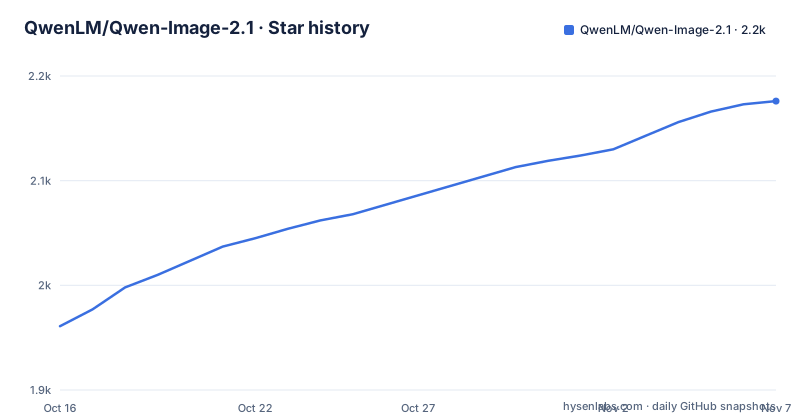
Star history
- QwenLM/Qwen-Image-2.12,176 ★ · +215
| Repository | 2026-10-16 | 2026-11-07 |
|---|---|---|
| QwenLM/Qwen-Image-2.1 | 2k | 2.2k |
215 Stars in the last 22 days, measured from the daily GitHub snapshot. Compare with other projects
Editorial analysis
Qwen-Image-2.1's Unified Image Generation and Editing Scope
Qwen-Image-2.1 targets people who need to create and modify images through one model rather than separate generation and editing workflows. According to the README, its visual generation component has 7B parameters distributed across 32 Single-Stream DiT layers. That size does not make it a lightweight deployment in every sense, but the repository presents the architecture as a compromise between output quality, inference efficiency, and the number of supported tasks.
The project covers text-to-image generation, image editing, transparent RGBA image creation, editing of transparent layers, and subject extraction from photographs. It also accepts as many as 10 reference images. A local modification can be constrained with circles, painted annotations, or a separate mask, while the model is intended to preserve the identity of people and products across supported editing tasks. The README also identifies typography, portrait lighting, and fine texture as areas of improvement, but it does not provide comparative measurements that would establish performance against another model.
The intended users are developers, researchers, designers, and teams that want programmable access to an image model through Python. The hosted Pro and Turbo APIs provide an alternative for applications that do not need local weights. The repository itself is primarily a distribution and usage point for the model, with `LICENSE`, `README.md`, `assets/`, and `prompt_rewrite/` as its listed top-level entries.
Mixed-Granularity Attention and Prefix Cache Reuse in Qwen-Image-2.1
The documented technical design centers on a 7B visual generation component made from 32 Single-Stream DiT layers. The README identifies mixed-granularity attention and prefix KV cache reuse as the main efficiency mechanisms. It does not publish a detailed architecture diagram, tensor layout, or explanation of how the attention granularities are selected, so those implementation details cannot be assessed further from the repository.
For image editing, supplied images and textual conditions enter the same model used for generation. Reference images provide visual context, while circles, painted marks, or masks identify areas for local edits. This unified route is the main architectural difference from a workflow that dispatches generation, segmentation, and editing to separate models. The README states that the model can handle regular and transparent output and can extract subjects from photographs, but it does not state which file formats are accepted for every reference image or mask.
Qwen-Image-2.1-Turbo retains the same 7B visual generation architecture according to the README. Its practical distinction is a recommended sampling schedule and generation or editing in 8 denoising steps. Diffusers loads that schedule from the checkpoint configuration, which is why the README directs users to the latest Diffusers source instead of pinning the library to an unspecified older release.
Installing Qwen-Image-2.1 with the Diffusers Pipeline
The documented local path uses Python, PyTorch, the latest Diffusers source, and a CUDA device. Install the packages in the environment where the model will run:
pip install torch>=2.4.0
pip install transformers>=5.17
pip install git+https://github.com/huggingface/diffusers
pip install accelerate
pip install pillow
The Git URL is intentional because the README says the current release includes `QwenImage21Pipeline` and pipeline-configured sampling sigmas. A release installed through another package channel may not provide the required pipeline at the time represented by the documentation.
The documented first initialization step loads the Turbo checkpoint in `torch.bfloat16` and moves it to CUDA:
import torch
from diffusers.utils import load_image
from diffusers import QwenImage21Pipeline

pipe = QwenImage21Pipeline.from_pretrained(
    "Qwen/Qwen-Image-2.1-Turbo", dtype=torch.bfloat16
).to("cuda")
The intended result is a `QwenImage21Pipeline` initialized on the CUDA device from `Qwen/Qwen-Image-2.1-Turbo`. The README defines a long poster prompt after this step, but its displayed example ends before the output and image-save calls. It therefore documents checkpoint loading and prompt construction without presenting a complete callable generation example. The hosted API pages are the documented source for separate Pro and Turbo application examples.
Qwen-Image-2.1-Turbo's Eight-Step Local Workflow
Qwen-Image-2.1-Turbo is the clearest starting point for a first local generation or editing attempt because it specifies an 8-step schedule. Its checkpoint is named `Qwen/Qwen-Image-2.1-Turbo`, and the README presents the same `QwenImage21Pipeline` class used for the base model. The checkpoint includes the recommended sampling schedule, which Diffusers loads automatically.
This setup is aimed at CUDA users. The example uses `dtype=torch.bfloat16` and calls `.to("cuda")`, while the repository does not give CPU instructions, minimum VRAM figures, quantization commands, or memory measurements. Those omissions matter because a 7B visual generation component still requires substantial accelerator resources, but an exact hardware threshold cannot be derived from the README.
Image editing is part of the Turbo model rather than a separate workflow. The README indicates that editing can use reference images and spatial controls such as masks, circles, or painted annotations. However, the displayed quick-start example does not show the complete method call for supplying these inputs. It names `load_image`, which indicates image loading through Diffusers, but does not demonstrate how a loaded image is passed to generation or editing in the displayed portion.
For users who do not want to manage local execution, Alibaba Cloud Model Studio provides hosted Pro and Turbo API pages. Those services remove the local checkpoint and CUDA setup from the application path, but their pricing, request limits, data handling terms, and exact output differences are not documented in this repository.
ComfyUI Workflows as an Alternative to Qwen-Image-2.1 Python Pipelines
The repository documents two distinct ways to work with Qwen-Image-2.1. Diffusers provides a Python API and is the path used for the documented local quick start. ComfyUI provides native model support through separate compatible weights and JSON workflows for text-to-image generation and image editing. The actual difference is the control surface rather than the model identity: Diffusers supports direct construction and invocation from Python, while ComfyUI represents generation as connected workflow graphs.
The README links compatible ComfyUI weights at `Comfy-Org/Qwen-Image-2.1`. It also links separate text-to-image and image-editing workflow templates. This makes ComfyUI relevant to users who prefer a node-based interface or existing ComfyUI workflows. It does not eliminate hardware requirements, and the repository does not state that the JSON templates support the Turbo eight-step checkpoint specifically.
For team code, Diffusers is the more explicit integration path because it exposes model IDs, device placement, dtype selection, and pipeline objects in Python. For manual workflow assembly, the linked ComfyUI templates are the more concrete alternative. The README does not document behavior differences in output quality between these front ends, so choosing between them should not be based on an unsupported claim that one produces better images.
Qwen-Image-2.1's Hardware, Format, and Licensing Boundaries
The clearest unsupported deployment path is CPU-only use. The README's local example moves the model to CUDA with `.to("cuda")`, and the compatibility news mentions GPU-focused runtimes and an Intel Arc Pro B70 integration. No CPU instructions or compatibility matrix are supplied, so CPU support should not be assumed from the Python package requirements.
The repository also does not document minimum memory, maximum prompt length, supported image resolutions, accepted upload formats, or deterministic generation controls. Its claim of support for up to 10 reference images is explicit, but it does not define memory scaling as references are added. That gap prevents a workload planner from deriving storage, latency, or capacity figures from the README.
Licensing needs separate scrutiny. GitHub classifies the repository license as Other, and the top-level `LICENSE` file is the controlling source. The README does not summarize its permissions, restrictions, acceptable-use conditions, or obligations, so no conclusion about commercial use, redistribution, or derivative output can be made without reading that file. Calling the model open source does not remove the need to inspect its custom terms.
There are no GitHub releases. Compatibility is instead communicated through Day-0 support announcements for Diffusers, ComfyUI, vLLM-Omni, SGLang, LightX2V, and Intel OpenVINO work. This reduces reliance on release artifacts, but it also shifts version coordination to the external repositories and model hosts.
Qwen-Image-2.1 Maintenance Signals and Upgrade Paths
The repository's last push was on 2026-10-14, which indicates recent development activity as of 2026-10-17. The README also records model availability, Turbo release information, hosted API availability, and integrations announced in September and October 2026. This is evidence of current repository activity, not a guarantee that every referenced runtime will remain compatible with later changes.
No GitHub releases are listed. Users therefore cannot infer a repository-managed versioning or upgrade cadence from tags or release notes. The documented install path depends on current PyTorch and Transformers minimums, Diffusers installed from Git, and a model checkpoint hosted on Hugging Face or ModelScope. Upgrading one component may require checking whether the local pipeline code still matches the checkpoint and the external serving framework.
The runtime options create a second upgrade dimension. SGLang documents features including prefix caching, Cache-DiT, CUDA graphs, parallelism, and component offload. vLLM-Omni lists step-wise execution, prefix KV caching, CUDA Graph decode, FP8 quantization, and TP/Ulysses parallelism. These are documented integration capabilities, but the README gives no version matrix or migration procedure for them. The cheapest maintenance path cannot be selected from the repository alone.
Editorial conclusion
Qwen-Image-2.1 fits local experimentation with unified image generation, transparency, and editing, especially for Python users comfortable with CUDA and current Diffusers releases. It is a poor fit for users seeking a small checkpoint, a documented CPU path, or a conventional GitHub release process. Before adoption, inspect the custom LICENSE, confirm that the target accelerator can hold the 7B checkpoint, and reproduce the documented `QwenImage21Pipeline` initialization on the intended CUDA environment.
Frequently asked questions
What does Qwen-Image-2.1 do?
It combines text-to-image generation and image editing, including RGBA generation, transparent-layer editing, subject extraction, reference images, and localized masks or annotations.
How do I run Qwen-Image-2.1 locally?
The README documents installing recent PyTorch, Transformers, Diffusers from Git, Accelerate, and Pillow, then loading `Qwen/Qwen-Image-2.1-Turbo` with `QwenImage21Pipeline` and moving it to CUDA.
Does Qwen-Image-2.1-Turbo use an eight-step sampling schedule?
Yes. The README states that Turbo performs generation and editing in 8 denoising steps and includes its recommended sampling schedule for Diffusers to load automatically.
Can Qwen-Image-2.1 edit more than one reference image?
The README states support for up to 10 reference images. It also documents circles, painted annotations, and separate masks for specifying local edits.
Does the repository document a GitHub release or upgrade process?
No GitHub releases are listed, and the README does not provide a repository release or migration procedure. It points to current Diffusers source and external runtime integrations for compatibility.
Official sources
Add this badge to your README
If you maintain this project, the badge below links readers to this analysis and shows its maintenance status from the daily GitHub snapshot. Paste the markdown into your README; add ?metric=license or ?metric=stars to the image URL for a different field.

[](https://hysenlabs.com/projects/qwenlm-qwen-image-2-1)Star history chart for your README
[](https://hysenlabs.com/projects/qwenlm-qwen-image-2-1)Was this useful?