reagraph: a WebGL graph canvas that trades SVG away for three.js
🕸 WebGL Graph Visualizations for React. Maintained by @goodcodeus.
At a glance
- What is it?
- Reagraph renders node and edge geometry through WebGL instead of SVG, giving 15 built in layouts and in-scene picking for React apps, at the cost of a 3D-first scene graph and no documented default layout in the quick start.
- Who is it for?
- Reagraph earns a place in dashboards and investigation tools where SVG node counts become the bottleneck, and it is a poor fit for plain org charts or for teams that need accessible text rendering of a graph.
- Can I use it commercially?
- Yes. Apache-2.0 is a permissive licence: you can use, modify and sell software built on it, as long as you keep its copyright and licence notices.
- Is it still maintained?
- Yes. The repository last received commits 121 days ago.
- What is it written in?
- Mainly TypeScript, according to GitHub's language statistics.
Answers come from the project's GitHub data, last synced on October 24, 2026, and from our analysis. They are not legal advice.
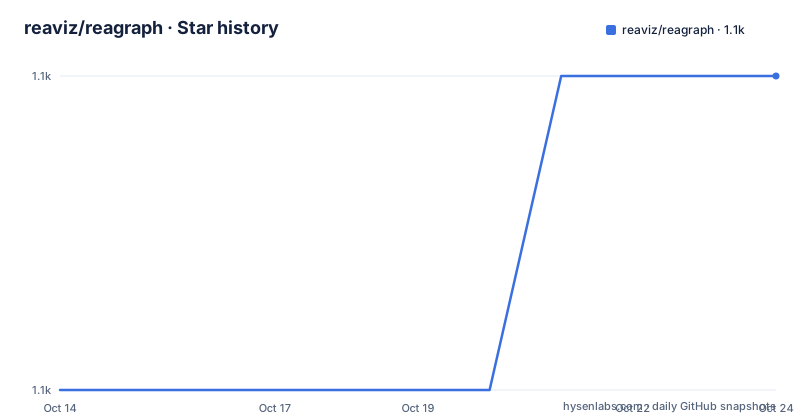
Star history
- reaviz/reagraph1,098 ★ · +1
| Repository | 2026-10-14 | 2026-10-24 |
|---|---|---|
| reaviz/reagraph | 1.1k | 1.1k |
1 Stars in the last 10 days, measured from the daily GitHub snapshot. Compare with other projects
Editorial analysis
Why the renderer is WebGL rather than SVG
Reagraph draws nodes, edges and labels through WebGL inside a React tree instead of emitting SVG elements, and the dependency list shows how much of the scene is borrowed rather than written here. `@react-three/fiber` at 9.6.1 connects React components to the three.js scene graph, `camera-controls` at 3.1.2 owns orbiting and zooming, and `@react-spring/three` drives animated transitions. Structure comes from d3: `d3-force-3d` at 3.0.6 supplies the force simulation and `d3-hierarchy` at 3.1.2 supplies the tree and cluster layout maths, both usable in 2D and 3D. `graphology` at 0.26.0 sits underneath as the graph data structure, and `d3-scale` handles value mapping.
The point of that stack is that layout changes animate. Switching a canvas from a circular arrangement to a tree runs as a spring transition rather than a repaint, which is why a spring library appears in runtime dependencies at all. Pointer work goes through `@use-gesture/react` at 10.3.1, so lasso selection and dragging are handled as gestures on the canvas rather than as DOM events on each node.
GraphCanvas takes flat node and edge arrays with string handles
The public entry point is a single component named `GraphCanvas`, handed two arrays. A node needs an id and a label; an edge needs an id, plus source and target values that point at node ids by string, and it may carry a label of its own.
import React from 'react';
import { GraphCanvas } from 'reagraph';
Nodes carry extra optional fields beyond those two, and the feature list names what they drive: sizing by attribute, by page rank, by centrality or by a custom function, plus badges, expand and collapse on a node, and custom rendering. Edges are styled and interpolated rather than drawn as straight segments, and the library also ships path finding between two nodes, edge bundling and clustering.
      {
        id: '1->2',
        source: 'n-1',
        target: 'n-2',
        label: 'Edge 1-2'
      }
Nothing in that contract is a class or an object reference. Every relationship is a string lookup, which is convenient when data arrives from JSON but means the caller owns uniqueness. A duplicate node id silently makes two nodes share one identity, and there is no validation pass in the example to catch it.
Fifteen built in layouts, and the README picks none of them
The layout list is the most concrete part of the feature set: 15 entries, of which 10 are 2D and 5 are 3D. Force Directed 2D and Force Atlas2 2D sit alongside Circular 2D, No Overlap 2D and Concentric 2D, alongside four tree arrangements split by orientation and dimension, Tree Top Down 2D, Tree Left Right 2D, Hierarchical Top Down 2D and Hierarchical Left Right 2D, plus Radial Out 2D. The 3D entries mirror five of those: Force Directed 3D, Tree Top Down 3D, Tree Left Right 3D, Radial Out 3D and Concentric 3D.
The close reading problem sits in the quick start. The example passes nodes and edges to `GraphCanvas` and nothing else. No layout prop, no camera position, no node positions on the nodes themselves, so positioning has to come from a default the README never names. A reader cannot tell from the README which layout they get first, or whether it is a stable default or a fallback. Anyone who needs a specific arrangement has to read the component props rather than the front page.
Installing the package and rendering a two node graph
Two package managers are covered, and the npm form writes straight to the manifest.
npm i reagraph --saveyarn add reagraphThe smallest useful component declares the canvas and hands it data.
export default () => (
  <GraphCanvas
    nodes={[
      {
        id: 'n-1',
        label: '1'
      },
Expect a canvas sized by its container rather than by the data, since node coordinates are absent from every node in the example. Cut the example short deliberately: the README does not document how the canvas sizes itself, what happens when the container has no height, or what a node needs before it can be clicked. Those gaps are the practical cost of reading this project from the README alone. A runnable sandbox at codesandbox.io/s/reagraph-example-mwh96q is linked for a working baseline.
Local development runs Storybook on port 9009
Working on the library itself is a three step path described in the development section: clone the repository, run `npm i`, then `npm start`. The start script is the only piece of concrete local wiring in the repository configuration.
"start": "storybook dev -p 9009",Port 9009 is worth knowing, because Storybook defaults elsewhere and anything proxying to it has to match. The build side is equally plain: `vite build --mode library` produces the distributable, and the build-storybook script builds the docs site separately. Formatting runs through prettier over `src/**/*.{ts,tsx,js,jsx}`, git hooks install via `husky install` on prepare, and visual regression runs through Chromatic with its project token written directly into the scripts block rather than read from the environment. A committed token in package.json is a small supply chain detail to be aware of if you fork the repository.
The test scripts pass whether or not any test exists
Two scripts run vitest and both are configured to succeed on an empty suite.
"test": "vitest --passWithNoTests",
"test:coverage": "vitest run --coverage --passWithNoTests",
`--passWithNoTests` turns a missing test suite from an error into a green result, so a clean test run is not evidence that anything is covered. That matters because the repository carries a top level `perf/` directory and a `test` script whose success carries no information about regressions in layout maths or in the WebGL scene graph. It also means consumers running the scripts in CI see green output either way.
One more detail from the same file. Almost every runtime dependency uses a caret range, with one exception: `@react-spring/three` is pinned at exactly 10.0.4, no caret. The animation layer, which every layout transition depends on, is the single exact pin in an otherwise floating dependency set.
What the package publishes and what it leaves behind
The manifest ships only `dist`. Source, stories, docs and the perf directory never reach npm, so reading the internals means reading the repository rather than the installed package. Entry points are declared for both module systems: `main` and `module` both resolve to `./dist/index.js`, `types` points at `dist/index.d.ts`, and the package sets `"type": "module"`. The single `.` export condition carries types, import and default, which means a CommonJS consumer falls through to the default branch.
Keywords name the intended audience: network-graph, dag, directed-graph, graph, threejs, webgl. The manifest also carries a homepage, an issues URL and the source entry point, and the docs site is reagraph.dev with a separate repository, reagraph-website, holding the documentation and its Figma design file.
The project sits under Apache-2.0 and the last push to the default branch landed on 2026-06-25. GitHub carries no release entries at all, so the only version trail is `CHANGELOG.md` in the repository and the manifest itself, which reads 4.32.0.
Editorial conclusion
Reagraph earns a place in dashboards and investigation tools where SVG node counts become the bottleneck, and it is a poor fit for plain org charts or for teams that need accessible text rendering of a graph. Before adopting it, check that your data survives the id, source and target string contract, read the GraphCanvas props to find out which layout you actually get when none is passed, and confirm your CI can tolerate a package whose test script exits clean with zero tests run. Note also that only the built dist directory reaches npm, so debugging has to happen against the repository.
Frequently asked questions
Does reagraph support 3D graphs?
Yes. Five of the 15 built in layouts are 3D: Force Directed 3D, Tree Top Down 3D, Tree Left Right 3D, Radial Out 3D and Concentric 3D. The scene is built on three.js through @react-three/fiber, and camera-controls handles the view.
How do I add reagraph to a React project?
Install it from npm with `npm i reagraph --save`, or use `yarn add reagraph`. Then render the `GraphCanvas` component with a nodes array and an edges array. A node needs an id and a label, an edge needs an id plus source and target node id strings.
What layout does reagraph use by default?
The README does not say. Its first example passes only nodes and edges to `GraphCanvas`, with no layout prop and no coordinates on the nodes, so the default is either implicit or handled by a default the documentation leaves unnamed.
How do I run reagraph locally while developing?
Clone the repository, run `npm i`, then `npm start`. That script is `storybook dev -p 9009`, so Storybook opens on port 9009 rather than the usual default.
What is inside the published reagraph package?
Only the `dist` directory. The manifest lists `files` as `dist` alone, with types at `dist/index.d.ts` and both `main` and `module` resolving to `./dist/index.js` under `"type": "module"`.
Official sources
Add this badge to your README
If you maintain this project, the badge below links readers to this analysis and shows its maintenance status from the daily GitHub snapshot. Paste the markdown into your README; add ?metric=license or ?metric=stars to the image URL for a different field.

[](https://hysenlabs.com/projects/reaviz-reagraph)Star history chart for your README
[](https://hysenlabs.com/projects/reaviz-reagraph)Was this useful?