Flowsint's module stack, its three default secrets, and its one exposed port
A modern platform for visual, flexible, and extensible graph-based investigations. For cybersecurity analysts and investigators.
At a glance
- What is it?
- Flowsint is a self-hosted OSINT graph platform for analysts and investigators, assembled from five modules behind a Docker Compose stack. The page documents its install paths, the secrets to rotate before sharing it, the Host header rule that gates network access, and the enrichers that expand a graph from one starting entity.
- Who is it for?
- Use Flowsint when you can run Docker Compose on a machine you control and want an investigation graph that never leaves it. Before you do, read ETHICS.md, rotate AUTH_SECRET, MASTER_VAULT_KEY_V1 and NEO4J_PASSWORD, add your own hostname to the nginx Host allowlist, and work out whether the database ports published by docker-compose.yml matter on the host you are using.
- Can I use it commercially?
- Yes. Apache-2.0 is a permissive licence: you can use, modify and sell software built on it, as long as you keep its copyright and licence notices.
- Is it still maintained?
- Yes. The repository last received commits 27 days ago.
- What is it written in?
- Mainly TypeScript, according to GitHub's language statistics.
Answers come from the project's GitHub data, last synced on November 14, 2026, and from our analysis. They are not legal advice.
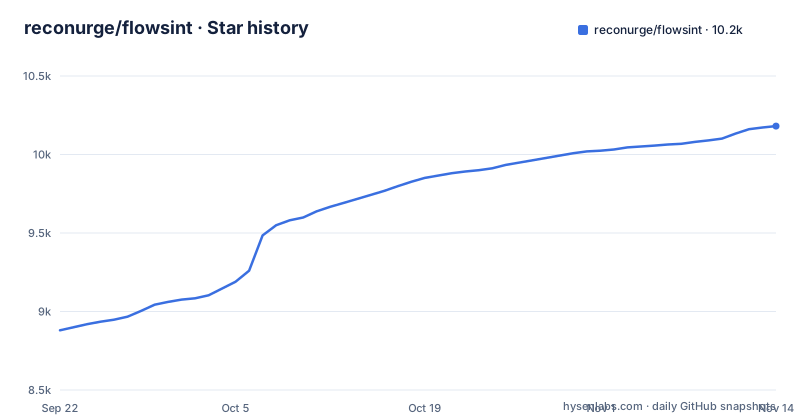
Star history
- reconurge/flowsint10,181 ★ · +1,301
| Repository | 2026-09-22 | 2026-11-14 |
|---|---|---|
| reconurge/flowsint | 8.9k | 10.2k |
1,301 Stars in the last 53 days, measured from the daily GitHub snapshot. Compare with other projects
Editorial analysis
Two install paths, and only the Windows one creates env files by hand
Installing means a git clone and Docker; no package registry path appears anywhere on the page. On Linux and macOS the prerequisites are Docker and Make, and the whole setup is three lines:
git clone https://github.com/reconurge/flowsint.git
cd flowsint
make prod
Windows takes a different road: Make is not needed, Docker Desktop and Git are, Docker Desktop has to already be running before the next step, and you create the env files yourself.
copy .env.example .env
copy .env.example flowsint-api\.env
copy .env.example flowsint-core\.env
copy .env.example flowsint-app\.envdocker compose -f docker-compose.prod.yml up -dThe README says the Windows route pulls pre-built images from GitHub Container Registry, so no local build is needed there.
The vault key and auth secret arrive pre-filled in .env.example
Before the browser opens, your secrets are already decided by a file you just copied. .env.example ships filled-in values:
AUTH_SECRET=superscretchangeitplz
MASTER_VAULT_KEY_V1=base64:qnHTmwYb+uoygIw9MsRMY22vS5YPchY+QOi/E79GAvM=
NEO4J_PASSWORD=password
The Windows path copies that file into .env and into flowsint-api, flowsint-core and flowsint-app, and the network deploy path copies it again with cp. The instruction to change the three values sits further down the page, inside the section about exposing the app to a network, and it ships with two generators:
openssl rand -hex 32python3 -c "import os, base64; print('base64:' + base64.b64encode(os.urandom(32)).decode())"AUTH_SECRET signs authentication tokens, MASTER_VAULT_KEY_V1 encrypts stored API keys, NEO4J_PASSWORD is the database password. The ordering has a consequence: a single user install runs with the vault key committed to the repository and the placeholder auth secret.
A Host header allowlist in nginx.conf decides who reaches a LAN install
Network access is gated by an nginx map nobody finds by accident. The prod setup exposes only port 5173, and PostgreSQL, Redis, Neo4j and the API stay bound to 127.0.0.1 on the server, reachable only through the frontend proxy, which serves the UI and proxies API calls internally so clients need no extra configuration. On top of that sits a Host-header allowlist in flowsint-app/nginx.conf, in a map keyed on $http_host and named $is_flowsint_host, and its default accepts only localhost, 127.0.0.1 and [::1], described as defending single-user installs against DNS rebinding. LAN and public deploys have to opt their own hostname in, and two commented-out template lines in the same map show the format.
Beyond a trusted LAN the page asks for a reverse proxy in front of 5173:
flowsint.example.com {
    reverse_proxy 127.0.0.1:5173
}
And when you do that, it says to rebind the app port in docker-compose.prod.yml to "127.0.0.1:5173:8080" so clients can only arrive over HTTPS.
docker-compose.yml opens four database ports the prod file hides
The single exposed port belongs to docker-compose.prod.yml, and the compose file at the top of the repository tells a different story. docker-compose.yml maps the PostgreSQL container from 5433 to 5432, runs redis:alpine on 6379, and opens Neo4j on 7474 for the web UI and 7687 for Bolt:
- "5433:5432" - "7474:7474" # Web UI
- "7687:7687" # BoltThe same file also enables the APOC plugin on Neo4j with file import and export switched on, and gives the graph a healthcheck that runs cypher-shell every 5 seconds. These mappings are in docker-compose.yml, not in docker-compose.prod.yml, so a reader who opens docker-compose.yml first could conclude the databases are reachable from the network. Postgres also sits on host port 5433 rather than 5432, which is why DATABASE_URL in the env example ends in localhost:5433 while REDIS_URL uses the service name redis.
Enrichers are grouped by entity type, and none has a documented timeout
The reach of the tool is an inventory of lookups, grouped by the entity you start from. Domain enrichers number eight: reverse DNS resolution, DNS resolution, subdomain discovery, WHOIS lookup, domain to website, domain to root domain, domain to ASN, and domain history. Then IP information and IP to ASN, ASN to CIDRs, CIDR to IPs, organization to ASN, organization information, organization to domains, wallet to transactions, wallet to NFTs, five website enrichers from crawler to text, email to Gravatar, email to domains, phone to breaches, individual to organization, individual to domains, and one integration, an N8n connector. That is thirty named enrichers in twelve categories.
Several entries resolve a person rather than infrastructure: Maigret searches a username across social platforms, email to Gravatar finds a profile, and email to breaches and phone to breaches query breach databases.
Five Python modules stack in one direction only
The project is five modules arranged in a chain that only points downward:
flowsint-app (frontend)
    ↓
flowsint-api (API server)
    ↓
flowsint-core (orchestrator, tasks, vault)
    ↓
flowsint-enrichers (enrichers & tools)
    ↓
flowsint-types (types)
flowsint-api is described as FastAPI server, API routes, and schemas only, so the work belongs below it: flowsint-core holds core utilities, the orchestrator, the vault, celery tasks and base classes, flowsint-enrichers holds the scanning logic and tools, and flowsint-types holds the Pydantic models. Nothing in that chain points back up, so an enricher has no path to the API layer. The build side is uv, with pyproject.toml requiring Python 3.12 or newer but below 4.0, listing flowsint-api, flowsint-core, flowsint-enrichers and flowsint-types as workspace members resolved from the workspace itself. One ruff section at the root sets line-length 88 and target-version py312, excluding migrations and neo4j-migrations, and the frontend is a separate yarn workspace listed under npm workspaces.
The npm manifest says 1.0.0 while the tags say 1.2.13
Two manifests in the root disagree about the version:
  "name": "flowsint",
"version": "1.0.0",name = "flowsint"
version = "1.2.11"
description = "Flowsint multi-module project"
authors = [{ name = "dextmorgn", email = "[email protected]" }]
requires-python = ">=3.12,<4.0"The npm manifest is marked private and described as Graph analysis and intelligence platform, and its only runtime dependencies are dotenv and neo4j-driver. Its devDependencies are the release and commit toolchain instead: commitizen wired to cz-conventional-changelog, husky, lint-staged, standard-version and commitlint. Alongside the release scripts sits a version sync:
    "sync-version": "node scripts/sync-versions.js",
    "migrate": "node scripts/migrate.js",
    "migrate:dry-run": "node scripts/migrate.js --dry-run"
So the drift is known about, and the practical consequence is that the version in package.json is not the version you installed. Use the release tag, or set FLOWSINT_VERSION in .env with a value like 1.2.10, to know what is running.
Early development is the project's own maintenance signal
The project states its own status in the contributing section: Flowsint is still in early development and definetly needs the help of the community, misspelling included, followed by an invitation to raise issues and propose features. That sits alongside the release record, with 1.2.11 tagged in July, 1.2.12 in August and 1.2.13 on 2026-10-03, while the repository was last pushed to on 2026-10-18. Nothing is archived. For a server deploy the README's version control knob is FLOWSINT_VERSION in .env, with 1.2.10 as the example. The repository does carry a CHANGELOG.md, a docs/ directory and a neo4j-migrations/ folder for graph schema changes, though whether those cover an upgrade is not something the page states. The framing is deliberate about use: an ETHICS.md for responsible use, a DISCLAIMER.md, a NOTICE file and a funding link sit next to the README.
Editorial conclusion
Use Flowsint when you can run Docker Compose on a machine you control and want an investigation graph that never leaves it. Before you do, read ETHICS.md, rotate AUTH_SECRET, MASTER_VAULT_KEY_V1 and NEO4J_PASSWORD, add your own hostname to the nginx Host allowlist, and work out whether the database ports published by docker-compose.yml matter on the host you are using. Look elsewhere if you need a single process instead of five services.
Frequently asked questions
How do I install Flowsint?
On Linux and macOS install Docker and Make, then clone the repository, cd into it and run make prod. On Windows install Docker Desktop and Git, clone, copy .env.example into .env and into the flowsint-api, flowsint-core and flowsint-app folders, then run docker compose -f docker-compose.prod.yml up -d, which pulls pre-built images.
What is Flowsint?
Flowsint is an open-source graph-based investigation tool focused on reconnaissance and OSINT. It lets you explore relationships between entities through a visual graph interface and automated enrichers, grouped by domain, IP, ASN, CIDR, organization, website, email, phone, individual, cryptocurrency, social media and integration.
Is Flowsint safe to run on my own machine?
Everything is stored on your machine and there are no credentials or an account by default, so you create one at http://localhost:5173/register. In the prod setup only port 5173 is exposed and the databases stay on 127.0.0.1, but before putting it on a network you must change AUTH_SECRET, MASTER_VAULT_KEY_V1 and NEO4J_PASSWORD and add your hostname to the nginx Host allowlist. The repository also ships ETHICS.md and DISCLAIMER.md.
How do I use Flowsint for an investigation?
Start from one entity and let the enrichers expand the graph: domain history, subdomain discovery, reverse DNS, ASN and CIDR lookups, website crawling, breach lookups for an email or phone number, and wallet lookups. The visual graph interface is where you read the relationships between the nodes those enrichers add.
Is there a Flowsint alternative?
Flowsint's own stack is Neo4j for the graph database, Postgres for storage and Redis for Celery and cache, with Maigret for username search and an N8n connector for workflows.
Official sources
Add this badge to your README
If you maintain this project, the badge below links readers to this analysis and shows its maintenance status from the daily GitHub snapshot. Paste the markdown into your README; add ?metric=license or ?metric=stars to the image URL for a different field.

[](https://hysenlabs.com/projects/reconurge-flowsint)Star history chart for your README
[](https://hysenlabs.com/projects/reconurge-flowsint)Was this useful?