TizenTube: a userscript and a TizenBrew module for Samsung TV
A TizenBrew module to remove ads and add support for SponsorBlock for your Tizen TV.
At a glance
- What is it?
- TizenTube injects a userscript into the YouTube app on Samsung Tizen TVs to strip ads and skip sponsored segments, and it now also ships as a standalone app. The install is the hard part, and the project keeps the guide in a separate document.
- Who is it for?
- TizenTube is worth installing if you own a Samsung Tizen TV, use its YouTube app, and are willing to install an unsigned or re-signed package on a device that did not ship with one. It is not an option for a non Tizen television, for the mobile or desktop YouTube apps, or for anyone unwilling to enable Developer Mode.
- Can I use it commercially?
- Yes, with conditions. GPL-3.0 is a copyleft licence: if you distribute software that includes it, you must release that software's source code under the same licence. Running it internally without distributing it does not trigger that obligation.
- Is it still maintained?
- Yes. The repository last received commits 6 days ago.
- What is it written in?
- Mainly JavaScript, according to GitHub's language statistics.
Answers come from the project's GitHub data, last synced on October 23, 2026, and from our analysis. They are not legal advice.
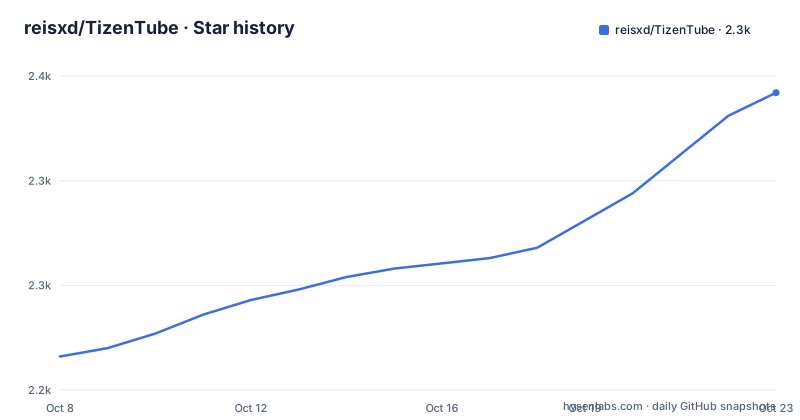
Star history
- reisxd/TizenTube2,342 ★ · +126
| Repository | 2026-10-08 | 2026-10-23 |
|---|---|---|
| reisxd/TizenTube | 2.2k | 2.3k |
126 Stars in the last 15 days, measured from the daily GitHub snapshot. Compare with other projects
Editorial analysis
One userscript, three delivery routes
The README describes TizenTube as a TizenBrew module that enhances streaming websites on your TV by removing ads and adding SponsorBlock support, and then states in bold that it now works as a standalone app. That shift is the most important fact in the repository, because it changes what you are installing.
As a TizenBrew module, TizenTube is a modification to the stock YouTube app: you install TizenBrew, add the module, and the app is patched. As a standalone app, YouTube is replaced by an app that ships its own copy of the injection logic, so there is no module to attach. The tree shows both worlds: mods/ for the TizenBrew package, service/ for the service side, and standalone/ for the standalone build.
The shared piece underneath is a userscript. package.json describes the artifact with main set to dist/userScript.js and serviceFile set to dist/service.js, and the keys array lists the remote control buttons the app registers, which is how the TV remote controls playback once the script is running. The package name in the manifest is scoped as @foxreis/tizentube even though the repository is reisxd/TizenTube, which is a small reminder that the npm-facing identity and the GitHub identity are not the same string.
One detail in the manifest explains the whole architecture. The websiteURL field points at youtube.com/tv with an additionalDataUrl parameter set to a localhost address on port 8085 under a dial/apps path. That is the app being told to load its web content from a local service rather than from Google, which is how injected code reaches a web view.
What the feature list actually claims
The README's feature list is short and specific: picture in picture mode, an ad blocker, SponsorBlock support to skip sponsored segments automatically, video speed control, and DeArrow support to replace clickbait titles with plain ones. Requests for more features go through the issue tracker, and the README says so.
Two of those deserve a note. SponsorBlock is the one with real dependencies outside the project: it needs the SponsorBlock API or its browser extension database to know where the segments are, so a local install has to point at some source of segment data, and the README does not say which. DeArrow works the same way, titling through a separate service at dearrow.ajay.app. If either service changes shape, the Tizen side is what breaks, and nothing in this repository controls that.
Picture in picture is the one feature that does not depend on the web view at all, which makes it the safest thing to test first when you are checking an install.
The README has no install steps and says where they are
The entire installation section reads: follow the guide in the Installation Guide, which points at docs/README.md inside the repository. There is no command, no URL and no step list on the main README page.
This is worth flagging rather than treating as a gap, because the alternative would have been a short page that looks complete and gets the wrong thing installed. The releases show why the guide needs to be long. v2.1.0 adds a Cobalt build for newer TVs with an explicit constraint: only for Tizen 6 or newer, and the package must be re-signed with a Samsung certificate at Partner level privilege. That is a signing requirement, not a copy and paste.
The other releases point the same way. v2.0.1 made the standalone app restart itself to re-inject the userscript when the Developer Mode host PC address is set to 127.0.0.1, specifically to prevent playback failures. A fix that depends on the host PC address means the app and the machine that installed it are coupled, which is the sort of thing a quick README would get wrong.
So the honest summary is that installation is a per-model decision. Read docs/README.md, find the section for your Tizen version, and check whether your certificate can sign the package.
Two version lines and one manifest
The most recent release is TizenTube Standalone v2.1.1 on 2026-09-13, which fixed slowness in the TizenTube Cobalt app for Samsung TV and added a second build option for people who cannot get the Cobalt build working for unspecified reasons, pointing them back at the installation guide. Before that, Standalone v2.1.0 landed on 2026-09-11 and Standalone v2.0.1 on 2026-07-28. All three recent release names carry the word Standalone.
The manifest in package.json says version 1.15.1. Both numbers are real and they are not the same thing. The release tags track the standalone application, while the package.json version describes the module artifact that TizenBrew consumes. Nothing in the repository reconciles them, so if you are pinning a module version for a TizenBrew install, the tag list is not where you will find your number.
The last push to the repository was on 2026-09-25, so work continues after the 2.1.1 release. Licensing is GPL-3.0 in the repository metadata and GPL-3.0-only in the package manifest, a distinction that narrows rather than widens what you may do with a modified copy: the only version option means no later GPL variants are granted. For a project people install by re-signing a package on their own hardware, that distinction rarely comes up, but it is the kind of thing worth knowing before you fork it.
A separate project for Android TVs
The README opens with a pointer to TizenTube Cobalt for anyone looking for the Android TV equivalent, hosted at reisxd/TizenTubeCobalt and described as offering everything TizenTube has for Android TVs. The releases reference Cobalt builds in both directions: the v2.1.1 fix was for the Cobalt app being slow on Samsung TV, and v2.1.0 shipped a Cobalt build for newer Tizen 6 hardware.
So Cobalt is doing double duty as a brand here, which makes search results and issue reports ambiguous if you are not paying attention. If you are trying to work out whether a problem you have seen belongs to this repository or the Android one, the manifest is the cheapest test: this project is JavaScript with a userscript as its main artifact, while the Android TV app is a separate codebase.
One more naming trap from the related searches: a fair amount of traffic for this name goes to TizenTube for mobile, for Windows, and to APK download pages. None of those are this repository. TizenTube is scoped to Samsung Tizen televisions and the YouTube app that ships on them.
The manifest tells you what the app expects from the TV
The service side of the project is easiest to understand from the manifest rather than from prose, because the manifest is the part that has to be right for the injection to work at all. The websiteURL field is the whole trick in one line.
"websiteURL": "https://youtube.com/tv?additionalDataUrl=http%3A%2F%2Flocalhost%3A8085%2Fdial%2Fapps%2FYouTube"The app opens the normal YouTube TV web address but carries an additionalDataUrl that redirects the content to a local service on port 8085. Whatever renders the page is therefore served locally, and the userscript runs in that context. The keys array next to it lists MediaPlayPause, MediaPlay, MediaPause, MediaStop, MediaFastForward, MediaRewind, MediaTrackNext and MediaTrackPrevious, which tells you the remote is expected to keep working through the injection layer.
This is also why the installation path is not optional and why the Developer Mode host address matters. If port 8085 is not reachable or the host PC address is wrong, the app has nothing to render, and the symptom appears as a playback failure rather than as an error message. Community support runs through a subreddit, a Discord server, a Telegram group and a Matrix space, all linked from the README, and the issue tracker is where the v2.0.1 playback problems were reported by number.
Editorial conclusion
TizenTube is worth installing if you own a Samsung Tizen TV, use its YouTube app, and are willing to install an unsigned or re-signed package on a device that did not ship with one. It is not an option for a non Tizen television, for the mobile or desktop YouTube apps, or for anyone unwilling to enable Developer Mode. Two things to check first. Read docs/README.md before anything else, because the README does not contain installation steps at all and the standalone versus TizenBrew route differs on how the package has to be signed. And note that the standalone and TizenBrew paths track separate version lines, with releases at 2.1.1 and package.json at 1.15.1, so pick one route and stay on it.
Frequently asked questions
What is TizenTube?
A TizenBrew module for Samsung Tizen televisions that injects a userscript into the YouTube app to remove ads, skip sponsored segments, control playback speed and apply DeArrow titles. It also now ships as a standalone app, so it can replace the stock YouTube app rather than patching it.
Is Tizen tube safe?
The project is GPL-3.0 licensed, actively pushed to, and installs as a TizenBrew module or a re-signed standalone package on your own television. It also points YouTube's web view at a local service on port 8085 through the websiteURL field in package.json, which is worth understanding before you install it, since the app depends on a reachable local service to render.
Why isn't TizenTube working?
The most common causes in the project's own history are signing and network reachability rather than the userscript itself. Release 2.0.1 made the standalone app restart itself to re-inject when the Developer Mode host PC address is 127.0.0.1, to prevent playback problems, and the 2.1.0 Cobalt build requires Tizen 6 or newer plus re-signing with a Partner level Samsung certificate.
Can I use TizenTube on my Samsung TV?
Yes, on Samsung Tizen televisions, either as a TizenBrew module or as the standalone app. Older Tizen versions may not support the Cobalt build for newer TVs, which the 2.1.0 release states is limited to Tizen 6 or newer with a re-signed package. The full steps live in the installation guide under docs, not on the main README.
Official sources
Add this badge to your README
If you maintain this project, the badge below links readers to this analysis and shows its maintenance status from the daily GitHub snapshot. Paste the markdown into your README; add ?metric=license or ?metric=stars to the image URL for a different field.

[](https://hysenlabs.com/projects/reisxd-tizentube)Star history chart for your README
[](https://hysenlabs.com/projects/reisxd-tizentube)Was this useful?