snips.sh: a pastebin you reach with an SSH client
✂️ passwordless, anonymous SSH-powered pastebin with a human-friendly TUI and web UI
At a glance
- What is it?
- snips.sh is a pastebin with no accounts and no passwords, where uploads and downloads happen over SSH and the interactive interface is a terminal UI, with a web view for browsing and syntax-highlighted rendering. It suits a developer who wants to pipe a snippet somewhere and read one back, and the same key that authenticates you is the identity of the snippet.
- Who is it for?
- Adopt snips.sh if you want a pastebin you can drive from the shell with no account and no API key, since the SSH transport removes both. Skip it if your organisation needs an audit trail or per-user identity, because the anonymity is a design decision rather than a missing feature.
- Can I use it commercially?
- Yes. MIT is a permissive licence: you can use, modify and sell software built on it, as long as you keep its copyright and licence notices.
- Is it still maintained?
- Yes. The repository last received commits 7 days ago.
- What is it written in?
- Mainly Go, according to GitHub's language statistics.
Answers come from the project's GitHub data, last synced on November 6, 2026, and from our analysis. They are not legal advice.
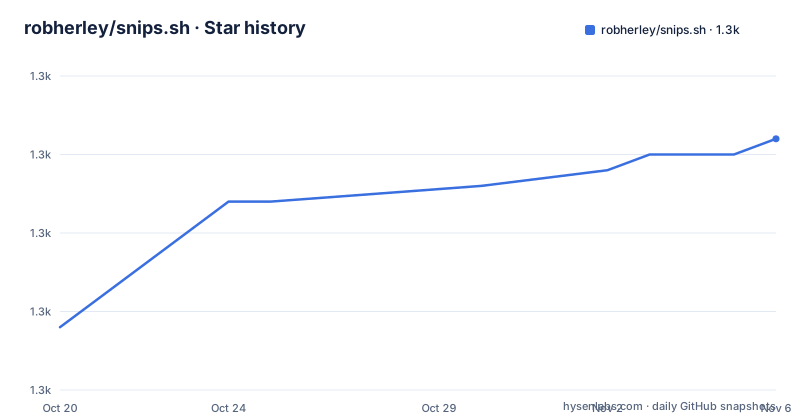
Star history
- robherley/snips.sh1,331 ★ · +12
| Repository | 2026-10-20 | 2026-11-06 |
|---|---|---|
| robherley/snips.sh | 1.3k | 1.3k |
12 Stars in the last 17 days, measured from the daily GitHub snapshot. Compare with other projects
Editorial analysis
The whole idea in one command
snips.sh is an SSH-powered pastebin with a human-friendly TUI and web UI, and the zero-install claim is demonstrated by the quick start. If you have an SSH key, you upload with:
echo '{ "hello" : "world" }' | ssh snips.shand you reach the terminal interface with:
ssh snips.shThere is no client to install, no token to manage and no account to create, because the protocol you already have is the protocol. The feature list spells out the consequences, with zero-install meaning use from any machine with an SSH client installed, no passwords meaning all you need is an SSH key, and anonymous meaning no sign ups, no logins and no email required. The primary language is Go, the licence is MIT, the homepage is snips.sh, the last push was on 2026-10-01, and the releases are v0.14.1 on 2026-09-08, v0.14.0 on 2026-08-15 and v0.13.0 on 2026-08-01, so the project is on a 0.x line and still moving.
The library behind it, and the language detection
The credits section names the projects the implementation rests on, and the choice of Magika is the interesting one. The technology is powered by charmbracelet, with `wish` as the SSH server and `bubbletea` as the TUI framework, and by `google/magika` for AI-powered file type detection, through the `robherley/magika-go` binding. Magika is what gives the ML language detection feature, so a snippet is recognised as source code rather than as plain text, which is what makes the syntax highlighting possible without asking the user to name a language. The rest of the stack is the standard set for a Go web application, with `alecthomas/chroma` for syntax highlighting, `yuin/goldmark` for Markdown parsing, `microcosm-cc/bluemonday` as the HTML sanitizer, and `tdewolff/minify` as the minifier. The go.mod also shows the persistence and infrastructure choices, with `mattn/go-sqlite3` and `jackc/pgx/v5` for the database layer and `pressly/goose/v3` for migrations.
The features that go beyond copy and paste
Two features lift this above a minimal pastebin. The first is URLs with TTL, time-limited access for sensitive sharing, and the second is revision history, since updating an existing snip in place saves each diff as a revision. Together they address the two things a pastebin normally gets wrong. A permanent URL for a secret is a liability, and an edited snippet with no history makes it impossible to tell what was shared originally. The rest of the list is the usual set done well: a web UI with syntax-highlighted code, short links and Markdown rendering, a TUI so you never leave your terminal for snippet management and viewing, and a self-hosting story that is containerized and light on resources. The acceptable use policy and the terms of service are separate documents in the docs directory, which is worth reading before you point a team at a public instance.
The container, and why there is a native library in it
The Dockerfile is a two-stage build and it explains the CGO requirement. The build stage is `golang:1.26.0`, and it installs `jq`, `just`, and the aarch64 Linux cross-compiler, then runs `just vendor-onnxruntime` to fetch the ONNX runtime into `/opt/onnxruntime`. The build then selects the cross compiler when the target is arm64 and runs `just build`. The runtime stage is `gcr.io/distroless/cc-debian12`, and it copies the ONNX runtime libraries across and sets `LD_LIBRARY_PATH` to point at them, which is why the C library has to travel with the binary. The distroless base has no shell, so the image is small and the attack surface is small, and the environment variables point the process at itself, with `SNIPS_HTTP_INTERNAL` on port 8080 and `SNIPS_SSH_INTERNAL` on port 2222, both of which are exposed. The single process serves both interfaces, which is why the SSH server and the web server share a binary.
The justfile, and the local development loop
The justfile is the build orchestration, and the targets map to the ways you would work on the project. `run` executes the application locally with `go run`, `build` produces `bin/snips.sh`, `dev` runs it in development mode with live reload through `air`, and there is a `test-compose` target that runs the Docker Compose services for tests, with a `docker-compose.test.yml` in the repository root. The test target depends on starting those services and then runs the suite with `gotestsum` over `go test -json`, optionally writing the JSON results to a file. Every target that touches the native library depends on a `_check-onnx` guard, which tests that the ONNX runtime directory exists and prints the instruction to run `just vendor-onnxruntime` if it does not. That guard is a small kindness, because the failure mode without it is a linker error rather than an explanation. The environment also carries `mise.toml`, a `.air.toml` for the live reload configuration and a `biome.json` for the front end.
Where the design points
Two things are worth pulling out. The first is the identity model. With no account and no password, the SSH key is the identity, which means a snippet's owner is whoever holds the key, and that is also what makes the anonymity work without an account system at all. The trade is that a lost key means a lost snippet, and there is no recovery path, because there is no account to reset. The second is the choice to keep the web interface and the SSH interface in one process rather than splitting them. The consequence is that the SSH path is not a bolt-on client for an HTTP API but a first-class interface, and the TUI is a real terminal application built on bubbletea rather than a command that curls an endpoint. The cost is that the two interfaces share a fate, so a problem in the HTTP server takes the SSH interface down with it.
Editorial conclusion
Adopt snips.sh if you want a pastebin you can drive from the shell with no account and no API key, since the SSH transport removes both. Skip it if your organisation needs an audit trail or per-user identity, because the anonymity is a design decision rather than a missing feature. Before you self-host, note that the language detection depends on an ONNX runtime that the build vendors separately, that the container exposes two ports, one for the web interface and one for SSH, and that the docs set out what you may and may not upload under the acceptable use policy.
Frequently asked questions
How do I upload a snippet to snips.sh?
Pipe the content over SSH: `echo '{ "hello" : "world" }' | ssh snips.sh`. You need an SSH key, and there is no account, no login and no API token. To get the terminal interface, run `ssh snips.sh` with no piped input.
Does snips.sh support time-limited and private links?
Yes. URLs with TTL give time-limited access for sensitive sharing, and updating an existing snip in place saves each diff as a revision, so the history of what was shared is kept.
How does snips.sh detect the language of a snippet?
Through ML language detection powered by google/magika, using the robherley/magika-go binding. The detection is what makes the syntax-highlighted rendering in the web UI possible without the user naming a language.
What does self-hosting snips.sh require?
The image is containerized and light on resources. The Dockerfile builds from golang:1.26.0, vendors the ONNX runtime separately, and the final image is distroless, exposing port 8080 for the web interface and port 2222 for SSH.
Official sources
Add this badge to your README
If you maintain this project, the badge below links readers to this analysis and shows its maintenance status from the daily GitHub snapshot. Paste the markdown into your README; add ?metric=license or ?metric=stars to the image URL for a different field.

[](https://hysenlabs.com/projects/robherley-snips-sh)Star history chart for your README
[](https://hysenlabs.com/projects/robherley-snips-sh)Was this useful?