roboflow/sports: a soccer vision test bed whose docs stop at the dataset table
computer vision and sports
At a glance
- What is it?
- Roboflow chose sports as a test bed for object detection, image segmentation, keypoint detection and foundational models. What ships is a source install, nine dependencies, five dataset slugs and one example folder, with no documented function, import line or expected output.
- Who is it for?
- Take roboflow/sports when you already work in Roboflow Universe and want soccer detection, ball tracking and pitch keypoint code to read and adapt, and you are willing to read the package source to learn its API. Leave it if you need documented function signatures, basketball examples, published accuracy numbers, or a versioned package you can pin.
- Can I use it commercially?
- Yes. MIT is a permissive licence: you can use, modify and sell software built on it, as long as you keep its copyright and licence notices.
- Is it still maintained?
- Yes. The repository last received commits 78 days ago.
- What is it written in?
- Mainly Python, according to GitHub's language statistics.
Answers come from the project's GitHub data, last synced on November 13, 2026, and from our analysis. They are not legal advice.
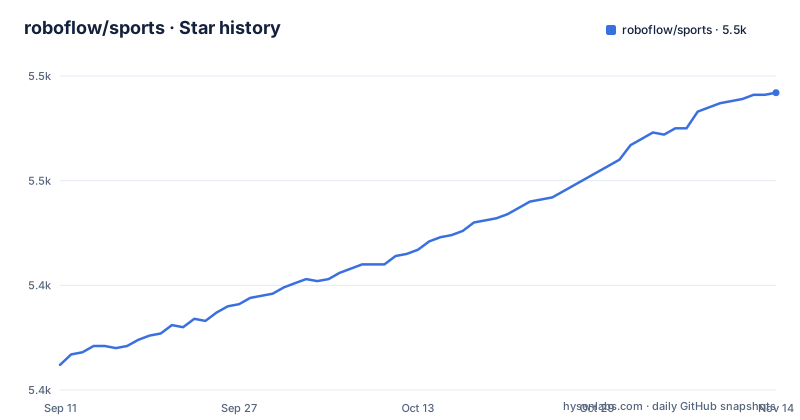
Star history
- roboflow/sports5,491 ★ · +129
| Repository | 2026-09-11 | 2026-11-13 |
|---|---|---|
| roboflow/sports | 5.4k | 5.5k |
129 Stars in the last 63 days, measured from the daily GitHub snapshot. Compare with other projects
Editorial analysis
The install line is a git URL, because no package exists on an index
Installing means pointing pip at a git URL, and the reason sits in the repo itself: there is no Python package yet, so you install from source in an environment running Python 3.8 or newer. setup.py agrees on that floor, names the distribution sports, and pins the version at 0.1.0, with find_packages() and include_package_data=True doing the discovery.
pip install git+https://github.com/roboflow/sports.gitTwo consequences follow for anyone planning around this. The command names no tag, no branch and no commit, so two people running it on different days can get different code from a repository whose only named release is soccer-analytics-pr-demos, dated 2026-07-06. And because nothing is published to an index, the install builds inside a source tree, and nothing in that tree pins the nine dependencies at versions you can name later.
The dependency list is the only map, and it has no labels
The install_requires block in setup.py is the closest thing to an architecture note. Nine runtime requirements come in, plus a tests extra that adds pytest.
install_requires=[
    "supervision",
    "numpy",
    "opencv-python",
    "transformers",
    "umap-learn",
    "scikit-learn",
    "tqdm",
    "sentencepiece",
    "protobuf"
]
What the repo never does is tie any of them to a call. transformers and sentencepiece sit beside the basketball jersey numbers OCR dataset, umap-learn and scikit-learn sit beside the re-identification challenge, protobuf sits beside whatever serialized config the tools read, opencv-python beside video decoding. Those are reading cues, not documented wiring: no import statement, no module path, no argument name, no return type for the package the repo calls reusable tools for object detection, image segmentation, keypoint detection and foundational models. You end up opening sports/ to learn what a function is even called, and the dependency list stops being a map.
examples/soccer/ is the whole example surface
One example directory carries the entire demonstration load, and the top level of the repository is thin enough to print:
.gitignore
LICENSE
README.md
examples/
setup.py
sports/
The dataset table reaches past football into basketball with a court keypoint set and a jersey numbers OCR set, yet nothing under examples/ shows a basketball script. There is no test directory in the listing either, even though pytest sits in the tests extra. For a reader trying to learn the call sequence, this is where the cost lands. One example directory covers one of the two sports named in the table, so basketball work, or any tracking job that is not a soccer clip, starts from package source and a script you write yourself.
Five dataset slugs, none with a class list attached
The dataset section is a five row table pairing a use case with a Roboflow Universe slug.
https://universe.roboflow.com/roboflow-jvuqo/football-players-detection-3zvbc
https://universe.roboflow.com/roboflow-jvuqo/football-ball-detection-rejhg
https://universe.roboflow.com/roboflow-jvuqo/football-field-detection-f07vi
https://universe.roboflow.com/roboflow-jvuqo/basketball-court-detection-2
https://universe.roboflow.com/roboflow-jvuqo/basketball-jersey-numbers-ocr
The table records none of what you need in order to train against them: no class list, no image count, no split, no annotation format, no license per dataset, no model checkpoint the tools are known to load. The naming is uneven as well. Three football slugs end in a short hash, the basketball court set ends in a plain 2, and the jersey number set carries no suffix. When a run goes wrong after hours of training, the table cannot tell you which label set you were meant to reproduce, and a dataset re-versioned under the same name moves without any code change on your side.
Calibration is named as the problem, never delivered as a function
Camera calibration appears in the challenge list as the thing you need for player speed and distance traveled, and as hard work because the action is dynamic and the camera angles vary. Two court keypoint datasets back the input side of that problem, a football field set and a basketball court set. The output side is absent. Nothing in the docs maps court keypoints to meters: no homography helper, no documented keypoint order, no court dimension constants, no function that returns a coordinate frame. The same list calls re-identification tricky when cameras move, which is exactly the case where a pixel to meter assumption you wrote yourself stops holding. So the two numbers the project names as its motivation are the two you have to derive, and the five challenges read as a candid list of what stays unsolved rather than a description of what ships.
The demo section is one link with no expected output
The demos section is a single line: one link to a stored video asset, with no caption, no input clip, no expected output, no metric. There is no second example, so nothing in the docs tells you whether the result you got is the intended one. That gap has a practical shape. No fixture, no error handling path and no accuracy or frame rate figure is attached to any of the five challenges, and the classifier line in setup.py stops at Development Status :: 4 - Beta. When a run misbehaves, the candidate causes are all still open: a detector that lost the ball, a keypoint order that differs from your assumption, a calibration that is off, an identity switch in the tracker. Settling which one it is means reading the source in sports/, the same work the documentation would otherwise have saved you.
Four sibling links, one maintainer, two dates worth checking
The header links four sibling projects instead of documenting an integration: roboflow/notebooks, roboflow/inference, autodistill/autodistill and roboflow/multimodal-maestro. None of them gets a sentence of explanation, and nothing says which one runs a model for you or whether an account and key come with it. The contribution path is one line pointing at the issue tracker, asking what else should be built. The repository is not archived, its last push is dated 2026-08-28, and its only named release, soccer-analytics-pr-demos, is dated 2026-07-06. Licensing is MIT, setup.py names Piotr Skalski as author with a single contact address, and the classifiers cover Windows, POSIX, Unix and MacOS with an intended audience of Developers and Science/Research. If you need evidence about momentum, those two dates are what the repo itself offers.
Editorial conclusion
Take roboflow/sports when you already work in Roboflow Universe and want soccer detection, ball tracking and pitch keypoint code to read and adapt, and you are willing to read the package source to learn its API. Leave it if you need documented function signatures, basketball examples, published accuracy numbers, or a versioned package you can pin. Before committing a week, verify the five dataset slugs still serve the label sets you trained on and build your own calibration path, because the repo documents neither.
Frequently asked questions
How do I install roboflow/sports?
There is no Python package yet, so the project installs from source in a Python 3.8 or newer environment with pip install git+https://github.com/roboflow/sports.git. setup.py declares the distribution as sports at version 0.1.0, so nothing is pinned to a release tag.
What dependencies does roboflow/sports pull in?
Nine runtime requirements: supervision, numpy, opencv-python, transformers, umap-learn, scikit-learn, tqdm, sentencepiece and protobuf, plus a tests extra that adds pytest. The license is MIT and the package is marked Development Status :: 4 - Beta.
Which datasets does roboflow/sports point to?
Five Roboflow Universe snapshots: football-players-detection-3zvbc, football-ball-detection-rejhg, football-field-detection-f07vi, basketball-court-detection-2 and basketball-jersey-numbers-ocr. The table pairs each with a use case but gives no class list, split, image count or license per dataset.
Can roboflow/sports compute player speed and distance covered?
Not from its documentation. Calibration is named as the requirement for those statistics and as one of the five open challenges, but no function that turns court keypoints into a metric frame is documented, so the transform is yours to design and validate.
Is roboflow/sports still being worked on?
The repository is not archived. Its last push is dated 2026-08-28 and its one named release, soccer-analytics-pr-demos, is dated 2026-07-06, so commits are landing even though the README still says there is no Python package.
Official sources
Add this badge to your README
If you maintain this project, the badge below links readers to this analysis and shows its maintenance status from the daily GitHub snapshot. Paste the markdown into your README; add ?metric=license or ?metric=stars to the image URL for a different field.

[](https://hysenlabs.com/projects/roboflow-sports)Star history chart for your README
[](https://hysenlabs.com/projects/roboflow-sports)Was this useful?