Knowledge: local knowledge management with Chromium and chat
Knowledge is a tool for saving, searching, accessing, exploring and chatting with all of your favorite websites, documents and files.
At a glance
- What is it?
- Knowledge is an Electron application for collecting websites, documents and files, then searching, organizing and chatting with that content. Its main adoption constraint is explicit: the README says development has stopped.
- Who is it for?
- Knowledge may suit users who want a desktop research archive with a built-in Chromium browser and chat over saved material, especially when accepting an unmaintained application is acceptable. It is a poor choice for production data, security-sensitive documents or teams that require ongoing compatibility work.
- Can I use it commercially?
- Yes. Apache-2.0 is a permissive licence: you can use, modify and sell software built on it, as long as you keep its copyright and licence notices.
- Is it still maintained?
- Yes. The repository last received commits 30 days ago.
- What is it written in?
- Mainly TypeScript, according to GitHub's language statistics.
Answers come from the project's GitHub data, last synced on November 7, 2026, and from our analysis. They are not legal advice.
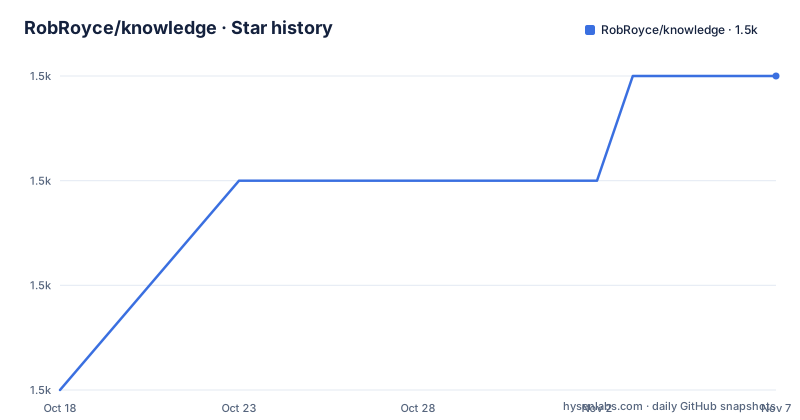
Star history
- RobRoyce/knowledge1,465 ★ · +3
| Repository | 2026-10-18 | 2026-11-07 |
|---|---|---|
| RobRoyce/knowledge | 1.5k | 1.5k |
3 Stars in the last 20 days, measured from the daily GitHub snapshot. Compare with other projects
Editorial analysis
Knowledge's desktop research workflow
Knowledge addresses a specific personal knowledge-management problem: keeping useful web pages, documents and files in one collection that can be searched, browsed and discussed. Its intended users appear to be readers, researchers and learners who accumulate source material and then return to it. The application presents that collection through an Inbox, Graph and Grid view, as shown in the repository screenshots. Those names suggest two different navigation needs. The Inbox supports the intake side of the workflow, while the Graph and Grid provide visual ways to inspect stored information.
The project also adds a built-in Chromium browser. This is more than a convenience feature for an article collector because web pages can be brought into the same knowledge workflow through browser actions. The README documents right-click commands for summarizing page content, extracting topics and converting web content into Notes. A Note can therefore become a structured artifact rather than remaining only a captured URL. The README does not document the exact extraction pipeline, supported file formats, local database schema or synchronization behavior, so those details cannot be inferred from the screenshots.
Knowledge is intended for a desktop environment rather than a conventional command-line service. `package.json` identifies Electron as the entry point through `src/kc_electron/dist/main.js` and declares workspaces for `src/kc_electron`, `src/kc_angular` and `src/kc_storage`. Based on that repository layout, the product separates the desktop shell, user interface and storage workspace. The documentation does not establish whether storage is local only, whether remote synchronization is included in every build, or what happens when two copies of a document are captured.
Chat over Knowledge Projects and Sources
Knowledge includes a Chat feature for asking questions about Projects and Sources. According to the README, conversations use Large Language Models and are scoped to a user's organized knowledge, allowing questions and concept exploration within a selected part of the collection. This makes the feature an interface over imported material rather than a generic chat window, at least as described by the documentation.
That distinction also defines an important boundary. The README does not identify the model provider, authentication method, network policy, retention policy, context-selection method or data sent to the model service. It also does not say whether local models are supported. Users should not infer offline operation merely from the Electron architecture or the built-in Chromium browser. The source tree contains a storage workspace, but the README and repository metadata do not establish whether chat requests remain on the machine or whether captured documents can be transmitted to an external provider.
The feature is likely most useful when a Source has enough related material for retrieval to be meaningful, but the README gives no measurable limits for document size, indexing delay or answer accuracy. There are also no documented claims about citations, quotation fidelity or warnings when a response is unsupported. For evaluation, the first chat test should use a small, non-sensitive Project and compare the response with the stored source text. That is a concrete verification step, not a claim about what Knowledge will produce.
Installing Knowledge and starting a collection
The README does not provide installation commands for an end user. It directs readers to the Latest Stable Release and All Versions pages for `KnowledgeCanvas/knowledge-canvas`, and separately links to the Chrome Extension repository. Because the README includes no release notes, installer names or operating-system matrix, it cannot confirm supported platforms, package formats or checksums. This repository has no GitHub releases, so the linked release location should be checked rather than inferred from `version` in `package.json`.
A suitable first-use sequence follows the capabilities documented in the README. Download the latest stable application, install it, and open it with an empty or disposable collection. Add one website that you know well, one document and one file type that matters to your work. Open each item from the Inbox and inspect how Knowledge represents it. Then open the Graph and Grid to see whether the organization matches the way you think about relationships among sources. Do not import a large confidential archive before checking the application's data handling and backup process.
The browser workflow can then be checked with a public page. Use the built-in Chromium view, open that page and invoke the documented right-click actions for summarizing, topic extraction or conversion to a Note. Finally, place the item in a focused Project and ask a factual question through Chat. Compare the answer with the source. The README does not provide a command for either step, so no shell code should be substituted for the missing setup instructions. The project points users to its Getting Started and Shortcut Keys wiki pages for the application-specific procedure.
Building the Knowledge TypeScript workspace
Source builds are documented, although the full contents of `DEVELOPMENT.md` are not available in the repository description. The root manifest provides enough information to identify package-manager commands, but not the prerequisite installation sequence or platform-specific setup. The repository uses Yarn workspaces and declares `commonjs` as its package type.
Once the dependencies and runtime prerequisites described in `DEVELOPMENT.md` are in place, the root `build` script builds the Electron and Angular workspaces in sequence. For a development build, `start-dev` runs the development builds before launching Electron. The command below is copied from the root `package.json`:
yarn start-devA reader should expect the script to execute `yarn build-dev` and then start Electron from the root application entry point. The repository also exposes separate workspace build commands, which are useful when diagnosing which side of the application needs attention:
yarn build-electron-devyarn build-angular-devThese commands compile application code, but the README does not document the Node.js installation procedure, the required `.node-version` value, Electron download requirements or test commands. It would therefore be inaccurate to present source compilation as a complete installation guide. The documented Local Development link is the correct place to resolve those prerequisites.
Stopped development and Knowledge upgrade exposure
The decisive maintenance fact is stated in the README: "Knowledge is no longer being developed." The repository is not archived, and the last push was on 2026-10-08, but a recent push does not contradict the explicit development notice. Repository layout should not be treated as evidence of ongoing product maintenance. This repository also has no GitHub releases, although the README links to a separate `knowledge-canvas` release site.
This status changes the upgrade calculation. An adopter may need to handle application, Chromium, Electron, operating-system or dependency changes outside the normal upstream release process. The project includes a root `interactive-upgrade` script that delegates to `yarn upgrade-interactive`, but the README does not say that using this command produces a supported or tested application build. Likewise, the presence of `e2e/`, `tests/` and packaging scripts shows that test and release machinery exists in the repository. It does not establish that tests currently pass or that binaries will be produced for every platform.
Knowledge is licensed under Apache-2.0. That license includes an express grant of copyright and patent rights and imposes conditions on distribution and modification, including preservation of applicable notices. The repository is marked `private` in `package.json`, which indicates that the root package is not intended for public npm publication. It does not revoke the stated Apache-2.0 project license. Users still need to inspect the actual `LICENSE` file and distribution notices before modifying or redistributing a build.
Knowledge failure modes and data ownership
The most obvious failure mode is not a documented bug but an adoption mismatch: placing durable research data in an application whose README says it is no longer developed. A broken package signature, unavailable update path, incompatible operating-system release or obsolete Chromium behavior could leave data stored in an application that is difficult to service. The disclaimer explicitly says the software is not a consumer product, carries no warranty, and may result in loss of data or other damage. That language makes backup and export verification essential before adoption.
The documentation also does not describe collaboration, access control, encryption, retention or deletion. This does not prove those features are absent from every build, but it leaves a real evaluation gap. Knowledge should not be selected for a compliance-controlled library unless its actual build can answer those questions. The README describes an interface for individual Projects and Sources, not a documented multi-user permission model.
Another alternative is a conventional document search tool with established indexing and backup workflows, though that would omit the browser-assisted collection and conversational interface. The right comparison depends on whether capturing and exploring heterogeneous sources matters more than supported export formats and ongoing maintenance.
Editorial conclusion
Knowledge may suit users who want a desktop research archive with a built-in Chromium browser and chat over saved material, especially when accepting an unmaintained application is acceptable. It is a poor choice for production data, security-sensitive documents or teams that require ongoing compatibility work. Before adoption, verify the latest downloadable build, the behavior of the chat and browser integrations on your required platforms, and the export or backup procedure for your existing collection.
Frequently asked questions
Is Knowledge still being developed?
No. The README explicitly says that Knowledge is no longer being developed. The repository is not archived and its last push was on 2026-10-08, but that repository activity does not change the project's stated development status.
How do I install Knowledge?
The README links to the Latest Stable Release and All Versions pages for `KnowledgeCanvas/knowledge-canvas`. It does not provide an end-user installation command or confirm the available installer formats.
Can Knowledge chat with my saved websites and documents?
Yes. The README describes Chat for asking questions about Projects and Sources using Large Language Models. It does not identify the model provider, network policy or offline-model support.
Can Knowledge capture and process web pages in its browser?
The built-in Chromium browser can summarize page content, extract topics and turn web content into Notes through documented right-click actions. The README does not describe the extraction implementation or page-processing limits.
What license does Knowledge use?
The repository manifest identifies `Apache-2.0`. The root package is also marked `private` in `package.json`, so it should not be treated as a public npm package.
Official sources
Add this badge to your README
If you maintain this project, the badge below links readers to this analysis and shows its maintenance status from the daily GitHub snapshot. Paste the markdown into your README; add ?metric=license or ?metric=stars to the image URL for a different field.

[](https://hysenlabs.com/projects/robroyce-knowledge)Star history chart for your README
[](https://hysenlabs.com/projects/robroyce-knowledge)Was this useful?