alive-progress: a Python progress bar that runs at your loop's real speed
A new kind of Progress Bar, with real-time throughput, ETA, and very cool animations!
At a glance
- What is it?
- The spinner animates at the throughput of your own loop, the ETA is smoothed and progressively rounded, print and logging hooks carry the bar position into every message, and the whole bar can be suspended and resumed mid-loop.
- Who is it for?
- Use alive-progress when the job runs in a real terminal and you want the output to answer two questions the loop cannot: how fast is it going, and how long is left. Skip it for headless runs where nobody sees a terminal, and for anything that cannot depend on one author's package choices.
- Can I use it commercially?
- Yes. MIT is a permissive licence: you can use, modify and sell software built on it, as long as you keep its copyright and licence notices.
- Is it still maintained?
- Activity is slowing. The repository last received commits 6 months ago.
- What is it written in?
- Mainly Python, according to GitHub's language statistics.
Answers come from the project's GitHub data, last synced on November 22, 2026, and from our analysis. They are not legal advice.
Star history
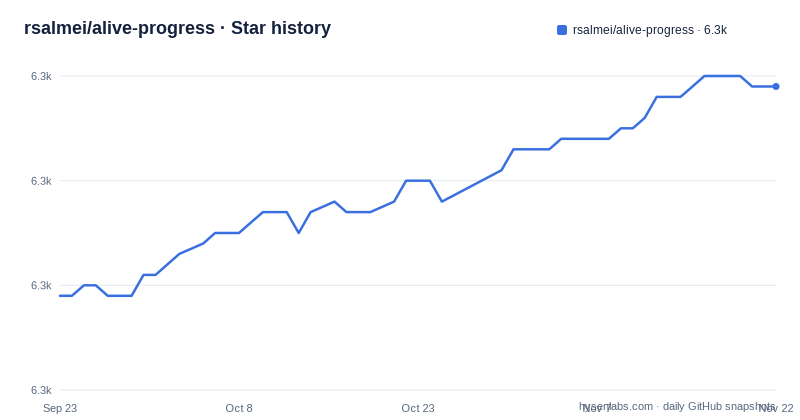
- rsalmei/alive-progress6,329 ★ · +20
| Repository | 2026-09-23 | 2026-11-22 |
|---|---|---|
| rsalmei/alive-progress | 6.3k | 6.3k |
20 Stars in the last 60 days, measured from the daily GitHub snapshot. Compare with other projects
Editorial analysis
The spinner moves at the speed your loop actually runs
The animation is not a fixed timer. The README states that the spinner reacts to your actual processing speed, getting faster or slower with your throughput, so a slow job visibly crawls and a fast one visibly whips. Underneath, the bar updates itself at a fraction of the real processing rate to keep CPU usage low and avoid terminal spamming, and the project puts that relationship at roughly 60 updates per second for 1,000,000 iterations per second. Because rendering is decoupled from iteration, a loop running a million items a second and a loop running a hundred items a minute both produce readable output instead of a flood of escape codes. Rendering also happens on its own thread, which is why a second thread writing to the terminal does not tear the animation apart. A calibration step exists for machines whose terminal does not match the default frame rate, so the speed can be tuned per environment rather than hardcoded. What it will not do is tell you that the rate is wrong. Nothing in the project inspects whether a workload is slower than it should be: a crawling spinner and a nearly idle process look the same on screen.
Counter mode, percentage mode, and a handler that accepts negatives
The bar handler ships with two modes of operation. In auto or unknown counter mode the bar counts items itself: you call the handler with a numeric increment and it renders a counter. In manual percentage mode you supply the progress yourself and the bar shows a percentage. The two modes do not give the handler identical semantics, which is why the project documents a section on how the same call behaves differently in each. Since the 3.2 series, counter mode also accepts zero and even negative increments: calling `bar()` with `0` marks an iteration that achieved nothing, and `bar(-N)` walks the bar backwards, which is what you want when a batch gets rolled back or a queue drains faster than it fills. An auto-iterating form wraps a loop so you never write the handler call at all, and a loop-less form covers work that is not a straightforward iteration. What the counter cannot express is a job whose length is neither known nor inferable from its own progress, such as one that depends on remote data arriving.
An ETA that gives up precision as it grows
The estimate comes from an Exponential Smoothing Algorithm, which weights recent iterations more heavily than old ones instead of averaging the whole run. For a long job that matters: a mean based estimate swings every time an early outlier washes out of the average, while a smoothed one reacts to a genuine change in speed within a few iterations. Since the 3.2 series the ETA also lowers its own precision as the number climbs, so a two hour job stops promising seconds it cannot honestly deliver and settles on a coarser unit that does not jitter from frame to frame. The price is that you lose the fine grained countdown exactly when a long run is the thing you most want to watch closely. The exact figures are meant to land in the final receipt instead, and since the 3.3 series that receipt stays reachable from the bar handle after the run has ended.
print and logging hooks that carry the bar position
Output that normally destroys a progress bar is intercepted. The library installs print and logging hooks automatically, so any message printed or logged while the bar is alive is routed through it, and each message is enriched with the current bar position, producing lines that read like `on 57:` instead of an orphan row above a moving animation. Since 3.2, those hooks work across threads: everything is synchronized, so you can print from worker threads with no queue funneling messages to the main thread, which the project calls a highly requested feature. A custom `enrich_offset` can be supplied so the enriched prefix need not start at 1, and the two cases named for it are starting with `on 1:` or continuing where a previous computation stopped. What the hooks do not cover is output that bypasses the print and logging modules entirely, such as a subprocess writing straight to the terminal descriptor, and they never rewrite the text of your own message.
Under and overflow counts, and what the final receipt reports
The bar can be told to detect underflows and overflows, which lets you track hits, misses, or any count you care about independently of how many iterations actually ran. A batch job where 3 of 100 records failed is exactly that case: the iteration count says 100, the under counter says 3, and neither number yields the other. When processing ends, a final receipt prints three things: the total items, the elapsed time, and the observed throughput. Since the 3.3 series that receipt is also available in the `alive_bar` handle after the bar has finished, and the bar title and text can be changed after it finished too, so the receipt can be relabelled with whatever context your own logging needs.
Suspending tears down the animation and keeps the loop
The feature the project leads with is suspension. Inside the bar handler you can suspend the bar, which removes the animation and returns you to the interactive Python prompt while the surrounding loop stays alive. You inspect or fix the items that were wrong, step back into the same execution, and resume as if it had never stopped, which is the whole reason the author built the project rather than wrapping an existing bar. Two neighbouring advanced pieces matter alongside it, loop-less use for work that is not a plain iteration, and forcing animations in environments that need it, such as PyCharm and Jupyter. The cost lands on your side of the boundary: any state the loop depends on has to survive the round trip through the prompt, and local variables you never wrote anywhere will not.
check() runs spinner frames before anything is installed
Styles are generated rather than pasted out frame by frame. The project ships a Spinner Compiler plus spinner factories and bar factories, so a style is described by its component moves and cycle length instead of a long literal list of frames. The `check()` tool previews the result: it explodes the generated frames and animation cycles across your screen and runs them alive, so a style can be iterated on before it ever touches a real workload. What `check()` cannot do is test a style against a real workload. It shows the animation at the speed it animates in isolation, not how it reads while a loop is simultaneously writing to the terminal, the ETA is being recomputed on every frame, and enriched log lines scroll past underneath it.
No GitHub releases, and a justfile that owns the build
The developer workflow lives in a justfile at the repository root, and packaging lives in setup.py, which imports the package and reads its version, description, author and license from the module itself rather than duplicating them. setup.py declares the project as Development Status :: 5 - Production/Stable, Intended Audience :: Developers and Environment :: Console. For a development checkout, the justfile's install recipe pulls two separate requirement files before putting the package in editable mode:
install:
    pip install -r requirements/dev.txt -r requirements/test.txt -e .

lint:
    ruff check alive_progress --line-length 100

test:
    pytest {{ cov }}

build: lint clean
    python setup.py sdist bdist_wheel

release: build && tag
    twine upload dist/*
So there is no separate CLI to learn: running the tests through the same recipes is also the fastest way to confirm the checkout works on your interpreter. Two things are worth checking before you pin anything. The repository carries no GitHub releases, so version history lives in CHANGELOG.md and in the What's new sections of the README instead of in release objects you can point a dependabot config at. And in setup.py the older Programming Language :: Python classifier lines (2.x and 3.2 to 3.8) are commented out, while Python 3, 3.9 and 3.10 remain active. The project also publishes a Python end of life notice covering 2.7 and 3.5, then 3.6, then 3.7 and 3.8. The 3.3 series replaced the unmaintained grapheme dependency with graphemeu, a maintained fork of the original, added py.typed for mypy and other type checkers, and covers Python 3.14 in CI for now. The repository is not archived and its last push was on 2026-05-24.
Editorial conclusion
Use alive-progress when the job runs in a real terminal and you want the output to answer two questions the loop cannot: how fast is it going, and how long is left. Skip it for headless runs where nobody sees a terminal, and for anything that cannot depend on one author's package choices. The repository has no GitHub releases, the older Python version classifiers are commented out in setup.py, and the grapheme dependency already had to be replaced once. Before pinning a version, read CHANGELOG.md and the What's new sections of the README, then check the Python end of life notice for your interpreter.
Frequently asked questions
How do I create progress bars in Python?
alive-progress gives you a bar handler you call with a numeric increment: counter mode counts items itself, while manual percentage mode takes your own progress value. Either way the bar prints a final receipt with the total items, the elapsed time and the observed throughput.
What does alive-progress do that a plain counter cannot?
Its spinner animates at a rate tied to your loop's real throughput instead of a fixed timer, and its ETA comes from an Exponential Smoothing Algorithm that weights recent iterations over old ones, then lowers the displayed precision as the estimate grows so a long countdown stops jittering.
Can alive-progress be paused during a long run?
Yes. Suspending inside the bar handler removes the animation and returns you to the Python prompt while the surrounding loop stays alive, so you can fix or inspect items and then step back into the same processing.
How do I install alive-progress and run its own checks?
The repository root has a justfile: the install recipe pulls requirements/dev.txt and requirements/test.txt in editable mode, the test recipe runs pytest with coverage on the alive_progress package, and the release recipe builds a wheel with setup.py and uploads it with twine. The version tag itself is derived from alive_progress.__version__.
Official sources
Add this badge to your README
If you maintain this project, the badge below links readers to this analysis and shows its maintenance status from the daily GitHub snapshot. Paste the markdown into your README; add ?metric=license or ?metric=stars to the image URL for a different field.

[](https://hysenlabs.com/projects/rsalmei-alive-progress)Star history chart for your README
[](https://hysenlabs.com/projects/rsalmei-alive-progress)Was this useful?