GodNS supports twenty-two DNS providers and documents one build command that cannot run
A dynamic DNS client tool that supports AliDNS, Cloudflare, Google Domains, DNSPod, HE.net & DuckDNS & DreamHost, etc, written in Go.
At a glance
- What is it?
- TimothyYe/godns is a Go dynamic DNS client with a built-in web panel, a rewrite of the author's earlier project. Twelve of its providers cannot update a root domain, the router build is a single malformed command, and the repository carries two competing release toolchains.
- Who is it for?
- This suits someone with a home server or a small router who wants dynamic records without a browser tab open and without handing credentials to a hosted service, since the whole thing is one static binary with an embedded panel. Two things to check first.
- Can I use it commercially?
- Yes. Apache-2.0 is a permissive licence: you can use, modify and sell software built on it, as long as you keep its copyright and licence notices.
- Is it still maintained?
- Yes. The repository last received commits 9 days ago.
- What is it written in?
- Mainly Go, according to GitHub's language statistics.
Answers come from the project's GitHub data, last synced on November 14, 2026, and from our analysis. They are not legal advice.
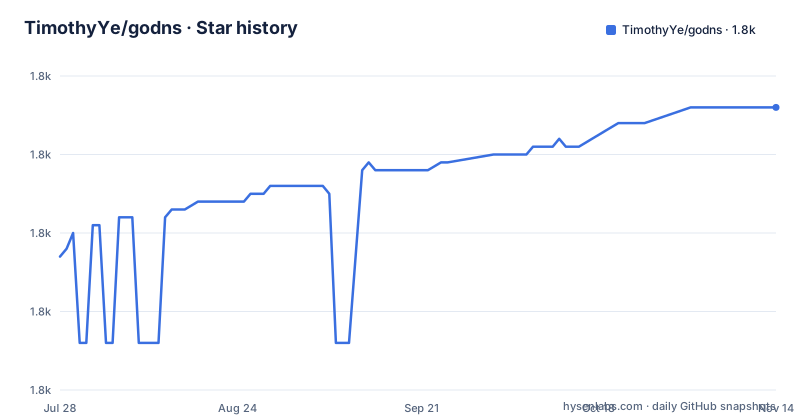
Star history
- TimothyYe/godns1,786 ★ · +19
| Repository | 2026-07-28 | 2026-11-14 |
|---|---|---|
| TimothyYe/godns | 1.8k | 1.8k |
19 Stars in the last 109 days, measured from the daily GitHub snapshot. Compare with other projects
Editorial analysis
Twenty-two providers, and twelve of them stop at subdomains
The provider table is the most useful page in the repository and it is also the place to look before buying anything. Every one of the twenty-two rows supports both address families and subdomain records. The root domain column is the interesting one: ten providers can update a record at the top of a domain you own, and twelve cannot. Cloudflare, DigitalOcean, DNSPod, Hurricane Electric, AliDNS, Scaleway, Linode, Porkbun and one registrar with a dot in its name are on the permissive side; the rest are marked otherwise. A tip points readers at a tracking issue for the current status of root domain support, which is an admission that the gaps are known and tracked rather than finished.
One provider needs no domain at all
The preconditions are short. To self-host you are assumed to own a domain and to have delegated it to one of the supported providers, which in practice means the nameserver records for your domain point at that provider. There is one exception, and it is the friendliest line in the section: you can instead sign in to DuckDNS with a social account and get a subdomain under their domain for free, which removes the only real prerequisite. That is also the provider the description leads with, alongside the two most widely used ones. It is worth noting that the table still lists a registrar whose nameserver service most people no longer hold a domain at, and its row is marked as unable to update a root domain.
The router build command cannot run as written
Router support is listed as a platform, with the promise that the binary can run on routers as well, and one command is given to produce it:
GOOS=linux GOARCH=mips/mipsle GOMIPS=softfloat go build -aThe architecture value contains a forward slash. The build tool expects one architecture per invocation, so this line is a shorthand that has been left in the documentation without the loop or the second command that would make it real. It is also the only place the soft-float setting appears, so a reader following it literally gets an error rather than a router binary. That matters more than a typo usually would, because the release process builds five archives by hand and none of them is this architecture, so the routers claim depends entirely on you fixing the command yourself.
Two release toolchains ship in the same repository
The root holds a configuration file for an automated release tool, and the Makefile also contains a hand-written release target. The Makefile version cleans the tree, builds the binary for five targets one after another with the version stamped into it through linker flags, packs each into a tarball, and then calls the image target, which runs a multi-architecture container build and pushes twice, once under the version and once under a moving tag. So every release publishes two image tags and five archives, from a target that has to be maintained by hand, while a declarative configuration for the automated path sits beside it unused by that target. Nothing in the documentation says which one is authoritative.
Three providers arrive as vendor libraries, the rest are hand-written
The module manifest is small and tells you how the provider support is actually built. Twenty-two providers cannot each come from an official library, and indeed only three do: a client for one hosting provider, a client for another, and a client for a third European registrar, all as direct dependencies. Everything else is implemented against each provider's API by hand. The same manifest reveals the rest of the feature surface: a web framework for the panel, a DNS library, an OAuth client, a file watcher, structured logging in two libraries, and two notification channels, one for a chat platform and one for email. A web assembly helper and a compression library sit alongside, which is consistent with a panel that has to work in a container.
The panel is a frontend built with Bun and embedded in the binary
The container build is three stages and the middle one is the interesting part. The first stage takes a JavaScript runtime image, installs the frontend with a frozen lockfile and builds it. The second stage takes a Go image, downloads and verifies the modules, then copies the frontend's output directory into the Go source tree and runs code generation before compiling, with the C library disabled so the binary is static and the version stamped in at link time. The final stage is a minimal base image with no shell, into which the compiled binary, the certificate bundle and the timezone database are copied, running as a non-root user. The practical consequence is that the panel and the client ship as one artifact, and there is no separate front end to deploy.
Three spellings, two capitalisations, and a hosted sibling to start with
The name is not consistent. The prose calls the project GoDNS with capitals, while the repository, the module path and the binary are all lowercase. The badge links make it worse by alternating between two capitalisations of the owner between one badge and the next, so a link copied from one line will not match the other. The page also opens, before anything else, by recommending a hosted version of the same service for anyone who would rather not run a server, manage records by hand, or own a domain in advance. For a self-hosting tool that is an unusual lead, and it does tell you who is behind the hosted offering. Underneath it sits the note that this is a rewrite in Go of the author's earlier project, which is still linked and still running.
Editorial conclusion
This suits someone with a home server or a small router who wants dynamic records without a browser tab open and without handing credentials to a hosted service, since the whole thing is one static binary with an embedded panel. Two things to check first. Only ten of the twenty-two providers can update a root domain rather than a subdomain, so if you are pointing a bare domain at your machine, confirm your registrar is in the right half of that table. And the router claim is not backed by the release process: the build command in the documentation is malformed, and the release target produces five archives that do not include that architecture.
Frequently asked questions
What is GoDNS?
It is an Apache-2.0 licensed dynamic DNS client written in Go, with multi-provider support and a built-in web panel. It is a rewrite in Go of the author's earlier dynamic DNS project, and it ships as a single binary with the panel embedded. A hosted version of the same service is also offered for people who prefer not to run their own.
Which DNS providers does GoDNS support?
Twenty-two, including Cloudflare, DigitalOcean, DNSPod, Hurricane Electric, AliDNS, Scaleway, Linode, Porkbun, DuckDNS, No-IP, Dynv6, DreamHost, Hetzner, OVH, IONOS, Strato, TransIP, Infomaniak, Loopia, Dynu and one registrar with a dot in its name. All of them support both address families and subdomain records.
Can GoDNS update a root domain?
Only for some providers. The provider table marks ten of the twenty-two as able to update records at the top of a domain you own and twelve as not, and it points readers at a tracking issue for the current status of the remaining ones. If you are pointing a bare domain rather than a subdomain at your machine, check that column before configuring anything.
What do I need before self-hosting GoDNS?
A domain you own, delegated to one of the supported providers so its nameserver records point there. The exception is DuckDNS, where you can sign in with a social account and receive a subdomain under their domain for free, which removes the domain requirement entirely.
Can GoDNS run on a router?
MIPS is listed among the supported platforms alongside Linux, macOS, Windows and ARM Linux, with the claim that the binary can run on routers. The single build command given for it puts two architectures in one architecture variable, so it needs fixing before it will run, and the release target produces five archives that do not include that architecture.
Official sources
Add this badge to your README
If you maintain this project, the badge below links readers to this analysis and shows its maintenance status from the daily GitHub snapshot. Paste the markdown into your README; add ?metric=license or ?metric=stars to the image URL for a different field.

[](https://hysenlabs.com/projects/timothyye-godns)Star history chart for your README
[](https://hysenlabs.com/projects/timothyye-godns)Was this useful?