S3QL mounts object storage as a UNIX file system with snapshots and dedup
a full featured file system for online data storage
At a glance
- What is it?
- S3QL is a FUSE file system that keeps its data in Google Storage, Amazon S3 or OpenSwift, and it is aimed at backup and archival rather than at speed. Its design puts the whole directory structure in a local database so that metadata operations never touch the network, and it layers compression, encryption and de-duplication underneath the file system interface.
- Who is it for?
- S3QL suits a sysadmin who wants to back up a machine to object storage and present it as a normal directory, and who values immutable trees and cheap snapshots more than throughput. It is the wrong choice if you want a fast working set on object storage, because the design favours simplicity over performance, and a poor match if your object store is not S3 compatible in the way S3QL expects.
- Can I use it commercially?
- Check first. The repository uses a licence we do not classify automatically, so read its LICENSE file before any commercial use.
- Is it still maintained?
- Yes. The repository last received commits 2 days ago.
- What is it written in?
- Mainly Python, according to GitHub's language statistics.
Answers come from the project's GitHub data, last synced on November 7, 2026, and from our analysis. They are not legal advice.
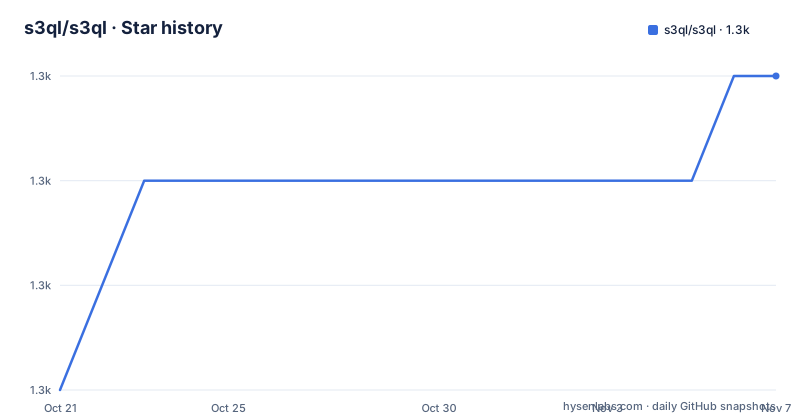
Star history
- s3ql/s3ql1,282 ★ · +3
| Repository | 2026-10-21 | 2026-11-07 |
|---|---|---|
| s3ql/s3ql | 1.3k | 1.3k |
3 Stars in the last 17 days, measured from the daily GitHub snapshot. Compare with other projects
Editorial analysis
A virtual drive of dynamic, infinite capacity
S3QL is a file system that stores all its data online using storage services like Google Storage, Amazon S3 or OpenStack, and it provides a virtual drive of dynamic, infinite capacity that can be accessed from any computer with internet access.
The comparison the documentation makes is with ext4, and it is the right one to hold on to. S3QL is a full featured UNIX file system that is conceptually indistinguishable from a local one. The transparency is spelled out: it supports hardlinks, symlinks, standard UNIX permissions, extended attributes and file sizes up to 2 TB. The dynamic part is that the size of the file system grows and shrinks as required.
The audience is a backup and archival user, and the readme is explicit that S3QL is designed to favor simplicity and elegance over performance and feature-creep. Care has been taken to make the source code as readable and serviceable as possible, solid error detection and error handling have been included from the very first line, and the project comes with extensive automated test cases for all its components.
That last combination, a deliberately conservative design philosophy and a serious test suite, is what makes a project like this still usable. A file system that stores your only copy of a machine in an object bucket is a bad place to be clever.
The supported platforms section is equally honest. S3QL is developed and tested under Linux, users have reported running it successfully on OS-X, FreeBSD and NetBSD, and the project tries to maintain compatibility with those systems but cannot guarantee that every release will run on all non-Linux systems, because of a lack of pre-release testers. That is a more useful statement than a support matrix, because it tells you where to look when something breaks.
The metadata database is the reason it feels fast
The most interesting design decision in S3QL is the one that makes directory operations quick, and it is described under the heading of performance independent of network latency.
All operations that do not write or read file contents, such as creating directories or moving, renaming and changing permissions of files and directories, are very fast because they are carried out without any network transactions. The mechanism is that S3QL saves the entire file and directory structure in a database, and this database is locally cached while the remote copy is updated asynchronously.
That is a substantial architectural decision, and it has a consequence that a user needs to know: the metadata is a first class part of the system, and it lives in a database. The file system is not just the objects in the bucket. It is the objects plus a database that describes the tree. The presence of a dedicated fsck.s3ql command in the console scripts is the acknowledgement of that, because a file system needs a consistency checker, and a file system with a remote metadata store needs one badly.
The second performance feature follows the same logic. S3QL supports low bandwidth connections by splitting file contents into smaller blocks and caching blocks locally. That minimizes both the number of network transactions required for reading and writing data and the amount of data that has to be transferred when only parts of a file are read or written. For a backup over a slow link, the difference between transferring a whole file and transferring the blocks that changed is the difference between a backup that runs overnight and one that does not.
The block caching and the metadata database are what make a network file system usable at all, and they are the reason S3QL can claim latency independence for the operations that people actually do constantly.
Compression, then encryption, then de-duplication
The data path has a fixed order, and the order is not arbitrary.
Before storage, all data may be compressed with the LZMA, bzip2 or deflate algorithm. After compression but before upload, all data can be AES encrypted with a 256 bit key, and an additional SHA256 HMAC checksum is used to protect the data against manipulation. And if several files have identical contents, the redundant data is stored only once.
The compression before encryption matters, because compressed data compresses better and encrypted data does not compress at all. The HMAC after encryption matters for a different reason: it authenticates the ciphertext, so a party with write access to the bucket cannot substitute a different blob without the file system noticing.
De-duplication is the feature with the widest scope, and the documentation is specific about how far it goes. It works across all files stored in the file system, and also if only some parts of the files are identical while other parts differ. So this is block level de-duplication across the whole file system, not a per file hash. For a backup of many machines with a shared operating system and shared libraries, that is a large saving, and it is the kind of saving that makes object storage viable for a small organisation's backup budget.
The cost is that a file system with de-duplication has to maintain a reference count across the whole store, and a store where blocks are shared between snapshots is exactly where reference counting goes wrong. The immutable trees and the copy-on-write snapshots are the other half of the design, and they are the next thing to look at.
Immutable trees and snapshots that cost nothing until you change them
Two features make S3QL more than a way to put files in a bucket.
Immutable trees let a directory tree be made immutable, so that its contents can no longer be changed in any way whatsoever. The stated purpose is to ensure that backups cannot be modified after they have been made, which is a requirement in any organisation that has to answer an audit question about who touched last quarter's data.
Copy-on-write snapshots are the other one. S3QL can replicate entire directory trees without using any additional storage space, and only if one of the copies is modified will the part of the data that has been modified take up additional storage space. The documented use is intelligent snapshots that preserve the state of a directory at different points in time using a minimum amount of space.
Combined with de-duplication, this is the design that makes S3QL interesting for backup. A nightly snapshot of a file server costs the storage of the changed blocks, the tree cannot be altered afterwards, and the same blocks are shared with the previous night's snapshot. For a system that already pays for object storage, that is an unusually good shape.
There is a limit worth naming, and it comes from the design rather than from an oversight. Copy-on-write means an update to a large file after a snapshot costs the space of the changed blocks, and a change to a file that was already modified since the snapshot costs the space of the difference from the snapshot. On a workload that rewrites everything every night, the savings shrink, and the value of the snapshot mechanism depends on the backup being mostly append only or mostly unchanged.
Mounting it takes three commands
The usage section is the whole of the operational story, and it is short.
Before a file system can be mounted, the backend that will hold the data has to be initialised, which is done with the mkfs.s3ql command. Using the Amazon S3 backend, with the bucket in which the file system will be stored:
mkfs.s3ql s3://ap-south-1/nikratio-s3ql-bucketTo mount the file system stored in that bucket in the directory /mnt/s3ql:
mount.s3ql s3://ap-south-1/nikratio-s3ql-bucket /mnt/s3qlAnd when you are done, the file system has to be unmounted:
umount.s3ql /mnt/s3qlOnce it is mounted, you instruct your favourite backup program to run a backup into the directory, and the data is stored on Amazon S3.
That is the whole workflow, and its shape explains the audience. The directory is what the backup tool sees, and S3QL is the layer that turns it into objects, so any tool that copies files works. Nothing about the backup program has to know that the destination is a bucket.
The mkfs step is worth pausing on, because it is the point where you choose the bucket and the region, and it is the step that cannot be undone without losing the file system. The bucket in the example is region scoped, with a region prefix in the path, which is the convention S3QL uses for a bucket in a specific region rather than a global one.
Twelve commands, a GPL licence and a long history
The console scripts tell you what the project has grown into, and the list is longer than a mount and an unmount.
There is mkfs.s3ql, fsck.s3ql, mount.s3ql and umount.s3ql for the life cycle, s3qlcp and s3qlrm for copying and removing, s3qlstat for the file system statistics, s3qladm for administration, s3qlctrl for control operations, s3qllock for locking, an OAuth client named s3ql_oauth_client for the authentication flows, and s3ql_verify.
The presence of a lock command and a verification command says something about how the project treats a store where several machines might be writing at once, and the OAuth client is there because the Google backends need one.
The licence is GPL-3.0-only according to the packaging metadata, although the licence field on the GitHub page is listed as a custom licence that GitHub cannot classify, so the file in the repository is the one to read. The author is Nikolaus Rath, and the project is old enough to have a ChangeLog.rst going back a long way.
The development status section is worth quoting because it is a promise with a mechanism. S3QL is considered stable and suitable for production use, and since version 2.17.1 it uses semantic versioning, so a backwards incompatible version, for example one that requires an upgrade of the file system revision, is reflected in an increase of the major version number. The current release is 6.3.1 and the repository is not archived, with the last push on 2026-10-10.
The dependencies show the shape of the implementation: pyfuse3 for the FUSE layer, apsw as the SQLite wrapper with a comment pointing at a specific upstream issue, cryptography, trio and anyio for the async stack, google-auth for the Google backends, typer for the command line, and pydantic. The build uses setuptools with Cython, and the repository also carries a developer-notes/ directory, an AGENTS.md, a CLAUDE.md, a WARNING file and a pre-commit configuration with a typo checker.
Editorial conclusion
S3QL suits a sysadmin who wants to back up a machine to object storage and present it as a normal directory, and who values immutable trees and cheap snapshots more than throughput. It is the wrong choice if you want a fast working set on object storage, because the design favours simplicity over performance, and a poor match if your object store is not S3 compatible in the way S3QL expects. Before deploying, read the WARNING file at the repository root, because the project keeps a prominent warning next to the licence, and plan for the metadata database, since the directory structure lives there and its loss is the loss of the tree.
Frequently asked questions
What is S3QL and what is it for?
S3QL is a file system that stores all its data online in services like Google Storage, Amazon S3 or OpenStack, providing a virtual drive of dynamic, infinite capacity. It is conceptually a normal UNIX file system with compression, encryption, de-duplication, immutable trees and snapshotting, and it is aimed at online backup and archival.
How do I mount an S3QL file system?
Initialise the backend with mkfs.s3ql and the bucket URL, mount it with mount.s3ql and the same URL and a local directory, and unmount it with umount.s3ql and the directory. Once mounted, any backup program can copy files into the mount point.
How does S3QL handle encryption and de-duplication?
Data is compressed first with LZMA, bzip2 or deflate, then encrypted after compression but before upload with a 256 bit AES key, and protected with an additional SHA256 HMAC checksum against manipulation. Identical data is stored once, across all files in the file system, including partial matches within files.
Which platforms does S3QL support?
S3QL is developed and tested under Linux. Users have reported running it successfully on OS-X, FreeBSD and NetBSD, and the project tries to maintain compatibility but cannot guarantee that every release runs on the non-Linux systems because of a lack of pre-release testers.
Official sources
Add this badge to your README
If you maintain this project, the badge below links readers to this analysis and shows its maintenance status from the daily GitHub snapshot. Paste the markdown into your README; add ?metric=license or ?metric=stars to the image URL for a different field.

[](https://hysenlabs.com/projects/s3ql-s3ql)Star history chart for your README
[](https://hysenlabs.com/projects/s3ql-s3ql)Was this useful?