HammerForge keeps CSG out of the viewport and runs it at bake time
A classic brush-based 3D level editor plugin for Godot 4.6+. HammerForge brings Hammer and TrenchBroom inspired workflows directly into the Godot editor, featuring CAD-style CSG drawing, pending subtract operations, and one-click baking to optimized static meshes with auto-generated collision.
At a glance
- What is it?
- A single addons/ folder that gives Godot a Hammer style brush workflow: two click geometry, cuts along any plane, structures that rebuild from remembered numbers, and a bake step that produces meshes, collision, lightmap UVs, navmeshes and LODs. The author calls it early alpha.
- Who is it for?
- HammerForge suits a Godot developer who blocks out 3D space and wants the brush workflow from Hammer and TrenchBroom without leaving the editor, and who is willing to report bugs on a project that describes itself as buggy, rough and directionless. It is not a fit for production work today, since the author labels it early alpha, or for anyone whose Godot version is older than 4.7, since the README requires 4.7 or newer while the repository description says 4.6 or newer.
- Can I use it commercially?
- Yes. MIT is a permissive licence: you can use, modify and sell software built on it, as long as you keep its copyright and licence notices.
- Is it still maintained?
- Yes. The repository received new commits within the last day.
- What is it written in?
- Mainly GDScript, according to GitHub's language statistics.
Answers come from the project's GitHub data, last synced on October 22, 2026, and from our analysis. They are not legal advice.
Star history
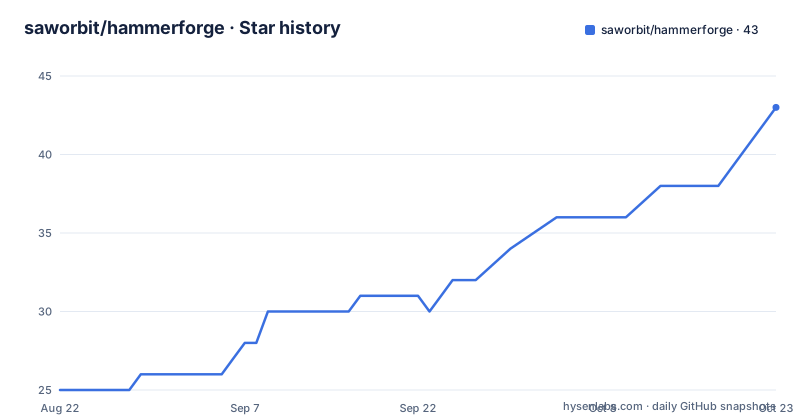
- saworbit/hammerforge42 ★ · +17
| Repository | 2026-08-22 | 2026-10-22 |
|---|---|---|
| saworbit/hammerforge | 25 | 42 |
17 Stars in the last 61 days, measured from the daily GitHub snapshot. Compare with other projects
Editorial analysis
Four steps: floor, walls, detail, bake
The workflow is presented as four steps with a screenshot of each, and the dock tab shown on the left is the one you would be using at that point. Step one is drawing a floor: drag a base, then click to set the height, which the README summarises as one brush and one shape. Step two is raising walls, where you add walls and leave a gap for the door, still two clicks each. Step three adds detail and materials, with platforms, ramps, pillars and the prototype textures coming from the Paint tab. Step four tests it, and this is where the plugin stops being a drawing tool: the HammerForge Console checks the level, and Test Level bakes and then plays it. That ordering matters, because nothing you draw becomes real geometry until that last step runs.
No live CSG in the viewport, full CSG at bake
The design decision that shapes everything else is stated first in the feature list: there is no full-scene live CSG. Brushes are lightweight preview nodes, and full CSG runs only at bake time, with an optional, capped subtract overlay that computes cut previews only for nearby geometry. That is why drawing stays responsive on large rooms. Geometry is still cheap to make, because each piece is two clicks: drag a base rectangle, click to set the height, extrude faces to extend a room, and type exact numbers whenever you want them rather than dragging. Transformation is unrestricted, so anything you have drawn can be rotated and mirrored in snapped steps about the axis you pick, then arrayed in a line, a ring or a lattice. Cutting is not restricted to the horizontal plane either, since clip and carve split real geometry and a selected face's plane can be used to chamfer a corner in one action.
Structures remember the numbers that made them
Generated geometry is parameterised rather than frozen. You can hollow any brush into walls, so a cylinder becomes a tube, and you can build an arch, a straight flight of stairs, a spiral staircase or a faceted dome from a handful of numbers, one brush per piece. The part that makes this usable is the edit story: a structure remembers the numbers that made it, so selecting a piece and adjusting any value rebuilds it in place, where you moved it, keeping the materials you painted on it. And before it does, it tells you if that rebuild would overwrite work you did by hand. That last detail is the difference between a procedural generator you trust and one you stop using after the first lost staircase, and it is the kind of warning most level editor plugins leave out.
Bake emits meshes, three collision modes, and LODs
One click at bake time produces a bundle rather than a single mesh. You get merged meshes, collision shapes in one of three modes, lightmap UVs, navmeshes and LODs. The three collision modes are named as trimesh, per-brush convex, and per-visgroup partitioned, which is what lets the same level serve a fast prototype and a shipped build without re-authoring collision. Painting is the other half of the content pipeline, and it is more than a colour picker: grid-based floor paint with heightmaps, multi-material blending, auto-connectors for ramps and stairs, and foliage scatter. The auto-connectors matter more than they sound, because they are what keep a painted floor walkable when you change its height, and the heightmap is what lets you sculpt terrain with the same brush vocabulary you used for the walls.
One addons/ folder and no custom Godot build
Distribution is deliberately dull. HammerForge is a single addons/ folder with no external tools, no custom builds and no export plugins, and installation is four lines:
1. Copy addons/hammerforge into your project
2. Enable the plugin: Project -> Project Settings -> Plugins -> HammerForge
3. Open a 3D scene and use Create Starter in the empty-state banner
4. Verify: the dock shows Build, Paint, Objects, and Test; the primary toolbar shows Draw, Select, Paint, More, and Help
Create Starter adds LevelRoot, a floor, sunlight and a player spawn, while Create Empty adds only LevelRoot. After that the loop is Draw plus Solid plus Box in the Build tab, then Test Level with Bake plus Play or Ctrl+Enter, which checks the level, bakes, validates the spawn and runs the scene, with Q switching between Solid and Cut. One safety rule is spelled out: an intentional left-click with the Draw tool can create an empty root, and navigation, selection and other passive input never modify the scene.
addons/ is a git allowlist, and enabling rewrites project.godot
The editor bridges section is the most useful paragraph in the README for anyone with a real project. The repository does not vendor an MCP server or any other editor bridge, and if you use one you are told to install it into your own addons/ folder and keep it out of your commits. The reason is technical: addons/ is an allowlist in .gitignore, so a new folder there is ignored until someone adds it deliberately. The catch is that enabling a plugin also rewrites the tracked project.godot, and that is the one change you have to keep out by hand. Tokens, client configuration and Godot user:// state are machine-local and must never be committed. Upgrade steps and a cache reset are separate, documented in docs/HammerForge_Install_Upgrade.md, which matters because a stale cache is a common reason a level editor appears to ignore your files.
Two numbers in the README contradict each other
The same document reports brush counts two ways. The banner says 81 brushes, describing every column, wall bay and gallery drawn with the tools, while the at-a-glance table says 15 brush shapes, box through dodecahedron. Those are probably counting different things, such as presets against primitive shapes, but nothing in the README says so, so a reader planning a level has to guess. The same pattern appears with the Godot version: the README requires 4.7 or newer and is tested on 4.7.stable, while the repository description says 4.6 or newer. Other figures are less ambiguous. The table claims 4,535 unit and integration tests with CI on every push, and 150 built-in prototype textures for greyboxing, plus Quake .map and glTF .glb export alongside the native .hflevel format with threaded I/O, customizable JSON keymaps, a plugin API, theme sync and a performance health monitor that gives recommendations.
Two Python scripts decide whether a build passes
The repository is mostly GDScript, but the Python at the root is not incidental. pyproject.toml explains that Python is contributor tooling only and is still linted, because two of the five scripts in tools/ decide whether a build passes: check_placement_order.py fails CI when a world transform is assigned before a node is parented, and build_release_tree.py decides what ships to the Godot Asset Library. Ruff is configured with an 88 character line length, a py312 target and a rule set limited to imports, statement level mistakes, syntax and IO errors, pyflakes, import order, bugbear, simplify and RUF rules, with pyupgrade and the line length rule deliberately left out. Alongside that sit .gdlintrc for GDScript, .gutconfig.json for the test runner, requirements-ci.txt and requirements-docs.txt, a samples/ directory with step by step demo scenes and a stress spawner, mkdocs.yml for the docs build, and a spec, roadmap and changelog at the root.
Editorial conclusion
HammerForge suits a Godot developer who blocks out 3D space and wants the brush workflow from Hammer and TrenchBroom without leaving the editor, and who is willing to report bugs on a project that describes itself as buggy, rough and directionless. It is not a fit for production work today, since the author labels it early alpha, or for anyone whose Godot version is older than 4.7, since the README requires 4.7 or newer while the repository description says 4.6 or newer. Before you install, read the two conflicting numbers for brush count, plan for a bake step rather than live geometry, and if you use an editor bridge such as an MCP server, keep it in your own addons/ folder because the plugin folder here is a git allowlist and enabling the plugin rewrites your tracked project.godot.
Frequently asked questions
How is a hammer forge different from a press forge, and is HammerForge about either?
This repository is not about metalworking. It is a Godot editor addon whose name comes from the level editors it imitates, Hammer and TrenchBroom, which the README credits with proving that brush based workflows are the fastest way to block out 3D space. The repository contains no information about forging processes.
Which Godot version does HammerForge require?
The README requires Godot 4.7 or newer and says it is tested on 4.7.stable, working both in the editor and in exported games through HFIORuntime. The repository description is looser and says 4.6 or newer, so the README value is the one to plan against.
How do I install and start HammerForge in a Godot project?
Copy addons/hammerforge into your project, enable the plugin under Project, Project Settings, Plugins, then open a 3D scene and use Create Starter in the empty-state banner. Create Starter adds LevelRoot, a floor, sunlight and a player spawn, and the dock should then show Build, Paint, Objects and Test.
Official sources
Add this badge to your README
If you maintain this project, the badge below links readers to this analysis and shows its maintenance status from the daily GitHub snapshot. Paste the markdown into your README; add ?metric=license or ?metric=stars to the image URL for a different field.

[](https://hysenlabs.com/projects/saworbit-hammerforge)Star history chart for your README
[](https://hysenlabs.com/projects/saworbit-hammerforge)