metric-learn: supervised and weakly supervised metric learning for scikit-learn
Metric learning algorithms in Python
At a glance
- What is it?
- scikit-learn-contrib/metric-learn ships ten supervised and weakly-supervised metric learning estimators behind the scikit-learn API. Its setup.py contains a copy-paste bug in its own error message, its last tag is two years older than its last commit, and one algorithm needs a fork pinned to a single commit hash.
- Who is it for?
- Use metric-learn if you already work in scikit-learn and want a metric transform that drops into an existing pipeline, and pin the version deliberately, because the newest tag is 0.7.0 from 29 September 2023 while the branch has moved since. Do not treat the master branch as a release, and do not read the setup.py failure text as instructions: the django line is a copy-paste artifact and the rest of that message is sound.
- Can I use it commercially?
- Yes. MIT is a permissive licence: you can use, modify and sell software built on it, as long as you keep its copyright and licence notices.
- Is it still maintained?
- Activity is slowing. The repository last received commits 8 months ago.
- What is it written in?
- Mainly Python, according to GitHub's language statistics.
Answers come from the project's GitHub data, last synced on November 15, 2026, and from our analysis. They are not legal advice.
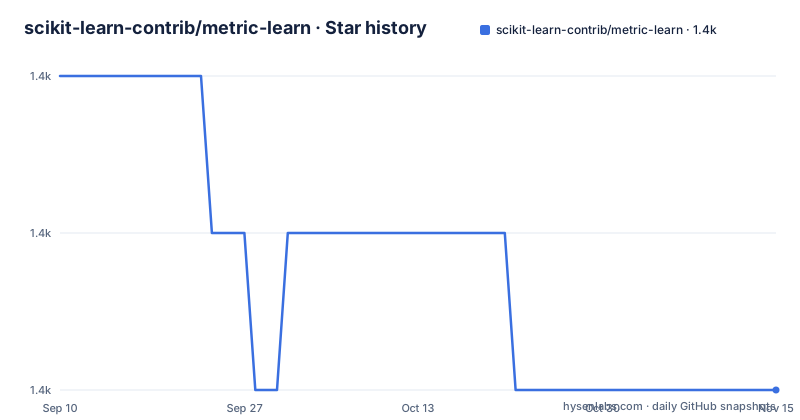
Star history
- scikit-learn-contrib/metric-learn1,430 ★ · -2
| Repository | 2026-09-10 | 2026-11-15 |
|---|---|---|
| scikit-learn-contrib/metric-learn | 1.4k | 1.4k |
-2 Stars in the last 66 days, measured from the daily GitHub snapshot. Compare with other projects
Editorial analysis
The unsupported-Python guard tells you to install django
When the version check in setup.py fails, metric-learn writes a block of help text and exits 1. The help is mostly sound. It names the version required and the version it found, and it points at the two usual causes of a false failure, a pip that ignores the python_requires classifier and an outdated setuptools. It suggests:
python -m pip install --upgrade pip setuptools
python -m pip install django
The second line is a copy-paste leftover from another project. It has nothing to do with metric learning or with Django, and running it installs an unrelated web framework into the environment you were trying to repair. The remainder is correct: if pip or Python cannot be upgraded, the message says to request an older release, `pip install "metric-learn<0.6.0"`. The floor itself is consistent between the documentation and the code. Both require Python 3.6, and both name v0.5.0 as the last version supporting Python 2 and Python 3.5.
SDML and its optional skggm dependency
Sparse Determinant Metric Learning (SDML) can use the optional skggm dependency for problematic cases. The README provides a Git URL pinned to a specific commit, while setup.py separately declares an sdml extra requiring skggm version 0.2.9 or newer. A commit pin fixes the chosen source revision, but updates must be adopted deliberately. Check compatibility and package provenance in your environment before installing either option. Matplotlib is also listed for running examples.
The README stops one line before any code
Installation gets three paragraphs. Usage gets one sentence: see the sphinx documentation for full documentation about installation, API, usage, and examples. That is the whole usage section, and it points at contrib.scikit-learn.org/metric-learn/, the project's hosted documentation, with documentation sources also present in the repository. The tree does carry examples, in three files: a README.txt, plot_metric_learning_examples.py, and plot_sandwich.py. Nothing in the README explains what the sandwich example plots or why it carries that name. The dependency list mentions matplotlib only for running the examples, which confirms the examples exist without saying what they show. A reader who installs the package and then asks how to instantiate any of the ten estimators has to leave the repository to find out, and the package ships no importable example in its own documentation page.
Two releases 38 minutes apart, then two years of untagged commits
v0.6.1 and v0.6.2 were both published on 2 July 2020, 38 minutes apart, so the 0.6 line was republished twice inside one morning. The next tag is v0.7.0, dated 29 September 2023. The branch itself was last pushed on 19 March 2026. The newest tag is therefore more than two years older than the newest commit, and `pip install metric-learn` gives you v0.7.0 rather than anything from master. The JMLR paper the README asks you to cite, volume 21, number 138, dates from 2020 and describes the 0.6 era. The dependency floors, numpy >= 1.11.0, scipy >= 0.17.0 and scikit-learn >= 0.21.3, are lower bounds with no upper bound, but lower bounds alone do not guarantee compatibility with every newer dependency release. Test the selected versions together.
The version number is exec'd out of a file inside the package
setup.py obtains its own version by opening metric_learn/_version.py and executing the contents into a dictionary. That keeps the version in one place inside the package rather than duplicated in the build script, and it also means a build from an incomplete checkout fails somewhere unrelated to packaging. The long description is read from README.rst, under a comment that names README.md. The root holds README.rst and no README.md, so the comment is wrong and the code is right. Licensing follows the same pattern: LICENSE.txt sits at the root and the README carries an MIT shield badge pointing at a shields.io endpoint. Higher in the file, a comment requires that the version check and everything above it stay compatible with Python 2.7, while the README declares 3.6 as the floor. That Python 2 requirement survives as a comment rather than as support, and it is the reason the version guard still uses a plain tuple comparison.
Three install paths, and only one names the test command
Three paths are offered, and they differ in what they prove.
conda install -c conda-forge metric-learnpip install metric-learnThe conda path pulls from conda-forge, which keeps its own feedstock page with further options. The pip path takes the PyPI copy. The manual path is the one spelled out in full: download the source repository and run `python setup.py install`, then run `pytest test` to run all tests, which requires the pytest package. That last sentence is the only mention of the test suite anywhere in the documentation, and the command names the directory in the singular, matching the `test` entry at the repository root next to pytest.ini. Only the manual path runs code from your own checkout, and only the manual path says how to check that the checkout is intact. The other two are the paths most people take, and neither mentions tests.
Supervised and weakly supervised algorithms
metric-learn implements supervised and weakly supervised metric-learning algorithms using a scikit-learn-compatible API. Mahalanobis Metric for Clustering (MMC), despite its name, is weakly supervised: it learns from pairs labelled similar or dissimilar. Its documentation also describes a supervised variant. Check the input format and estimator documentation for each method before integrating it into a pipeline.
Four badges, and a bench directory none of them reaches
The repository root carries bench/, .github/, .codecov.yml, .landscape.yml, pytest.ini, doc/, examples/, metric_learn/, test/, setup.py, setup.cfg, LICENSE.txt and README.rst. The README publishes four badges: a GitHub Actions build status, an MIT license shield, a PyPI version badge, and a codecov coverage graph. The Actions badge is pinned to a single query, push events on the master branch, which matches the default branch but leaves pull request runs outside what that badge reports. bench/ and .landscape.yml appear in the tree and are named nowhere in the README, which never mentions benchmarking at all. A directory of benchmarks with no documented entry point, and a quality-configuration file that neither a badge nor a documentation page links to, are the two loose ends at the root of an otherwise tidy package.
Editorial conclusion
Use metric-learn if you already work in scikit-learn and want a metric transform that drops into an existing pipeline, and pin the version deliberately, because the newest tag is 0.7.0 from 29 September 2023 while the branch has moved since. Do not treat the master branch as a release, and do not read the setup.py failure text as instructions: the django line is a copy-paste artifact and the rest of that message is sound. Before reaching for SDML, decide whether a git-pinned commit of a third-party fork belongs in your environment, and if you must read the hosted documentation at contrib.scikit-learn.org/metric-learn/ before the README, since the README itself carries no usage example and no API snippet.
Frequently asked questions
How do you install metric-learn?
From PyPI with `pip install metric-learn`, or from conda-forge with `conda install -c conda-forge metric-learn`. A manual path also exists: download the source repository and run `python setup.py install`, then `pytest test` to run all tests, which needs the pytest package installed.
Which algorithms does metric-learn implement?
Ten: Large Margin Nearest Neighbor, Information Theoretic Metric Learning, Sparse Determinant Metric Learning, Least Squares Metric Learning, Sparse Compositional Metric Learning, Neighborhood Components Analysis, Local Fisher Discriminant Analysis, Relative Components Analysis, Metric Learning for Kernel Regression, and Mahalanobis Metric for Clustering.
What does metric-learn need for Sparse Determinant Metric Learning?
An optional dependency on skggm, which lets the algorithm solve problematic cases, installed from one specific commit rather than a release: `pip install 'git+https://github.com/skggm/skggm.git@a0ed406586c4364ea3297a658f415e13b5cbdaf8'`. matplotlib is the only other optional dependency, and it is needed for the examples.
Which Python versions does metric-learn support?
Python 3.6 and later, declared in both the README and the python_requires field of setup.py. v0.5.0 was the last version supporting Python 2 and Python 3.5, and the setup.py version guard tells anyone on an older interpreter to install `metric-learn<0.6.0` instead.
When was the last metric-learn release?
v0.7.0, published on 29 September 2023, following v0.6.1 and v0.6.2 on 2 July 2020. The master branch itself was last pushed on 19 March 2026, so the newest tag does not describe the current state of the branch.
Official sources
Add this badge to your README
If you maintain this project, the badge below links readers to this analysis and shows its maintenance status from the daily GitHub snapshot. Paste the markdown into your README; add ?metric=license or ?metric=stars to the image URL for a different field.

[](https://hysenlabs.com/projects/scikit-learn-contrib-metric-learn)Star history chart for your README
[](https://hysenlabs.com/projects/scikit-learn-contrib-metric-learn)Was this useful?